
Disclosure: VPNFin is reader-supported. If you buy a VPN through links on this page, we may earn a commission at no extra cost to you. This never affects our ratings — here’s our full disclosure.
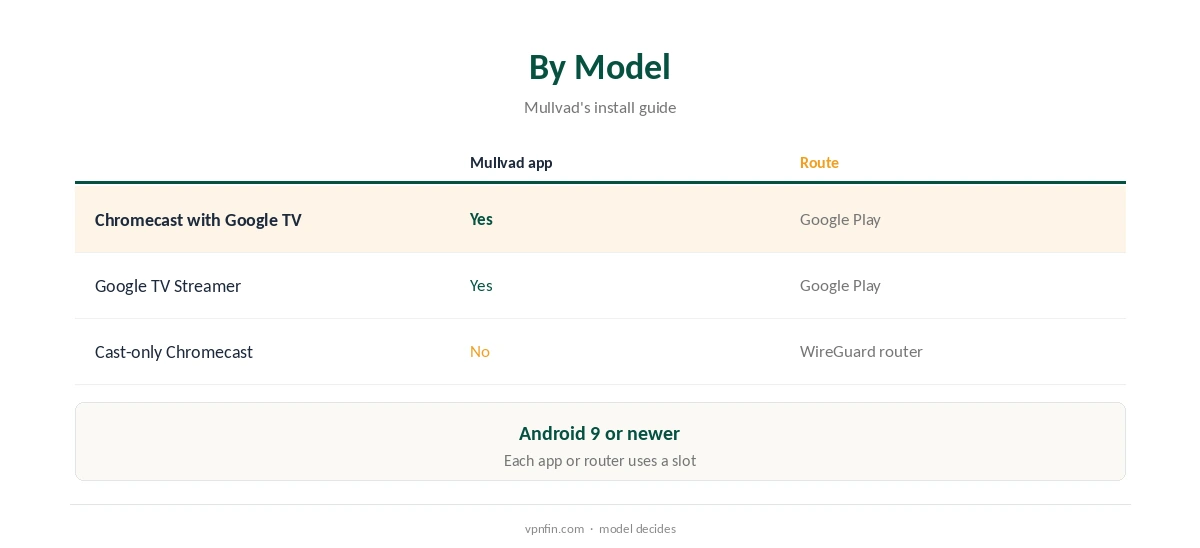
Mullvad Chromecast support depends on the model. Mullvad’s Android app runs on Android TV with Android 9 or newer, its install guide says, so a Chromecast with Google TV or a Google TV Streamer installs it from Google Play. Cast-only Chromecasts run no apps, and when you cast from a phone app the Chromecast fetches the stream itself. Those need a router running a Mullvad WireGuard file.
This guide covers each model, casting and mirroring, routers, streaming and device slots.
Which Chromecast Do You Have?
A Chromecast that came with a remote and shows a home screen of apps runs Google TV and can install Mullvad. The Google TV Streamer, its successor, works the same way. One without a remote that only receives casts is a cast-only model.
Our Chromecast VPN guide explains the difference for every provider.
Mullvad Chromecast With Google TV
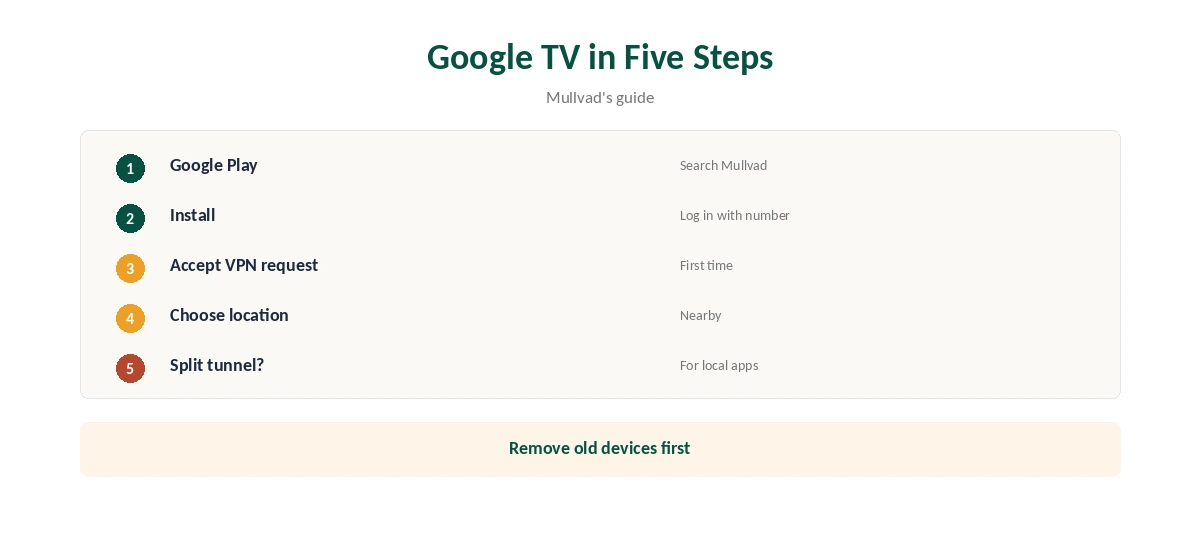
Open Google Play, search for Mullvad VPN, install it and log in with your 16-digit account number, typed with the remote or a phone keyboard. Accept Android’s VPN request on the first connection, then choose a nearby location.
Mullvad’s Android app offers split tunnelling, so you can keep a local streaming app outside the tunnel. Our Mullvad Android guide covers the settings.
Cast-Only Chromecasts and Routers
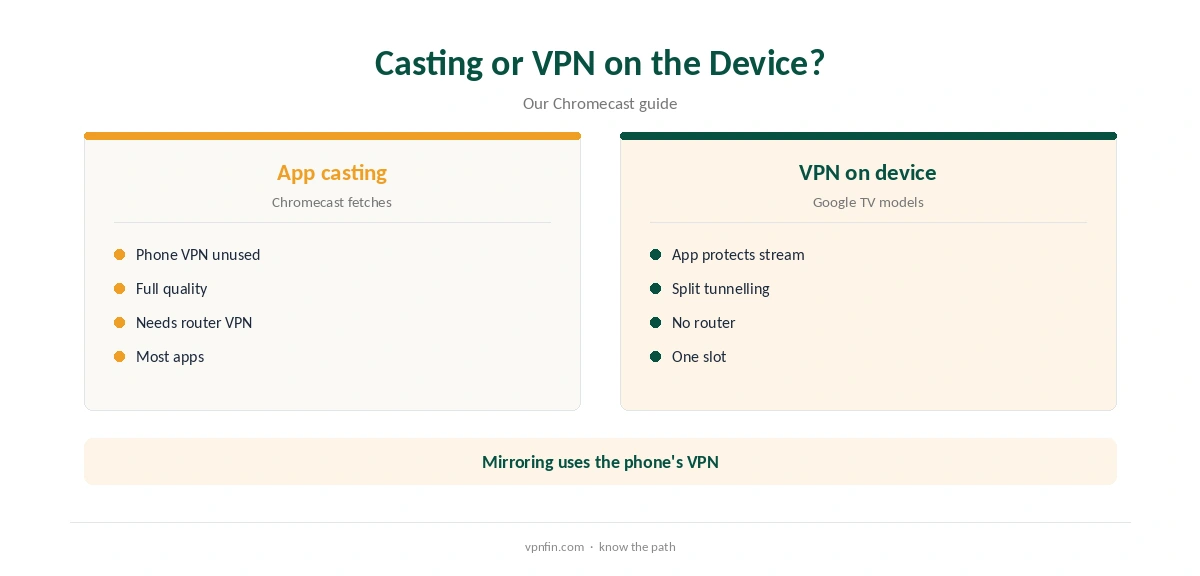
When you cast from Netflix or YouTube, the phone tells the Chromecast what to play, and the Chromecast downloads the stream itself. Mullvad on the phone does not change that stream, whatever the phone’s own settings.
Screen mirroring sends the phone’s screen instead, so the phone’s VPN applies, though quality is lower and the phone must stay on.
A router running a Mullvad WireGuard file covers a cast-only Chromecast and everything else on the network, using one of your five device keys. GL.iNet routers and OpenWrt handle WireGuard well.
Our Mullvad router guide walks through the setup.
Streaming
Testers found Netflix blocked Mullvad: Top10VPN on every server it tried, and Comparitech found no foreign libraries. ProPrivacy could not reach US Netflix or Hulu either. Mullvad markets privacy rather than streaming and runs no servers set aside for it.
On a Google TV model, split tunnelling can keep Netflix outside the tunnel. Our Mullvad Netflix guide explains.
Settings and Checks on Google TV
Turn on auto-connect so the Chromecast reconnects after a restart, and pick a nearby location for smooth playback. Android may send you to its own VPN settings for these options. Lockdown mode blocks traffic if the VPN drops.
Mullvad’s QUIC and LWO obfuscation on Android help on networks that block VPNs, our tables record.
The Mullvad app shows the connected location clearly on its main screen. For cast-only models behind a router, check from a phone on the same network that the address is a Mullvad one.
A streaming app showing the expected region is the final check.
Restrictive Networks
On networks that block VPNs, the Android app’s QUIC and LWO obfuscation can help, our tables record. A router running a plain WireGuard file has no such option, so it may fail on those networks.
Hotel networks may also block casting between devices, so a travel router running Mullvad can give the Chromecast and your phone a private network to share.
Device Slots and Price
Each app login uses one of Mullvad’s five device slots, and so does a router file or WireGuard key. Remove old devices in your account before adding the Chromecast, or the login will ask you to.
A router covering several streaming devices saves slots compared with installing the app on each, which matters with only five.
Mullvad costs a flat €5 a month for five devices, with an account number instead of an email, and has more than 10 audits in our table. You cannot buy Mullvad time through Google Play, its help page notes.
Our Mullvad cost guide covers payment methods.
Choosing a Location
Pick the nearest Mullvad location for smooth, steady playback; distance costs more speed than anything else. Mullvad has no streaming-labelled servers, so any location works the same way.
Switch locations only when you really need to, and restart the streaming app after each change so it checks your region again.
Privacy and Turning It Off
Mullvad asks for no email and accepts cash, and it has more than 10 audits in our table. On a streaming device, the VPN mainly hides viewing traffic from your internet provider.
Our Mullvad vs NordVPN page compares its record with a larger rival.
Disconnect in the Mullvad app, or turn off auto-connect if you no longer want it at start-up. Log the Chromecast out in your Mullvad account to free its device slot for another device.
For a router setup, switch the router’s VPN client off or move the Chromecast to a network outside it.
How We Research
This page draws on Mullvad’s Android install guide and Google Play listing, Top10VPN’s and Comparitech’s Mullvad Netflix tests and our Chromecast and Mullvad tables. We cross-checked these sources against each other, and where they conflict or something can’t be verified, we say so in the text rather than guessing. We checked time-sensitive figures, including prices in US dollars, on 8 October 2026. The main source we relied on is Mullvad’s Android install guide. Our full approach lives on the About Us page.
Mullvad Chromecast FAQ
Yes, through its Android TV app from Google Play.
Only through a router; cast-only models run no apps.
Not for app casting; the Chromecast fetches the stream.
Testers found it blocked; split tunnelling helps on Google TV.
One of five slots per app or router.
The Verdict
A Mullvad Chromecast setup is simple on Google TV models with the app. Cast-only Chromecasts need a WireGuard router.