
Disclosure: VPNFin is reader-supported. If you buy a VPN through links on this page, we may earn a commission at no extra cost to you. This never affects our ratings — here’s our full disclosure.
ExpressVPN ESPN Plus access worked in Security.org’s 2026 testing, which named ExpressVPN its pick for streaming ESPN+ on consoles. ESPN+ blocks viewers outside the US, so travellers need a US server, and Security.org also got around a local blackout of a college hockey game with ExpressVPN. It was not the fastest VPN in that test, and blackouts are a rights question as much as a technical one.
This guide covers access abroad, blackouts, consoles, speed for live sport and fixes.
What Security.org Found, and Watching Abroad
Security.org ranked ExpressVPN among its five ESPN+ picks, calling it best for consoles, and found every server could stream. It noted speeds below NordVPN’s, despite both having their own fast protocols.
Our ESPN+ VPN guide compares the other picks.
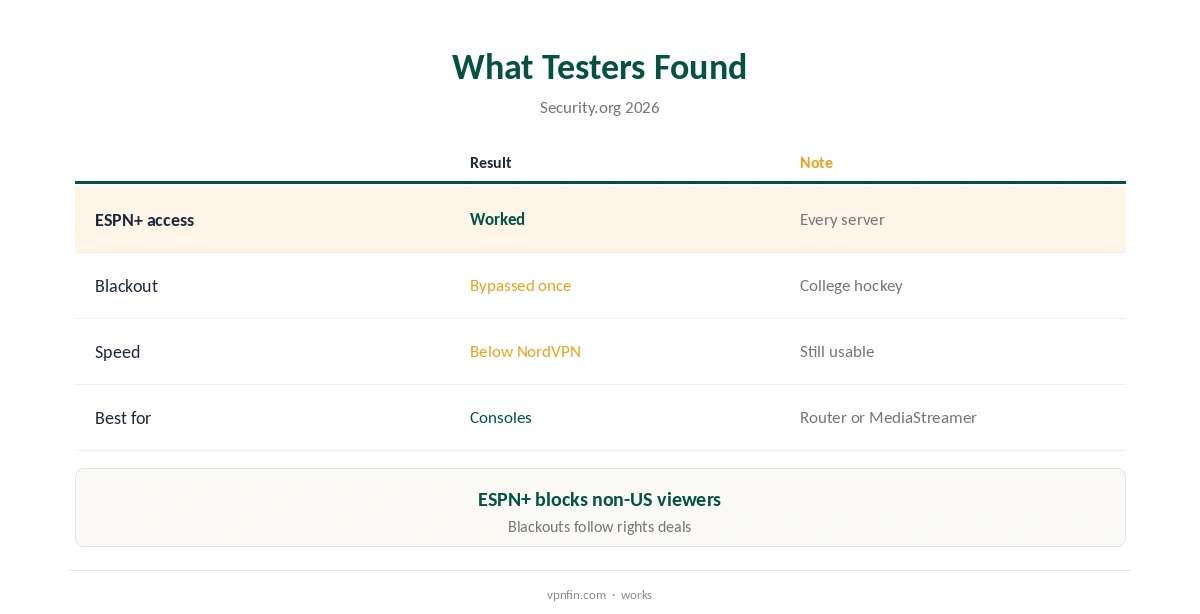
ESPN+ blocks streams from outside the US, Security.org notes, so a US subscriber travelling abroad needs a US server. Connect to the US city nearest your home before opening the app, so your usual regional games appear.
Your subscription is the same; the VPN only changes where the service thinks you are.
Blackouts
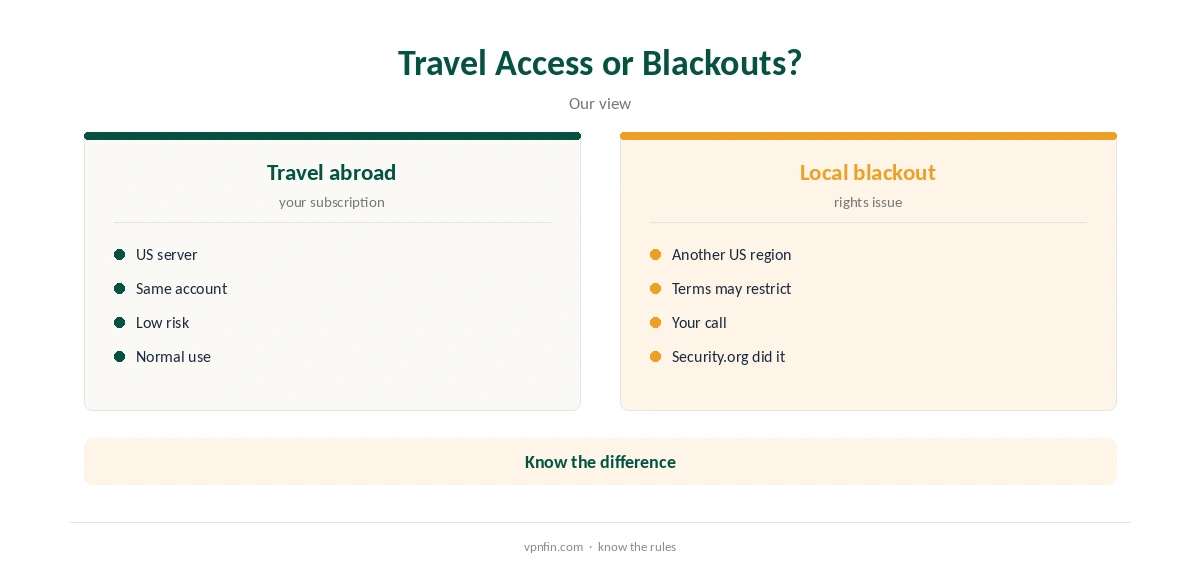
Some games are blacked out in local areas because a regional broadcaster holds the rights. Security.org got around a local blackout of a Vermont vs Merrimack college hockey game with ExpressVPN by connecting elsewhere in the US.
Blackouts exist because of rights deals, and ESPN’s terms may restrict getting around them; decide for yourself whether that is a risk worth taking.
ExpressVPN ESPN Plus on Consoles, TVs and Live Sport
Consoles cannot install VPN apps, so use a router running ExpressVPN, a shared PC connection or MediaStreamer. MediaStreamer changes DNS without encryption. Fire TV, Android TV and Apple TV can run ExpressVPN’s apps directly.
Our ExpressVPN PS5 guide covers the console routes.
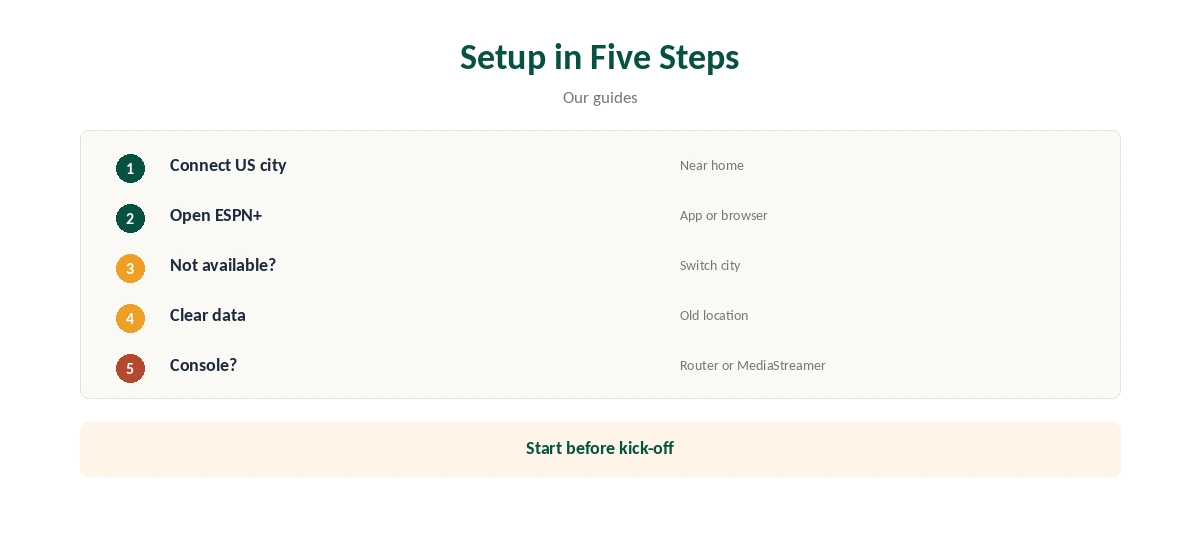
Live sport leaves no room for buffering, especially in the final minutes of a close game. Pick the closest US city, use Lightway and a wired connection, and start the stream a few minutes before kick-off.
If quality drops mid-game, switch to a nearer city rather than waiting.
Fixing Errors
If ESPN+ says the content is not available in your area, close the app, switch US city and reopen it. Clear the app’s data or the browser’s cookies if it keeps your old location, and check for DNS leaks.
Our sports streaming VPN guide covers other services.
Bundles, Subscriptions and Price
ESPN+ is not free with Disney+, Security.org notes, though it comes in some bundles, such as Hulu + Live TV. A VPN does not add channels your subscription lacks; it only changes where the service thinks you are watching from.
Check which games your plan includes before troubleshooting the VPN, since a missing game may simply not be in it.
On Phones, and Checking It Works
The ESPN app on phones may use device location as well as your IP address, so a mismatch can trigger a not-available message. Turn off the app’s location permission while travelling and reconnect ExpressVPN to a US city.
Close the app fully after switching servers so it checks your location again from scratch.
Open a game listing that shows as available in your US region and press play. If it streams, the setup is right; if you see a blackout or region notice, switch US city.
A quick leak test confirms your DNS shows the VPN’s country too, not your real one.
ExpressVPN’s Basic plan renews at $99.95 a year for 10 devices, our tables record, and new users get 30 days to ask for a refund. Test ESPN+ within that window, ideally across a weekend of games.
ExpressVPN lists 27 independent audits by May 2026.
Before You Travel
Install ExpressVPN and the ESPN app on your phone or laptop before leaving, sign in to both, and test a stream at home with a US server. Note a US city that works so you can return to it abroad without trial and error.
Hotel Wi-Fi may need a login page first; connect the VPN after that and keep Network Lock on.
A Router at Home
For a household that watches ESPN+ on a TV and console, a router running ExpressVPN covers every device at once. ExpressVPN’s router app can group devices, so the console can use one location and other devices another.
Our ExpressVPN router guide covers the router app.
Privacy, and If It Still Fails
ExpressVPN lists 27 independent audits by May 2026 and runs servers from memory under its TrustedServer design. On public Wi-Fi, the tunnel also hides which games you stream.
Kape owns ExpressVPN, along with CyberGhost and PIA, which run as separate services.
If every US city shows the same error, update both apps, restart the device and try a browser in a private window. ExpressVPN’s live chat runs around the clock and can help diagnose the problem.
Keep your test within the 30-day refund window so you have a way out.
How We Research
This page draws on Security.org’s 2026 ESPN+ VPN tests and our ExpressVPN tables. We cross-checked these sources against each other, and where they conflict or something can’t be verified, we say so in the text rather than guessing. We checked time-sensitive figures, including prices in US dollars, on 8 October 2026. The main source we relied on is Security.org’s ESPN+ VPN tests. Our full approach lives on the About Us page.
ExpressVPN ESPN Plus FAQ
Yes; Security.org named it best for ESPN+ on consoles.
Yes, by connecting to a US server.
Security.org did so once; ESPN’s terms may restrict it.
Through a router, a shared PC or MediaStreamer.
Not in Security.org’s test; NordVPN was faster.
The Verdict
ExpressVPN ESPN Plus access works for US subscribers abroad and on consoles via a router. Treat blackout workarounds as a rights risk.