
Disclosure: VPNFin is reader-supported. If you buy a VPN through links on this page, we may earn a commission at no extra cost to you. This never affects our ratings — here’s our full disclosure.
ExpressVPN OpenVPN support has two sides. In its apps, OpenVPN over UDP or TCP sits alongside Lightway, the default, and WireGuard on some platforms. For manual setups on routers and older devices, OpenVPN is the only protocol ExpressVPN still supports, its help pages say, after dropping PPTP and L2TP. ExpressVPN warns that manual OpenVPN does not offer the same security and privacy benefits as its apps.
This guide covers when to use OpenVPN, manual configuration files, routers, the March 2026 certificate change and limits.
ExpressVPN OpenVPN in the Apps
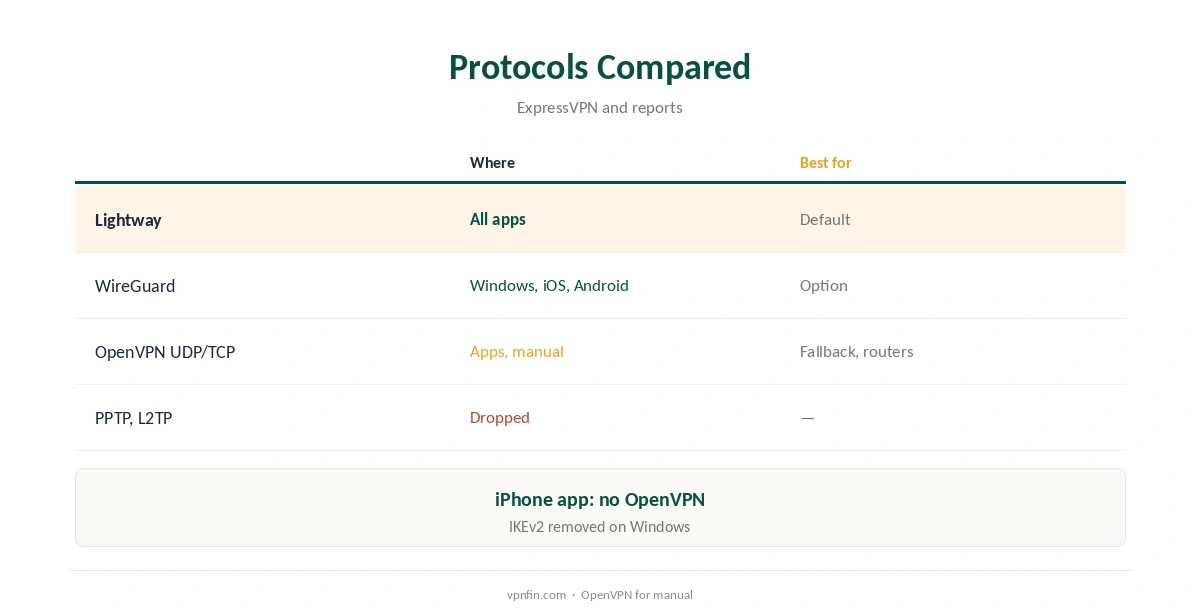
ExpressVPN’s apps list OpenVPN UDP and TCP alongside Lightway on platforms that support it, protocol comparisons show; the iPhone app uses Lightway and WireGuard instead. Automatic mode picks Lightway in most cases, and that suits most users.
Pick OpenVPN TCP when a network blocks UDP and Lightway TCP also fails, or when you need to match a setup elsewhere. Most people never need to change from Automatic. Our ExpressVPN WireGuard guide covers the newer option.
The Only Manual Protocol
ExpressVPN no longer supports PPTP and L2TP manual configurations, which it says offer minimal protection, so OpenVPN is the protocol for any device that cannot run its apps, its support page explains.
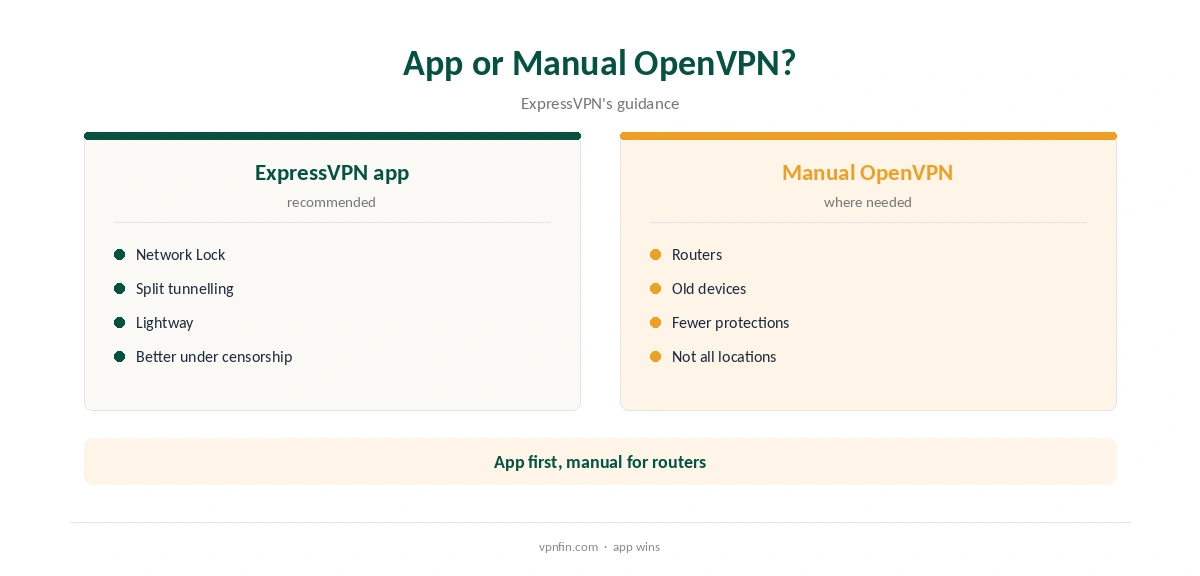
That covers older Windows, Mac and Android versions that the current apps no longer support, routers without ExpressVPN firmware, and other devices with an OpenVPN client. Not every location is available for manual connections, ExpressVPN notes, so the app keeps a wider choice.
Downloading Configuration Files
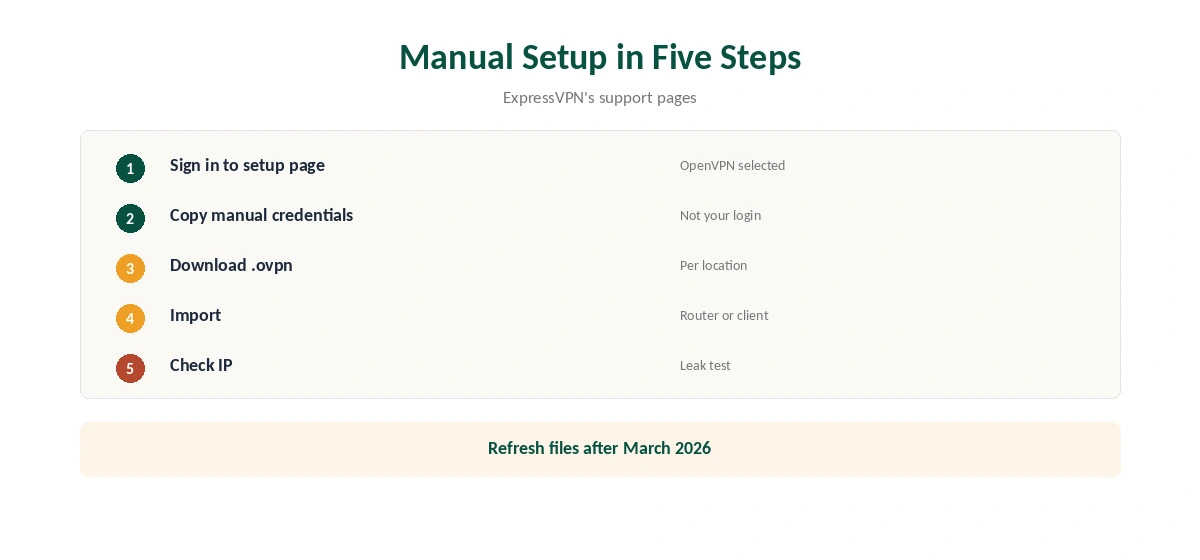
Sign in on ExpressVPN’s setup page, which selects OpenVPN by default. You will see a separate username and password for manual use and a list of locations; click one to download its .ovpn file.
The manual credentials differ from your normal account login, so copy them carefully; they are what your router or client will ask for. Download several locations if you switch often, and keep them in one folder.
Routers
ExpressVPN publishes OpenVPN guides for Asus, DD-WRT, Netduma R1 and R2, Sabai and Tomato routers, its support pages list. Routers without AES-NI hardware acceleration, such as the Asus RT-AC86U, may see occasional slowdowns, it warns. Newer routers usually handle OpenVPN better.
For a simpler router route, ExpressVPN’s own Aircove and Fortify routers run its firmware, so the router needs no manual files at all. Our ExpressVPN router guide covers both.
Mac With Tunnelblick
On a Mac that cannot run the app, ExpressVPN’s guide uses Tunnelblick, a free open-source OpenVPN client: choose I have configuration files, double-click the .ovpn file, then connect and enter the manual credentials from the setup page.
ExpressVPN’s help pages send Macs too old for the current app to this OpenVPN route, so older Macs are the main case for Tunnelblick.
The March 2026 Certificate Change
On 31 March 2026, ExpressVPN retired older security certificates, so legacy apps stopped connecting, Tom’s Guide reported. Users with manually configured routers may need to download new configuration files, ExpressVPN said.
If a router setup stopped working after March 2026, download fresh .ovpn files and replace the old ones. Apps older than the versions ExpressVPN listed also stopped connecting and need updating.
UDP or TCP?
OpenVPN over UDP is faster and suits most connections. OpenVPN over TCP gets through networks that block UDP or allow only web ports, at some cost in speed, because TCP resends lost packets inside an already reliable tunnel.
In the apps, try Lightway first, then OpenVPN TCP if a network blocks everything else. For manual files, ExpressVPN’s setup page provides the configurations to download.
Censored Networks
ExpressVPN advises using its app rather than a manual setup in countries with heavy censorship, for a more stable connection. Its app connected on every attempt in vpnpicked’s China testing, our tables record.
Plain OpenVPN is easy for censors to detect, so manual files are a poor choice there. Install the app before you travel, since its website may be blocked on arrival. Our China VPN guide covers what still works.
Checking the Connection
After connecting with a manual file, ExpressVPN’s support pages suggest checking your address with its IP address checker. Run a DNS leak test as well, since a manual client may keep your usual resolver.
Our DNS leak guide explains the test and the fixes.
Limits of Manual OpenVPN
Manual setups lack Network Lock, split tunnelling, Lightway and automatic server selection, and ExpressVPN advises using the app in countries with heavy censorship for a more stable connection. Our guide to ExpressVPN on Synology NAS covers an OpenVPN profile in DSM, step by step.
OpenVPN is also slower and heavier on battery than modern protocols: TheBestVPN’s 2026 test found OpenVPN over TCP used about 7% of battery over two hours, against about 2% for WireGuard. Our WireGuard vs OpenVPN guide explains the differences.
How We Research
This page draws on ExpressVPN’s support pages on manual configuration, PPTP and L2TP, Tunnelblick, router setup and app versions, Tom’s Guide on the certificate change and our ExpressVPN tables. We cross-checked these sources against each other, and where they conflict or something can’t be verified, we say so in the text rather than guessing. We checked time-sensitive figures, including prices in US dollars, on 8 October 2026. The main source we relied on is ExpressVPN’s app vs manual setup guide. Our full approach lives on the About Us page.
ExpressVPN OpenVPN FAQ
Yes, in its apps and as the only manual protocol.
On ExpressVPN’s setup page, with separate manual credentials.
No; it dropped both for manual setups.
ExpressVPN retired old certificates on 31 March 2026; download new files.
No; the company says it lacks some of the app’s protections.
The Verdict
ExpressVPN OpenVPN is a fallback in the apps and the backbone of manual setups. Use the app where you can, and refresh router files after the 2026 certificate change.