
Disclosure: VPNFin is reader-supported. If you buy a VPN through links on this page, we may earn a commission at no extra cost to you. This never affects our ratings — here’s our full disclosure.
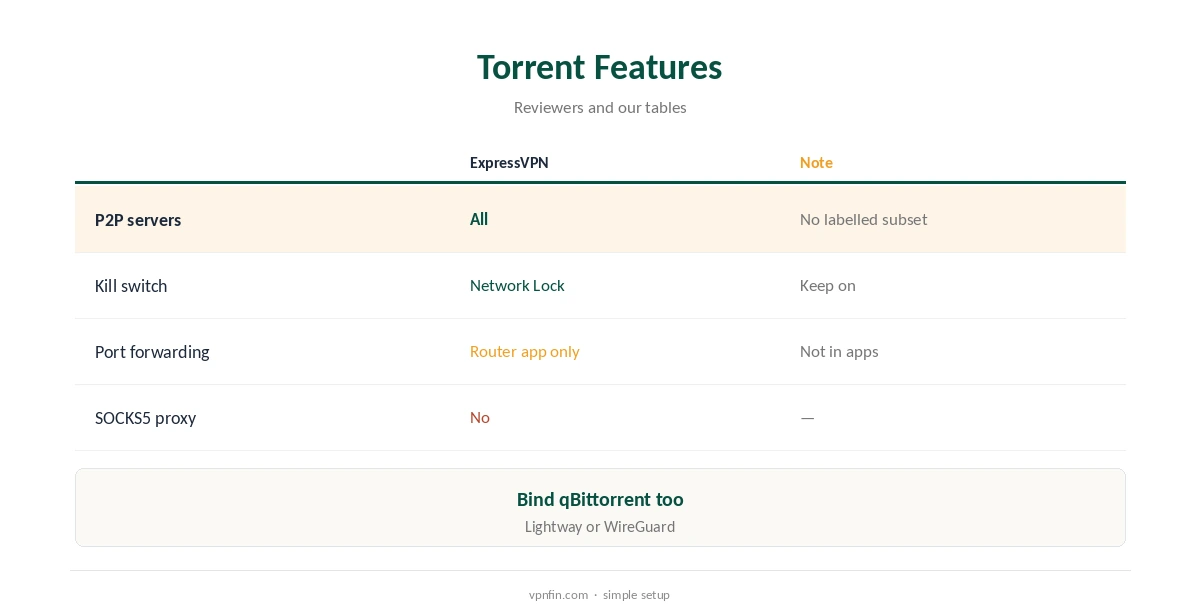
ExpressVPN qBittorrent use is straightforward. ExpressVPN allows P2P on every server rather than a labelled subset, Top10VPN and Comparitech found, so you pick a nearby location and start. Its apps offer Network Lock and split tunnelling but no port forwarding; VPNAlert and Cloudwards note port forwarding exists only on ExpressVPN’s router app. Binding qBittorrent to the VPN interface stops leaks if the tunnel drops.
This guide covers servers, binding qBittorrent, Network Lock, port forwarding, speed and the legal side.
P2P on Every Server
ExpressVPN has no torrent-labelled servers because it allows P2P across its whole network, Top10VPN and ProPrivacy report. Choose the nearest location for speed, since distance matters most for large downloads. Every location carries P2P, so there is no need to hunt for special servers or switch countries for torrents.
Cloudwards found ExpressVPN performed better than NordVPN in its torrenting tests, where NordVPN had trouble on regular servers. Its servers run on TrustedServer, which wipes data with every reboot because nothing is written to hard drives.
ExpressVPN qBittorrent Binding
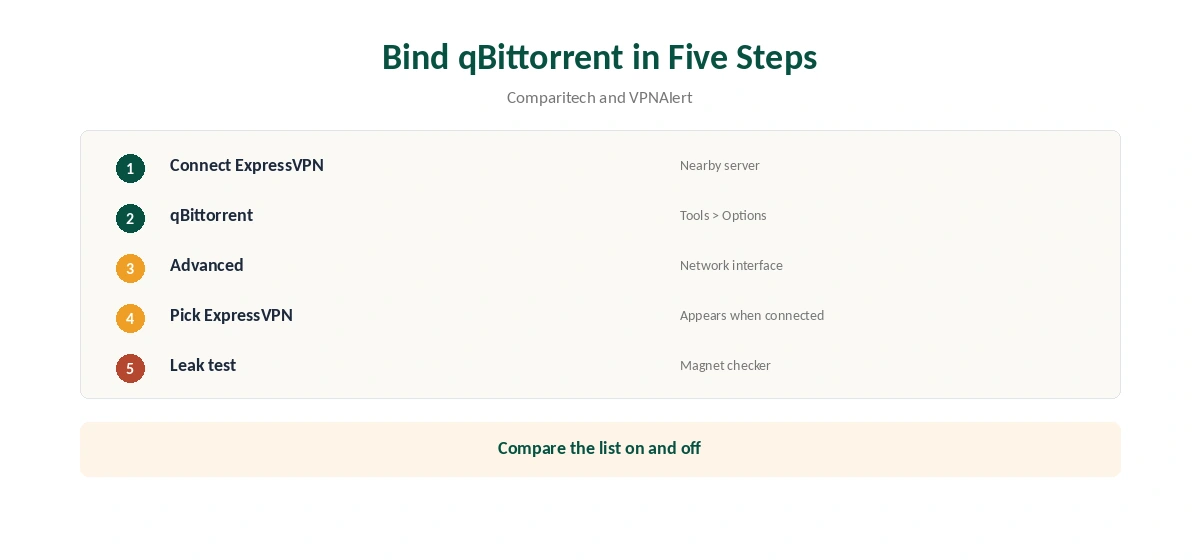
In qBittorrent, open Tools, Options, then Advanced, and set Network interface to ExpressVPN’s adapter, Comparitech and VPNAlert describe. qBittorrent then sends traffic only through that interface and stops if it disappears.
VPNAlert notes ExpressVPN’s adapter may not have an obvious name in the list. Compare the list with ExpressVPN connected and disconnected, and pick the entry that appears only when connected.
Network Lock and Split Tunnelling
Network Lock, ExpressVPN’s kill switch, blocks traffic if the tunnel drops; keep it on while torrenting. On Linux it has an always-on mode, our tables record. Binding qBittorrent adds a second layer that works even if Network Lock is off or fails during an app update.
Never exclude qBittorrent with split tunnelling, even briefly; ExpressVPN’s apps can split by app on Windows, Android and Linux. Our kill switch guide explains how the two protections differ and why using both is safer.
Port Forwarding: Router Only
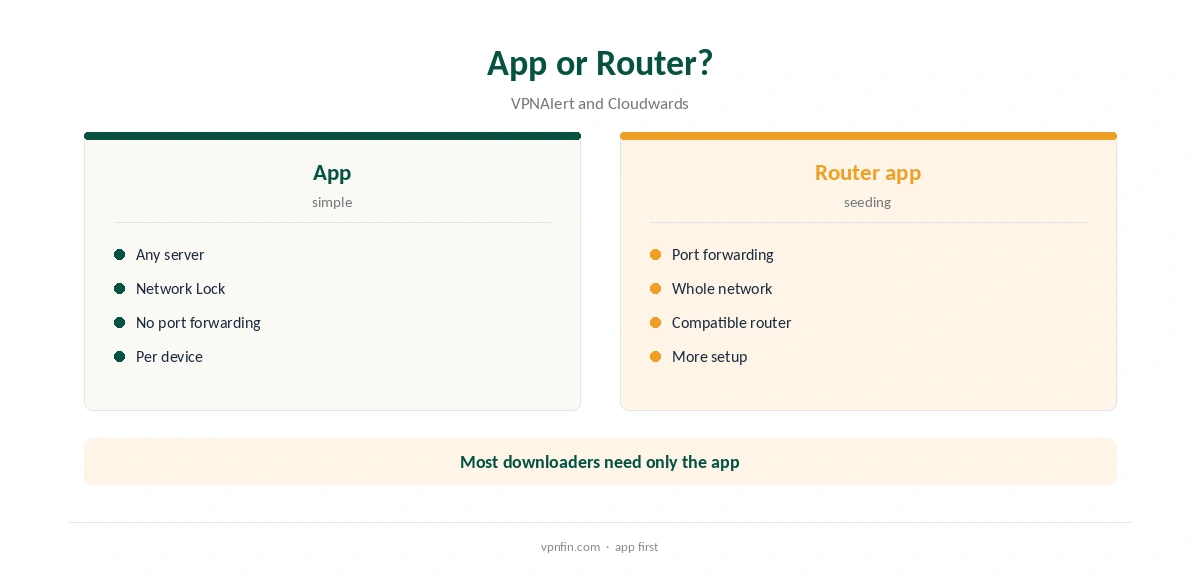
ExpressVPN’s apps do not offer port forwarding, Top10VPN and ProPrivacy note, which limits seeding to peers you can reach. VPNAlert and Cloudwards say its router app does support it.
Without a forwarded port, popular torrents still download well, but rare ones and private trackers get harder, because only peers with open ports can reach you. Our ExpressVPN router guide covers the router app.
Protocol and Speed
Lightway, ExpressVPN’s default, is fast, uses post-quantum key exchange and works over UDP or TCP. UDP is usually quicker for torrents. ExpressVPN added WireGuard on Windows, iOS and Android in August 2025, so you can compare both protocols on your own connection.
Pick a nearby server, since distance usually costs more speed than protocol choice. Our ExpressVPN WireGuard guide explains when to pick each.
Other Torrent Clients
Deluge and Transmission can also be tied to the VPN: Deluge has an outgoing interface setting, and Transmission can bind to the VPN’s address. The principle matches qBittorrent’s: traffic stops if the tunnel disappears, rather than leaking onto your normal connection.
Whatever the client, keep Network Lock switched on as the first safeguard, and test with a magnet checker after any change.
Recommended qBittorrent Settings
Besides binding the interface, turn off UPnP and NAT-PMP port mapping in qBittorrent’s Connection settings, since your router cannot forward ports through the VPN anyway. Leave DHT and peer exchange on for public torrents when you use the full VPN. All traffic is already in the tunnel, and those features help find peers.
Set a sensible upload limit so seeding does not crowd out other traffic on the same connection, such as video calls or streaming in another room.
Downloading Without Port Forwarding
Without a forwarded port, you can still connect to peers who accept incoming connections, so well-seeded torrents download at full speed. Most mainstream downloads fall into that group. Torrents with few seeders, and private trackers that reward uploads, suffer most.
If that describes your use, ExpressVPN’s router app, which supports port forwarding, or a provider with app-level port forwarding fits better. Our port forwarding guide compares the options.
Checking for Leaks
Load a torrent IP checker’s magnet link, such as the one on ipleak.net, in qBittorrent. Then confirm the address it reports is ExpressVPN’s, as NordVPN’s own help pages suggest for any provider. Also disable IPv6 on the adapter if your setup does not tunnel it, and repeat the test after changing location.
Our DNS leak guide covers the browser side.
The Legal Side
A VPN hides torrenting from your internet provider, but it does not make downloading copyrighted material legal; rules differ by country. ExpressVPN’s terms also forbid distributing copyrighted content, VPNAlert notes, so the service is for legal sharing such as open-source software and public-domain media. Our guide to ExpressVPN and SOCKS5 covers why there is no SOCKS5 proxy, and what to use instead.
Our VPN legality guide explains the rules by country.
How We Research
This page draws on Top10VPN’s, ProPrivacy’s, Comparitech’s, VPNAlert’s and Cloudwards’ ExpressVPN torrenting guides, NordVPN’s qBittorrent help and our ExpressVPN tables. We cross-checked these sources against each other, and where they conflict or something can’t be verified, we say so in the text rather than guessing. We checked time-sensitive figures, including prices in US dollars, on 8 October 2026. The main source we relied on is Top10VPN’s ExpressVPN torrenting guide. Our full approach lives on the About Us page.
ExpressVPN qBittorrent FAQ
Yes, on every server.
Tools, Options, Advanced, then pick ExpressVPN’s network interface.
Not in its apps; its router app supports it.
Yes, alongside binding qBittorrent.
Lightway by default; test WireGuard where available.
The Verdict
ExpressVPN qBittorrent setups are simple: any server, Network Lock on, qBittorrent bound to the VPN. Seeders who need port forwarding must use the router app.