
Disclosure: VPNFin is reader-supported. If you buy a VPN through links on this page, we may earn a commission at no extra cost to you. This never affects our ratings — here’s our full disclosure.
A proxy changes where one application appears to be. A VPN changes where your whole device appears to be, and encrypts the journey. Our page on StrongVPN for Chrome covers the HTTP proxy extension and what it leaves unprotected.
Most explanations stop there, and that is where they become useless. The practical question is not which is better in the abstract. It is that a great many things sold as VPNs are proxies, and a few are neither. Our page on TunnelBear and SOCKS5 covers why there is no proxy and how split tunnelling can substitute.
The Short Answer
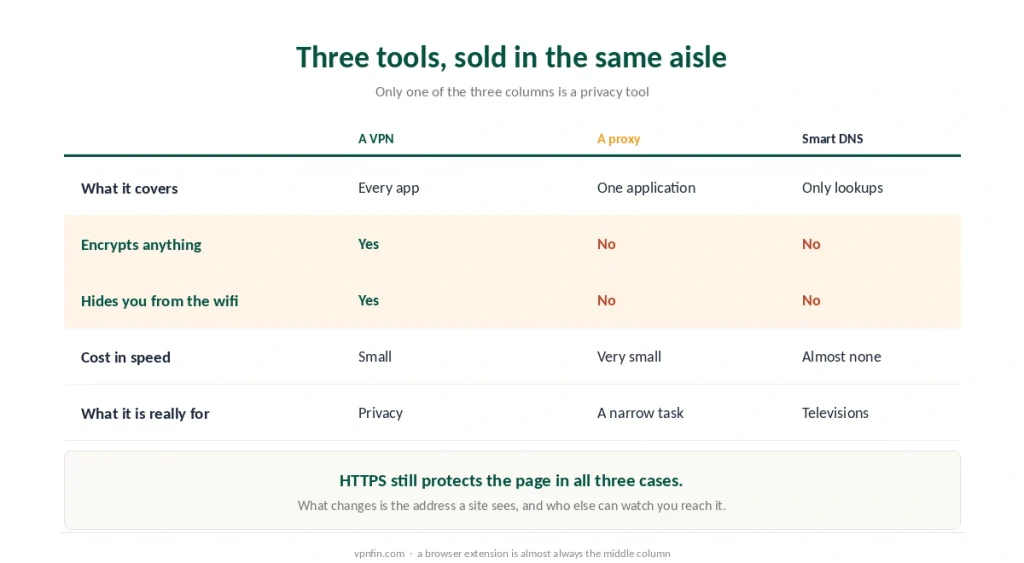
A VPN covers the device. Every app, every connection, encrypted between you and the server.
A proxy covers one application. Usually the browser, usually without encryption, and everything else on the machine carries on as normal.
Use a proxy for a narrow, temporary job. Use a VPN when the point is that nobody in between can read what you are doing — which is what a VPN actually moves.
What a Proxy Actually Is
Three kinds exist, and the differences matter more than the label.
An HTTP proxy handles web traffic only. It forwards requests from your browser and returns the response, and it reads everything that is not encrypted by HTTPS.
A SOCKS5 proxy handles any kind of traffic, including torrent clients, but still without encrypting it. It is faster than a VPN because it does less. Our page on CyberGhost and SOCKS5 covers why there is no proxy and the encrypted alternative. Some providers sell proxies and a VPN in one plan, as our FirstVPN review explains. Knowing which option encrypts traffic matters, as our FirstVPN safety check shows.
A browser extension is almost always one of the above. Turning one off is a different job from turning off a VPN, because there was never a tunnel to close.
⚠️ None of them encrypts anything by itself. HTTPS still protects the content of a page, exactly as it does without a proxy. What changes is the address the site sees.
The Third Thing: Smart DNS
Worth including because it is sold alongside both and does something different again.
It redirects only the lookups, the part where your device asks which server holds a website. Nothing is encrypted, nothing is routed elsewhere, and speed barely changes.
It exists for televisions. Samsung and LG sets cannot run VPN apps, so Smart DNS is the workaround — and switching it off later is its own small problem.
⚠️ On public wifi it does nothing for you at all. Treat it as a streaming convenience rather than protection, and note that the free measures which do help there are a different list entirely.
When a Proxy Is the Right Tool
Three genuine cases, and they are narrower than the marketing suggests.
Checking how a page looks from another country. A quick, disposable job where nothing sensitive passes through.
Speed on a task that does not need privacy. SOCKS5 adds less overhead than an encrypted tunnel, which matters for bulk transfers where the content is not secret. Our page on Surfshark and SOCKS5 covers why there is no proxy and how Bypasser fills the gap.
Scraping and automation, where the point is a different address rather than confidentiality.
⚠️ Notice that none of these involves protecting you. For that, the encryption is the product, and a proxy simply does not have one.
The Category Nobody Warns You About
Here is the part that changes how you read every free option.
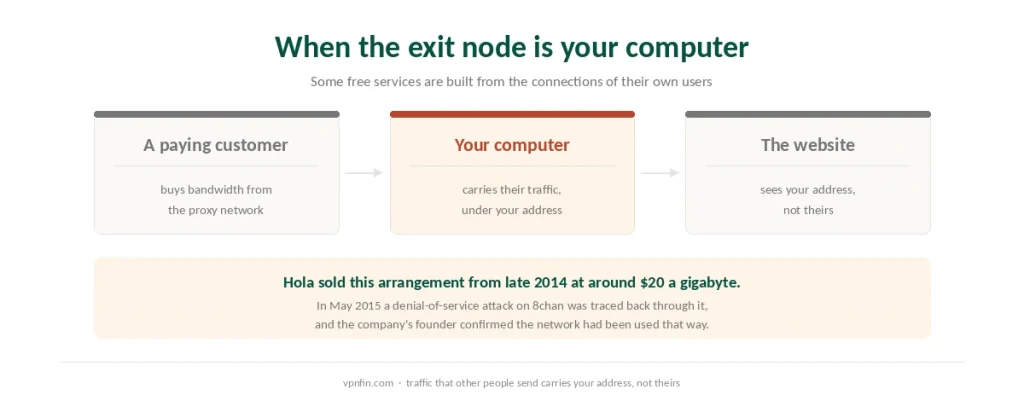
Some services route your traffic through other users’ devices rather than through servers they own. Your machine becomes an exit node for strangers in the same arrangement. For how to protect Firefox without an extension, see our page on VyprVPN on Firefox.
Hola is the documented case. From late 2014 the company sold access to its free users’ bandwidth under the name Luminati, charging around $20 a gigabyte for connections it did not pay for. In May 2015 a moderator of the site 8chan traced a denial-of-service attack back to that network, and Hola’s founder confirmed it. The company then updated its FAQ to mention the arrangement. Our guide to Windscribe Chrome Extension covers browser privacy tools, and what it leaves out.
Trend Micro examined the traffic later across roughly a hundred million scanned addresses, and described every device running the free version as an exit node monetised by the commercial proxy service. Urban VPN runs the same model today, and researchers documented a further step in 2025.
⚠️ The consequence is unusual and worth stating plainly. Traffic that other people send through your connection carries your address, not theirs. Free tools with no revenue model are funded somehow, and this is one of the ways.
Which One You Want
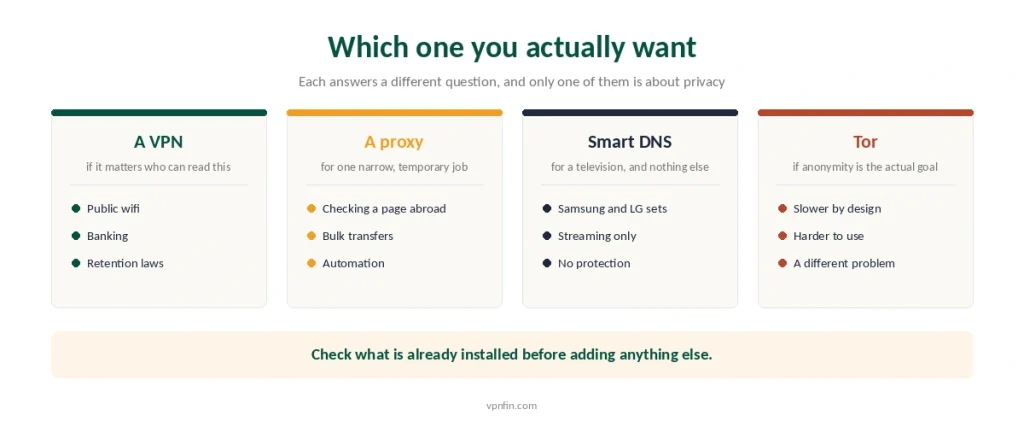
Choose a VPN if the answer to “who can read this” matters. Public wifi, retention laws, banking, anything you would not put on a postcard. Our guide to Opera Built-In VPN covers what the free browser VPN protects, and what it misses.
Choose a proxy for a single narrow task you could describe in one sentence, on a machine where nothing else needs covering. Our guide to IPVanish on Firefox covers why the Secure Browser extension is not a VPN, and what to use instead.
Choose Smart DNS only for a television, and only for streaming — where the provider still decides what actually unblocks.
Choose Tor if anonymity rather than privacy is the goal — the comparison is worth reading, and it solves a harder problem far more slowly.
⚠️ And check what you already have. Something in your browser may be doing one of these jobs without your knowing — a leak test settles it in a minute.
What the big three’s browser extensions actually are: NordVPN’s is a proxy, Surfshark’s adds ad blocking that works without the VPN, and ExpressVPN’s switches between proxy and full-device modes.
Opera’s free VPN is a browser proxy; our Opera VPN alternatives guide explains when that’s enough.
How We Research
This guide draws on Wikipedia, PCWorld and gHacks for the history of Hola and Luminati from late 2014, on TorrentFreak’s confirmation from Hola’s founder of the 8chan incident in May 2015, and on Trend Micro’s analysis as reported by TechRadar for the scale of the exit-node arrangement. The technical descriptions of HTTP proxies, SOCKS5 and Smart DNS are standard definitions rather than sourced claims, and everything about VPN behaviour comes from our own explainer and the pages behind it. We do not run our own tests. Our method lives on the About Us page.
VPN vs Proxy FAQ
Scope and encryption. A VPN routes every connection from your device through an encrypted tunnel. A proxy redirects a single application, usually the browser, and usually without encrypting anything. HTTPS still protects page content in both cases, but only a VPN hides your activity from the network you are on.
For hiding your address from a website, yes. For anything else, barely. The proxy operator sees whatever HTTPS does not encrypt, your other applications remain unaffected, and free proxy lists are run by people whose motives you cannot check.
Usually, because it does less work. A SOCKS5 proxy adds little overhead since it does not encrypt. Whether that trade is worth it depends entirely on whether the traffic in question needs to be private, and most of the time it does.
Most are not. They are proxies that cover the browser and leave every other application on the device untouched. Some are also the arrangement where free users become exit nodes for paying customers of the same company, which is a category of its own.
It redirects only your device’s requests for which server holds a website. Nothing is encrypted and nothing is rerouted, so it is fast and useless for privacy. Its real purpose is televisions from Samsung and LG, which cannot run VPN apps at all.
The Verdict
The difference is scope, not just encryption. A proxy redirects one application; a VPN covers the device and encrypts the route.
Most free browser tools marketed as VPNs are proxies, and a few are something worse: networks built from their own users’ connections.
So the question to ask is not which is better. It is what the thing you already installed is actually doing, and whose computer your traffic is passing through.