
Disclosure: VPNFin is reader-supported. If you buy a VPN through links on this page, we may earn a commission at no extra cost to you. This never affects our ratings — here’s our full disclosure.
Yes. And the question people are really asking is a different one.
They want to know which apps to exclude. Three or four things break with a tunnel running, and switching the whole thing off to fix them is the wrong tool.
⚠️ Because the toggle is where the exposure happens. You turn it off on the network you distrusted, then forget to turn it back on.
What Actually Breaks
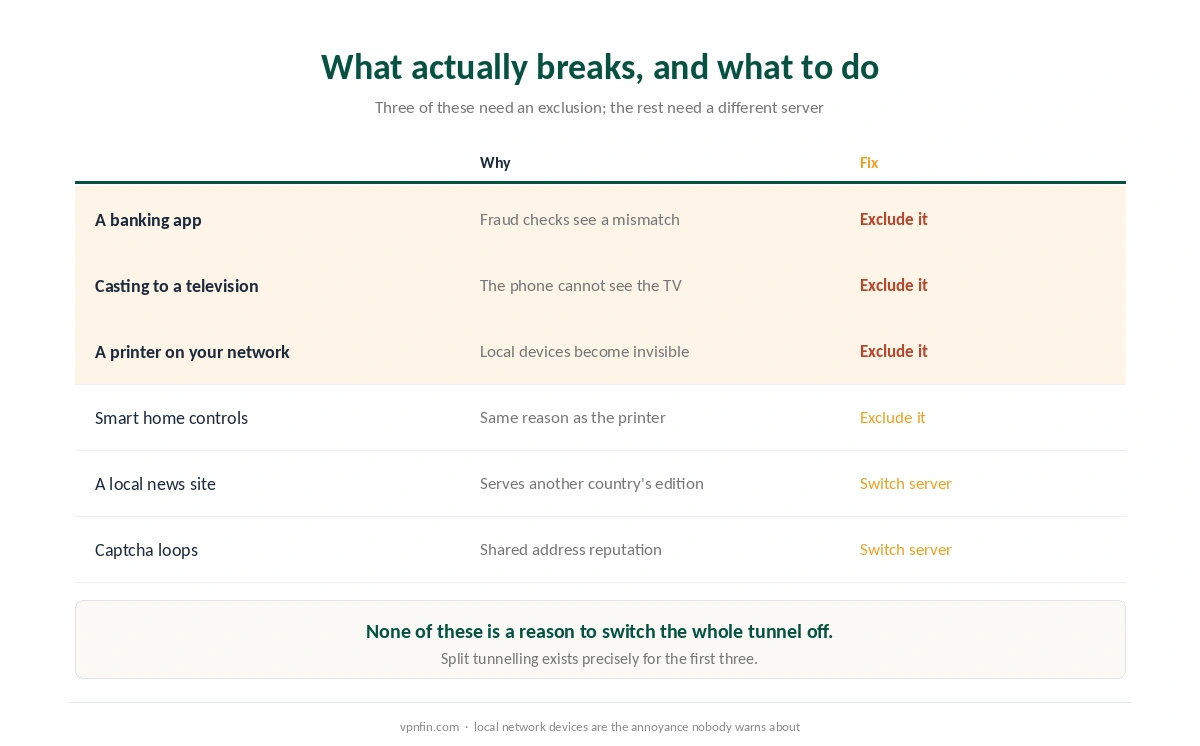
Banking apps. Fraud systems compare your usual location with the one they see, and a mismatch triggers a challenge or a block. This is the commonest real reason people switch off.
Casting to a television. Your phone and the television are on the same local network. A tunnel routes the phone elsewhere, so it can no longer see the television.
Printers and smart home devices. Same reason, and the annoyance nobody warns about. Local devices become invisible.
⚠️ None of these needs the tunnel off. Split tunnelling exists for exactly this, and it excludes an app or a destination while everything else stays covered.
Two More Annoyances, With a Different Fix
Sites serving the wrong country’s edition. A local news site or a shop redirects you by address, so you get prices and content for somewhere else.
Captcha loops and refused connections. Shared addresses carry a reputation score, and a busy one attracts challenges — which is the same mechanism streaming services use.
Both are server problems rather than tunnel problems. Switching to a nearby server in your own country usually resolves them.
⚠️ And a dedicated address fixes the second one permanently, at a cost — a static address is easier to associate with you, which is the trade that page sets out.
The Costs, at Their Real Size
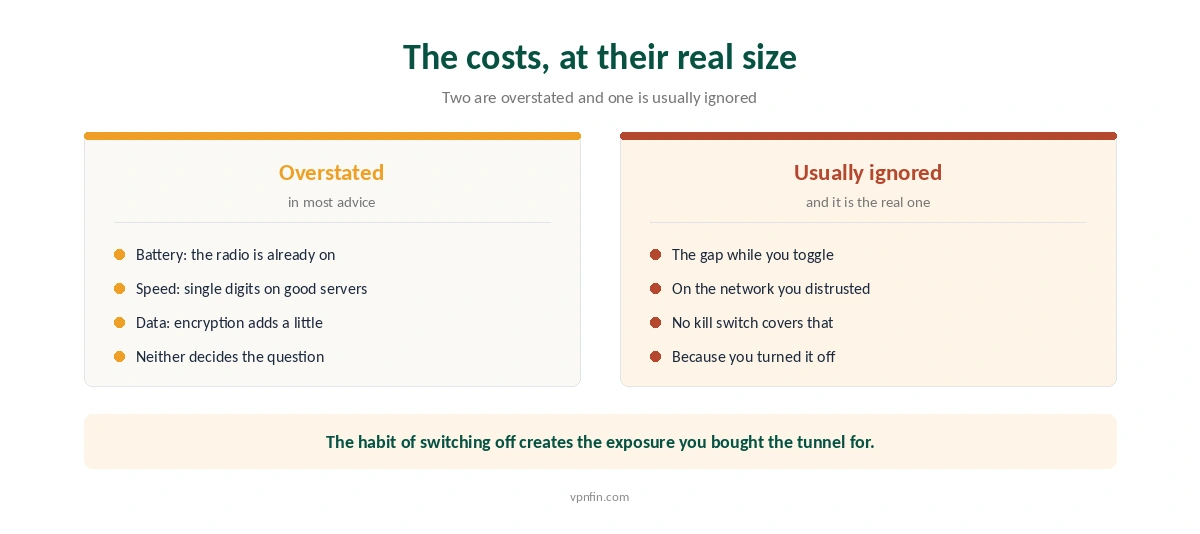
Battery is overstated. The radio is already transmitting whether a tunnel is up or not, and encryption is cheap on modern hardware. It is a measurable cost and rarely a decisive one.
Speed is smaller than expected on a nearby server. Published measurements put good providers in single-digit percentage loss, and the figure grows with distance rather than with the tunnel itself — our page on speed loss has the numbers and the disagreements between labs.
⚠️ The cost nobody counts is the gap. A kill switch protects you when a tunnel drops unexpectedly. It cannot protect you when you switch off deliberately, which is the moment most people actually get exposed.
And forgetting to switch back on is the normal outcome. That is not carelessness. It is what happens to any setting that needs attention several times a day.
When It Genuinely Should Be On
Any network you do not control. Hotels, cafés, airports and conference venues — the case nobody disputes.
Anywhere your internet provider’s visibility matters to you. A tunnel moves that visibility to the VPN company instead, which is the whole transaction — stated precisely on our page about what a VPN hides.
Travelling, for your own subscriptions and services. The ordinary reason most people buy one.
⚠️ And on a company network, with a caveat. A tunnel on your own device hides content from the network and not the fact of its existence — and a policy may forbid it regardless.
The Setup That Ends the Question
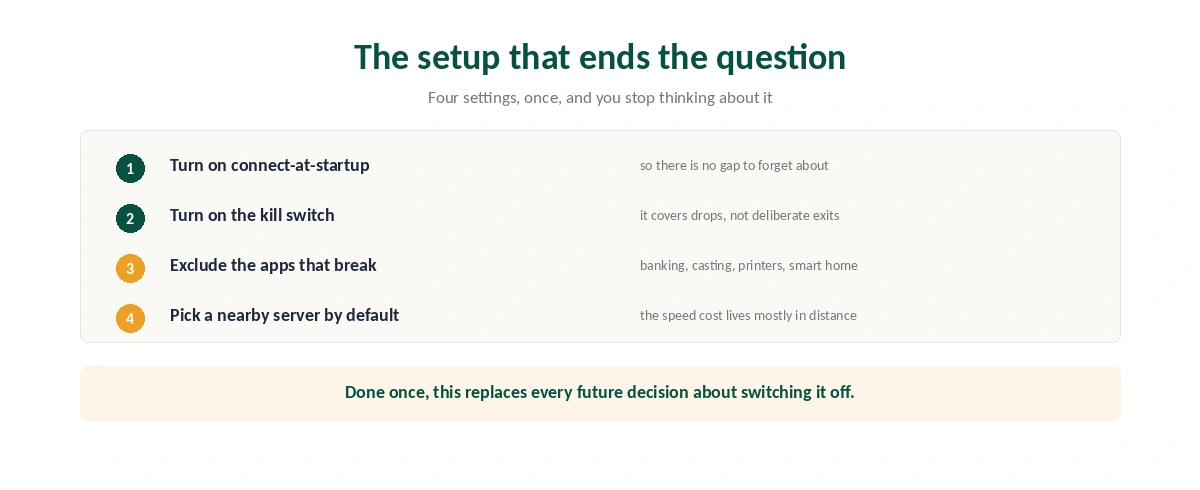
Switch on connect-at-startup. The tunnel comes up with the device, so there is no moment you have to remember.
Switch on the kill switch. It covers unexpected drops, and testing has found many clients failing at exactly that.
Exclude the three or four apps that break. Banking, casting, printing and smart home controls. Everything else stays inside.
Set a nearby server as the default. Most of the speed cost lives in distance, and most days you are not trying to appear elsewhere.
When to Switch It Off Anyway
When a network blocks tunnels outright. Some hotel and corporate networks refuse them, and obfuscation is the setting for that rather than switching off.
When you are diagnosing a connection problem. Turning it off tells you whether the tunnel is the cause, which is a test rather than a habit.
When an app has no exclusion option. Rare, and a reason to check whether your provider supports per-app routing at all.
⚠️ And check for leaks after any of that. A client that reconnects badly can send lookups outside the tunnel — the commonest failure we cover.
How We Research
The trade-offs on this page come from our own coverage: speed loss from our page on that subject, which records where laboratory figures disagree, kill switch behaviour from our page on that feature, and per-app routing from our split tunnelling page. Published guides by TechRadar, Tom’s Guide and others describe the same annoyances, and several of them repeat the claim that a VPN protects card details on public wifi, which we do not — encrypted connections cover the content and a tunnel covers which sites the network sees you reach. Battery and data costs vary by device and we have not measured them. We do not run our own tests. Our method lives on the About Us page.
Always-On VPN FAQ
Yes, with a few apps excluded. Turning it off is where exposure usually happens, because you switch off on the network you distrusted and then forget to switch back on. Per-app exclusions solve the reasons people toggle.
Fraud detection compares your usual location with the one it sees, and a mismatch triggers a challenge or a block. Excluding that single app through split tunnelling fixes it without exposing everything else.
A little, and less than most advice suggests. The radio is already transmitting either way and encryption is cheap on current hardware. It is a real cost and rarely the one that should decide the question.
Because your phone and the television are on the same local network, and the tunnel routes your phone elsewhere. The phone can no longer see local devices. Printers and smart home controls break for the same reason.
No. A kill switch blocks traffic when a tunnel drops unexpectedly. A deliberate disconnection is not a failure, so nothing intervenes — which is why the on-off habit is the part worth changing.
The Verdict
Leave it on, and exclude what breaks. Banking, casting, printing and smart home controls account for almost every reason anyone reaches for the switch.
The battery and speed arguments are smaller than they sound. Single-digit speed loss on a nearby server, and a radio that was transmitting anyway.
And the toggle is the risk. A kill switch cannot help when you switched off on purpose, on the network you were protecting yourself from.