
Disclosure: VPNFin is reader-supported. If you buy a VPN through links on this page, we may earn a commission at no extra cost to you. This never affects our ratings — here’s our full disclosure.
Split tunneling lets you choose which traffic goes through the VPN and which does not. It is the most requested feature in this category and the least examined. Our page on TunnelBear and SOCKS5 covers why there is no proxy and how split tunnelling can substitute.
Whatever you route outside the tunnel is exactly as exposed as it would be with no VPN at all. Your real address, your internet provider watching the domains, all the things a VPN was moving. That is not a flaw in the feature — it is the feature.
What It Actually Does
Four kinds exist, and providers use different names for the same things.
App-based. You pick which applications use the tunnel. The most common form on Windows and Android, and the setting that makes leaving the VPN on all the time practical.
URL or domain-based. You exclude specific websites, which is what most iOS implementations really are.
IP-based. You exclude specific addresses, which is how people keep printers and network storage reachable.
Inverse. Everything goes direct except what you name — the safer default, because a forgotten app stays outside rather than inside.
⚠️ Only the last one fails safe. With standard split tunneling, anything you forget to add is unprotected. With inverse, anything you forget stays protected.
The Two Settings That Disagree
Worth putting early, because most people run both without noticing.
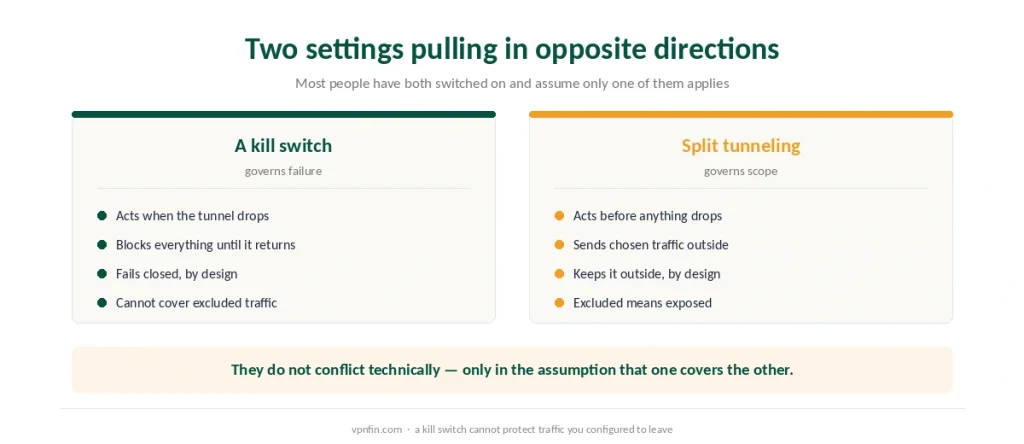
A kill switch promises that traffic never leaves the tunnel, even for a moment, even if the connection drops — and fourteen of thirty tested providers failed to deliver that.
Split tunneling arranges for traffic to leave the tunnel deliberately, and keeps it out.
⚠️ They are not in conflict technically. The kill switch governs what happens to tunneled traffic when the tunnel fails; split tunneling defines what counts as tunneled in the first place. But if you assume the kill switch protects everything, split tunneling is where that assumption breaks.
On iPhone, It Mostly Does Not Exist
The single most useful thing on this page, and the least reported.
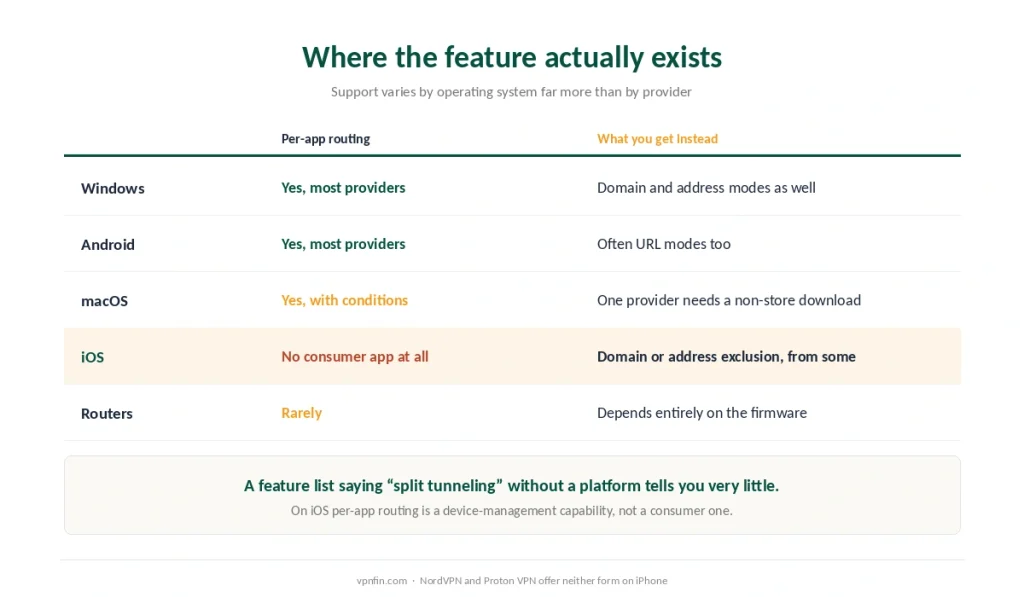
No consumer VPN offers app-level split tunneling on current iOS. The capability exists only through mobile device management, on devices an employer controls.
What providers offer instead is website, domain or IP exclusion. Surfshark, ExpressVPN and IPVanish all provide that on iOS. It is genuinely useful and it is not the same feature.
NordVPN and Proton VPN offer neither on iPhone.
⚠️ So a provider’s page claiming split tunneling on iOS is describing the limited version. ExpressVPN’s own feature page says it supports iOS; independent descriptions say per-app routing is impossible there for any consumer app. Both statements can be true, and only one of them answers the question you were asking.
macOS has its own catch. ExpressVPN’s implementation requires downloading the application from the company’s website rather than the App Store, because store policy prohibits the system extensions the feature depends on. Mullvad added it in 2024, requiring macOS 13 or newer.
When It Is the Right Answer
Five situations, and they are more specific than the marketing suggests.
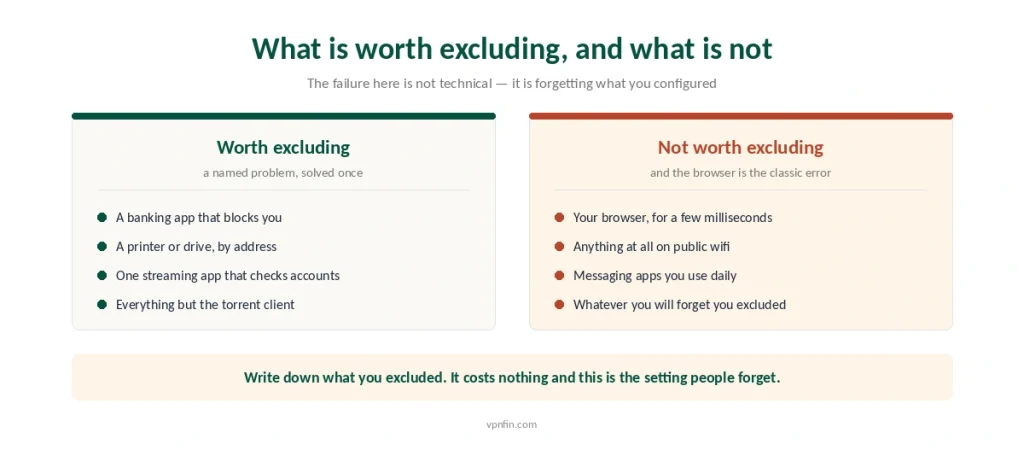
Your bank blocks the VPN. Financial services reject connections from datacentre addresses routinely — which is the recurring problem with banking over a VPN, and excluding one app solves it cleanly.
Your printer and local devices vanish. Full tunnel routing takes your traffic off the local network, and IP-based exclusion brings them back.
A streaming service refuses because the account and address disagree. Excluding that one app is the fix we recommend for Xbox Cloud Gaming.
Latency matters more than privacy for one task. Video calls and competitive games pay for encryption in milliseconds.
Torrenting, in reverse. Keep the client inside the tunnel and let everything else go direct — the one case where inverse split tunneling is clearly right.
When It Is a Mistake
Configuration drift is the real risk, and it is not technical.
You set it once and forget what you excluded. Six months later a browser or a messaging app is routing outside the tunnel and nothing on screen says so.
Excluding a browser excludes everything you do in it. People add Chrome to save a few milliseconds and remove the VPN from ninety per cent of their traffic.
On public networks it defeats the purpose entirely. The one place a VPN reliably earns its cost is the place where partial coverage is worth least.
⚠️ Websites cannot see that you are using split tunneling, but they can notice when your DNS requests and your address disagree — which is one of the ways an excluded app gets flagged anyway.
Setting It Up, and Checking It
The path is nearly identical everywhere. Settings, then Split Tunneling or Bypasser, then choose a mode and add applications. Our guide to PureVPN on Windows covers split tunnelling by program, every process counts.
Disconnect and reconnect afterwards. Most clients do not apply the change to a live session.
Then verify, rather than assuming. Open a leak test in an excluded application and in an included one — if both show the same address, the feature is not doing what you set it to do.
Write down what you excluded. This is the setting people forget, and the note costs nothing.
⚠️ Router-level VPNs mostly cannot do this. Firmware split tunneling exists but is rare — which is the most common reason people abandon router setups.
Which Providers Do It Properly
NordVPN offers app-based standard and inverse modes on Windows, Android and Linux, with a command-line flag that is genuinely unusual. Nothing on iOS.
Surfshark calls it Bypasser and covers apps and websites on Windows, Android and, since February 2026, macOS; on iOS it excludes websites only. That is still the widest platform coverage of the providers we rank.
Proton VPN supports it on Windows, macOS, Android and Linux, and not on iPhone.
⚠️ Check the provider’s page for your operating system specifically. Support varies by platform far more than by provider, and a feature list that says “split tunneling” without qualification is telling you very little — the same is true of obfuscation, where seven providers use seven names for two mechanisms.
How We Research
This guide draws on Comparitech and PrivacyJournal for the platform coverage of individual providers and the naming conventions each one uses, on ExpressVPN’s own documentation for its claimed iOS support, on independent technical write-ups for the finding that app-level split tunneling is unavailable to consumer applications on current iOS and for the App Store restriction affecting the macOS implementation, and on our own pages for the kill switch testing and leak-check procedures. Where a provider’s marketing and an independent description conflict — as they do on iOS — we have set both out rather than choosing. We do not run our own tests. Our method lives on the About Us page.
Split Tunneling FAQ
The tunneled traffic is protected exactly as before — split tunneling changes the scope of protection, not its strength. What it does is leave the excluded traffic completely unprotected, carrying your real address and revealing the domains you visit to your internet provider.
Not in the form most articles describe. App-level split tunneling is unavailable to consumer VPN applications on current iOS; it exists only through enterprise device management. Surfshark, ExpressVPN and IPVanish offer website or domain exclusion instead, which is useful but different.
The reverse default: all traffic goes through the VPN except the applications or sites you name. It is the safer configuration, because anything you forget to configure stays inside the tunnel rather than outside it. Providers sometimes label it “Bypass VPN” or “exclude”.
Financial services routinely reject connections from datacentre addresses because fraud prevention treats them as suspicious. Excluding the banking application from the tunnel resolves it without turning the VPN off for everything else, which is one of the clearest uses for this feature.
Open a leak-testing page inside an excluded application and again inside an included one. If both report the same address, the configuration is not taking effect. Remember to disconnect and reconnect after changing the settings, since most clients do not apply changes to a live session.
The Verdict
Split tunneling is a scalpel, and most people use it as a switch. Excluding one banking app is a good reason; excluding a browser to save latency removes the VPN from most of what you do. Our page on CyberGhost on Windows covers the Windows app’s protocols, settings and repair steps.
Inverse mode is the safer default, because what you forget stays protected rather than exposed.
And on iPhone the feature you are reading about does not exist in the form most articles describe. Domain exclusion is real and useful; per-app routing is not available to any consumer application. Our page on NordVPN split tunneling covers platforms, TV setup and the kill switch catch.