
Disclosure: VPNFin is reader-supported. If you buy a VPN through links on this page, we may earn a commission at no extra cost to you. This never affects our ratings — here’s our full disclosure.
The warning is familiar: never bank on café Wi-Fi, because someone at the next table is reading your passwords out of the air.
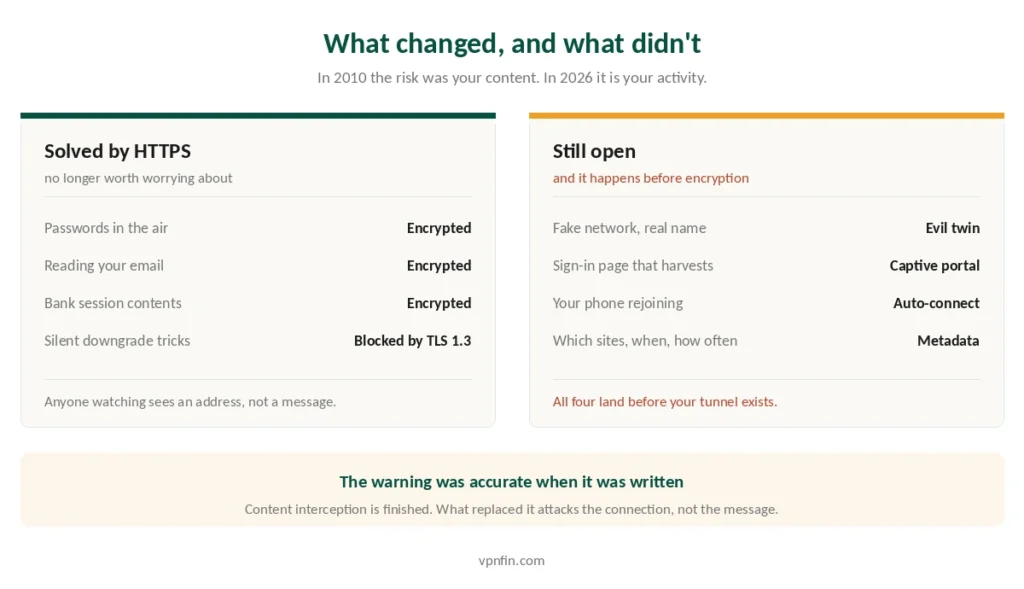
That threat is largely finished. HTTPS now covers more than 95% of web traffic, and TLS 1.3 closed the interception techniques that made the original advice sensible. A person on the same network sees which servers you contacted, not what you sent them.
However, two risks survived, and both work by attacking the moment before your encryption starts. Neither is addressed by the advice most people have been given. So this guide covers what actually changed, what did not, and where a VPN genuinely earns its subscription. Our page on whether VPNs work covers what a VPN protects, what it does not and how to check it.
The Short Answer
Reading news and social media on café Wi-Fi? The risk without a VPN is low. HTTPS is doing the work.
Handling money, work systems or anything you would not hand to the venue? Use one. Not because of eavesdropping, but because of what happens if the network itself is fake.
Travelling, especially hotels? Use one, and turn on always-on mode. Hotel networks have been targeted by organised groups since at least 2007.
Best picks: NordVPN for speed and reliability, Proton VPN if you want a free tier that does not monetise you, Surfshark to cover a family’s devices.
What Actually Changed
The old model assumed your traffic travelled in readable form. It no longer does.
HTTPS encrypts the content end to end, between your browser and the site, before the network sees anything. The Wi-Fi operator, the person beside you and anyone running a packet capture all see the same thing: encrypted data going to an address.
TLS 1.3 removed the downgrade tricks that older interception tools relied on. Certificate warnings now appear loudly when something sits between you and a site, and modern browsers refuse to proceed quietly.
⚠️ What still leaks is metadata. Which domains you contact, when, how often and for how long. That is visible to the network operator whether or not you use HTTPS. In 2010 the risk was your content being read; in 2026 it is your activity being observed. What a VPN actually hides covers the distinction in detail.
Risk One: The Network Might Not Be Real
An evil twin is a hotspot broadcasting the same name as the legitimate one. Connect to it and the attacker controls your gateway.
It needs no skill and no expensive equipment. Consumer hardware and freely available software are enough, and the attacker only has to be in the same room.
Your device does most of the work for them. Phones and laptops rejoin saved networks automatically, without asking. Walk past a hotspot named after a coffee chain you once used, and you are connected before you take your phone out.
Then the captive portal arrives. A convincing sign-in page asking for an email, a password, a card number or a social login costs an attacker nothing to build, and people hand over credentials because the page looks like every other hotel Wi-Fi form.
Two habits reduce this more than any purchase:
- Turn off automatic reconnection for public networks, and forget them when you leave
- Verify the network name with staff rather than trusting the strongest signal
⚠️ Never install a certificate or configuration profile to use a café or hotel network. Legitimate networks do not ask. A device that trusts an attacker’s certificate authority is compromised in a way no VPN can repair.
Risk Two: The Gap Before Your VPN Connects
This is the part almost nobody explains, and it is the reason always-on mode matters.
Your device starts talking the moment it joins a network. Connectivity checks, push notifications, email sync, DNS lookups — all of it fires while your VPN app is still negotiating. On a hostile network, that window is when the interesting things happen.
Always-on mode closes it by refusing any traffic until the tunnel exists. On Android this is built into the operating system: Always-on VPN and Block connections without VPN sit in Settings and cost nothing.
On iPhone the option does not exist on personal devices, and iOS additionally leaves already-open connections outside the tunnel. Our iPhone guide covers the workaround, which is to connect the VPN and then toggle Airplane Mode.
Practical order on any device: join the network, connect the VPN, and only then open your banking app.
⚠️ The same gap reopens every time the tunnel drops. Auto-reconnect closes it quickly rather than preventing it, so a kill switch is what covers the interval — and drops on public networks are frequently deliberate rather than a fault in your app.
What a VPN Does Not Fix
Being straight about this matters more than selling you something.
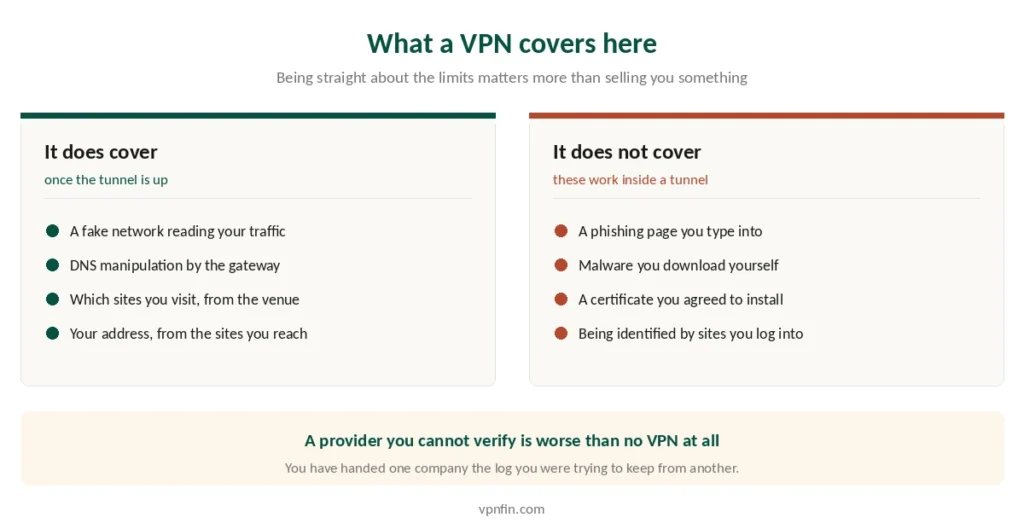
It does not stop phishing. A fake login page works identically inside an encrypted tunnel.
It does not stop malware. A file you download is the same file either way.
It does not help if you installed the attacker’s certificate. The VPN faithfully tunnels a compromised connection without knowing anything is wrong. Our guide to VPN for Freelancers covers public Wi-Fi, client allowlists and split tunnelling.
It does not make you anonymous. You remain identifiable to the sites you log into, and to the VPN provider itself — which is exactly why a provider with published audits matters. Some of those sites treat the tunnel as a fraud signal, your bank included, and UK regulation now expects platforms to detect it deliberately. A provider you cannot verify is worse than no VPN, because you have handed one company the log you were trying to hide from another.
⚠️ Free VPNs are the clearest example. Many fund themselves by collecting the browsing data you installed them to protect. Our free VPN guide covers the handful that do not.
So What Should You Actually Do?
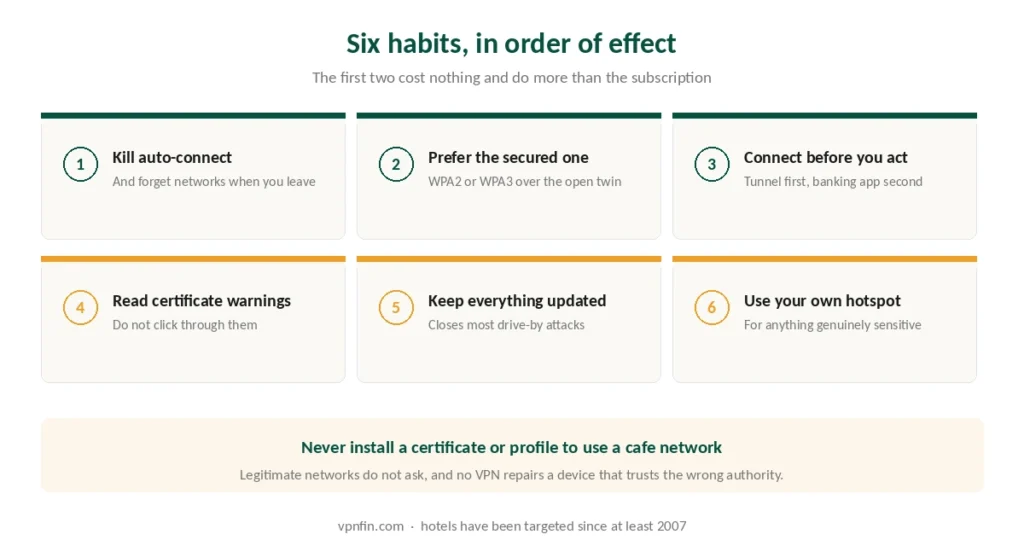
Six habits, in the order they reduce risk.
- Turn off auto-connect and forget public networks after use
- Prefer the secured network if a venue offers both an open and a WPA2 or WPA3 option
- Connect the VPN before anything sensitive, and use always-on where your device supports it
- Read certificate warnings instead of clicking through them
- Keep the operating system and browser updated, which closes most drive-by attacks
- Use your phone’s hotspot for genuinely sensitive work, since a network you control beats any network you do not
⚠️ Hotels deserve extra caution. Business travellers have been targeted through hotel networks by organised groups since at least 2007, and the pattern continues because the guest list tells an attacker who is worth attacking.
⚠️ Hotel networks also block VPN ports routinely, which is a nuisance rather than an attack. If the tunnel refuses to come up at all there, a thirty-second test tells you whether the network or your laptop is at fault.
⚠️ And a tunnel does not relocate you legally. Connecting through another country changes what a website sees about your address, not which rules apply to you — one US state has now written that into statute, and it held everywhere else already.
The Picks
NordVPN — fastest in independent testing at 2.9% average download loss, six Deloitte no-logs audits, ten devices, and a kill switch that behaves predictably when you move between networks. Renewal is $139.08 a year. Our NordVPN review has the detail.
Proton VPN — the free tier has no data cap, no ads and the same no-logs policy as paid, which makes it a reasonable answer for travel rather than a trap. Five published annual audits, open-source apps. Our Proton VPN review covers the paid tiers.
Surfshark — unlimited simultaneous connections, so a family’s phones, tablets and laptops are all covered on one subscription for around $79 a year at renewal. Our Surfshark review sets it against the rest.
CyberGhost — 45 days to change your mind, fifteen more than NordVPN, and $56.94 a year at renewal. Useful if you are unconvinced this is worth paying for at all. Our CyberGhost review has the rest.
Troubleshooting: our fix guides cover a VPN not working on hotel Wi-Fi.
How We Research
This guide draws on published measurements of HTTPS adoption, security analyses of evil twin and captive portal attacks from named outlets, provider documentation on always-on behaviour, and reporting on hotel-network targeting — cross-checked and verified at publication. We don’t run our own network tests. Where sources disagreed, most sharply on whether a VPN is a baseline requirement or a situational tool, we set out both positions and explain which activities each applies to rather than picking the version that sells more subscriptions. Our full approach lives on the About Us page.
Public Wi-Fi VPN FAQ
Less than the warnings suggest. HTTPS covers over 95% of web traffic, so nobody on the network can read what you send. What remains are fake networks with cloned names, sign-in pages built to harvest credentials, and the visible record of which sites you contacted and when.
For browsing and social media, no — the risk is low. For banking, work systems or anything you would not hand to the venue, yes. The reason is not eavesdropping but the possibility that the network itself is controlled by someone else.
A hotspot broadcasting the same name as a legitimate network, so your device connects to it instead. It requires no technical skill, and phones rejoin saved network names automatically. Turning off auto-connect and forgetting public networks after use removes most of the exposure.
No. It encrypts your traffic before it reaches the network, which covers eavesdropping and DNS manipulation. It does nothing about phishing pages, malware you download, or a certificate you were persuaded to install. Those attacks work identically inside a tunnel.
Only a small number are safe. Many free services fund themselves by collecting the browsing data you installed them to protect, which leaves you worse off than using nothing. Proton VPN’s free tier is the clearest exception, with no data cap and audited no-logs claims.
The Verdict
The advice you were given was right in 2010 and is mostly wrong now. Content interception is finished. What replaced it is subtler: fake networks your device joins by itself, sign-in pages designed to harvest credentials, and the seconds before your tunnel comes up.
A VPN addresses the second and third of those, and does nothing about phishing, malware or a certificate you agreed to install.
If you are reading the news in a café, you are fine. If you are moving money, working on client material or travelling through hotels, connect before you open anything — and turn on always-on if your device offers it.