
Disclosure: VPNFin is reader-supported. If you buy a VPN through links on this page, we may earn a commission at no extra cost to you. This never affects our ratings — here’s our full disclosure.
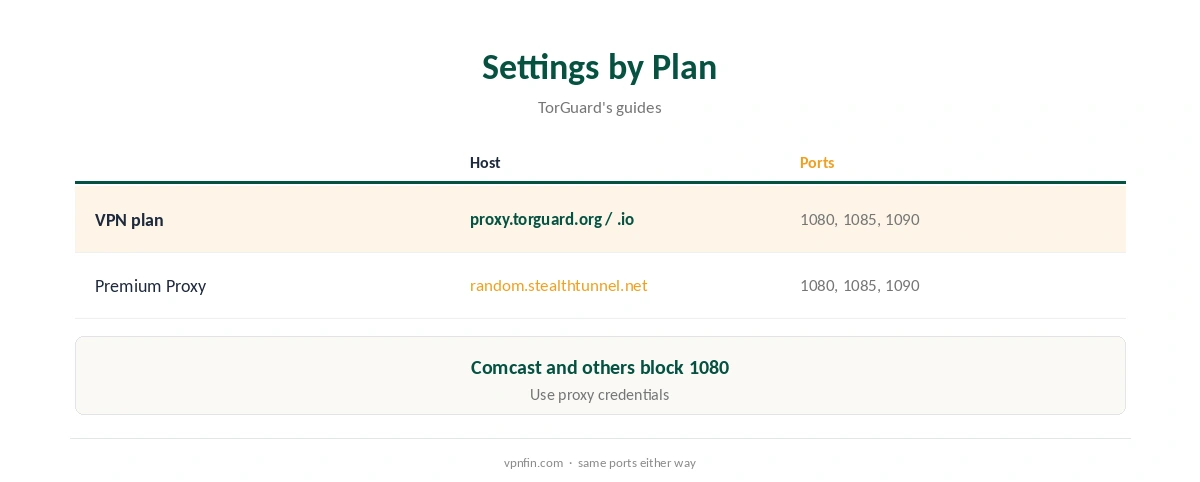
TorGuard SOCKS5 comes with its VPN plans and as a separate Premium Proxy service, TorGuard’s guides explain. VPN owners use proxy.torguard.org or proxy.torguard.io; Premium Proxy users use random.stealthtunnel.net. Ports 1080, 1085 and 1090 all work, since some providers, such as Comcast, block 1080. You sign in with your proxy username and password, not your website login. SOCKS5 hides your IP from peers but does not encrypt traffic.
This guide covers the settings, a qBittorrent setup, the privacy limits and when to use the VPN instead.
Server and Port Settings
TorGuard’s uTorrent and qBittorrent guides give the same details: SOCKS5 type, proxy.torguard.org or proxy.torguard.io for VPN plans, random.stealthtunnel.net for Premium Proxy, and port 1080, 1085 or 1090. Authentication uses your proxy credentials from the account panel.
TorGuard SOCKS5 in qBittorrent
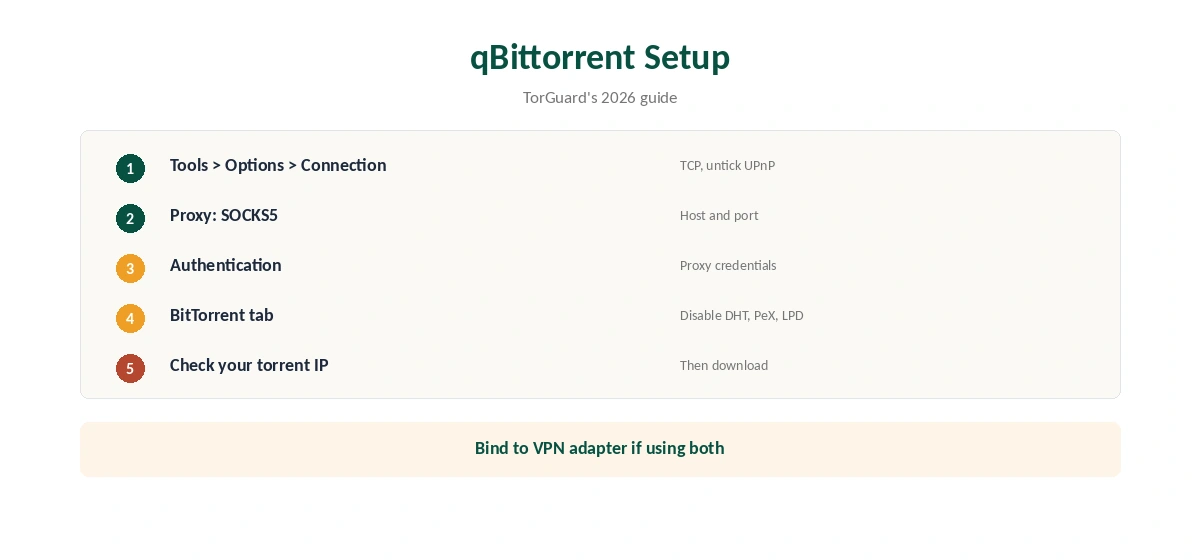
Open Tools, Options, Connection. Set the listening protocol to TCP and untick UPnP and NAT-PMP. Under Proxy Server, choose SOCKS5, enter TorGuard’s host and port, tick authentication and enter your proxy credentials. Then, under BitTorrent, disable DHT, peer exchange and local peer discovery, as TorGuard’s 2026 guide recommends.
Privacy Limits
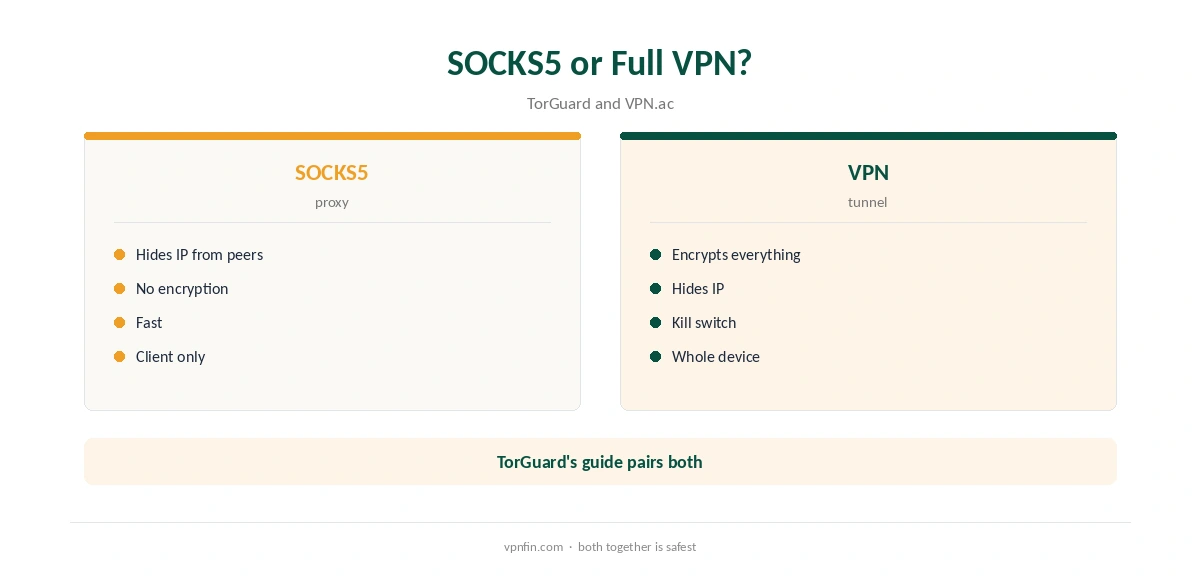
SOCKS5 is a clear-text proxy: it does not encrypt your traffic, VPN.ac’s guide notes, and some torrent clients can make direct connections that bypass it. That is why TorGuard’s guide disables DHT and peer exchange. Your provider can still see torrent traffic, though not who you connect to. Our VPN vs proxy guide explains the difference.
SOCKS5 Plus VPN
TorGuard’s guide describes running both: connect the VPN, configure SOCKS5 in the client, and bind the client to the VPN adapter. That encrypts traffic and adds a separate exit address for peers. Our TorGuard Windows guide covers the VPN client.
Why Use TorGuard SOCKS5?
A SOCKS5 proxy in the torrent client hides your IP from peers without routing the rest of your computer through a VPN. That keeps browsing and games on your normal connection while torrents use the proxy. It is also usually faster, VPN.ac notes, because there is no encryption overhead. Our page on TunnelBear and SOCKS5 covers why there is no proxy and how split tunnelling can substitute.
Checking Your Torrent IP
TorGuard’s guides recommend checking the IP your client reports, using a torrent IP check tool. If it shows your real address, the proxy is not in use; recheck the settings and authentication.
Port Forwarding
TorGuard offers port forwarding through its client area, which works with the VPN and helps seeding. Our port forwarding guide explains how it helps.
A Quick Rule
Just torrents, fast? TorGuard SOCKS5 with DHT and peer exchange off. Want encryption too? Run the VPN and bind the client to it. Seeding heavily? Add port forwarding.
Choosing a Proxy Location
TorGuard’s guides point VPN owners to a SOCKS5 server status page to pick a specific proxy. Choose a location outside the US for torrents, given TorGuard’s 2022 settlement, and near you for speed.
TorGuard SOCKS5 and Leaks
Torrent clients can sometimes connect directly despite proxy settings, VPN.ac warns. Disabling DHT, peer exchange and local peer discovery reduces that risk. Turning off IPv6 on your network adapter helps too. Our DNS leak guide covers wider leak checks.
Several Devices
Standard VPN plans allow up to eight devices, Fahimai notes. A torrent client using SOCKS5 on one computer does not stop other devices from using the VPN.
Is TorGuard SOCKS5 Enough on Its Own?
For hiding your IP from torrent peers, yes. For privacy from your internet provider, no, since traffic is not encrypted. Pair it with the VPN when that matters, as TorGuard’s own guide suggests.
Keeping Credentials Safe
Proxy credentials sit in your torrent client’s settings. Use a unique password, and change it in TorGuard’s account panel if you share the computer.
Quick Check
After setup, start a well-seeded public torrent and check the client’s reported IP with a torrent IP checker. It should show a TorGuard address, not yours. Repeat after client updates, which can reset proxy settings.
Speed
Without encryption, SOCKS5 usually adds less overhead than a VPN, VPN.ac notes. If downloads slow, try another proxy location or port before blaming the proxy itself.
Premium Proxy
Premium Proxy is a separate TorGuard product with its own login and servers, aimed at heavier proxy use. VPN plan owners already have the standard proxy included.
Other Clients
TorGuard’s guides cover uTorrent and BitTorrent on Windows, and Deluge works in a similar way. On a Mac, its guide notes uTorrent has limited UDP support through SOCKS and suggests Vuze instead. Our guide to SOCKS5 VPN covers which providers offer a proxy, and when to use it.
Troubleshooting
If the proxy fails, check you used proxy credentials, not your website login, try ports 1085 or 1090, and make sure the firewall is not blocking the client, TorGuard’s guide advises. We put the two side by side in our IPVanish vs TorGuard comparison.
TorGuard’s Record
Our audit table records no independent audit for TorGuard. Its 2022 settlement blocks BitTorrent on US servers, so pick a non-US proxy. Our TorGuard cost guide covers the plans.
How We Research
This page draws on TorGuard’s qBittorrent and uTorrent SOCKS5 guides (2026 versions), VPN.ac’s SOCKS5 notes and our TorGuard tables. We cross-checked these sources against each other, and where they conflict or something can’t be verified, we say so in the text rather than guessing. We checked time-sensitive figures, including prices in US dollars, on 7 October 2026. The main source we relied on is TorGuard’s qBittorrent SOCKS5 guide. Our full approach lives on the About Us page.
TorGuard SOCKS5 FAQ
Yes, with VPN plans, and as a separate Premium Proxy service.
proxy.torguard.org or proxy.torguard.io for VPN users.
1080, 1085 or 1090.
No; combine it with the VPN for encryption.
Your proxy username and password, not the website login.
The Verdict
TorGuard SOCKS5 is a handy, fast proxy for torrent clients, included with VPN plans. Pair it with the VPN for encryption, and disable DHT and peer exchange.