
Disclosure: VPNFin is reader-supported. If you buy a VPN through links on this page, we may earn a commission at no extra cost to you. This never affects our ratings — here’s our full disclosure.
TorGuard for PC runs on Windows 11, Windows 10 from version 1607, Windows 8.1 and, with limited support, Windows 7, including ARM devices, TorGuard’s June 2026 setup guide says. It defaults to WireGuard, adds OpenVPN and OpenConnect, and offers Stealth modes for blocked networks, port forwarding and an app kill switch. One default needs changing at once: the kill switch is off when you install it. Our page on TorGuard on iPhone covers the iOS app, the OpenVPN Connect route and the missing kill switch.
This guide covers the setup, the features, the defaults worth changing and TorGuard’s record.
TorGuard for PC Setup
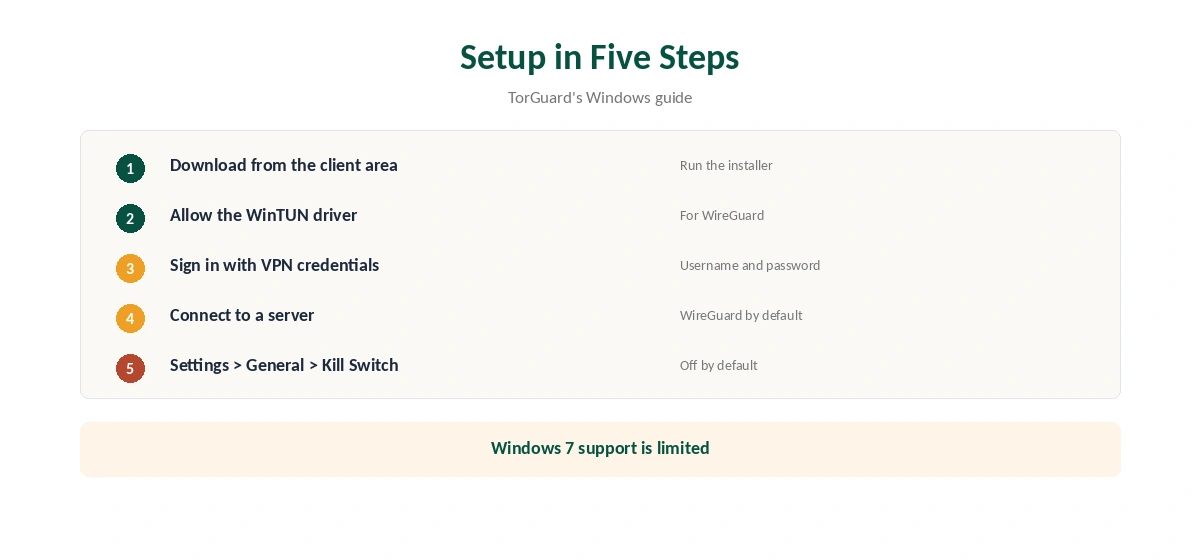
Download the Windows client from TorGuard’s client area, run the installer, and allow it to add the WinTUN driver it uses for WireGuard. Sign in with your TorGuard VPN username and password, as the guide describes, then pick a server and connect.
Then open Settings, General, and turn on the kill switch, which TorGuard’s guide lists as disabled by default.
Protocols
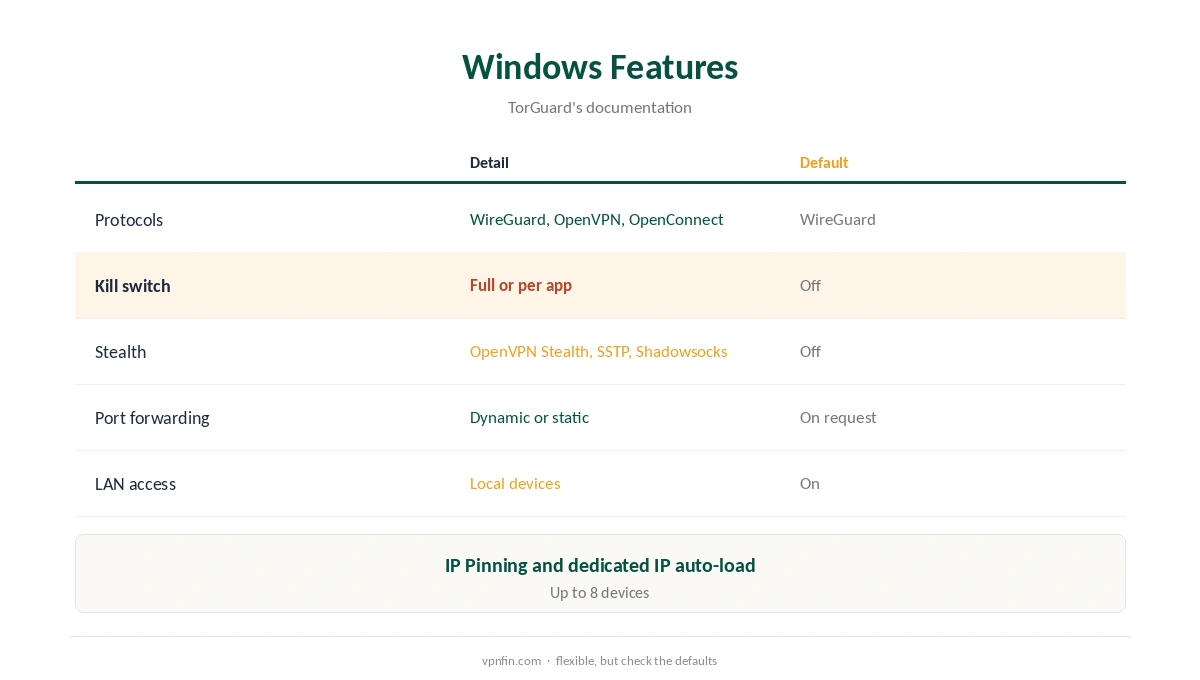
TorGuard’s software page lists OpenVPN, WireGuard and OpenConnect built in, with WireGuard selected by default as the fastest. You can also import custom WireGuard configurations from TorGuard’s config generator.
Kill Switch Options
TorGuard offers a full connection kill switch or an app kill switch that terminates chosen programs when the VPN drops, its software page explains. Its support pages also describe building an application kill switch with Windows Firewall rules. ProPrivacy notes the kill switch exists on Windows and macOS but not on mobile. Our kill switch guide explains the difference.
Stealth for Blocked Networks
TorGuard’s feature pages list OpenVPN Stealth, SSTP and Shadowsocks for getting past deep packet inspection. GreatFirewallGuide ranked TorGuard second for China in 2026, with a 78% success rate. Our obfuscation guide explains how disguised traffic works.
Port Forwarding and Dedicated IPs
TorGuard supports dynamic and static port forwarding, requested in the client area, according to its documentation. Dedicated IPs load automatically into the server list, and IP Pinning lets you return to the same shared address. That suits torrent seeders and remote access, as our port forwarding guide explains.
Defaults Worth Changing
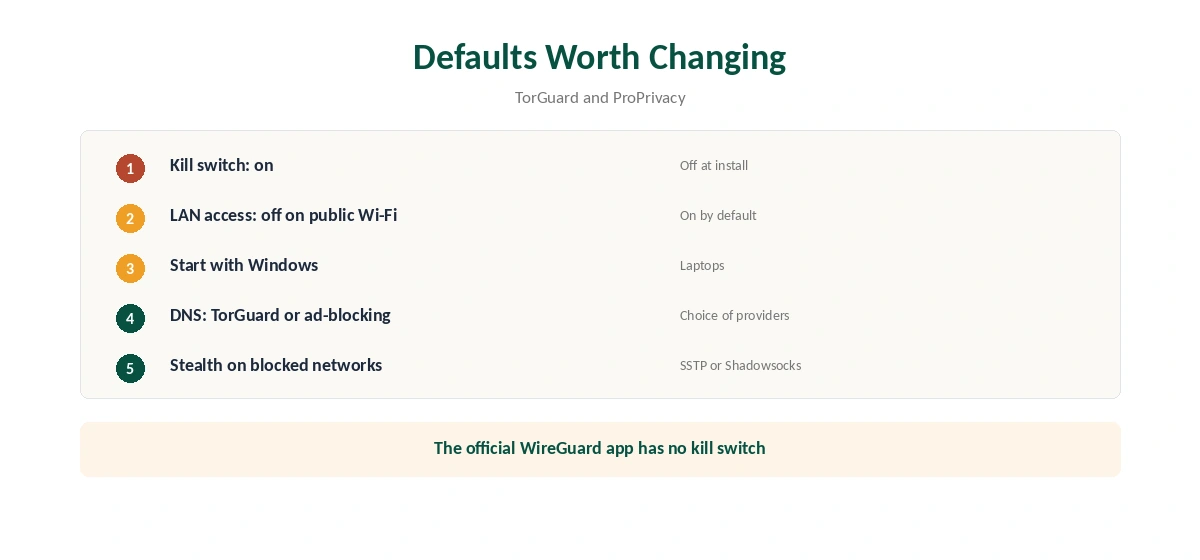
Turn the kill switch on. TorGuard’s software page says LAN access is enabled by default; switch it off on public Wi-Fi if you do not need to reach local devices. Set the app to start with Windows on laptops. ProPrivacy notes a choice of DNS providers, including TorGuard’s ad-blocking DNS.
Torrenting With TorGuard for PC
ProPrivacy notes TorGuard allows P2P across its network, and its proxy service works with torrent clients. Combine the app kill switch, set to close your torrent client, with a forwarded port for the best seeding results. Remember the 2022 settlement blocks BitTorrent on TorGuard’s US servers, so choose a server elsewhere. Our torrenting VPN guide compares providers.
Windows Troubleshooting
TorGuard’s Windows guide suggests switching to WireGuard, using TorGuard DNS, disabling IPv6 and adding TorGuard to security software exceptions when connections fail. Try one change at a time, and reconnect after each.
Is TorGuard for PC Right for You?
TorGuard for PC suits users who want port forwarding, dedicated IPs and Stealth in one client and are comfortable changing defaults. Beginners may prefer an app with the kill switch on from the start. Up to eight devices are included, TorGuard’s feature page says.
ARM Laptops
TorGuard’s guide lists Windows on ARM as supported, so TorGuard for PC runs on ARM-based laptops too. Install the same client and check that WireGuard connects.
A Quick Rule
Install, turn the kill switch on, pick WireGuard, and switch to Stealth only when a network blocks you.
The Official WireGuard App
TorGuard’s guide to the official WireGuard client for Windows notes it has no built-in kill switch and recommends TorGuard’s own app instead, unless you build firewall rules yourself. Our guide to TorGuard on a Router covers the OpenWrt app, DD-WRT and pfSense.
TorGuard’s Record
Our audit table records no independent audit for TorGuard. In 2022 it settled a copyright lawsuit by blocking BitTorrent traffic on its US servers, without disclosing user records, our review notes. It is run by VPNetworks LLC in Florida, inside the Five Eyes. Our VPN audit tracker puts that in context.
Checking the Connection
After connecting, confirm the new address with our VPN test page. Repeat the check after major Windows updates, which can reset network settings.
Then run our DNS leak guide and IPv6 leak guide once, since a leaking request can reveal your real address even with the tunnel up.
Turning It Off
Disconnect in the TorGuard app, or quit it from the system tray. If a kill switch keeps blocking the internet after you exit, turn the kill switch off first. Our guide to turning off a VPN on Windows covers stubborn cases.
How It Compares
Our Windows VPN guide compares providers for Windows.
For head-to-heads, see our TorGuard vs PIA and NordVPN vs TorGuard pages.
How We Research
This page draws on TorGuard’s Windows setup guide, software page, feature pages and WireGuard guide, ProPrivacy’s review, GreatFirewallGuide and our TorGuard review and audit table. We cross-checked these sources against each other, and where they conflict or something can’t be verified, we say so in the text rather than guessing. We checked time-sensitive figures, including prices in US dollars, on 6 October 2026. No affiliate link for this provider; prices on its own site. The main source we relied on is TorGuard’s Windows setup guide. Our full approach lives on the About Us page. Our page on TorGuard on Chrome covers the VPN extension, Premium Proxy and their limits.
TorGuard for PC FAQ
Windows 11, 10 from 1607 and 8.1, plus limited Windows 7 support, including ARM.
No. Turn it on under Settings, General.
Yes, dynamic and static ports, requested in the client area.
GreatFirewallGuide ranked it second in 2026, with Stealth modes.
Our audit table records no independent audit.
The Verdict
TorGuard for PC is a power-user client with Stealth, port forwarding and dedicated IP tools. Turn the kill switch on straight away, and weigh the missing audit and US base. Our page on TorGuard on Mac covers the universal app, Gatekeeper and settings.