
Disclosure: VPNFin is reader-supported. If you buy a VPN through links on this page, we may earn a commission at no extra cost to you. This never affects our ratings — here’s our full disclosure.
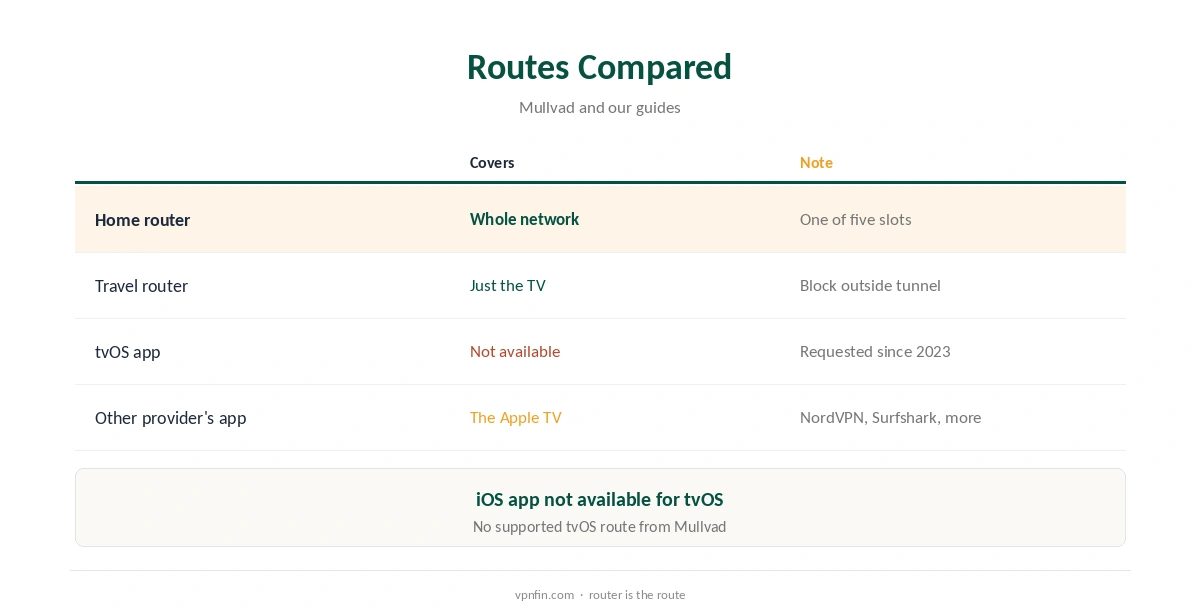
Mullvad Apple TV support does not exist as an app. Apple opened tvOS 17 to third-party VPN apps in 2023, and users asked Mullvad for one on GitHub that year. In January 2026 they were still asking, the discussion shows. The working route is a router running Mullvad’s WireGuard configuration, which covers the Apple TV and everything else on the network.
This guide covers why there is no app, the router route, other options, what an Apple TV gains and loses, and providers that do ship tvOS apps.
Why There Is No Mullvad Apple TV App
A GitHub issue opened after tvOS 17 asked Mullvad to add Apple TV support, and a later discussion collected requests through 2024 into January 2026. Mullvad has not released a tvOS app, and its supported platforms list Windows, Linux, macOS, Android and iOS. Requests in the thread point to tvOS 17’s VPN support as the reason an app is now possible.
Mullvad’s iOS app is not available for tvOS, and Mullvad offers no supported way to run its WireGuard tunnel on the Apple TV itself. Today, the box cannot run Mullvad directly.
The Router Route
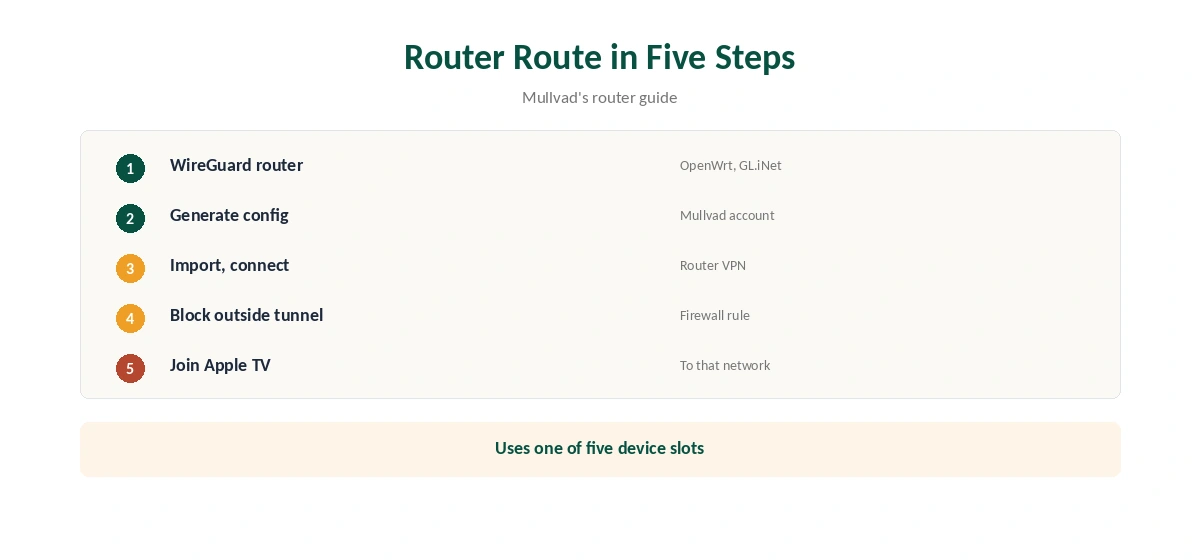
Put Mullvad on a router that runs WireGuard, such as OpenWrt or GL.iNet, and connect the Apple TV to it. Generate a WireGuard configuration from your Mullvad account and import it. Every device behind the router then uses the tunnel, as Mullvad’s router guide describes.
The router uses one of your five device slots and covers the Apple TV, consoles and smart TVs together. Configure its firewall to block traffic outside the tunnel, so nothing falls back to your normal connection. Our Mullvad router guide walks through the setup.
A Travel Router for One TV
If you do not want the whole home on the VPN, a small travel router running Mullvad can sit between the Apple TV and your main router. Only devices connected to it use the tunnel, so phones and laptops on the main network are unaffected.
GL.iNet’s compact models import WireGuard configurations directly, guides describe. Set the router’s firewall to block traffic outside the tunnel, so the Apple TV never falls back to your normal connection.
What an Apple TV Gains and Loses
Through a router, the Apple TV appears in Mullvad’s chosen location and its traffic is hidden from your internet provider, including which streaming apps it opens. Streaming services may still block VPN addresses, and Mullvad does not market streaming support.
You lose per-app control: the whole Apple TV uses one location, and changing it means editing the router. Mullvad’s app features, such as DAITA and multihop modes, do not apply to a plain router configuration.
Streaming on Apple TV Through Mullvad
Mullvad does not market streaming support, and streaming services may block VPN addresses whatever device you use. A router changes the Apple TV’s location for every app at once, including ones you did not mean to move.
If streaming is the main reason for a VPN on the TV, a provider with a tvOS app and tested streaming results may suit better. Our Netflix VPN guide explains why services block some servers.
Providers With tvOS Apps
If you want a VPN app on the Apple TV itself, several providers ship one. NordVPN, Surfshark, ExpressVPN, PureVPN and IPVanish do, and Proton on paid plans, our guides record; NordVPN and Surfshark share an owner, Nord Security. IPVanish’s tvOS app added WireGuard and OpenVPN in July 2026, TechRadar reported.
Our Apple TV VPN guide compares them, and our Proton VPN Apple TV guide covers one in detail.
Mullvad’s Privacy Record
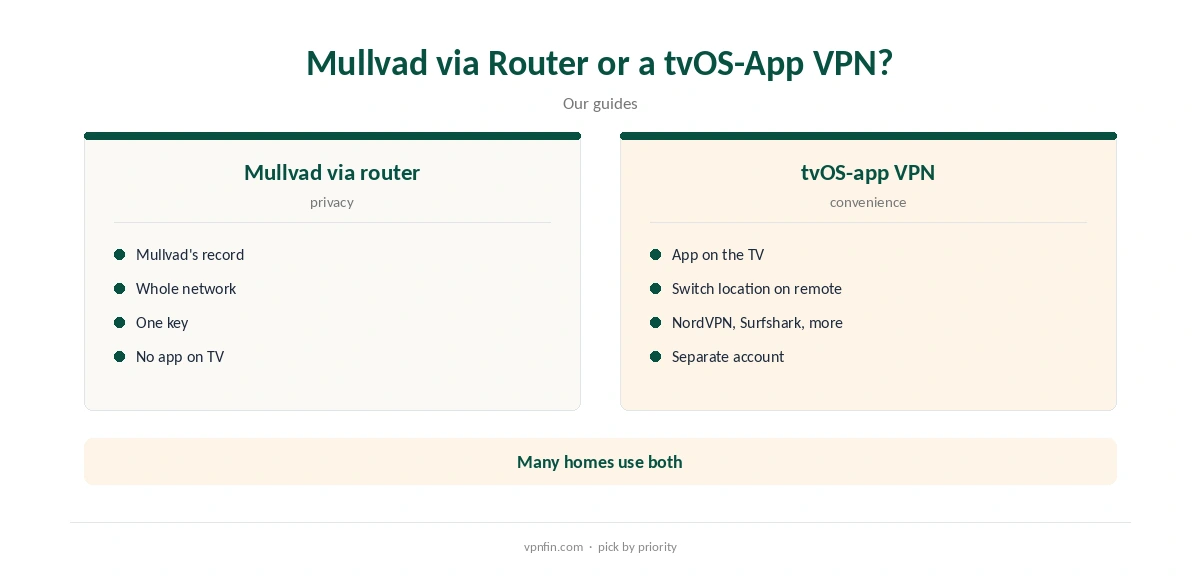
Mullvad has more than 10 audits in our table, and police who visited its office with a warrant left with nothing, because there were no user records. Accounts are numbers, not emails, and payment can be in cash.
That record carries over to a router setup: the router’s traffic goes through the same servers under the same no-logs policy. Our Mullvad cost guide covers the flat €5 price.
Keeping Mullvad Elsewhere
Many households combine both approaches. Mullvad runs on phones and laptops, where its apps add DAITA and quantum-resistant tunnels, and a router or a tvOS-app provider covers the TV.
Mullvad costs a flat €5 a month for five devices, its terms say. Our Mullvad iPhone guide covers the Apple device Mullvad does support.
Turning It Off
With a router setup, the Apple TV has no VPN switch of its own. To take it off the VPN, connect it to a network without the tunnel, or change the router’s routing.
Our guide to turning off a VPN on Apple TV covers app, settings and router cases.
How We Research
This page draws on Mullvad’s GitHub issue and discussion on tvOS support, its router guide and terms, TechRadar on IPVanish’s tvOS update and our Apple TV and Mullvad tables. We cross-checked these sources against each other, and where they conflict or something can’t be verified, we say so in the text rather than guessing. We checked time-sensitive figures, including prices in US dollars, on 8 October 2026. The main source we relied on is the GitHub discussion on Mullvad tvOS support. Our full approach lives on the About Us page.
Mullvad Apple TV FAQ
No; users have asked since tvOS 17, and none has shipped.
Through a router running Mullvad’s WireGuard configuration.
As one of your five, covering everything behind it.
NordVPN, Surfshark, ExpressVPN, PureVPN, IPVanish and Proton (paid).
No; Mullvad’s iOS app is not available for tvOS.
The Verdict
Mullvad Apple TV use means a router: there is no tvOS app. If you want an app on the TV itself, pick a provider that ships one and keep Mullvad for phones and laptops.