
Disclosure: VPNFin is reader-supported. If you buy a VPN through links on this page, we may earn a commission at no extra cost to you. This never affects our ratings — here’s our full disclosure.
Search for the Netflix proxy error and every result quotes the same code: M7111-5059. Netflix’s own help pages no longer use it. The current warning is E106, or a plain sentence saying you appear to be using a VPN or proxy. our ExpressVPN and Netflix page sets out what this year’s tests found.
That matters less than what the retired code hides. Two of the most common reasons Netflix fails with a VPN have nothing to do with which VPN you bought, and switching providers fixes neither. our Surfshark and Netflix page sets out what this year’s tests found.
So this guide starts with how the blocking actually works, covers the two causes people misdiagnose, and then gets to which apps are worth paying for. Our page on Astrill and Netflix covers why US works while other libraries mostly fail.
The Short Answer
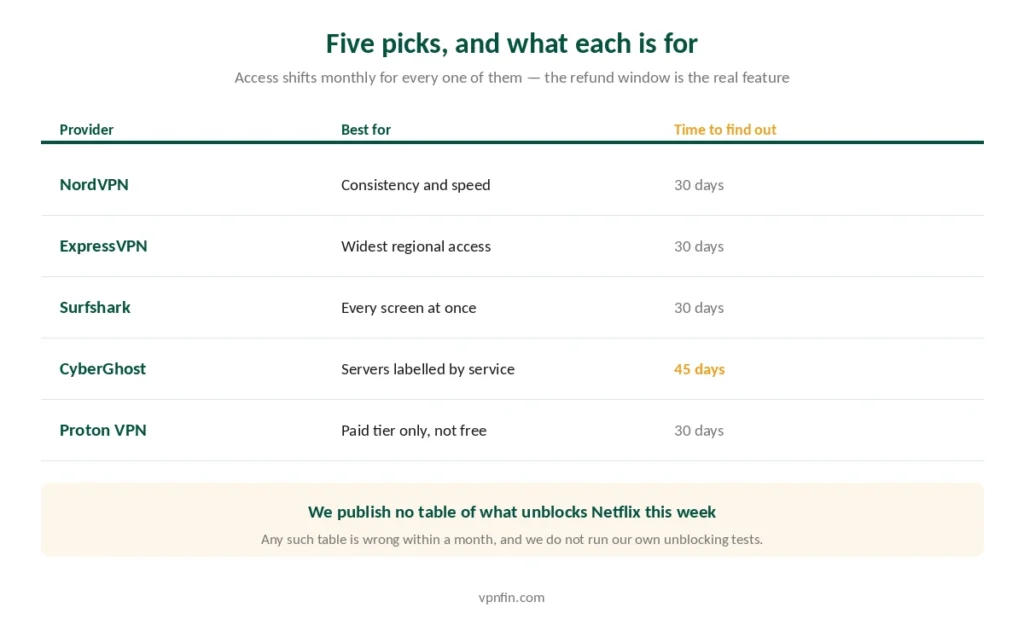
Best overall: NordVPN — the most consistently reported unblocking record, and fastest in independent testing. Our page on NordVPN and Netflix covers libraries, SmartPlay and proxy error fixes.
Widest library access: ExpressVPN — 20 or more Netflix regions, plus MediaStreamer for TVs that cannot run an app.
Best for a household: Surfshark — unlimited connections, so every screen is covered.
Best value: CyberGhost — servers labelled by streaming service, and 45 days to find out whether it works for you.
How Netflix Actually Blocks VPNs
The mechanism is simpler than most explanations suggest, and knowing it changes what you try first.
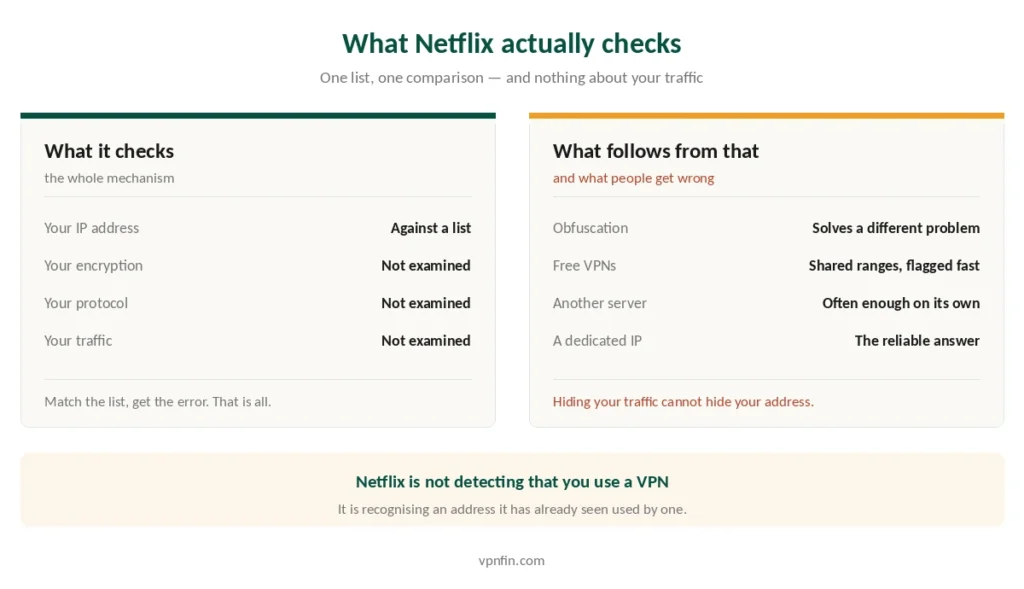
Netflix keeps a list of IP addresses it believes belong to VPN and proxy servers. Every connection gets checked against that list. If yours appears, you get the error. Nothing about your traffic is inspected, and nothing about your encryption gives you away. YouTube TV runs three checks instead of one, which is why the same advice does not transfer. HBO Max checks something a VPN cannot reach at all — the country that issued your card.
That is why obfuscation does not help here. Stealth and camouflage modes disguise VPN traffic from a network that blocks VPNs — a school, an office, a censoring country. Netflix is not looking at your traffic, so disguising it changes nothing. Providers that suggest otherwise are describing a different problem. Our page on PureVPN and Netflix covers the Netflix proxy error and the fixes in order.
It also explains why free VPNs fail almost immediately. They pack thousands of users onto a handful of addresses, so blacklisting a single range takes out everyone at once. Our free VPN guide covers the few worth using, and none of them promise Netflix.
⚠️ A dedicated IP is the most reliable answer, precisely because it is yours alone and never gets flagged for someone else’s behaviour. Most providers sell one as an add-on.
Reason One: Your Plan
This is the fix nobody suggests, because it is not a fix.
Netflix states that VPNs are not supported on the ad-supported plan, nor for live events. If you are on the cheaper tier with adverts, no provider will change that. The restriction sits on your account rather than on your connection.
Live content behaves the same way regardless of tier. Sports and live specials are licensed differently and blocked more aggressively than the on-demand catalogue.
⚠️ Check which plan you have before you blame the VPN. If you are on the ad tier and streaming works only with the VPN off, you have found your answer, and switching provider will waste your money.
Reason Two: It Might Not Be a VPN at All
You can see the proxy error with no VPN running whatsoever. Netflix’s own documentation covers this, and so do provider help pages. Our page on PureVPN and Hulu covers its US servers, the proxy error and Hulu’s own rules.
Causes that have nothing to do with a VPN:
- A shared or carrier-grade IP address from your internet provider, previously flagged for someone else’s traffic
- ISP routing that sends your connection through a data centre Netflix has blacklisted
- Custom DNS — a Private DNS hostname on Android, or a third-party resolver on your router
- Cached cookies holding an old location after you have already disconnected
- Antivirus or security software running its own proxy layer
The quickest test: open fast.com, which Netflix operates, and check the country and address it reports. If that country is wrong with everything switched off, the problem is upstream of you. Our page on FastestVPN and Netflix covers what testers reported and how to check the libraries you need.
What to Try, in Order
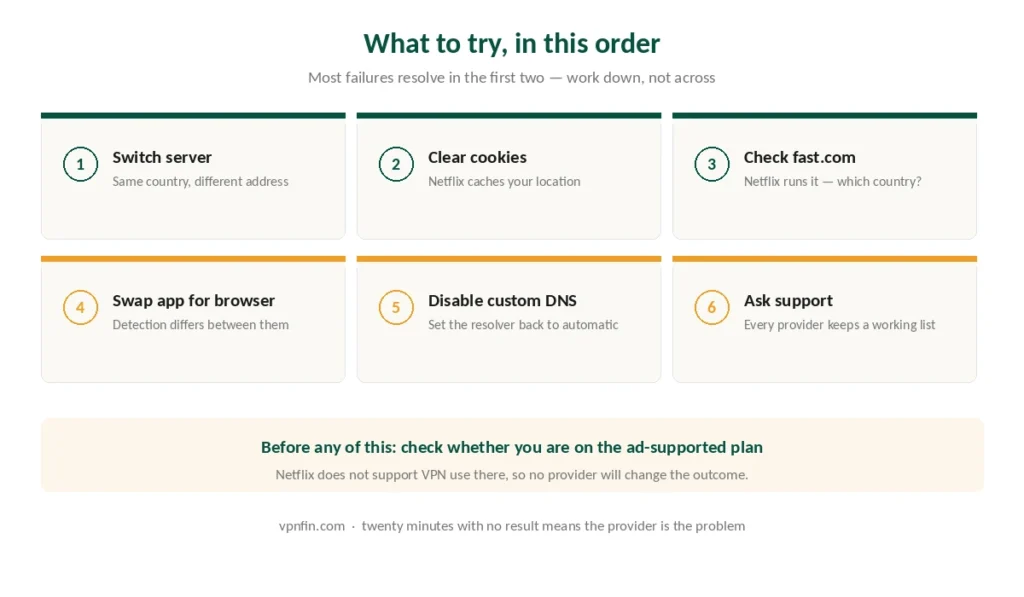
Work down this list rather than across it. Most failures resolve in the first two steps.
- Switch to a different server in the same country. Providers run many addresses per location; one being blacklisted says nothing about the rest.
- Clear cookies and cache, then reload. Netflix caches your detected location, and a stale cookie survives a server change.
- Check fast.com and confirm the country matches the server you chose.
- Try the app instead of the browser, or the browser instead of the app. Detection differs between them.
- Disable custom DNS and set the resolver back to automatic.
- Ask support for a working server. Every provider here maintains an internal list, and their live chat will give you one.
⚠️ If none of that works after twenty minutes, the provider is the problem. That is what the refund window is for, and our streaming guide covers how quickly access shifts across the whole category.
Does Netflix Ban Accounts for This?
No, and the fear is worth addressing directly because it stops people using a tool they have paid for.
What actually happens is an error message. You see the warning, the content does not play, and nothing else follows. NordVPN’s own documentation states plainly that the error does not mean you are banned, and no pattern of terminations has been reported.
What is true: using a VPN to reach another country’s catalogue does breach Netflix’s terms of service, and Netflix reserves the right to end a subscription over it. That right exists on paper. Enforcement, in practice, means showing you an error.
Changing your IP address is not illegal in the countries this site is written for. It is a contractual matter between you and Netflix, not a legal one — our legality guide covers where the distinction matters more.
1. NordVPN — Best Overall
The most consistently reported unblocking record across independent reviews, and the fastest provider in CNET’s testing at 2.9% average download loss — which matters when Netflix drops resolution rather than buffering.
Ten devices, six Deloitte no-logs audits, Smart DNS for televisions that cannot run an app. A dedicated IP is available as an add-on, which is the closest thing to a permanent fix.
The catch: renewal reaches $139.08 a year. Our NordVPN review covers the whole picture.
2. ExpressVPN — Widest Library Access
plus Disney+, BBC iPlayer, Hulu and Max — though not Peacock, which blocks harder than any of them. MediaStreamer, its Smart DNS, reaches consoles and older televisions where no VPN app exists.
Renewal is $99.95 a year, and Lightway carries post-quantum protection by default. Our ExpressVPN review has the detail.
3. Surfshark — Best for a Household
Unlimited simultaneous connections, so the television, both phones and the laptop all stream at once without juggling logins. Our guide to VPN for Paramount Plus covers where it runs, what worked and the proxy error.
Renewal is around $79 a year with two Deloitte no-logs audits. Our Surfshark review sets it against the rest.
4. CyberGhost — Best Value, and the Longest Test Window
Servers are labelled by streaming service rather than by country alone, which removes most of the guesswork about which one to pick. Our guide to VPN for DAZN covers account rules, EU travel and the error codes.
Renewal is $56.94 a year, and the 45-day money-back guarantee is the longest available — long enough to see whether access holds rather than whether it works once. Our CyberGhost review covers the rest.
5. Proton VPN — Best Free Tier, With a Caveat
Paid plans reach ten or more Netflix regions. The free tier does not: Netflix blocks its shared ranges, and Proton makes no guarantee there. Our guide to IPVanish and Netflix covers which libraries work, and which do not.
Five annual no-logs audits published in full, open-source apps, ten devices. Our Proton VPN review has the full account.
Which Library, and Does It Matter?
Catalogues differ because licences are sold country by country, not because Netflix hides things. A show absent from your region is usually absent because someone else bought the rights there. For which providers reached the Japan library, see our page on Japanese Netflix VPN.
The commonly cited large catalogues are Japan, Canada, the United Kingdom and South Korea, though the specifics change monthly as contracts turn over. Anime fans should know that Crunchyroll works the other way round. If Japan is your target, our Japan guide covers what else changes when you connect there.
⚠️ Subtitles and audio tracks follow the library. Switching regions can remove the language options you were relying on, which surprises people more often than the missing shows do.
On televisions, most of this depends on whether the set can run an app at all — our smart TV guide covers the router and Smart DNS routes for the ones that cannot.
How We Research
This guide draws on the Netflix Help Centre’s current documentation of its proxy warning, provider help pages from NordVPN and CyberGhost describing the detection mechanism, published testing of regional access from named reviewers, and each provider’s own terms for dedicated IP and Smart DNS — cross-checked and verified at publication. We don’t run our own unblocking tests, and we don’t publish a table of which service works this week, because that table is wrong within a month. Our full approach lives on the About Us page.
Netflix VPN FAQ
No. What happens is an error message and content that will not play. Reaching another country’s catalogue does breach Netflix’s terms of service, and Netflix reserves the right to end a subscription over it, but enforcement in practice means showing the warning rather than closing accounts.
Several causes have nothing to do with a VPN: a shared address from your internet provider that was flagged for someone else, ISP routing through a blacklisted data centre, a custom DNS resolver, cached cookies holding an old location, or antivirus software running its own proxy. Open fast.com to see what country Netflix thinks you are in.
It is the current code for the VPN and proxy warning. The older M7111-5059 appears throughout older guides and search results, but Netflix’s help pages now use E106 or a plain-language message instead. Both describe the same detection.
No. Netflix states that VPNs are not supported on the ad-supported tier, nor for live events. That restriction applies to your account rather than your connection, so changing provider will not help. Upgrading the plan is the only route.
NordVPN has the most consistently reported unblocking record, and ExpressVPN reaches the widest range of regional catalogues. Access shifts constantly for every provider, though, which is why a long refund window matters more than any snapshot of what worked last month.
The Verdict
Check your plan first. If you are on the ad-supported tier, Netflix does not support VPN use at all, and no provider on this page changes that.
Then check whether it is even your VPN. Open fast.com with everything disconnected. A wrong country there means the problem is your internet provider, your DNS or your cookies.
Only then does the choice of provider matter. NordVPN for consistency and speed, ExpressVPN for the widest regional access, Surfshark to cover a whole household, CyberGhost for 45 days to find out properly. Our page on PrivadoVPN and Netflix covers the libraries testers reached and the free plan’s access.