
Disclosure: VPNFin is reader-supported. If you buy a VPN through links on this page, we may earn a commission at no extra cost to you. This never affects our ratings — here’s our full disclosure.
Mullvad SOCKS5 is not a standalone proxy. Mullvad runs a SOCKS5 proxy on its WireGuard servers at 10.64.0.1, port 1080, and its help page says you can reach it only while connected to Mullvad VPN. That makes it a tool inside the tunnel. It can give one app, such as a browser, a different exit location from the rest of your traffic, or stop an app’s traffic if the VPN drops.
This guide covers what it does, browser and app setup, multihop through other servers, testing and the limits.
What Mullvad SOCKS5 Does
When you point an app at 10.64.0.1:1080, its traffic leaves through the proxy on your current server, Mullvad’s guide explains. Other apps keep using the normal tunnel as before. Each proxy has a single exit address, Mullvad’s guide adds.
Because the proxy only exists inside the tunnel, an app set to use it has no route out if the VPN disconnects. It stops rather than falling back to your real connection. Our SOCKS5 VPN guide explains SOCKS5 in general.
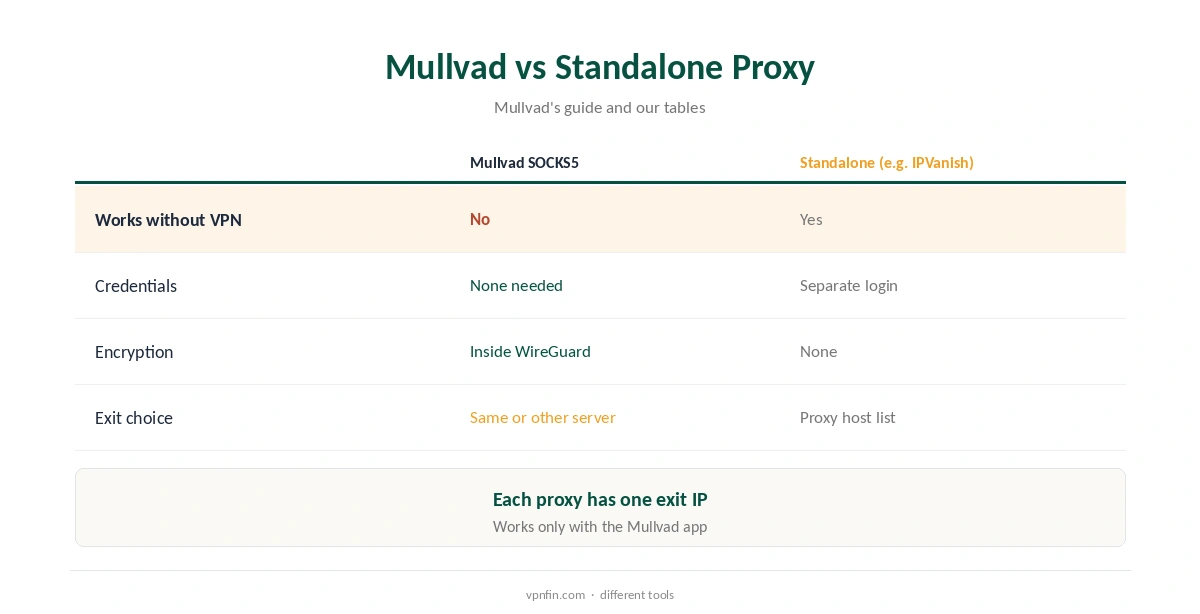
No Standalone Use
Unlike IPVanish’s proxy, Mullvad’s will not change a torrent client’s address on its own, without the VPN running underneath. It also needs no separate credentials, since only connected Mullvad users can reach it from inside the tunnel.
Mullvad notes the setup works only when using the Mullvad app. Our IPVanish SOCKS5 guide covers a proxy you can use without a tunnel.
Mullvad SOCKS5 in a Browser
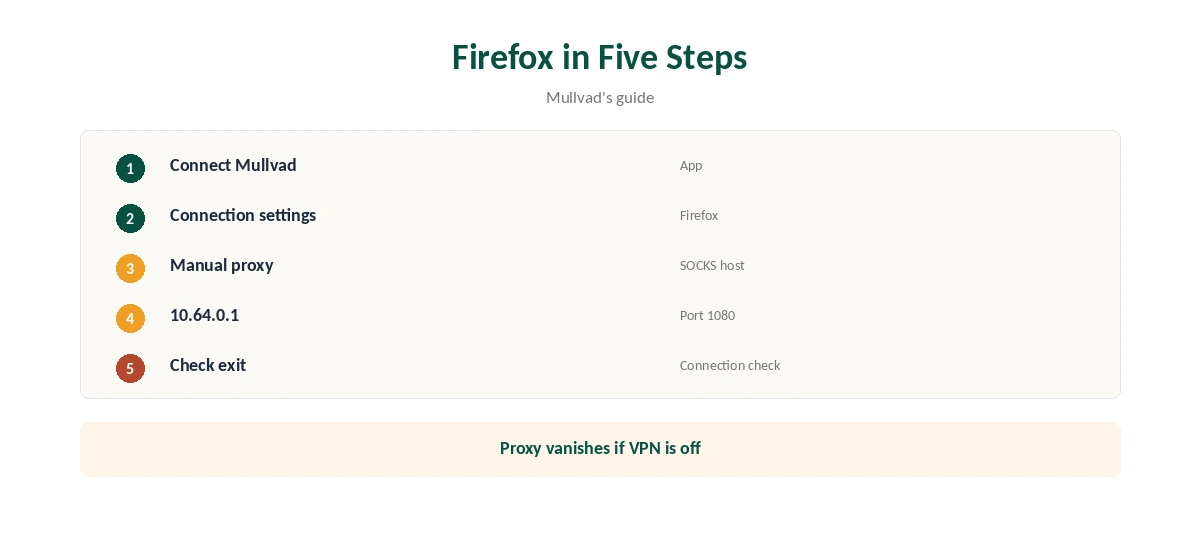
In Firefox, open the connection settings, choose manual proxy configuration and enter 10.64.0.1 as the SOCKS host and 1080 as the port, Mullvad’s guide shows. Chromium-based browsers such as Brave take a proxy-server launch option pointing to the same address.
Mullvad also suggests a Chromium flag that stops WebRTC from sending traffic outside the proxy, which closes a common browser leak.
Multihop Through Another Server
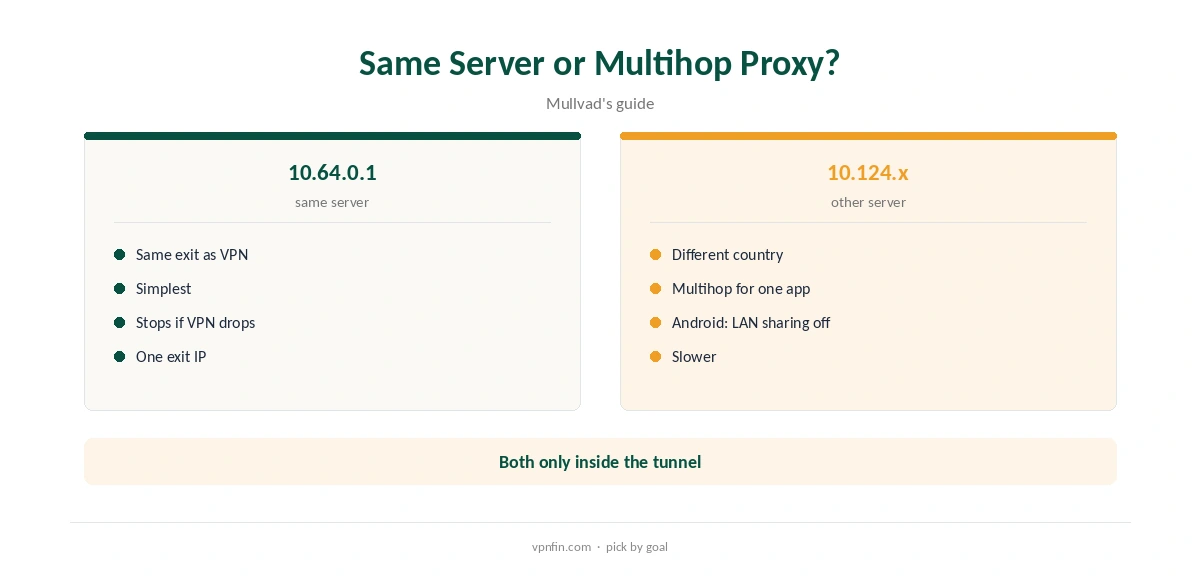
Besides 10.64.0.1, Mullvad runs proxies on addresses in the 10.124.0.x to 10.124.1.x range that are reachable from its other WireGuard servers. Pointing an app at one of those sends its traffic out through a different server and country than your VPN connection, Mullvad’s guide explains.
On Android, turn off local network sharing in the app’s settings when using these multihop proxies, the guide notes.
Why Use It at All
The proxy lets one app leave through a different exit from the rest of your traffic without changing the VPN connection. A browser can appear in one country while other apps appear in another, which helps keep separate activities apart.
It also suits apps you want to stop completely if the VPN drops, without relying only on system-wide lockdown.
Lockdown Mode Alongside
Mullvad’s lockdown mode blocks all traffic whenever the VPN is off, across the whole device. The proxy adds a per-app layer: an app pointed at 10.64.0.1 loses its route even before lockdown acts.
Use both for apps where a leak would matter most, such as a torrent client or a work browser. Our kill switch guide explains the difference.
Torrent Clients
Setting a torrent client to 10.64.0.1:1080 while connected to Mullvad means the client stops if the VPN drops, a useful second safeguard alongside lockdown mode. Mullvad offers no port forwarding, so seeding remains limited.
Our Mullvad torrenting guide covers the rest of the setup.
Testing It
Mullvad’s guide uses a curl command against its own connection checker through the proxy. In a browser, Mullvad’s connection check page shows the exit address and whether it is a SOCKS5 address. Compare it with the address shown without the proxy; the two should differ if you used a multihop proxy.
If the page fails to load, check the VPN is connected, since the proxy exists only inside the tunnel.
Limits
The proxy adds no encryption of its own beyond the WireGuard tunnel it sits inside, and it covers only apps you configure. Mullvad runs it on WireGuard servers, which since January 2026 are all its servers.
Mullvad costs a flat €5 a month for five devices, with more than 10 audits in our table. Our Mullvad cost guide covers payment options.
Other Apps With Proxy Settings
Any app that accepts a SOCKS5 proxy can use 10.64.0.1:1080 while Mullvad is connected, such as email clients like Thunderbird or messaging apps like Telegram, which both offer proxy settings. Command-line tools such as curl take a SOCKS5 option too.
Leave the authentication fields empty; Mullvad’s proxy needs none, unlike most commercial proxies.
Common Mistakes
The most common mistake is setting the proxy while the VPN is off, which simply stops the app. Another is using 10.64.0.1 for multihop: Mullvad’s guide notes that address is not reachable from other servers, so multihop needs a 10.124.x proxy.
Finally, there are no credentials to enter, so leave username and password blank even if the app asks.
How We Research
This page draws on Mullvad’s SOCKS5 proxy guide in several languages and our Mullvad tables. We cross-checked these sources against each other, and where they conflict or something can’t be verified, we say so in the text rather than guessing. We checked time-sensitive figures, including prices in US dollars, on 8 October 2026. The main source we relied on is Mullvad’s SOCKS5 proxy guide. Our full approach lives on the About Us page.
Mullvad SOCKS5 FAQ
Yes, at 10.64.0.1 port 1080, inside the VPN.
No; it is reachable only while connected.
No; only connected users can reach it.
Yes, through the 10.124.x proxies on other servers.
It stops the client if the VPN drops; there is no port forwarding.
The Verdict
Mullvad SOCKS5 is a tool inside the tunnel: a second exit for chosen apps and a natural stop if the VPN drops. It is not a standalone proxy.