
Disclosure: VPNFin is reader-supported. If you buy a VPN through links on this page, we may earn a commission at no extra cost to you. This never affects our ratings — here’s our full disclosure.
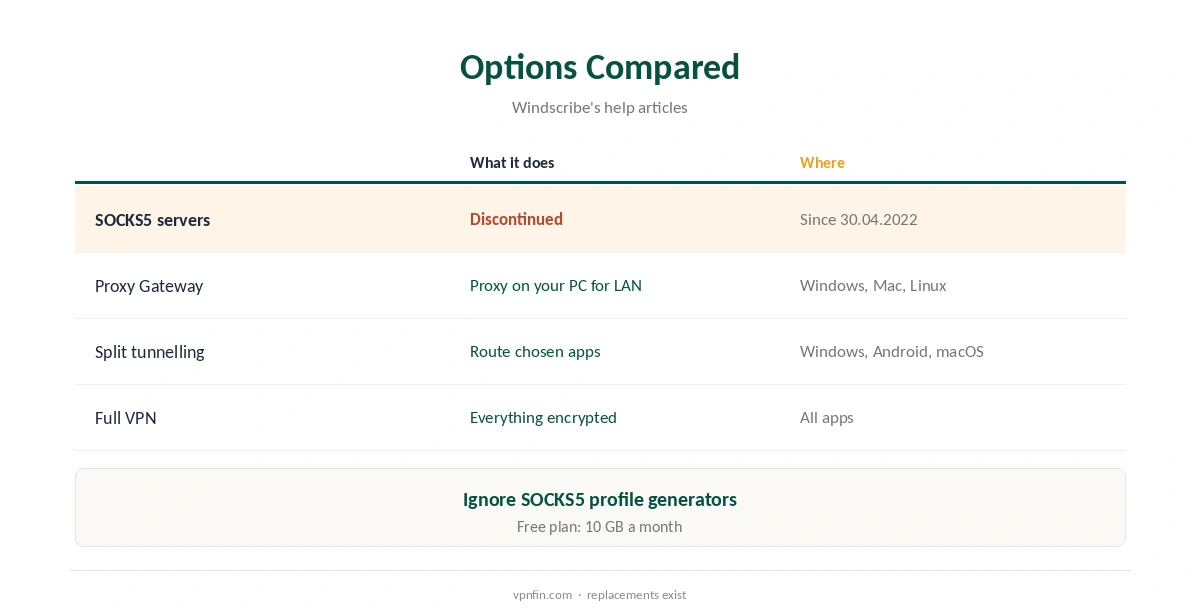
Looking for SOCKS5 Windscribe settings? Windscribe no longer offers SOCKS5 proxy servers. Its help centre says it stopped supporting and hosting them on 30 April 2022. SOCKS5 does not encrypt traffic, and many people abused the proxies against other sites. Older guides, including one still on Windscribe’s site, describe a SOCKS5 profile generator that no longer applies.
Windscribe points to two replacements: Proxy Gateway in its desktop apps, and split tunnelling. This guide covers both.
Why Windscribe Dropped SOCKS5
Windscribe’s help article gives three reasons. SOCKS5 lacks encryption, so the company considers it insecure. Windscribe is a VPN provider rather than a proxy provider. And people used its proxies to abuse other websites and services.
If a guide tells you to generate SOCKS5 credentials in your Windscribe account, it predates the change. Our SOCKS5 VPN guide explains the trade-offs of proxies.
Proxy Gateway
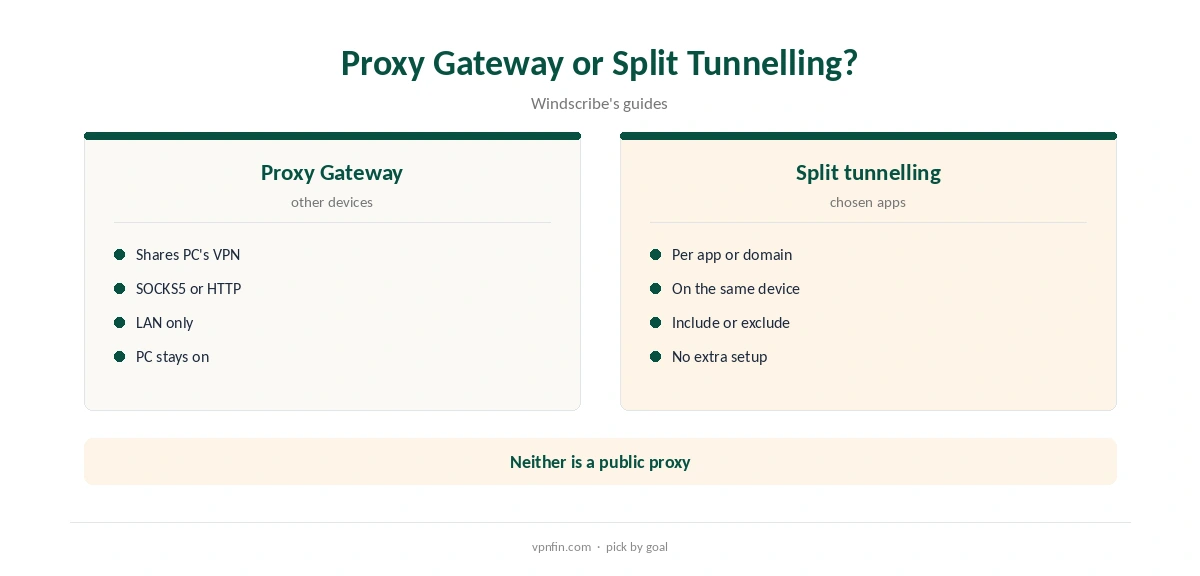
Proxy Gateway turns a Windows, Mac or Linux computer running Windscribe into an HTTP or SOCKS5 proxy for other devices on your local network, Windscribe’s guide explains. Devices that cannot run a VPN app can then use the computer’s protected connection.
It runs on your own machine, not on Windscribe’s servers, and is only available on your local network. Think of it as sharing the computer’s VPN connection.
SOCKS5 Windscribe Proxy Gateway Setup
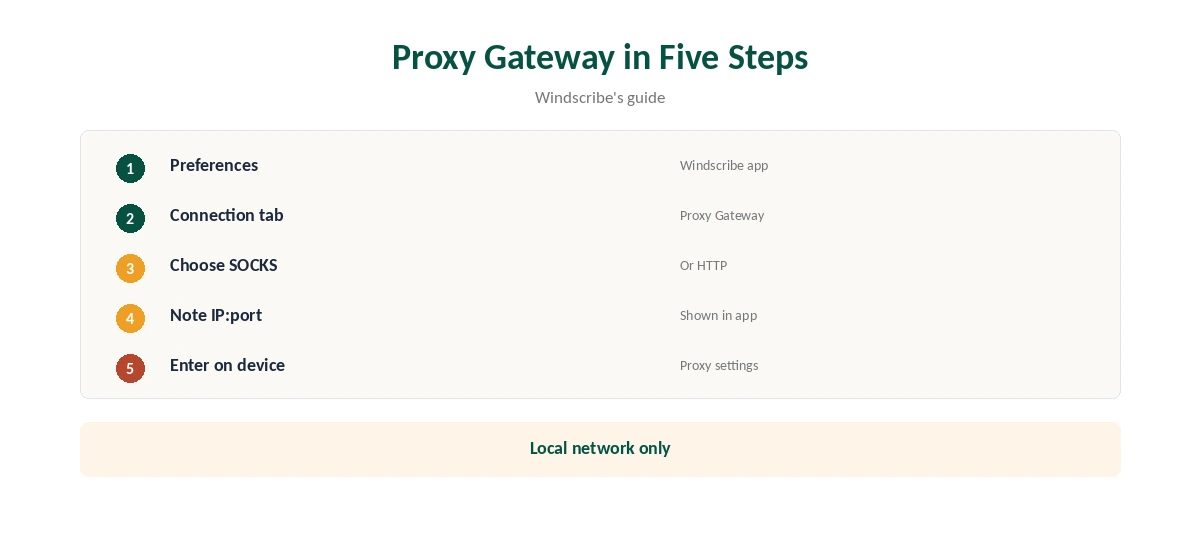
Open the Windscribe app’s Preferences, go to the Connection tab and scroll to Proxy Gateway. Turn it on, choose SOCKS, which carries all traffic types, or HTTP, which carries only web traffic, and note the IP address and port shown.
On the other device, open its network or proxy settings and enter that IP and port. Its traffic then goes through the computer and out through Windscribe’s tunnel, to whatever location the computer uses.
Which Devices Can Use Proxy Gateway
Any device with proxy settings can use it: many phones, tablets and browsers, and some consoles and TVs that offer a manual proxy option in their network settings. Devices without proxy settings cannot use it at all.
Choose SOCKS where the device supports it, since it carries all traffic types; HTTP covers only web traffic, Windscribe’s guide notes.
Limits of Proxy Gateway
Proxy Gateway works only on your local network, and the computer running Windscribe must stay on and connected. Windscribe does not encrypt traffic between the other device and the computer, though it stays inside your home network.
For devices that leave home, such as phones and laptops, the Windscribe app itself is the better choice.
Split Tunnelling Instead
If you wanted SOCKS5 to send one app through the VPN, split tunnelling does it directly. Windscribe’s apps let you route chosen apps, processes, domains or IP addresses through the tunnel, or keep them out, under Preferences, Connection, Split Tunneling.
Windscribe lists split tunnelling on Windows, Android and macOS. Our split tunnelling guide explains the modes.
Torrent Clients
For torrents, run the Windscribe app with P2P on Pro or paid Build-a-Plan locations; Windscribe has switched P2P off on free servers, its help article says. Bind the client to the VPN interface so it stops if the tunnel drops.
Pro includes temporary port forwarding that lasts seven days at a time, Windscribe’s port forwarding page says; a permanent port needs a paid static IP. Our Windscribe P2P guide covers the rules.
If You Need a Standalone SOCKS5 Proxy
Some providers still run SOCKS5 servers you can use without a VPN tunnel, such as IPVanish, which offers one on more than 25 servers in 14 countries. NordVPN retired its own in 2025, a 2026 comparison reports.
Our IPVanish SOCKS5 guide covers one option.
Plans and Refund
Proxy Gateway and split tunnelling come with Windscribe’s apps; the free plan gives 10 GB a month. Pro costs $9 a month or $69 a year.
Windscribe’s terms allow a refund of the first payment within seven business days if you have used less than 10 GB. Our Windscribe refund guide explains the rules.
Checking It Works
On the device using Proxy Gateway, visit an IP check site. The address should match the Windscribe location the computer currently uses. If pages fail to load, check the IP and port and that the computer still shows a connection.
If the computer sleeps, the proxy stops; adjust its power settings for longer sessions or evenings of streaming.
Older Guides to Ignore
Windscribe’s site still hosts an old uTorrent guide that tells you to get a SOCKS profile and credentials from a SOCKS5 profile generator on a Pro account. That generator belongs to the discontinued service.
Third-party guides written before 2022 repeat the same steps. If a guide mentions Windscribe SOCKS5 credentials, treat it as outdated and use the VPN app or Proxy Gateway instead.
How We Research
This page draws on Windscribe’s help articles on why SOCKS5 was discontinued, what SOCKS5 is and Proxy Gateway, its port forwarding page, its older uTorrent guide and our Windscribe tables. We cross-checked these sources against each other, and where they conflict or something can’t be verified, we say so in the text rather than guessing. We checked time-sensitive figures, including prices in US dollars, on 8 October 2026. The main source we relied on is Windscribe’s SOCKS5 article. Our full approach lives on the About Us page.
SOCKS5 Windscribe FAQ
Not any more; it stopped on 30 April 2022.
They predate the change, including an older one on its site.
A SOCKS5 or HTTP proxy on your own computer for local devices.
Use split tunnelling.
IPVanish is one; NordVPN retired its proxy in 2025.
The Verdict
SOCKS5 Windscribe servers are gone since 2022. Use Proxy Gateway to share a protected connection on your network, or split tunnelling for single apps.