
Disclosure: VPNFin is reader-supported. If you buy a VPN through links on this page, we may earn a commission at no extra cost to you. This never affects our ratings — here’s our full disclosure.
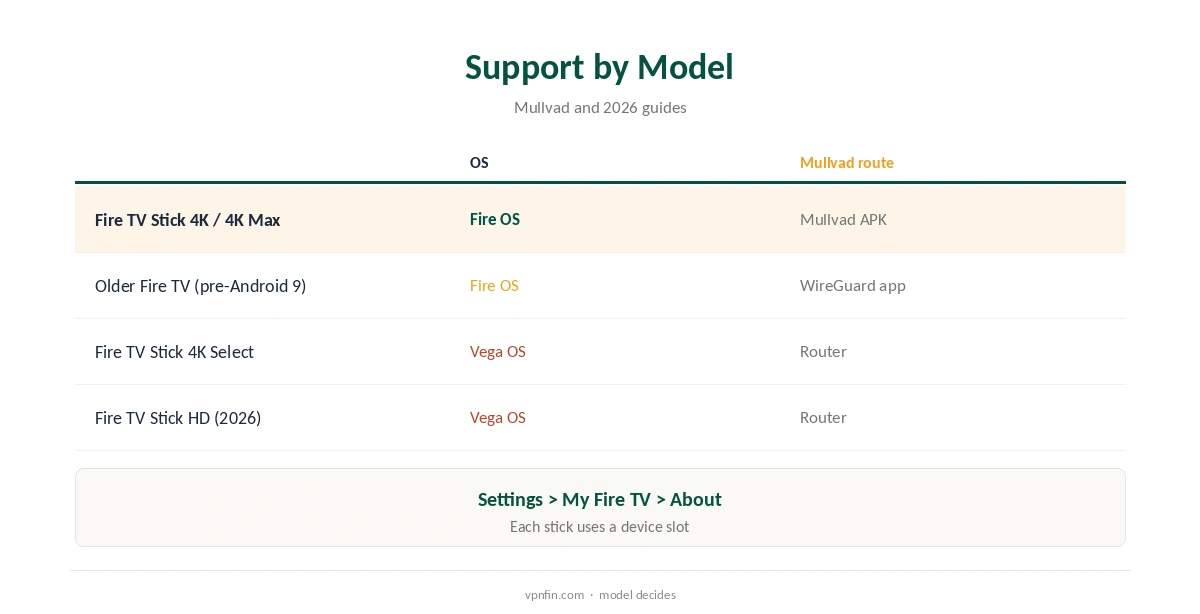
A Mullvad Fire Stick setup works, though not through Amazon’s store. Mullvad’s help page says its Android app runs on Fire TV devices with Android 9 or newer. It is not in the Amazon Appstore and installs from mullvad.net using the Downloader app. Older Fire TV models can use the WireGuard app instead, Mullvad advises. Amazon’s newer Vega OS sticks cannot install outside apps at all, so they need a router.
This guide covers which sticks qualify, the install, settings, auto-connect, the Vega OS gap and alternatives.
Which Sticks Work
The Mullvad app needs Android 9 or newer, which on Fire TV means newer Fire OS versions. On an older device the install fails with the error There was a problem parsing the package, Mullvad’s help page says. Amazon’s site lists each model’s version.
Amazon’s Vega OS sticks do not run Android apps or allow sideloading: the Fire TV Stick 4K Select from October 2025 and the Fire TV Stick HD from April 2026, as the Fire TV guides we checked agree. Check Settings, My Fire TV, About before you start, since the box looks the same either way.
Mullvad Fire Stick Install
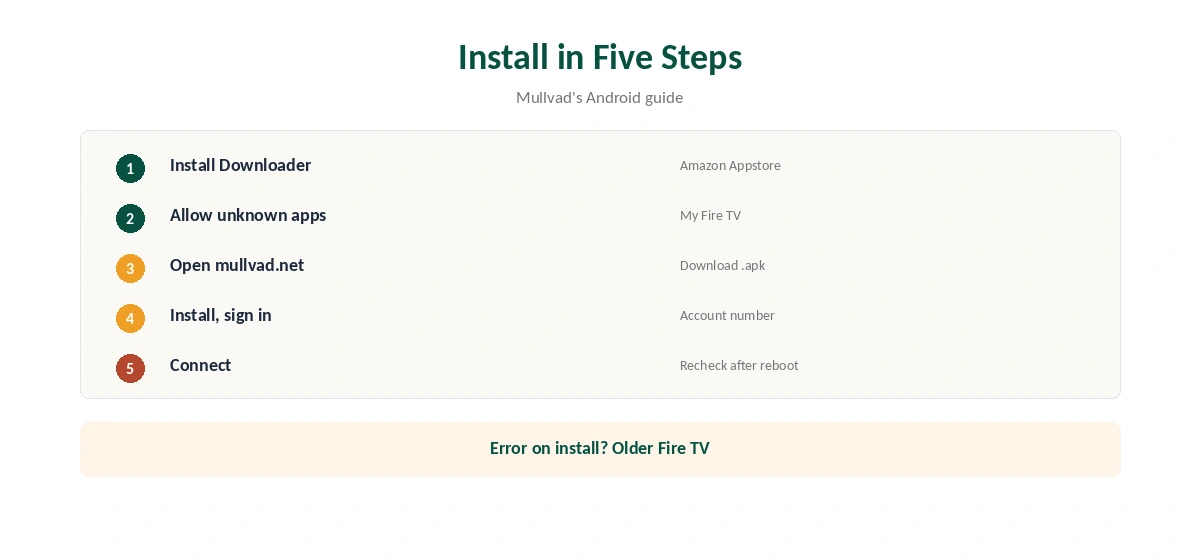
Install Downloader from the Amazon Appstore, then allow it to install unknown apps under Settings, My Fire TV, Mullvad’s guide shows. Open Downloader in Browser mode, go to mullvad.net/download/vpn/android and choose Download .apk.
Install the downloaded file, then open Mullvad, enter your account number and connect. Accept the Android VPN connection request the first time. Each Fire Stick uses one of your five Mullvad device slots, so a household with several sticks fills the account quickly.
Settings Worth Checking
Mullvad’s Android settings include auto-connect and lockdown mode, local network sharing, DNS content blockers, anti-censorship, quantum-resistant tunnels and DAITA, its guide lists. A remote makes these slower to change, so set them once and leave them alone afterwards.
Local network sharing helps if you cast or reach a home media server from the stick. Our Mullvad Android guide explains each setting.
Auto-Connect
On Android, Mullvad’s auto-connect relies on the system’s Always-on VPN setting, and Mullvad noted in 2022 that this may exclude Fire Sticks and Android TV. Without it, you may need to open Mullvad and connect again after each restart of the stick.
Check after rebooting whether the tunnel comes up by itself; that note dates from 2022, so newer Fire OS versions may behave differently. If not, make opening Mullvad part of your routine before streaming.
Older and Vega OS Sticks
For Fire TV devices older than Android 9, Mullvad points to the WireGuard app, which supports Android 7 and newer. It installs the same way through Downloader. Generate a configuration file in your Mullvad account and import it into the WireGuard app on the stick.
A plain WireGuard file lacks DAITA and the app’s other features. Our Mullvad WireGuard guide covers the configuration generator.
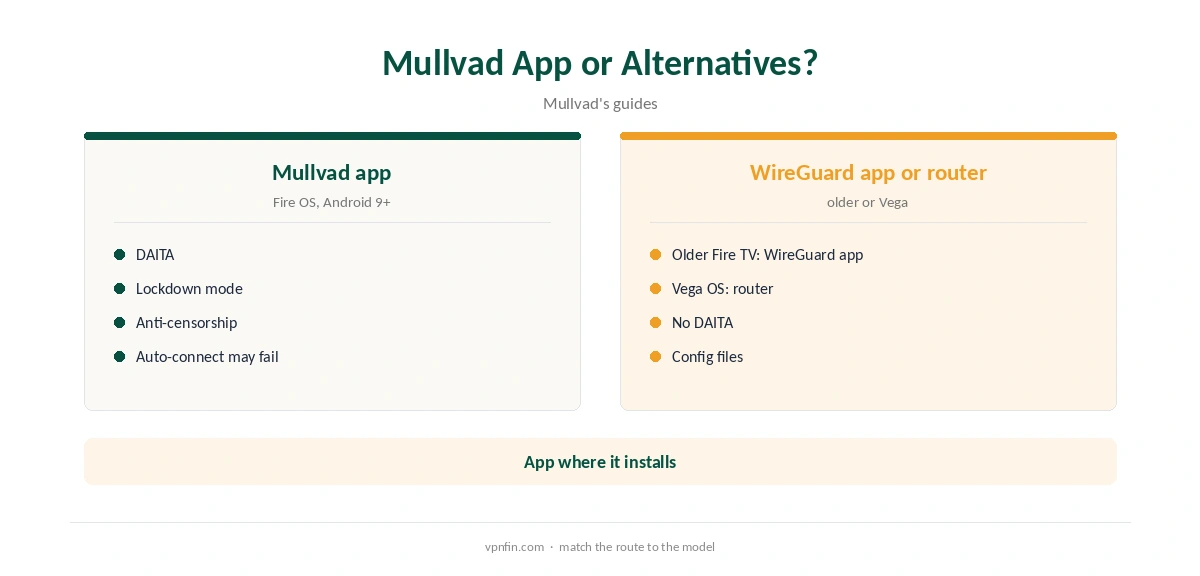
Since Vega OS blocks outside apps, the only Mullvad route for a Fire TV Stick 4K Select or the 2026 Stick HD is a router running Mullvad’s WireGuard configuration. That covers the stick and everything else on the network.
Our Mullvad router guide walks through the setup, and our Firestick VPN guide lists providers with official Vega apps.
Updates, Price and Privacy
Because the app does not come from the Amazon Appstore, Amazon will not update it. Check mullvad.net for new versions now and then, and install the new file over the old one with Downloader.
Updates matter: Mullvad removed OpenVPN in January 2026, so very old app versions may stop connecting.
Mullvad costs a flat €5 a month for five devices, with an account number instead of an email, its terms say. It has more than 10 audits in our table.
Our Mullvad cost guide covers payment methods, including cash.
Streaming
Mullvad does not market streaming support, and services may block VPN addresses. If streaming is the main reason for a VPN on the stick, a provider with an official Fire TV app and tested streaming results may suit better.
Mullvad suits Fire Stick users who want privacy from their internet provider rather than other countries’ catalogues. Its DNS content blockers can also trim adverts in some apps.
Fire TV Cube, Smart TVs and Removing It
The Fire TV Cube and Fire TV smart TVs from brands such as Toshiba and Insignia still run Fire OS and accept sideloaded apps, Fire TV guides note. The same Mullvad steps apply if they meet the Android 9 requirement.
To remove Mullvad, uninstall it under Settings, Applications, then log the device out in your Mullvad account so the slot frees up. Our guide to turning off a VPN on Firestick covers both kinds of stick.
How We Research
This page draws on Mullvad’s Android install and usage guides, Mullvad’s 2022 note on auto-connect, Fire TV guides on Vega OS sideloading and our Mullvad and Fire TV tables. We cross-checked these sources against each other, and where they conflict or something can’t be verified, we say so in the text rather than guessing. We checked time-sensitive figures, including prices in US dollars, on 8 October 2026. The main source we relied on is Mullvad’s Android install guide. Our full approach lives on the About Us page.
Mullvad Fire Stick FAQ
No; install the APK from mullvad.net with Downloader.
Fire OS models with Android 9 or newer.
Your Fire TV is older than Android 9; use the WireGuard app.
No; Vega OS blocks outside apps, so use a router.
It may not, since Fire OS may lack Always-on VPN.
The Verdict
A Mullvad Fire Stick setup works on Fire OS models with Android 9 or newer via Downloader. Vega OS sticks need a router instead.