
Disclosure: VPNFin is reader-supported. If you buy a VPN through links on this page, we may earn a commission at no extra cost to you. This never affects our ratings — here’s our full disclosure.
An Apple TV Windscribe setup is straightforward: Windscribe has a native tvOS app in the App Store for Apple TV HD and every Apple TV 4K running tvOS 17.5 or later, its help article from August 2026 says. Sign in, press Connect, and allow the system permission on the first connection. The app’s code is public, R.O.B.E.R.T. filters DNS requests, and the free plan’s 10 GB works on the TV too.
This guide covers which models qualify, setup, settings, the free plan, older Apple TVs and troubleshooting.
Which Apple TVs Qualify
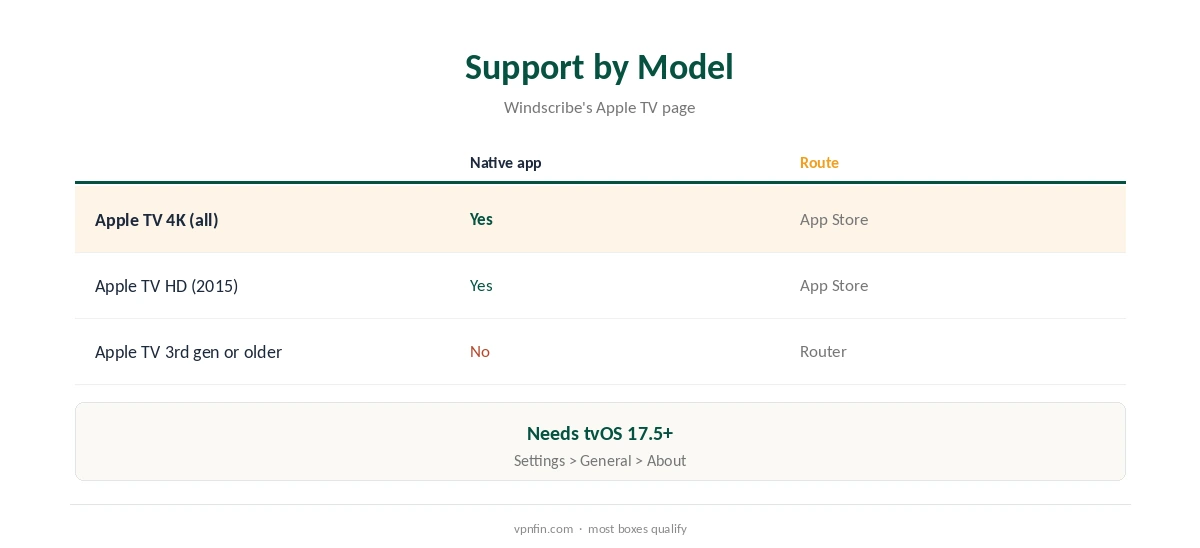
Windscribe’s app works on Apple TV HD, the fourth-generation box from 2015, and all Apple TV 4K models running tvOS 17.5 or later, its Apple TV page lists. Apple opened tvOS to third-party VPN apps with tvOS 17, and Windscribe’s current app needs version 17.5.
Apple TV third generation and older cannot run apps from the App Store, so they need another route, usually a router. Check your tvOS version under Settings, General, About.
Apple TV Windscribe Setup
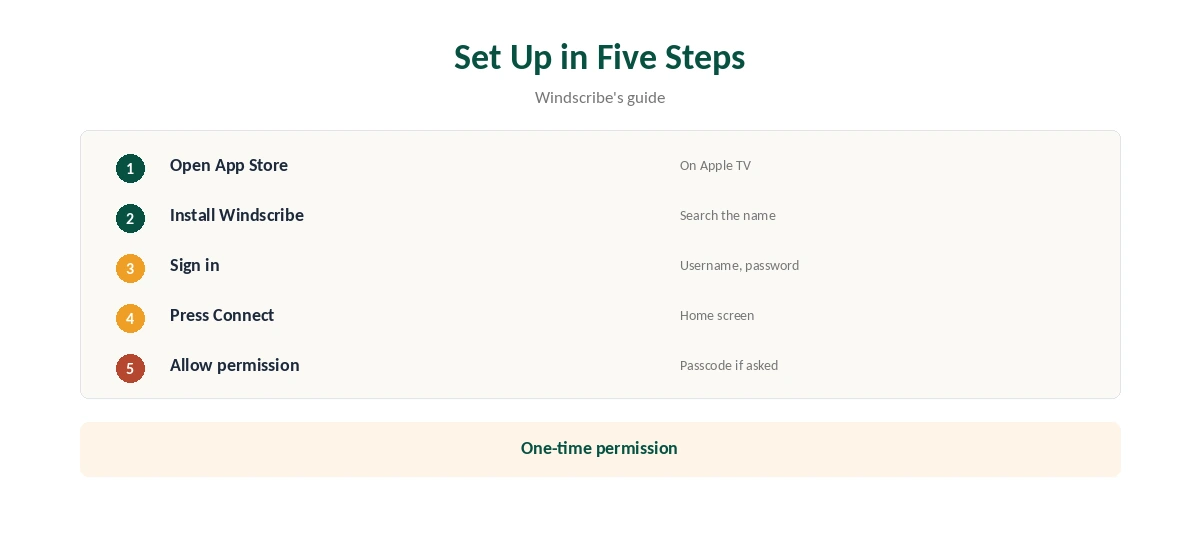
Open the App Store on the Apple TV, search for Windscribe VPN and install the official app. Launch it, then sign in with your Windscribe username and password, and press Connect on the home screen, Windscribe’s guide shows.
On the first connection, tvOS shows a permission window: choose Allow and enter the Apple TV’s passcode if asked. After that, connecting takes one press of the remote, and the app remembers your last location.
Settings Worth Knowing
R.O.B.E.R.T., Windscribe’s DNS filter, drops requests to blocked domains before they reach the Apple TV, the guide explains. Windscribe publishes a separate guide to customising its rules.
Windscribe offers six protocols across its apps, its Apple TV page says, including WireGuard. On the TV, pick a nearby location for smooth streaming; Windscribe notes that nearby servers and WireGuard keep overhead low.
Free Plan, Pro and Your Other Devices
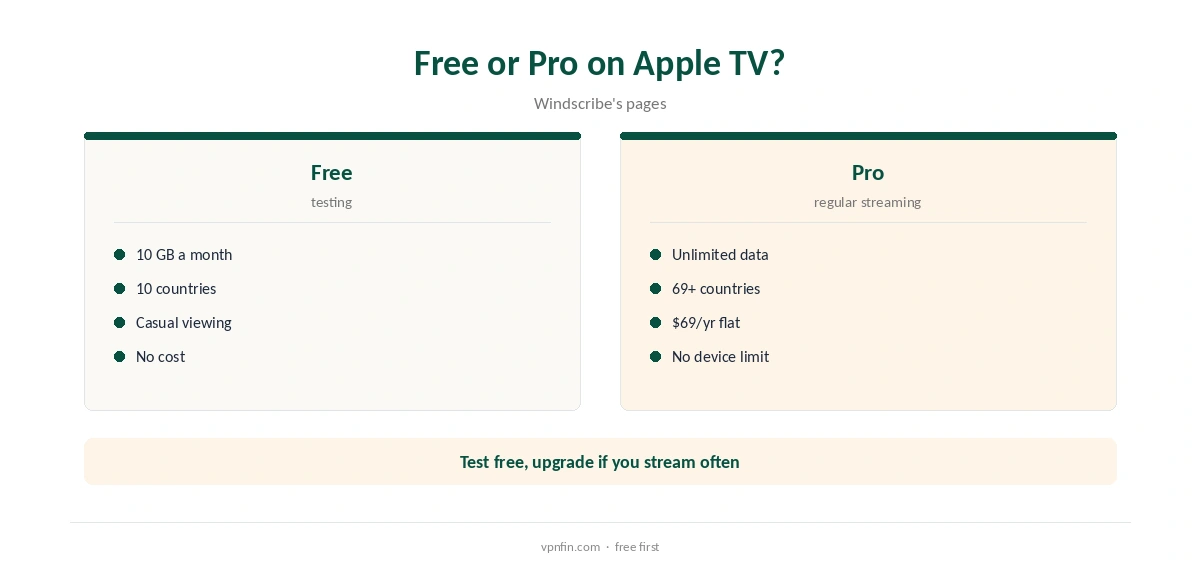
The free plan gives 10 GB a month with a confirmed email, which Windscribe says is enough to test the setup or stream casually, with servers in 10 countries. Streaming in high definition uses that allowance quickly.
Pro costs $9 a month or $69 a year with no renewal jump, or Build-a-Plan from $3. Our Windscribe price guide compares them.
Open Source and Privacy
Windscribe publishes the source of its iOS and tvOS apps, so independent reviewers can check how the app works, its guide notes. Its no-logs claim held when an Athens court dismissed charges against its CEO in April 2025, because no user data existed to hand over.
Sign-up needs no email, though confirming one raises free data. Our Windscribe safety guide covers its record.
Streaming on Apple TV
Security.org reported Netflix problems on Windscribe, and streaming services may block VPN addresses on any device. The free plan lets you test the services you use before paying.
Choose a location in the country whose catalogue you are entitled to, and restart the streaming app after connecting. Nearby locations keep buffering down.
Windscribe sets no device limit, so the same account covers the Apple TV, phones, laptops and any other screen in the house. Free accounts share the 10 GB allowance across devices.
Our Windscribe iPhone guide covers the phone app.
For Apple TV third generation or older, the app is not an option. A router running Windscribe covers the box, using a configuration file on a paid plan.
Our Apple TV VPN guide covers routes for older boxes.
Older Boxes and Troubleshooting
If the app will not connect, check the tvOS version, switch location, and try another protocol in settings. If a streaming app shows an error, close it fully and reopen it after connecting.
To stop using the VPN, disconnect in the app, or remove the VPN configuration in the Apple TV’s settings. Our guide to turning off a VPN on Apple TV covers each case.
Other VPNs With tvOS Apps
Windscribe is one of several providers with a native Apple TV app: NordVPN, Surfshark, ExpressVPN, PureVPN and IPVanish have them, and Proton on paid plans, our guides record. NordVPN and Surfshark share an owner, Nord Security. Mullvad has no tvOS app.
Windscribe stands out for a free plan that works on the TV. Our NordVPN Apple TV guide covers one of the paid alternatives.
Checking It Works
Apple TV has no browser, so check from another device on the same account and location, or confirm that a streaming app shows the region you expect. Windscribe’s app shows the connected location on its home screen, so a glance at the TV confirms it.
If the region looks wrong, disconnect, pick another location in the same country and reopen the streaming app. Clearing the app’s data in its own settings can help too. Our guide to Windscribe on Smart TV covers apps for Google TV, Fire TV and Apple TV, a router for the rest.
How We Research
This page draws on Windscribe’s Apple TV help article and feature page, its plans page and our Windscribe and Apple TV tables. We cross-checked these sources against each other, and where they conflict or something can’t be verified, we say so in the text rather than guessing. We checked time-sensitive figures, including prices in US dollars, on 8 October 2026. The main source we relied on is Windscribe’s Apple TV guide. Our full approach lives on the About Us page.
Apple TV Windscribe FAQ
Yes, a native tvOS app in the App Store.
tvOS 17.5 or later.
Yes, with 10 GB a month after confirming an email.
Windscribe publishes its iOS and tvOS source code.
It cannot run the app; use a router.
The Verdict
An Apple TV Windscribe setup takes minutes on tvOS 17.5 or later, and the free plan lets you try it. Older boxes need a router.