
Disclosure: VPNFin is reader-supported. If you buy a VPN through links on this page, we may earn a commission at no extra cost to you. This never affects our ratings — here’s our full disclosure.
Something changed in 2026 that most guides haven’t caught up with. Amazon replaced the operating system on its newest Fire TV Sticks, and the replacement blocks a capability the previous one had. our ExpressVPN Fire Stick guide covers setup on both Fire TV systems.
On older Fire OS sticks, you can install any VPN from the Amazon Appstore, and sideload the ones that aren’t listed there. Our page on PrivadoVPN on Firestick covers the Appstore app, QR sign-in and Smart Route.
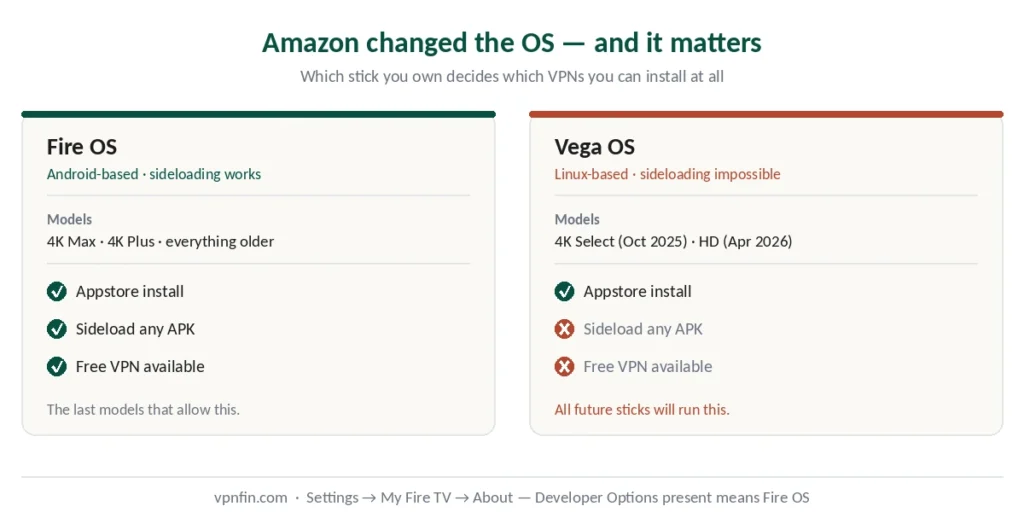
On the new Vega OS sticks, sideloading is impossible. Not difficult — impossible. No Downloader, no ADB, no workaround, and Amazon has confirmed all future models will run it.
That single fact decides which VPNs you can use, and whether a free one is an option at all. So start by finding out which stick you own.
Which Model Do You Have?
Running Vega OS: Fire TV Stick 4K Select, released October 2025, and Fire TV Stick HD, released 29 April 2026.
Running Fire OS (Android-based): everything older, including Fire TV Stick 4K Max and 4K Plus — currently the last sideloading-capable models still sold new.
The quick test: go to Settings → My Fire TV → About. If Developer Options exists in that menu, you have Fire OS. If there’s no “Install Unknown Apps” toggle anywhere, you have Vega OS. Chromebooks need the same check for a different reason — Play Store access rather than OS.
If You Have Fire OS
Two routes, and the first covers most people.
From the Amazon Appstore. Search for your provider by name, install, sign in, connect. NordVPN, Surfshark and Proton VPN are all listed. Takes about two minutes.
By sideloading, if your provider isn’t in the store. The sequence: Settings → My Fire TV → About → click the device name seven times to unlock Developer Options. Go back one level, open Developer Options, and enable Install Unknown Apps for the Downloader app specifically rather than as a blanket permission. Our page on VyprVPN on Firestick covers the TV app and the settings it locks.
Then install Downloader from the Appstore, open it once to grant storage permission, and use it to fetch the APK from your provider’s official site.
⚠️ Only download APKs from the provider’s own website. APK files from third-party repositories are a common malware vector, and a compromised VPN app is worse than no VPN at all.
If You Have Vega OS
Your options are narrower, and it’s worth knowing before you buy a subscription.
Only what’s in the Amazon Appstore works. Vega OS is Linux-based with no APK support whatsoever, so if your provider isn’t listed, there is no way to install it.
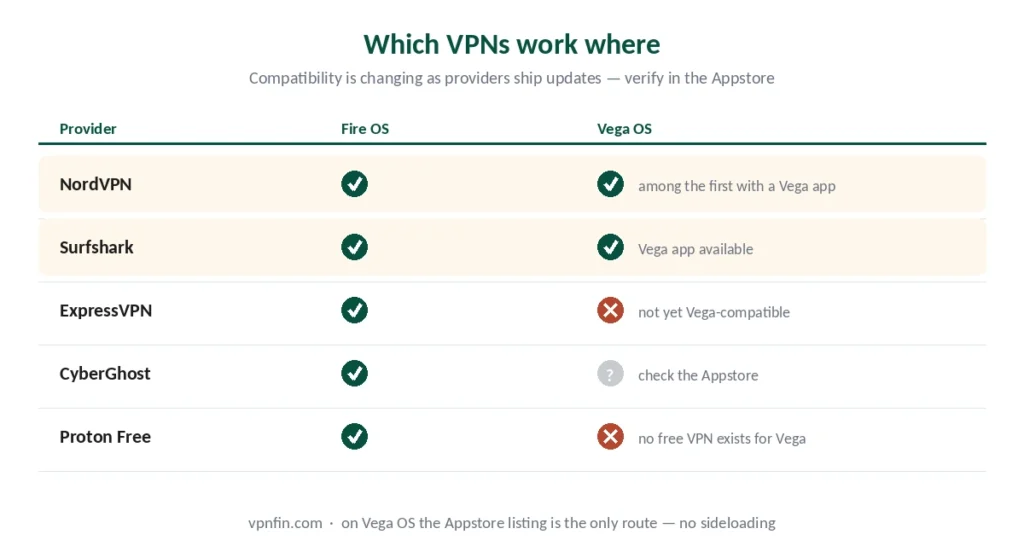
Who has a Vega OS app so far: NordVPN and IPVanish shipped first, in late 2025, and Surfshark followed in May 2026. ExpressVPN and Proton VPN added theirs in September 2026. Our guide to IPVanish on Firestick covers apps for Fire OS and Vega OS, and what each does.
One free option now exists for Vega OS. Proton VPN’s Vega app runs on its free plan, though Proton reserves streaming support for paid plans, as our Proton VPN on Firestick guide explains. Since sideloading is blocked, no other free provider’s APK will install.
⚠️ Check compatibility before subscribing, not after. This is the one situation where the provider you pick is constrained by hardware rather than preference.
⚠️ The same split decides how you switch one off. On Fire OS the app is in Manage Installed Applications; on Vega OS there is no app to find, which means the tunnel is coming from your router or your network settings.
Free VPNs on Firestick: What Actually Works
On Vega OS: nothing. Covered above, and it’s absolute.
On Fire OS, one option is genuinely worth knowing about.
Proton VPN Free is the only free tier with unlimited data, which matters enormously here — streaming consumes several gigabytes per session, and a 10 GB monthly cap disappears in a weekend. It’s Swiss, independently audited, and its clients are open-source.
The limits are real though: three server locations, one device, and no streaming support. It will protect your connection; it will not unblock a foreign Netflix library. For sideloading and alternatives for the missing Fire TV app, see our page on TunnelBear on Firestick.
Windscribe Free offers 10 GB a month across ten countries — enough for occasional use, not for regular viewing.
Everything else marketed as free for Firestick either has no Fire TV app at all, or belongs to the category our free VPN guide covers: services with no paid product, which have to make money some other way.
Why People Put a VPN on a Firestick
Three reasons, and only one is about unblocking.
ISP visibility. Your provider can see which streaming services you connect to and when. A VPN removes that, which matters more to some households than others. Our guide to Windscribe on Firestick covers the Appstore app, Lazy login and the free plan on a TV.
Regional libraries. Netflix, Prime Video and BBC iPlayer serve different catalogues by country — our streaming guide covers which providers open the most, and iPlayer is where Fire TV devices fail most often.
Sideloaded apps. Anything installed through Downloader is unverified by Amazon, and some of those apps report back. A VPN limits what they learn about your connection. Kodi is the common case here, and Amazon’s own apps report as well — Prime Video reads Fire TV device telemetry to spot a VPN without checking the address at all.
⚠️ What a VPN does not do: make unlicensed streaming legal. It hides your IP from the service and your ISP; it doesn’t change what’s lawful. Our legality guide covers that distinction properly.
Which Provider to Choose
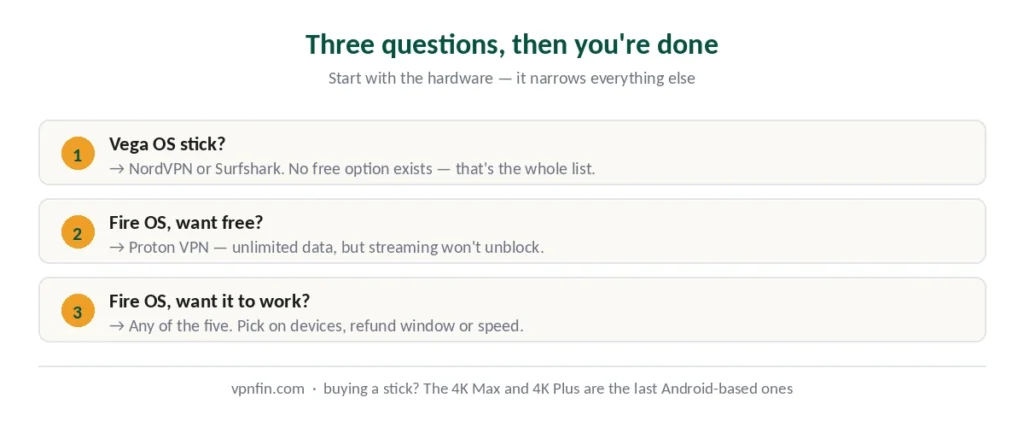
If you have Vega OS: NordVPN, Surfshark, ExpressVPN and Proton VPN all have compatible apps now, though Surfshark says its Vega app offers core features only for the moment. NordVPN also has the fastest speeds of the five we rank, which matters on a device with modest hardware.
If you have Fire OS: any of the five works, so pick on your actual priorities. Surfshark’s unlimited connections suit households with several sticks. CyberGhost labels servers by streaming platform and gives 45 days to change your mind.
If you want free: Proton VPN on Fire OS, understanding that streaming won’t work.
A practical note on the app itself. Fire TV remotes make text entry painful, so an app with a simple interface matters more here than on a phone. Providers with a one-button connect screen are worth the preference. Our guide to Mullvad on Firestick covers the APK route, and the Vega OS gap.
Using a specific provider? Our step-by-step guides cover NordVPN on Firestick and Surfshark on Firestick, each on both Fire OS and Vega OS.
How We Research
This guide draws on published documentation from Amazon and VPN providers, technical reporting on the Vega OS transition from named sources including MobilityArena, Top10VPN and Gizmodo, and our own full reviews of the providers we rank — cross-checked and verified at publication. Vega OS compatibility is changing as providers ship updates, so verify current support in the Amazon Appstore before subscribing. Our full approach lives on the About Us page.
Firestick VPN FAQ
On older Fire OS sticks, yes — Proton VPN Free is the strongest option, with unlimited data, Swiss jurisdiction and independent audits, though it offers three locations, one device and no streaming support. On the newer Vega OS sticks, Proton VPN’s free plan now runs too, since its Vega app arrived in September 2026, though streaming still needs a paid plan.
Vega OS is Amazon’s Linux-based replacement for the Android-derived Fire OS, shipped on the Fire TV Stick 4K Select from October 2025 and the Fire TV Stick HD from April 2026. It has no APK support, meaning sideloading is impossible — no Downloader, no ADB, no workaround. Only apps in the Amazon Appstore can be installed.
Go to Settings → My Fire TV → About. If Developer Options appears in that menu, you have Fire OS. If there’s no “Install Unknown Apps” toggle anywhere in settings, you have Vega OS. The 4K Max and 4K Plus are Fire OS; the 4K Select and the HD are Vega.
NordVPN and IPVanish released Vega apps first, in late 2025, and Surfshark followed in May 2026. ExpressVPN and Proton VPN arrived in September 2026. Since sideloading is impossible on these devices, the Appstore listing is the only route — check current availability before subscribing.
Only possible on Fire OS. Go to Settings → My Fire TV → About, click the device name seven times to unlock Developer Options, then enable Install Unknown Apps for the Downloader app specifically. Install Downloader from the Appstore and use it to fetch the APK from your provider’s official website — never from a third-party repository.
Rarely enough to matter. 4K streaming needs 15 to 25 Mbps depending on platform, and modern providers retain most of your connection speed. Fire TV Sticks have modest processors, so a lightweight protocol like WireGuard or a provider’s own implementation performs noticeably better than older OpenVPN.
The Short Version
Check your model first. Settings → My Fire TV → About. Developer Options present means Fire OS and full flexibility. Absent means Vega OS and a short list of compatible providers. Our page on CyberGhost on Firestick covers which Fire TV models run the app and why Vega OS sticks do not.
On Vega OS: NordVPN, Surfshark, ExpressVPN or Proton VPN, the last with a free plan that connects but does not support streaming. Our page on PureVPN on Firestick covers supported Fire TV models and the app’s settings.
On Fire OS: anything works. Proton VPN Free if you won’t pay, accepting that streaming won’t unblock.
And if you’re buying a stick: the 4K Max and 4K Plus are the last Android-based models. Once they’re gone, every Fire TV Stick will be locked to the Appstore — the same closed model Apple TV has always used, where the provider either shipped an app or did not.