
Disclosure: VPNFin is reader-supported. If you buy a VPN through links on this page, we may earn a commission at no extra cost to you. This never affects our ratings — here’s our full disclosure.
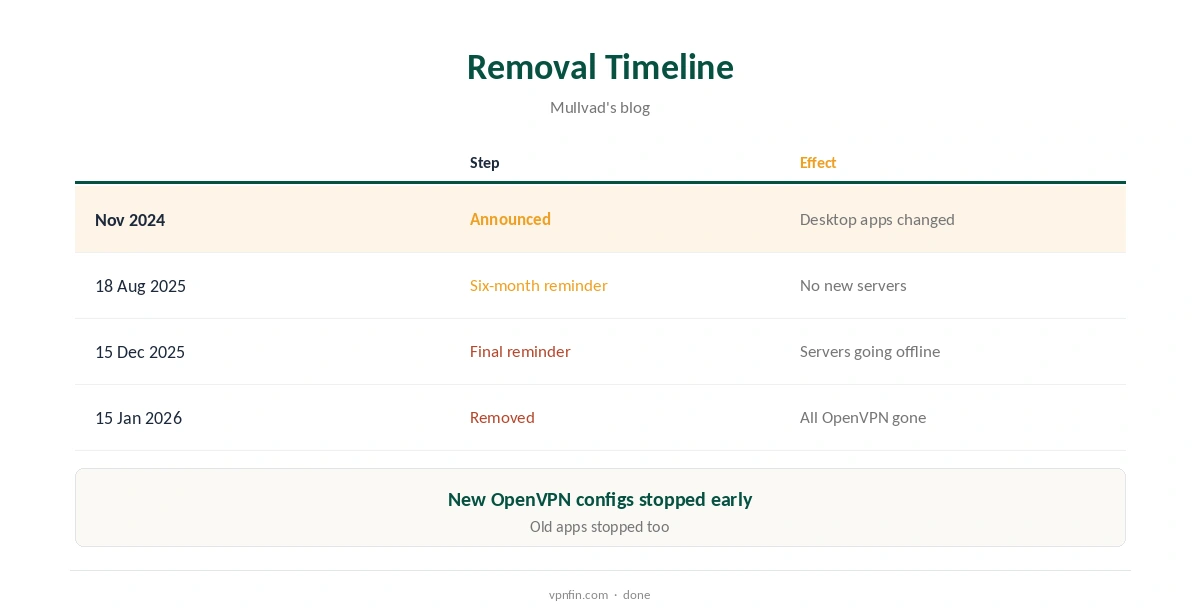
Mullvad OpenVPN support ended on 15 January 2026. Mullvad removed OpenVPN from its servers and apps on that date, after announcing the change in November 2024 and reminding users in August and December 2025, its blog records. Because Mullvad removed it on both the client and server side, even old apps with OpenVPN stopped working. Anyone using OpenVPN on a router or a third-party app had to move to WireGuard. Our guide to Mullvad WireGuard covers the only protocol, its new engine and obfuscation.
This guide covers the timeline, why Mullvad did it, who felt the change, how to migrate a router and what WireGuard now offers instead. Our guide to Mullvad on a Router covers WireGuard on OpenWrt, pfSense and GL.iNet.
The Mullvad OpenVPN Timeline
Mullvad first blogged about removing OpenVPN in November 2024, then removed it from its desktop apps. A reminder on 18 August 2025 gave six months’ notice, and a final reminder on 15 December 2025 gave one month, the blog shows.
During that period, OpenVPN servers kept working, but Mullvad added no new ones and took existing ones offline. Generating new OpenVPN configurations also stopped. On 15 January 2026, the last servers went, and the protocol disappeared from the apps at the same time.
Why Mullvad Dropped OpenVPN
Mullvad said it wanted to focus entirely on WireGuard, as it had explained back in 2017. TechRadar reported Mullvad praising WireGuard’s simple design for easing new features and allowing faster speeds. Community members also pointed to the maintenance cost of running two protocols across every app and server.
Its newest privacy features, DAITA, multihop and quantum-resistant tunnels, work only over WireGuard, community discussion notes. On desktop, WireGuard also gained obfuscation options, removing one of OpenVPN’s last advantages.
Who Was Affected
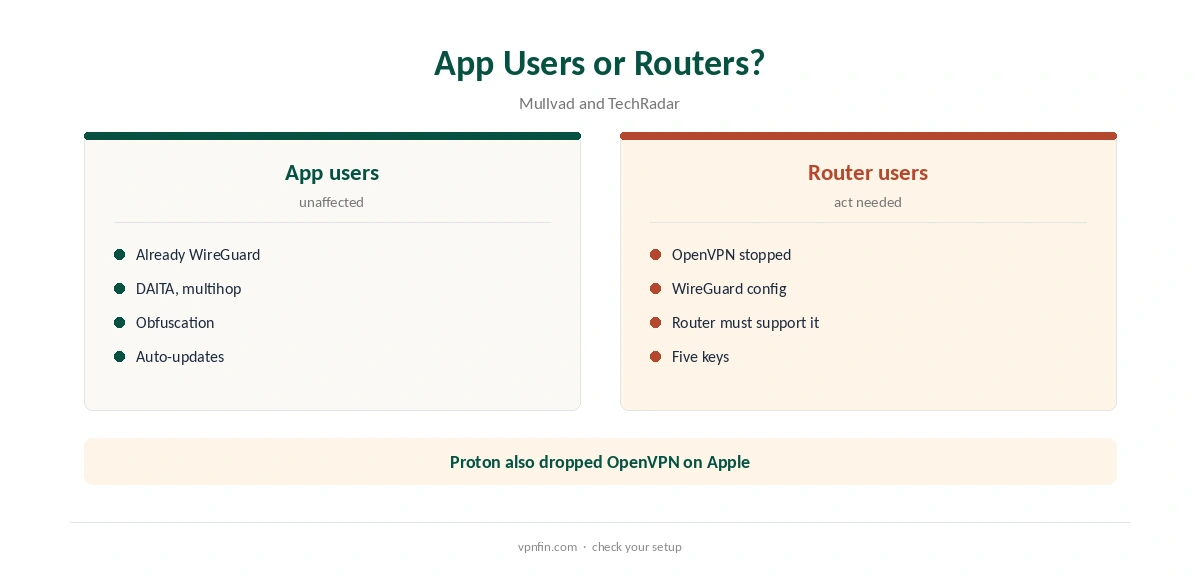
Mullvad’s own apps saw no change, since they already used WireGuard; Android and iOS had been WireGuard-only for some time, TechRadar reported. Desktop users who had chosen OpenVPN in older app versions saw warnings before the switch, and the apps had already defaulted to WireGuard, Mullvad’s August reminder said.
The real impact fell on routers and third-party clients configured with Mullvad’s OpenVPN files, files Mullvad had already stopped issuing in the months before the cutoff. Those connections stopped on 15 January 2026. If a router suddenly lost its tunnel around that date, this is the likely cause.
Migrating a Router to WireGuard
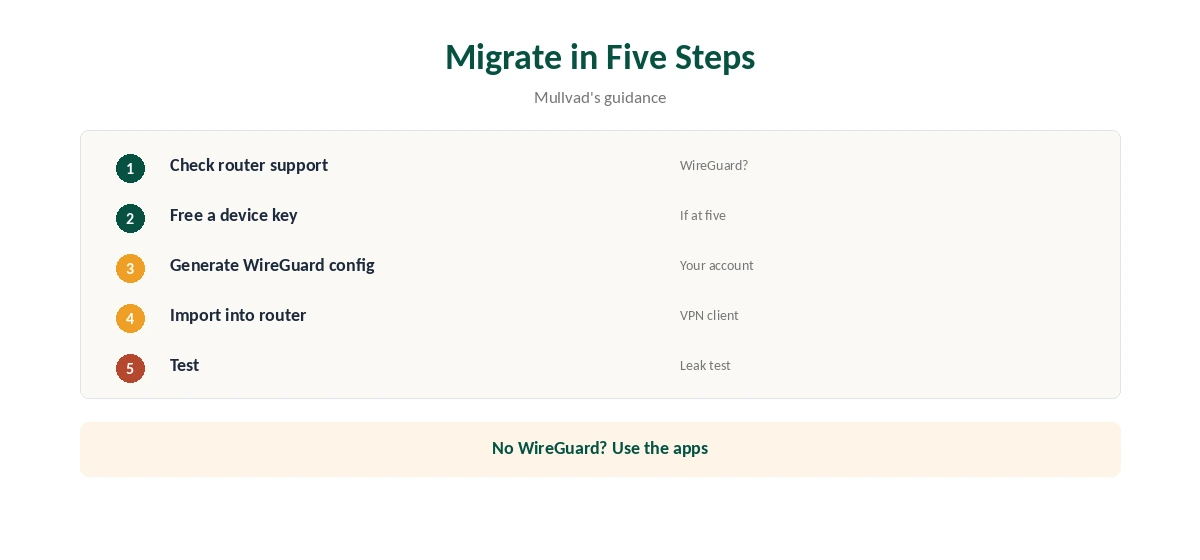
Generate a WireGuard configuration from your Mullvad account, choosing the server location you want, and import it into a router that supports WireGuard, such as OpenWrt or many Asus and GL.iNet models. Mullvad publishes WireGuard guides in its help section, the blog notes.
If your router supports only OpenVPN, it can no longer connect to Mullvad. Replace it, or run Mullvad on each device instead. Proton publishes WireGuard router guides for OpenWrt, Asus RT-AX and GL.iNet models, which show what WireGuard support looks like in practice. Our router setup guide covers choosing hardware.
WireGuard Keys and Devices
Mullvad allows five devices per account, and with WireGuard each device or router uses one of five keys. Community discussion noted this mattered to users who had kept rarely used devices on OpenVPN.
If you hit the limit, remove keys for devices you no longer use in your account, then add the router or new device. A router covers every device behind it with a single key, which helps households stay within five.
What WireGuard Offers Now
Moving to WireGuard brings Mullvad’s newer protections: DAITA against traffic analysis, multihop through two servers and quantum-resistant key exchange, all listed across platforms in Mullvad’s repository.
WireGuard is also lighter on battery and processor. TheBestVPN’s 2026 test found it used far less power than older protocols, as our VPN battery guide explains.
TCP and Blocked Networks
Some users relied on OpenVPN over TCP to get through networks that blocked UDP. Mullvad’s apps now offer obfuscation and anti-censorship options for WireGuard, its Android guide lists, including Shadowsocks on desktop and Android, Gizmodo notes.
Our obfuscation guide explains how these options disguise VPN traffic, and our WireGuard vs OpenVPN guide compares the protocols.
Checking the New Setup
After moving a router to WireGuard, check from a device behind it that traffic exits through Mullvad. Mullvad’s browser extension shows the connection status and checks for IP, WebRTC and DNS leaks in one click.
Our Mullvad Firefox guide explains the extension, and our DNS leak guide covers a manual test.
Other Providers Still Offering OpenVPN
Mullvad is not alone in moving away from OpenVPN: Proton removed OpenVPN and IKEv2 from its Apple apps, our tables record, keeping WireGuard and its own Stealth protocol. Others still publish OpenVPN files: our NordVPN OpenVPN guide covers one provider’s configurations.
If you depend on OpenVPN for a device you cannot replace, check a provider’s protocol support before buying. Our VPN protocols guide lists the options.
How We Research
This page draws on Mullvad’s blog posts on the OpenVPN removal from November 2024 to December 2025, TechRadar’s August 2025 report, Privacy Guides community discussion and our Mullvad tables. We cross-checked these sources against each other, and where they conflict or something can’t be verified, we say so in the text rather than guessing. We checked time-sensitive figures, including prices in US dollars, on 8 October 2026. The main source we relied on is Mullvad’s final OpenVPN reminder. Our full approach lives on the About Us page.
Mullvad OpenVPN FAQ
No; it removed OpenVPN on 15 January 2026.
No; Mullvad removed it on the server side too.
Move it to a WireGuard configuration from your account.
To focus on WireGuard, where its newest features run.
No; they already used WireGuard.
The Verdict
Mullvad OpenVPN support is gone for good. App users noticed nothing; router and third-party users needed WireGuard configs. Check your router supports WireGuard before relying on Mullvad there.