
Disclosure: VPNFin is reader-supported. If you buy a VPN through links on this page, we may earn a commission at no extra cost to you. This never affects our ratings — here’s our full disclosure.
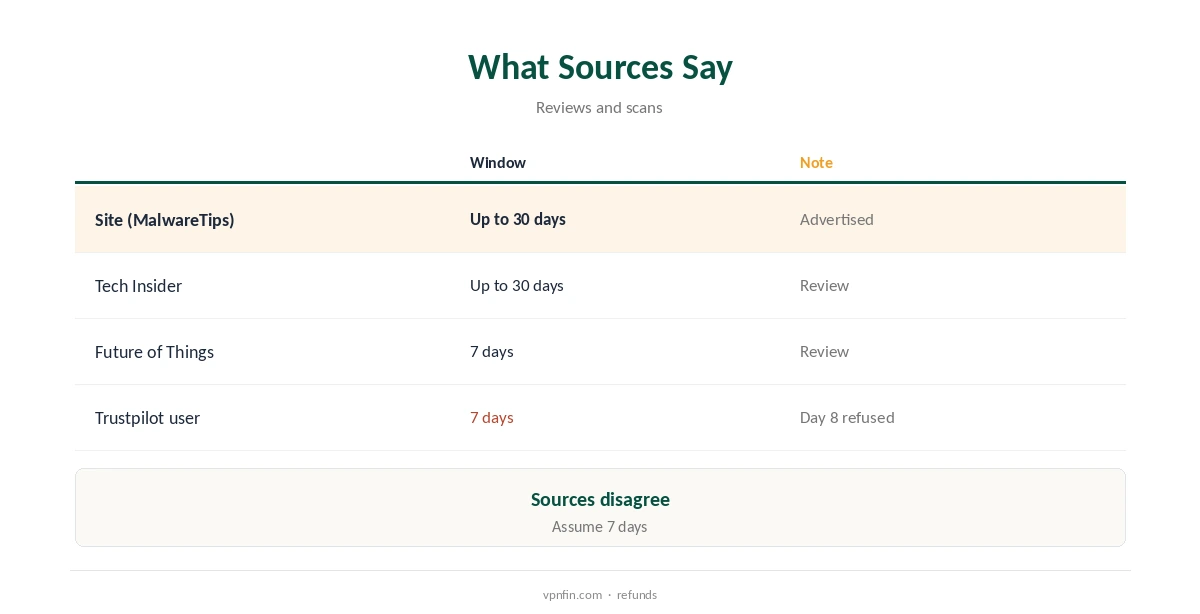
Mysterium VPN refund terms are unusually unclear. The site advertises a money-back guarantee of up to 30 days, according to MalwareTips’ scan, but several reviews and a user report describe a strict 7-day window.
This guide explains the conflict and how to protect yourself. Our Mysterium VPN review covers the service itself.
Mysterium VPN Refund: The Short Answer
Treat the window as 7 days to be safe. Some sources say up to 30, but at least one user says Mysterium refused a request on day 8.
What the Sources Say
MalwareTips’ scan of the site and Tech Insider describe a money-back guarantee of up to 30 days. The Future of Things and Techjockey describe 7 days instead.
One Trustpilot reviewer says support ignored the request until a card claim, then refused it on day 8 under a strict 7-day policy.
Why the Terms May Differ
Refund terms can change over time, and older reviews may describe earlier rules. Different plans or payment methods may also carry different terms.
That is why the terms shown at your checkout matter more than any review.
How to Claim a Refund
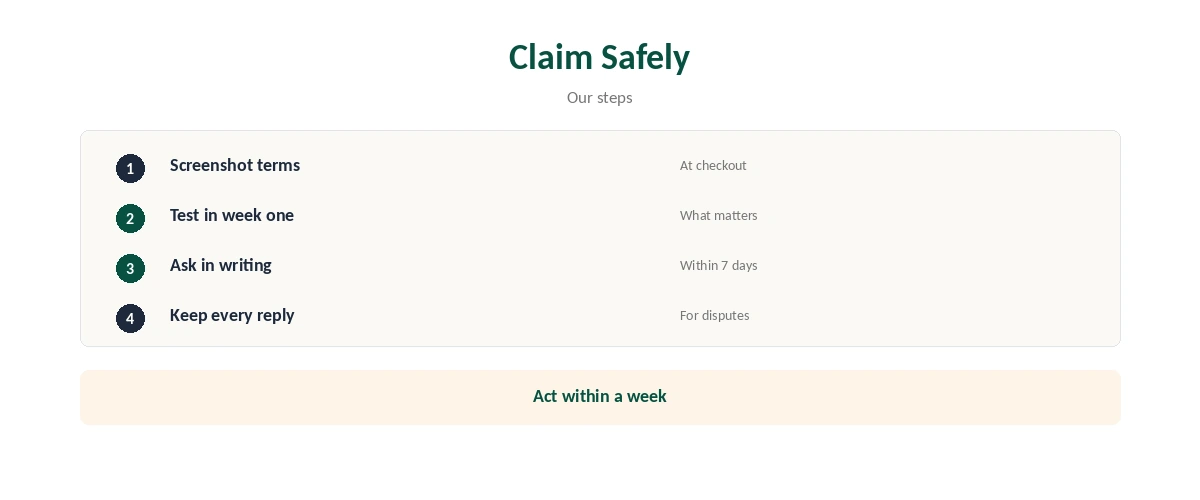
Contact support in writing as early as possible, ideally within the first week. Include your account details, payment reference and a short reason.
Keep copies of every message and screenshot the refund terms at checkout before you pay.
If You Paid With Crypto
Mysterium accepts cryptocurrency, and one Trustpilot exchange concerns a crypto top-up that did not arrive. No bank can reverse a crypto payment, so check the refund terms for crypto before paying.
If Support Does Not Reply
Trustpilot users describe slow replies. If you paid by card and the window is closing, your card provider’s dispute process may help, as one user found.
How It Compares
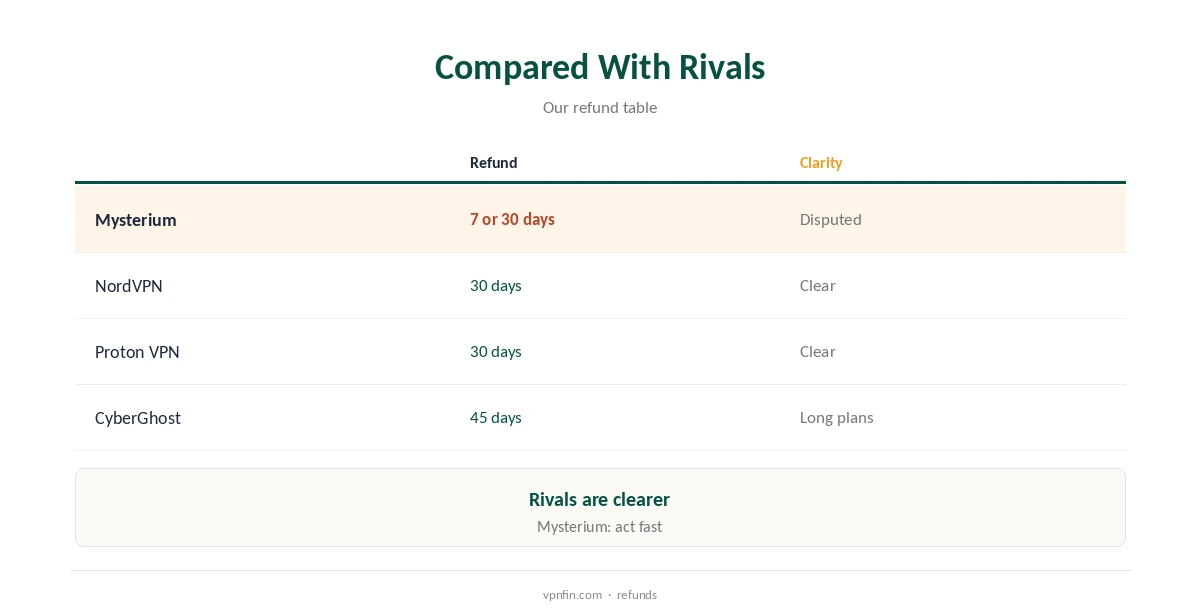
Audited rivals publish clearer terms: Nord Security’s NordVPN and Surfshark, and Proton VPN, offer 30 days, and CyberGhost 45 days on longer plans, our refund table records. Our VPN refund guide compares them.
Test Before You Commit
Use the first few days to test what matters: residential IPs on the sites you need, speed on your line and the apps on your devices.
What Counts as a Valid Reason
Most refund policies let you cancel for any reason within the window. Mysterium’s terms may still set conditions, so check them for usage limits or exclusions before paying.
Several Trustpilot users mention a fair usage policy that cut off streaming. If heavy use matters to you, ask support whether it affects refunds.
Refunds on Long Plans
Long plans offer the lowest monthly price, but they also put more money at stake if a refund goes wrong. That is why testing on a short plan first makes sense with Mysterium.
Billing Complaints to Know About
MalwareTips notes Trustpilot scores of 1.7 and 2.6 out of 5 for Mysterium’s network and VPN listings, with complaints centred on billing, unexplained suspensions and refunds.
Not every complaint applies to every user, but the pattern is worth weighing before a large payment.
Cancelling Without a Refund
If you are past the window, cancel auto-renewal to avoid the next charge. Check your account for a renewal setting and confirm the change in writing.
Keeping Your Account Secure
Change your password before you cancel if you shared the account with anyone. That stops further use while the refund is processed.
Before You Pay
First, read the refund terms on the checkout page and save a copy. Then decide whether you can test everything you need within seven days.
For example, if you need residential IPs for a specific site, try that site on day one. As a result, you will know quickly whether a refund is needed.
If Your Account Is Suspended
Some Trustpilot users report suspensions without explanation. In that case, ask support in writing for the reason and request a refund of the unused period.
Disputes Through Your Bank
Card disputes are a last resort, since they can lead to account closure. However, if support stops replying and the window is closing, they protect your money.
Keep your evidence ready: the refund terms, your messages and the dates. As a result, the dispute will be easier to support.
Questions to Ask Support
Before paying, ask three things: how many days the refund window lasts, whether crypto payments qualify, and whether usage limits affect a refund. Then keep the replies, since they form your best record if the terms are disputed later.
A Quick Rule
Pay monthly or short-term first, test within seven days, and only then buy a long plan.
Related pages on Mysterium VPN cover Proton VPN vs Mysterium VPN, Surfshark vs Mysterium VPN, whether Mysterium VPN is safe and what Mysterium VPN costs.
How We Research
We took refund terms from MalwareTips, Tech Insider, The Future of Things and Techjockey, and user experiences from Trustpilot, read on 21 October 2026. Rival terms come from our refund table. The main source is MalwareTips’ scan of mysteriumvpn.com. We do not run our own tests. Our full approach lives on the About Us page.
Mysterium VPN Refund FAQ
Sources disagree: 7 days or up to 30. Claim within 7 days to be safe.
Contact support in writing with your account and payment details.
Check the terms first; no bank can reverse crypto.
For card payments, your card provider’s dispute process may help.
The Verdict
Sources dispute the Mysterium VPN refund terms, so act as if you have 7 days. Test early, keep records, and buy a long plan only once you are sure.