
Disclosure: VPNFin is reader-supported. If you buy a VPN through links on this page, we may earn a commission at no extra cost to you. This never affects our ratings — here’s our full disclosure.
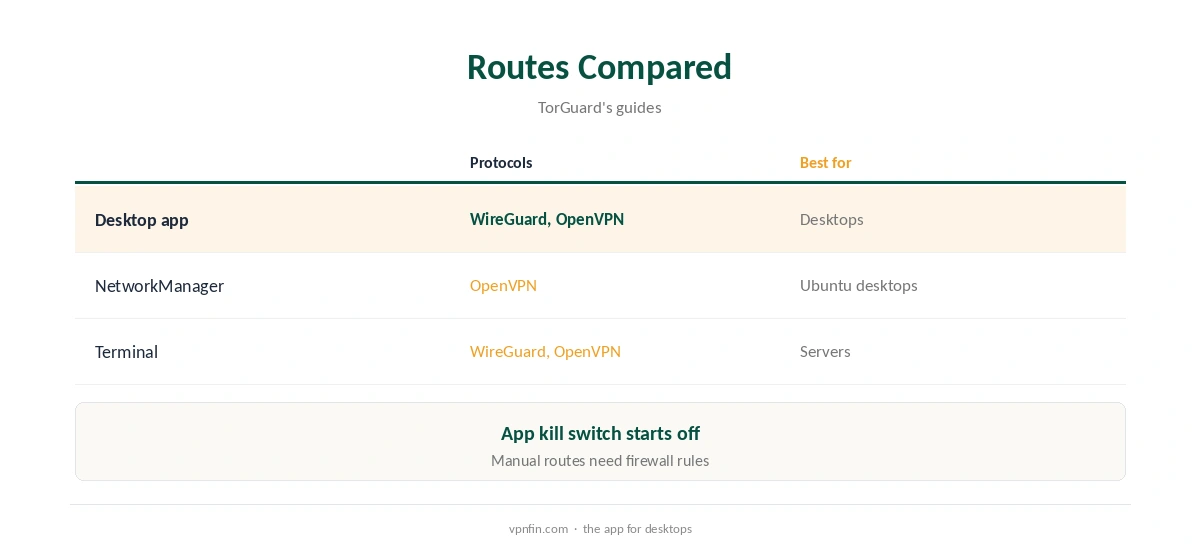
TorGuard for Linux comes in several forms. TorGuard’s downloads page lists its desktop app, version 4.8.29, for Linux alongside Windows and Mac, plus older beta builds for ARM devices. Its June 2026 Ubuntu guide sets up OpenVPN through NetworkManager with a file from TorGuard’s config generator, and points to the Linux app for WireGuard. Terminal setups suit servers.
This guide covers each route, the setup and the trade-offs.
The Desktop App
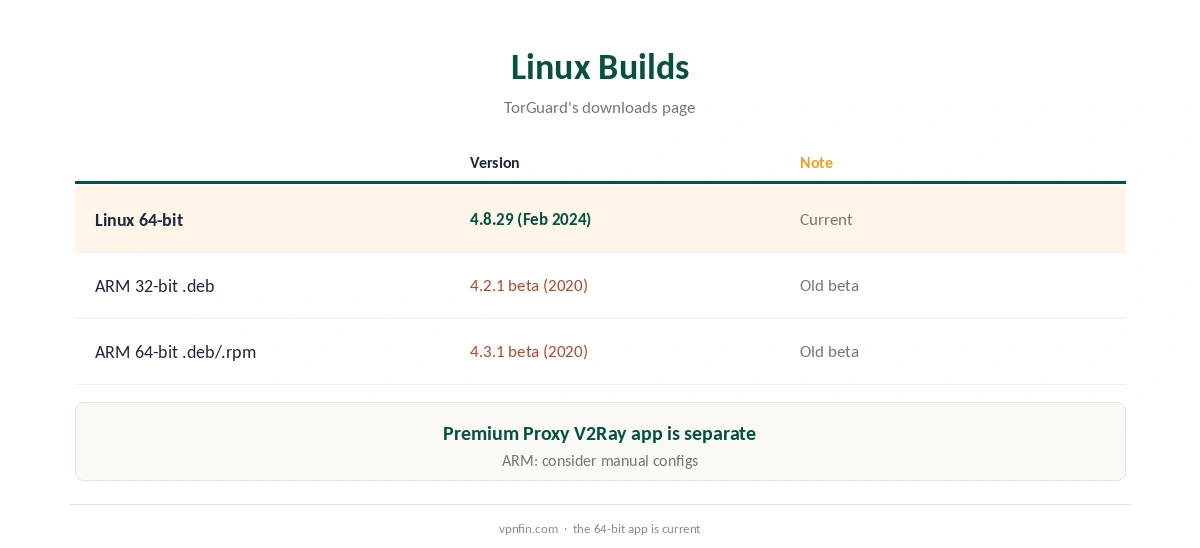
TorGuard’s downloads page lists the app at version 4.8.29, released in February 2024, for 64-bit Linux, with ARM beta builds from 2020 in .deb and .rpm form. Its Ubuntu guide describes the Linux app as a graphical client with WireGuard support. Use it if you want the same features as on Windows, including Stealth modes and the kill switch, which starts switched off on TorGuard’s desktop apps.
TorGuard for Linux With NetworkManager
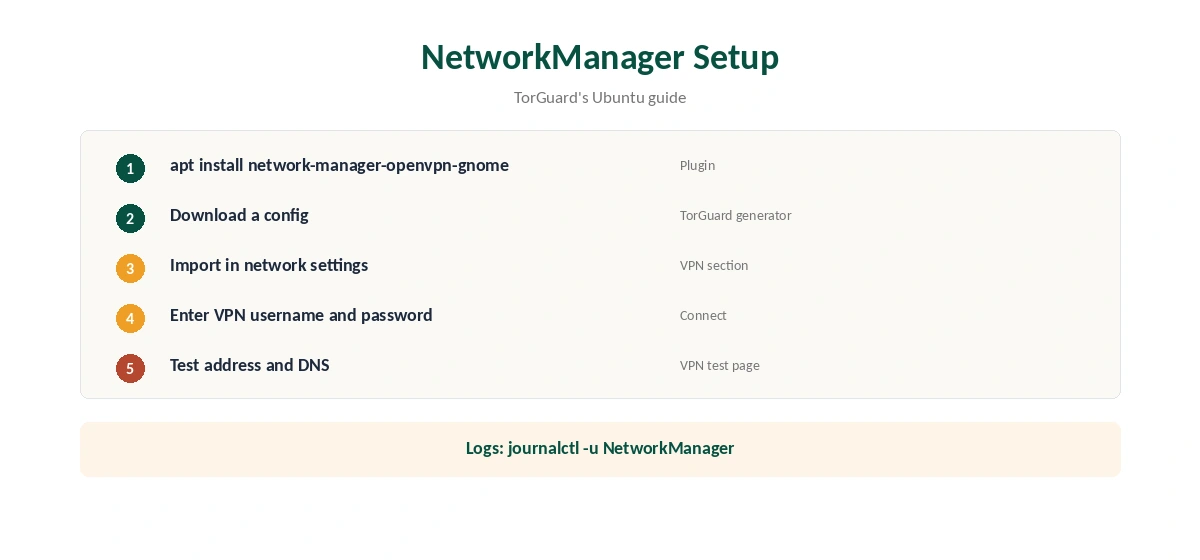
TorGuard’s Ubuntu guide covers Ubuntu 20.04, 22.04 and 24.04 and derivatives such as Linux Mint and Pop!_OS. Install the OpenVPN plugin for NetworkManager with apt, download a config from TorGuard’s config generator, import it in the network settings and enter your VPN username and password.
If the import fails, the guide suggests reinstalling the plugin, checking the NetworkManager logs and restarting the service.
The Terminal Route
For servers, install OpenVPN or WireGuard tools and use a config from TorGuard’s generator. Run it as a system service so it restarts at boot. Our TorGuard WireGuard guide covers the generator and dedicated IP configs.
ARM Devices and Raspberry Pi
The ARM builds on TorGuard’s downloads page are betas from 2020. On a Raspberry Pi or other ARM board, a manual WireGuard or OpenVPN setup from a generated config may be more current. Our Raspberry Pi VPN guide covers the hardware side. Our guide to TorGuard on Raspberry Pi covers OpenVPN setup, auto-connect and Gateway use.
TorGuard for Linux on Servers
On a server, the terminal route is the most reliable. Bring the tunnel up at boot, add firewall rules so nothing leaves outside it, and test after a reboot. Use a dedicated IP config if the server must keep the same public address.
Port Forwarding on Linux
TorGuard includes port forwarding, which helps torrent clients or self-hosted services behind the VPN. Request a port in the client area and point it at the right local service. Our port forwarding guide explains how the pieces fit.
Troubleshooting
If an imported connection fails, TorGuard’s guide suggests reinstalling the NetworkManager plugin, checking the logs with journalctl and restarting NetworkManager. In the app, switch protocol if a network blocks UDP.
A Quick Rule
Ubuntu desktop? Use the app or NetworkManager. Server? Use the terminal with a boot service. ARM board? Prefer a manual config over the old beta app. Always turn on a kill switch.
Is TorGuard for Linux Worth It?
For Linux users who want port forwarding, Stealth modes and a graphical client, TorGuard for Linux covers more than many rivals. The app’s last listed release dates from February 2024, though, so check for updates before relying on it, and use NetworkManager or terminal configs if the app misbehaves on your distribution.
Premium Proxy on Linux
TorGuard’s downloads page also lists a Premium Proxy V2Ray app for Ubuntu, Mint and Debian as a 2025 beta. It is a separate product with its own login, aimed at restrictive networks rather than everyday VPN use.
Several Distributions
TorGuard’s NetworkManager guide applies to Ubuntu-based systems such as Mint and Pop!_OS. On Fedora or Arch, the app’s 64-bit build or a terminal config is the simpler route, since package names differ. Check TorGuard’s guide index for your distribution before starting a TorGuard for Linux setup. Our TorGuard Chromebook guide covers Linux inside ChromeOS too.
Quick Check
After connecting, run ip a to confirm the tunnel interface is up, then check the address in a browser.
Keeping It Updated
Check TorGuard’s downloads page for new Linux builds and replace the app when one appears.
Kill Switch on Linux
In the app, turn the kill switch on after installing, since TorGuard’s desktop apps ship with it off. On NetworkManager or terminal setups, add firewall rules that allow traffic only through the tunnel. Our kill switch guide explains the idea.
Checking the Connection
Confirm the address on TorGuard’s IP page or our VPN test page, then run our DNS leak guide. Manual setups often leave DNS pointing at your provider.
TorGuard’s Record
Our audit table records no independent audit for TorGuard. It is run by VPNetworks LLC in Florida and settled a copyright lawsuit in 2022 by blocking BitTorrent on its US servers. Standard allows up to eight devices, and refunds are limited to seven days, as our TorGuard cost guide explains.
Related Guides
Our Linux VPN guide compares providers, and our guide to turning off a VPN on Linux covers stopping connections.
How We Research
This page draws on TorGuard’s downloads page, its June 2026 Ubuntu NetworkManager guide and our TorGuard guides and tables. We cross-checked these sources against each other, and where they conflict or something can’t be verified, we say so in the text rather than guessing. We checked time-sensitive figures, including prices in US dollars, on 7 October 2026. The main source we relied on is TorGuard’s Ubuntu NetworkManager guide. Our full approach lives on the About Us page.
TorGuard for Linux FAQ
It does; its downloads page lists version 4.8.29 for Linux.
Yes, with the OpenVPN plugin and a generated config, per TorGuard’s Ubuntu guide.
Its downloads page lists ARM beta builds from 2020.
No; turn it on in the app.
20.04, 22.04 and 24.04, plus Mint and Pop!_OS.
The Verdict
TorGuard for Linux gives you a desktop app, a NetworkManager route and terminal configs. Turn the kill switch on, and weigh the missing audit.