
Disclosure: VPNFin is reader-supported. If you buy a VPN through links on this page, we may earn a commission at no extra cost to you. This never affects our ratings — here’s our full disclosure.
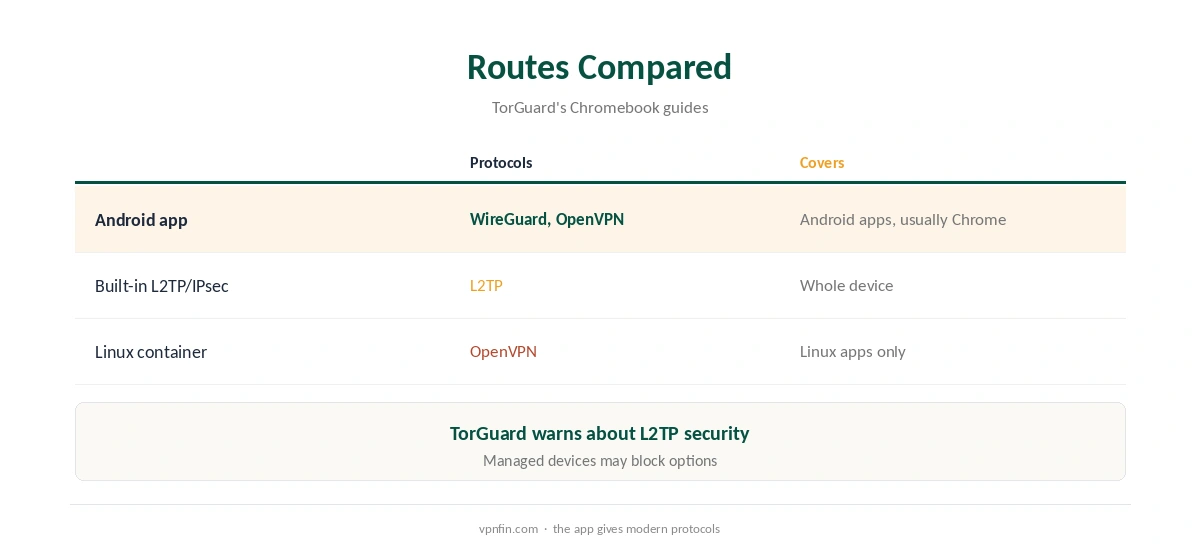
TorGuard Chromebook setups have three routes, and TorGuard’s own guides recommend one of them. On Chromebooks with the Play Store, install the TorGuard VPN Android app, which offers OpenVPN and WireGuard. ChromeOS also has built-in L2TP/IPsec support, but TorGuard’s 2026 guide advises considering more secure alternatives. Power users can run OpenVPN inside the Linux container.
This guide covers each route, the setup and the trade-offs.
TorGuard Chromebook Route One: The Android App
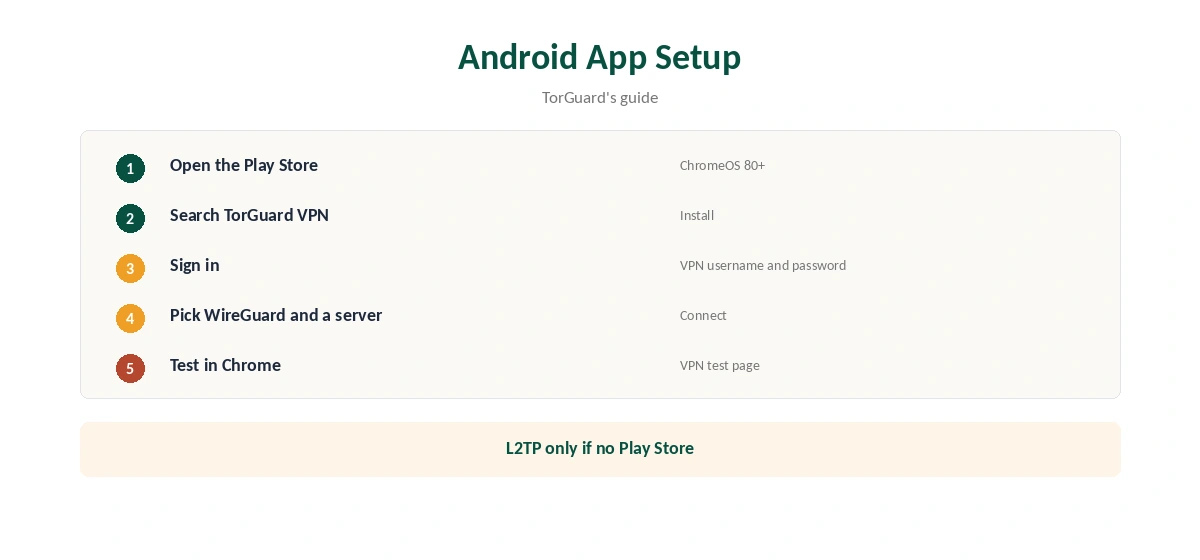
TorGuard recommends its Android app on Chromebooks with Play Store support, and suggests ChromeOS 80 or later. Open the Play Store, search for TorGuard VPN, install it and sign in. The app brings OpenVPN and WireGuard, which ChromeOS’s built-in VPN does not.
Route Two: Built-In L2TP/IPsec
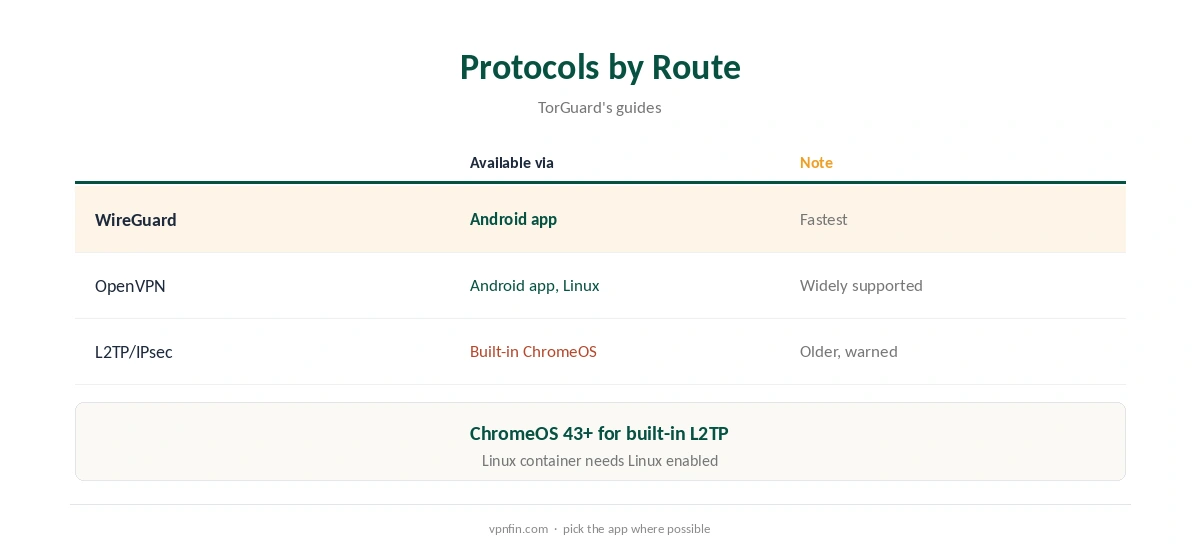
ChromeOS 43 or later can add a private network with L2TP/IPsec and a pre-shared key. TorGuard’s guide uses the pre-shared key torguard with your VPN username and password and a server from the member’s area. The same guide carries a security warning and recommends the Android app instead, since L2TP is an older protocol.
Route Three: The Linux Container
On Chromebooks with Linux enabled, TorGuard’s guide installs OpenVPN in the Crostini container, downloads its OpenVPN config bundle and connects from the terminal. This protects apps running inside the container, not the whole Chromebook. Our Linux VPN guide covers Linux setups more widely.
Which Route Protects What
The Android app protects Android apps and, on most Chromebooks, Chrome too. The built-in L2TP connection covers the whole device but with a weaker protocol. The Linux container covers only Linux apps. For most users the Android app is the practical choice.
TorGuard Chromebook Settings Worth Changing
In the Android app, choose WireGuard for speed and turn on auto-connect so the Chromebook reconnects after sleep. Allow the VPN to run in the background if ChromeOS asks. On public Wi-Fi, connect before signing in to anything. Our public Wi-Fi guide explains the risks.
When Chrome Bypasses the App
On some Chromebooks, Chrome may not route through an Android VPN app unless the app covers the whole device. If our test page still shows your real address in Chrome, check the app’s settings, or use the built-in L2TP connection as a fallback for the whole device.
Browser-Only Option
If you only need Chrome covered, TorGuard’s Chrome extension is lighter. Our TorGuard Chrome guide explains the VPN and Premium Proxy extensions.
Is a TorGuard Chromebook Setup Worth It?
For a Chromebook with the Play Store, yes: the Android app brings modern protocols with little effort. On a managed or older Chromebook without the store, built-in L2TP works but with weaker security, so weigh the risk.
TorGuard Chromebook Without the Play Store
Older or managed Chromebooks may lack the Play Store. In that case, the built-in L2TP connection is the main TorGuard Chromebook route: add a private network, choose L2TP/IPsec with a pre-shared key, and enter a server from the member’s area. TorGuard’s older guide also describes a built-in OpenVPN route using imported certificates, though its newer guide says ChromeOS lacks native OpenVPN, so TorGuard’s own instructions disagree.
A Quick Rule
Play Store available? Install the Android app and pick WireGuard. No Play Store? Use built-in L2TP and accept the weaker protocol. Working in the Linux container? Run OpenVPN there for those apps only.
Several Devices
A Chromebook counts as one device on your plan. Standard allows up to eight, Fahimai notes, so a TorGuard Chromebook setup leaves room for phones and laptops. Our TorGuard iPhone guide covers the phone side.
Turning It Off
Disconnect in the Android app, or turn off the L2TP connection in ChromeOS network settings. If Chrome still routes through a VPN, check both.
Keeping It Updated
The Play Store updates the Android app automatically. After an update, check that WireGuard and auto-connect stayed on, since updates can reset settings. Then reconnect and run a quick address test in Chrome.
Checking the Connection
Open Chrome and visit our VPN test page to confirm the new address. Then run our DNS leak guide. If Chrome still shows your real address, check whether the Android app is set to cover the whole device.
School and Work Chromebooks
Managed Chromebooks may block the Play Store or VPN settings. If options are greyed out, the administrator controls them; ask rather than trying to bypass the policy.
TorGuard’s Record
Our audit table records no independent audit for TorGuard. It is run by VPNetworks LLC in Florida and settled a copyright lawsuit in 2022 by blocking BitTorrent on its US servers. Standard allows up to eight devices, and refunds are limited to seven days, as our TorGuard cost guide explains.
Related Guides
Our Chromebook VPN guide compares providers, and our guide to turning off a VPN on Chromebook covers each route.
How We Research
This page draws on TorGuard’s Chromebook L2TP and OpenVPN guides (2025 and 2026) and our TorGuard tables. We cross-checked these sources against each other, and where they conflict or something can’t be verified, we say so in the text rather than guessing. We checked time-sensitive figures, including prices in US dollars, on 7 October 2026. The main source we relied on is TorGuard’s Chromebook guide. Our full approach lives on the About Us page.
TorGuard Chromebook FAQ
It does, best through its Android app from the Play Store.
Yes, with built-in L2TP/IPsec, though TorGuard advises safer options.
TorGuard’s guide uses torguard as the key.
No, only apps inside the container.
The Android app, on ChromeOS 80 or later.
The Verdict
TorGuard Chromebook use works best through the Android app, which brings WireGuard and OpenVPN. Use L2TP only when the Play Store is unavailable, and the Linux container for terminal work.