
Disclosure: VPNFin is reader-supported. If you buy a VPN through links on this page, we may earn a commission at no extra cost to you. This never affects our ratings — here’s our full disclosure.
For years the answer to “which VPN works on Linux” came with an asterisk: it works, but you’ll be typing commands.
That changed recently. Surfshark replaced its command-line-only client with a graphical app, and ExpressVPN added a GUI to what had been a character-based tool. NordVPN offers both and open-sourced its Linux client in 2025. Our page on NordVPN on Linux covers the GUI and command-line apps and the kill switch quirk.
So the question is no longer whether you can avoid the terminal. It’s whether you should.
The Short Answer
Native apps with a choice of GUI or CLI: NordVPN, ExpressVPN, Surfshark, Proton VPN and Private Internet Access.
Manual configuration required: IPVanish, Windscribe and most smaller providers, via NetworkManager or OpenVPN config files. Our page on Astrill on Linux covers the Linux client, the manual OpenVPN route and what each gives up.
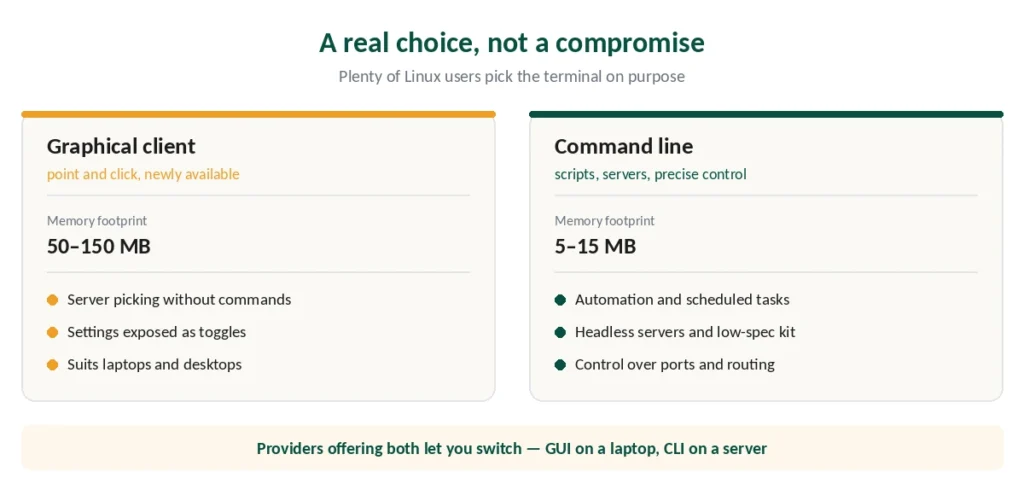
The terminal still wins on memory footprint, scripting and precise control — which is why plenty of Linux users choose it deliberately.
GUI or CLI: A Real Choice, Not a Compromise
The memory difference is substantial. A command-line VPN client uses roughly 5 to 15 MB of RAM. A graphical one uses 50 to 150 MB. On a modern desktop that’s noise; on a low-spec machine or a headless server it isn’t.
CLI genuinely suits three situations:
Automation workflows where connections need to start, stop or switch servers from scripts or scheduled tasks. Low-spec hardware where the memory gap matters. And precise control over protocols, ports and routing rules.
GUI suits everyone else, and now it exists. Surfshark’s new Linux app brings MultiHop, CleanWeb ad-blocking, WireGuard and leak protection to a point-and-click interface — features Linux users previously had to configure manually. Our page on StrongVPN on Linux covers WireGuard configs and NetworkManager setup.
⚠️ You don’t have to pick permanently. Providers offering both let you use whichever fits the moment — the GUI on a laptop, the CLI when managing a server.
What Each Provider Offers
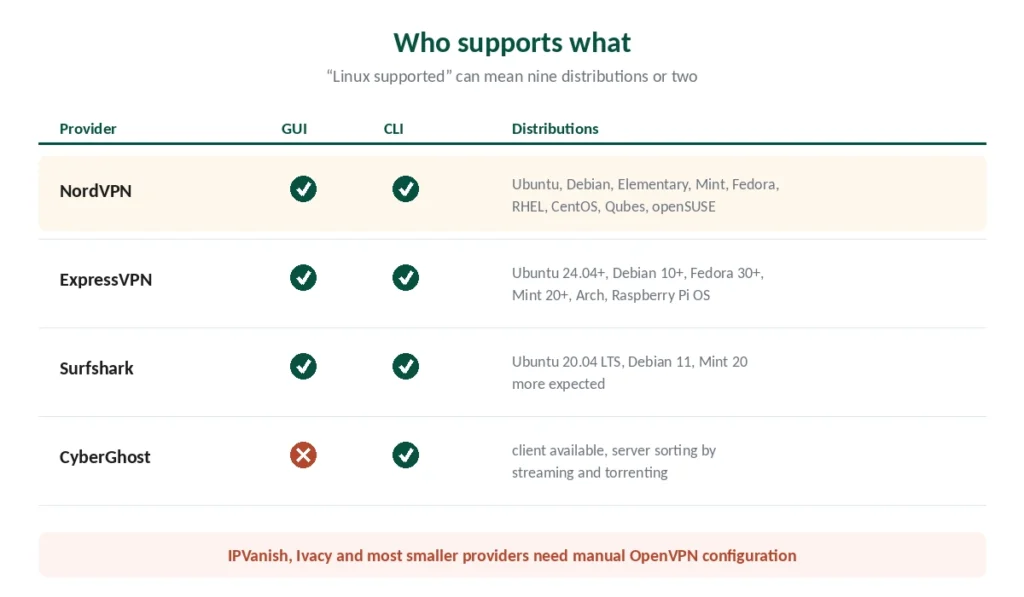
NordVPN supports the widest range of distributions — Ubuntu, Debian, Elementary OS, Mint, Fedora, RHEL, CentOS, Qubes OS and openSUSE. Both GUI and CLI, with kill switch and Threat Protection working across them. It open-sourced the Linux client in 2025, which is unusual transparency for this category.
Surfshark launched its GUI recently for Ubuntu 20.04 LTS, Debian 11 and Mint 20, with more distributions expected. Published testing described the interface as the most user-friendly of the Linux clients examined.
ExpressVPN added a GUI alongside its CLI, supporting 64-bit Ubuntu 24.04+, Debian 10+, Fedora 30+, Raspberry Pi OS Buster, Mint 20+ and Arch.
CyberGhost provides a Linux client with server sorting by streaming, torrenting or security.
⚠️ Check your distribution specifically. Support lists differ substantially between providers, and “Linux support” on a marketing page can mean anything from nine distributions to two.
When There’s No Native App
Plenty of providers don’t ship one, and the fallback works fine.
OpenVPN or WireGuard config files. Almost every provider publishes them. You import the files and connect through the generic client or NetworkManager. Our page on FastestVPN on Linux covers OpenVPN in the terminal and WireGuard setups.
What you lose: the branded conveniences. Generic clients don’t include DNS leak prevention or a kill switch by default — you’d add those through scripts or separate packages.
What you gain: both protocols are open-source, highly configurable, and available on virtually every distribution. For users who prefer knowing exactly what’s running, that’s the point rather than a compromise.
⚠️ The kill switch matters more here than elsewhere, because its absence is silent. Our setup guide covers the four tests that confirm your connection is actually protected.
Raspberry Pi and ARM
A separate case worth its own paragraph, since Pi users arrive at this question often.
ARM builds exist from NordVPN, Proton VPN and Private Internet Access, which work on Raspberry Pi OS. Turning the Pi into a VPN server instead is a different project that solves a different problem.
WireGuard is the protocol to use. It’s lightweight and efficient on limited hardware, where OpenVPN’s overhead is noticeable.
And this is where CLI earns its place properly. A headless Pi has no desktop to run a GUI on, and the memory difference matters on a device with a gigabyte or two of RAM.
The Steam Deck is the other special case. It runs an Arch-based system with a read-only root, so packages installed the way this page describes are reverted at the next update — there, containers are the answer instead.
Setting It Up
With a native app, installation is typically one command. NordVPN’s Debian-based install runs from a single curl line, after which nordvpn connect, nordvpn set killswitch on and similar commands cover most of what you need without touching config files.
With config files, you install the OpenVPN client through your package manager, download the server configurations from your provider, and connect by pointing the client at the file you want. Our page on VyprVPN on Linux covers OpenVPN, the WireGuard client and the retired CLI.
Either way, verify afterwards rather than assuming — a Linux VPN that connects but leaks DNS looks identical to one that works. Our guide to Mullvad on Linux covers the repository, the CLI and Mullvad browser.
Which to Choose
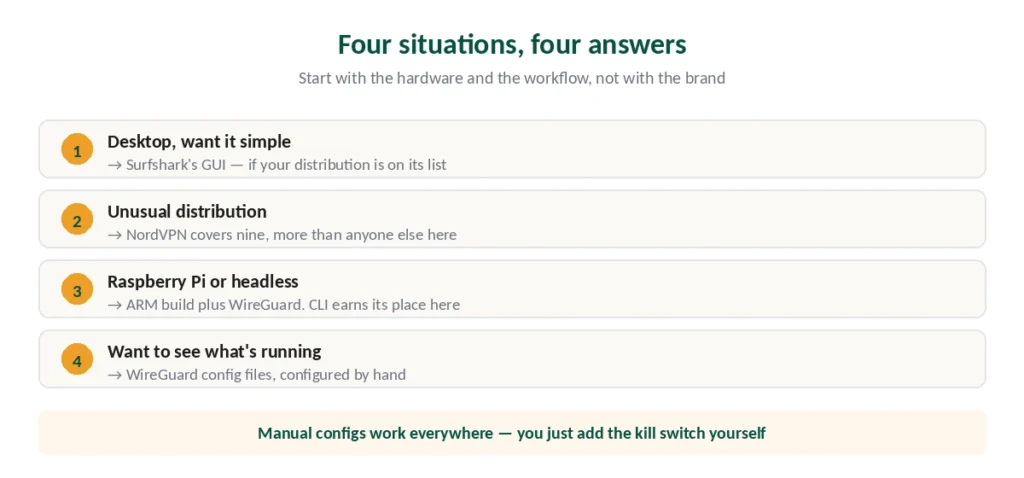
For the widest distribution support: NordVPN, which covers nine named distributions and posted the best speed result in independent benchmark testing. Our guide to Windscribe for Linux covers the desktop app, windscribe-cli and known issues.
Want the friendliest interface? Surfshark, whose new GUI was described in published testing as the most user-friendly of those examined — provided your distribution is on its shorter list. Our PrivadoVPN on Linux page goes into the Premium-only CLI and network manager setup.
For Raspberry Pi: NordVPN, Proton VPN or PIA, all with ARM builds, running WireGuard.
If maximum control is the point: any provider that publishes WireGuard config files, configured manually. You lose the conveniences and gain complete visibility into what’s running. Our guide to ExpressVPN on Ubuntu and Linux covers the GUI app, Network Lock and split tunnelling.
Need to disconnect from the command line? Our Linux guide covers nmcli, wg-quick, systemctl and the NordVPN client.
How We Research
This guide draws on published testing from named sources including Security.org, Comparitech and ProPrivacy, provider documentation on distribution support, and reporting on recent Linux client releases — cross-checked and verified at publication. Linux support changes faster than other platforms, so verify current distribution compatibility on the provider’s own site before subscribing. Our full approach lives on the About Us page.
Linux VPN FAQ
NordVPN has offered both GUI and CLI for a while. Surfshark replaced its command-line-only client with a graphical app covering Ubuntu 20.04 LTS, Debian 11 and Mint 20. ExpressVPN added a GUI supporting Ubuntu 24.04+, Debian 10+, Fedora 30+, Raspberry Pi OS, Mint 20+ and Arch. Proton VPN and Private Internet Access also ship native apps.
No, and many Linux users prefer it. A CLI client uses roughly 5 to 15 MB of RAM against 50 to 150 MB for a GUI, scripts cleanly for automation, and exposes precise control over protocols and routing. It’s the better choice for headless servers, low-spec hardware and scripted workflows.
Import its OpenVPN or WireGuard config files, which nearly every provider publishes. You connect through the generic client or NetworkManager. The trade-off is that generic clients don’t include DNS leak protection or a kill switch by default — you’d add those separately.
It varies widely. NordVPN covers the most — Ubuntu, Debian, Elementary OS, Mint, Fedora, RHEL, CentOS, Qubes OS and openSUSE. Others support two or three. Check the provider’s own documentation rather than trusting a “Linux supported” badge on a marketing page.
Yes. NordVPN, Proton VPN and Private Internet Access all offer ARM builds compatible with Raspberry Pi OS. WireGuard is the protocol to use, since it’s lightweight and efficient on the Pi’s limited hardware. A headless Pi is also where the CLI’s smaller memory footprint genuinely matters.
Native apps generally do — NordVPN enables it with a single command, and most GUI clients expose it as a toggle. Manual OpenVPN or WireGuard configurations do not include one by default, which is a meaningful gap since its absence is silent. Verify your setup rather than assuming.
The Short Version
The terminal is no longer mandatory. Surfshark and ExpressVPN both added graphical clients recently, and NordVPN has offered both for a while.
But CLI isn’t a downgrade. It uses a tenth of the memory, scripts cleanly, and gives you control the GUI abstracts away. Plenty of Linux users choose it on purpose.
Check your distribution before subscribing — support lists vary from nine distributions to two, and marketing pages rarely say which.
And if your provider has no native app, config files work. You just add the kill switch and leak protection yourself. Our page on PureVPN on Linux covers the GUI and command-line apps and stable settings.