
Disclosure: VPNFin is reader-supported. If you buy a VPN through links on this page, we may earn a commission at no extra cost to you. This never affects our ratings — here’s our full disclosure.
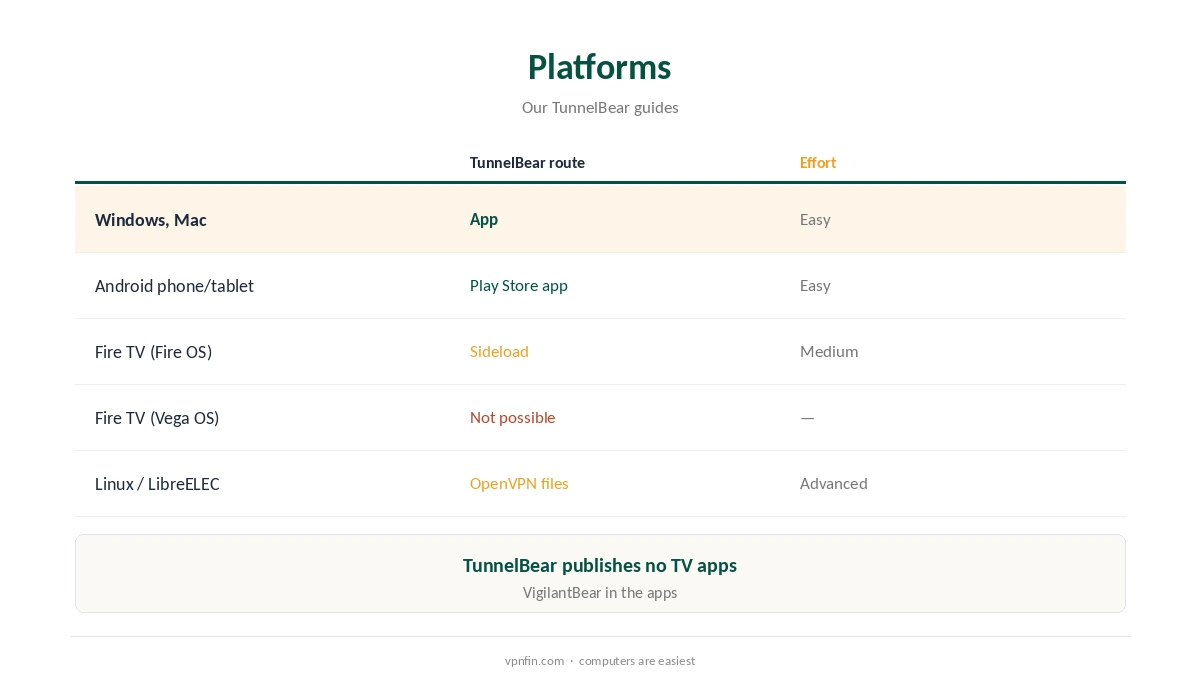
TunnelBear Kodi use works at the device level: Kodi itself has no VPN, so TunnelBear must run on the device Kodi runs on. That is simple on Windows, Mac and Android phones or tablets, where TunnelBear has apps. It is harder on TV boxes: TunnelBear publishes no TV apps, Fire TV needs sideloading on Fire OS models, and Linux-based Kodi systems need TunnelBear’s OpenVPN files.
This guide covers each platform, the setup, the free plan’s limits and legal use.
How a VPN Works With Kodi
Kodi is a media player. A VPN on the same device encrypts everything Kodi sends and receives, including add-on traffic. Connect TunnelBear first, then open Kodi. Our Kodi VPN guide explains the basics.
TunnelBear Kodi by Platform
Windows and Mac users install TunnelBear’s app and run Kodi alongside it. Android phones and tablets use the Play Store app. Fire TV has no TunnelBear app; sideloading works only on Fire OS devices, as our TunnelBear Firestick guide explains. On Linux-based Kodi systems, TunnelBear’s OpenVPN files are the route, as our TunnelBear Linux guide covers.
TunnelBear Kodi Setup
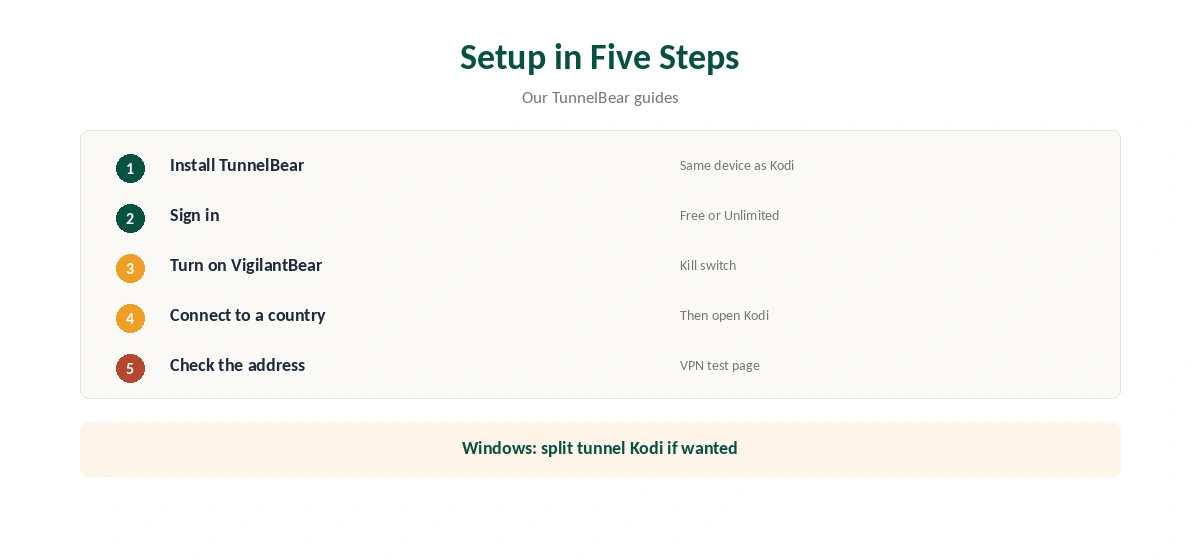
Install TunnelBear on the device, sign in and connect to a country. Turn on VigilantBear, the kill switch, so Kodi stops streaming if the tunnel drops. Then open Kodi and play. On Windows, split tunnelling can route only Kodi through the VPN if you prefer.
Free Plan or Unlimited
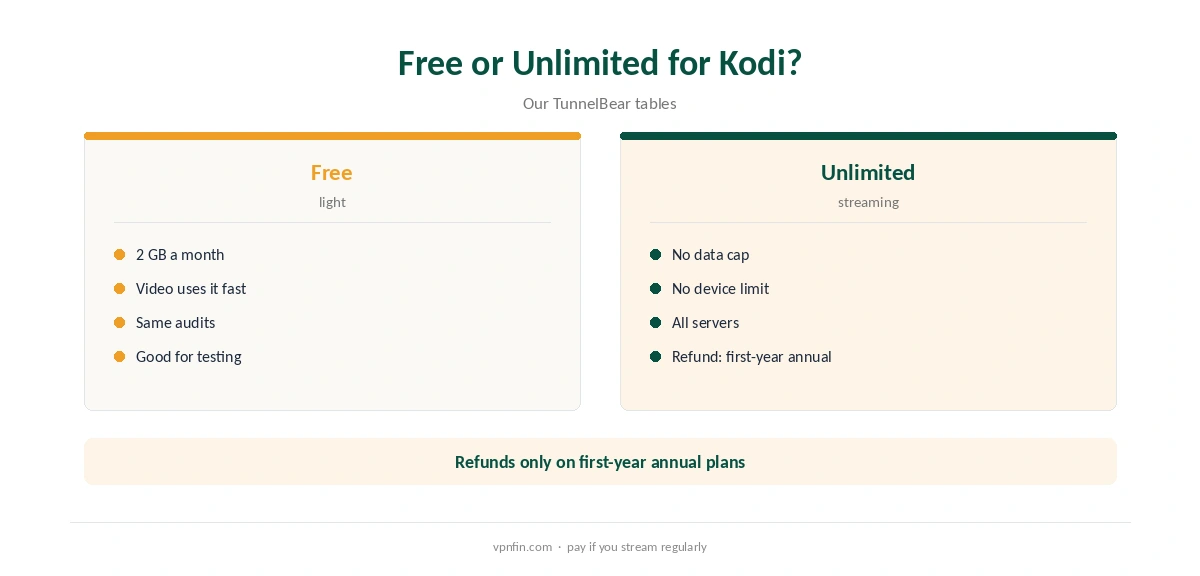
The free plan’s 2 GB a month suits light use, not regular streaming; an hour of HD video can use a large share of it. Unlimited removes the cap and sets no device limit, our tables record. Our TunnelBear pricing guide covers the plans.
TV Boxes Without an App
Many people run Kodi on Android TV boxes or Fire TV sticks. Without a TunnelBear TV app, those need sideloading or a different provider. Our NordVPN Kodi guide covers a provider with TV apps; NordVPN shares an owner, Nord Security, with Surfshark.
Choosing a Server
Pick a nearby country for everyday playback, since distance adds buffering. For content tied to a region, connect to that country before opening the media player, then restart it if a source still shows the wrong region.
Buffering
If streams buffer, try a closer server or switch protocol in the app. Wired Ethernet helps more than most settings on TV boxes. Our guide to VPN speed explains where the overhead comes from.
Several Devices
Unlimited sets no device limit, so a laptop, a phone and a tablet can all run the VPN on one plan. The free plan’s 2 GB is shared across all of them each month.
Better Fits for TV Boxes
If your media centre is an Android TV box or a Vega OS stick, a provider with native TV apps avoids sideloading. Our Surfshark Kodi guide and CyberGhost Kodi guide cover two.
Linux-Based Media Centres
Systems such as LibreELEC run Kodi on Linux. OpenVPN support there usually comes through an add-on or system settings, with TunnelBear’s .ovpn files and your login. Expect to configure it by hand, and test the address afterwards.
Quick Check
Before playing anything, open a browser on the same device and confirm the address on our test page. TV box users can check the media player’s system information page if it shows the external IP.
Is This Route Worth It?
A laptop or Android tablet runs the VPN app and the media player together with no extra effort. TV boxes are harder: the lack of a native app adds sideloading or manual configuration, and the free plan’s cap limits video. If your media centre is a TV box, a provider with TV apps saves time.
Keeping It Updated
Update the VPN app and the media player separately. After either update, reconnect the VPN first, then reopen the player.
Kill Switch Matters
If the tunnel drops mid-stream, the media player keeps loading over your normal connection. VigilantBear prevents that in the apps. Our kill switch guide explains why to keep it on. Manual setups need firewall rules instead.
Android Phones as a Media Centre
Some people cast from an Android phone running the media player to a TV. With the VPN app on the phone, the phone’s traffic goes through the tunnel. Casting that hands playback to the TV itself may bypass it, so check the library on the TV before relying on it for regional content.
Legal Use
A VPN protects your privacy; it does not make unlicensed streams legal. Use Kodi with content and add-ons you have the right to access.
TunnelBear’s Record
TunnelBear has had annual Cure53 audits since 2017 and belongs to McAfee, our tables record. Its free plan gives 2 GB a month, and Unlimited sets no device limit. Our TunnelBear safety guide covers the full picture.
How We Research
This page draws on Holafly on TunnelBear’s platforms, our TunnelBear Firestick, Linux and OpenVPN guides and our TunnelBear tables. We cross-checked these sources against each other, and where they conflict or something can’t be verified, we say so in the text rather than guessing. We checked time-sensitive figures, including prices in US dollars, on 7 October 2026. The main source we relied on is pcWRT’s TunnelBear OpenVPN guide. Our full approach lives on the About Us page.
TunnelBear Kodi FAQ
Yes, when TunnelBear runs on the same device as Kodi.
No; it works at the device level through its apps or files.
Only by sideloading on Fire OS devices; there is no Fire TV app.
For light use; 2 GB a month runs out quickly with video.
VigilantBear in its apps stops traffic if the tunnel drops.
The Verdict
TunnelBear Kodi use is easy on Windows, Mac and Android, and awkward on TV boxes. For a Kodi box, consider a provider with TV apps.