
Disclosure: VPNFin is reader-supported. If you buy a VPN through links on this page, we may earn a commission at no extra cost to you. This never affects our ratings — here’s our full disclosure.
TunnelBear Firestick support does not exist as an app. TunnelBear publishes no app for TVs or consoles, Holafly notes, and we found none in the Amazon Appstore. The workaround is sideloading TunnelBear’s Android app, which works only on Fire TV devices running Android-based Fire OS. Amazon’s newer Vega OS devices block sideloading entirely, Chipp.in reported in April 2026. Our TunnelBear on a Samsung Smart TV page goes into workarounds and better options.
This guide covers which devices allow the workaround, the steps, the limits and providers with native Fire TV apps.
Which Fire TV Devices Allow Sideloading
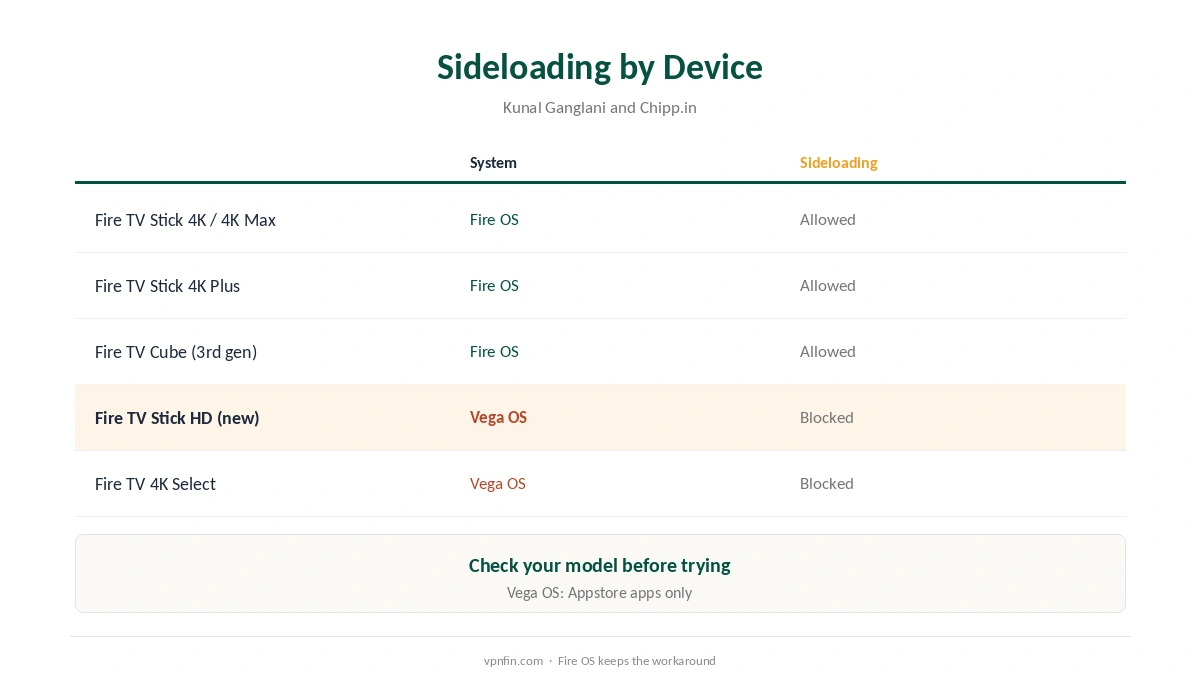
Kunal Ganglani’s 2026 guide lists Fire OS devices that still allow sideloading through Developer Options, including the Fire TV Stick 4K, 4K Max, 4K Plus and the third-generation Fire TV Cube. The newest Fire TV Stick HD and Fire TV 4K Select run Vega OS and accept only Appstore apps, Chipp.in reports. On those, TunnelBear cannot run at all.
TunnelBear Firestick Sideloading
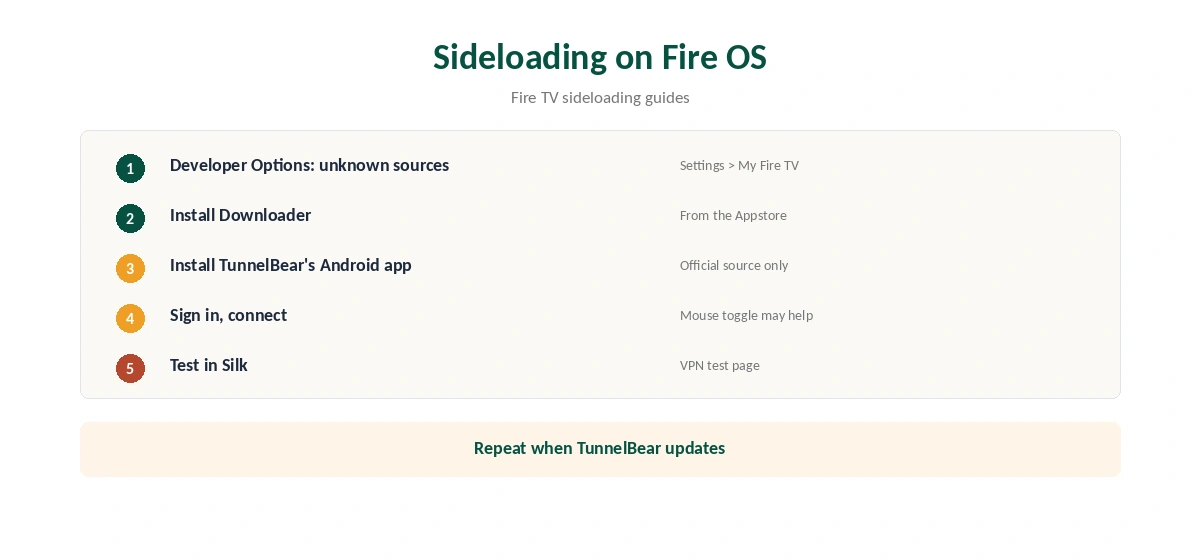
On a Fire OS device, open Settings, My Fire TV, Developer Options, and allow apps from unknown sources. Install the Downloader app from the Appstore, or use an app that transfers installed apps from your Android phone. Install TunnelBear’s Android app, open it, sign in and connect.
Only install TunnelBear from an official source. Avoid APK mirror sites, which can carry modified apps.
What to Expect From a Phone App on a TV
TunnelBear’s Android app is built for touchscreens, so some screens may be awkward with a remote. Sideloading guides suggest a mouse-toggle app for apps not designed for Fire TV. Updates will not arrive through the Appstore either, so repeat the install when TunnelBear updates.
On Android, TunnelBear offers WireGuard and OpenVPN and split tunnelling by app, as our TunnelBear Android guide explains. Whether each works on a Fire TV is not documented, so test what you need.
Providers With Native Fire TV Apps
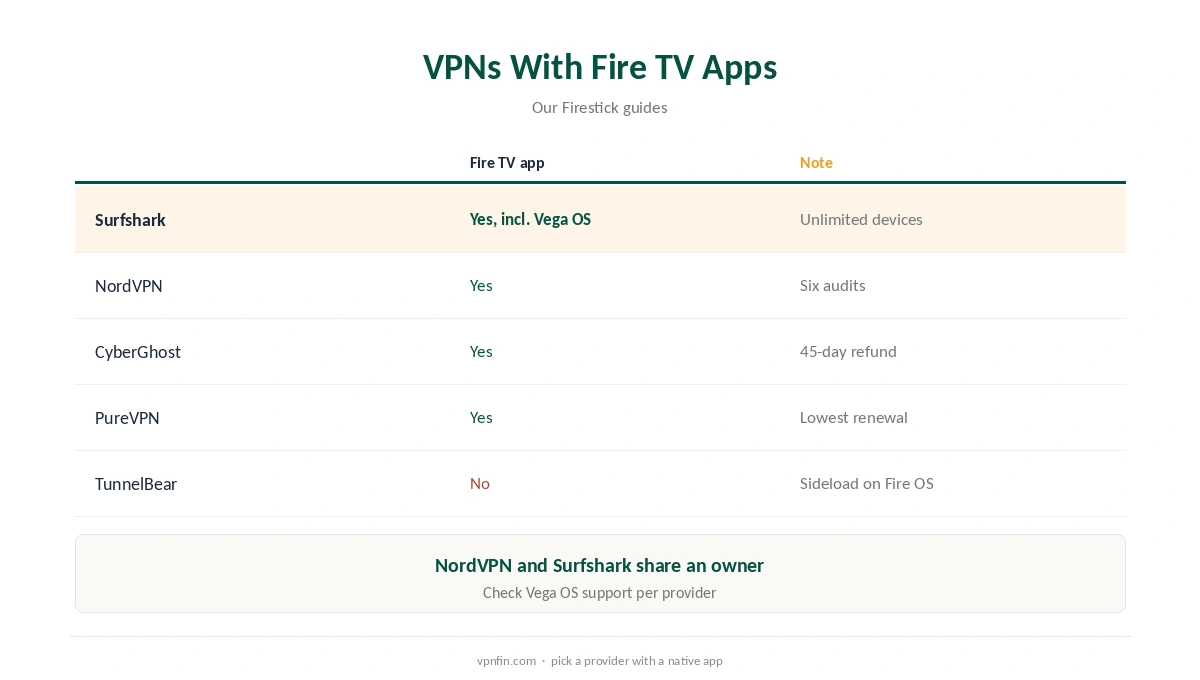
If sideloading sounds like too much, several providers publish Fire TV apps in the Appstore. Our Surfshark Firestick guide covers one with a Vega OS app as well, and our NordVPN Firestick guide covers another; the two share an owner, Nord Security.
Our CyberGhost Firestick guide and PureVPN Firestick guide cover two more.
Other Routes to a Protected Fire TV
A router running a VPN covers every device on the network, Fire TV included, without sideloading. We found no TunnelBear router support, so this route means using a provider that supports routers. Our router setup guide covers the options.
Another route is a Windows PC sharing its VPN connection as a hotspot, which some guides describe for devices without VPN apps. It works for occasional viewing but keeps the PC running.
Is TunnelBear Firestick Sideloading Worth It?
If you already pay for TunnelBear and own a Fire OS stick, sideloading costs nothing extra to try. If you are choosing a VPN for a Fire TV, a provider with a native app is simpler, gets automatic updates and works with the remote. The TunnelBear Firestick route also stops working if you upgrade to a Vega OS device.
Updates and Maintenance
A sideloaded app does not update through the Appstore. Check TunnelBear’s Android app version every month or so, and repeat the install when a new version appears. Fire OS updates can also change Developer Options, so check the unknown-sources setting after major updates.
A Quick Rule
Fire OS stick and already paying for TunnelBear? Try sideloading. Vega OS stick or choosing a new VPN? Pick a provider with a native Fire TV app. Streaming every night? A native app saves time every evening.
TunnelBear Firestick and Streaming
Even when sideloaded, streaming apps may detect the VPN. If an app shows your home library, close it fully, clear its cache in the Fire TV settings and reopen it after connecting. Our Netflix VPN guide explains how services detect VPNs.
Before You Try
Check your model in Settings, My Fire TV, About before attempting a TunnelBear Firestick install. If the device runs Vega OS, stop there, since no workaround exists for it. Choose a provider with a native Fire TV app instead.
Checking It Works
Open the Silk browser on the Fire TV and visit our VPN test page to confirm the address. Then open your streaming app; if it shows your home library, close it fully and reopen it.
The Free Plan on a TV
TunnelBear’s free plan gives 2 GB a month, our tables record, which streaming uses up quickly. Unlimited removes the cap and sets no device limit. Our TunnelBear pricing guide covers the plans.
Related Guides
Our Firestick VPN guide compares providers, and our Firestick troubleshooting guide covers connection problems.
To remove a VPN later, our guide to turning off a VPN on Firestick walks through the steps.
How We Research
This page draws on Holafly on TunnelBear’s platforms, Chipp.in on Vega OS sideloading, Kunal Ganglani’s Fire TV sideloading guide, general Fire TV sideloading guides and our TunnelBear tables. We cross-checked these sources against each other, and where they conflict or something can’t be verified, we say so in the text rather than guessing. We checked time-sensitive figures, including prices in US dollars, on 7 October 2026. The main source we relied on is Chipp.in on Fire TV sideloading. Our full approach lives on the About Us page.
TunnelBear Firestick FAQ
No. TunnelBear publishes no TV apps, and we found none in the Appstore listings.
On Fire OS devices, yes; Vega OS devices block sideloading.
The newest Fire TV Stick HD and Fire TV 4K Select, per Chipp.in.
Possibly not; it is built for touchscreens, so a mouse-toggle app may help.
Surfshark, NordVPN, CyberGhost and PureVPN, among others.
The Verdict
TunnelBear Firestick use relies on sideloading, which only Fire OS devices allow. For a simpler setup, a provider with a native Fire TV app saves effort. Our page on TunnelBear on Kodi covers device-level setup on each platform and its limits.