
Disclosure: VPNFin is reader-supported. If you buy a VPN through links on this page, we may earn a commission at no extra cost to you. This never affects our ratings — here’s our full disclosure.
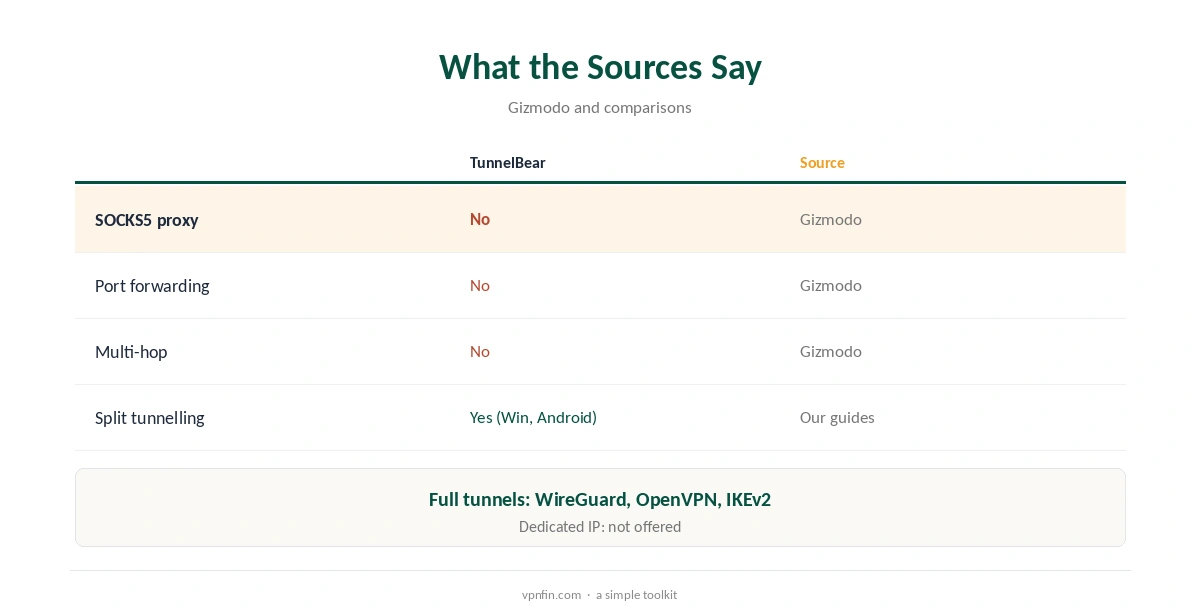
TunnelBear SOCKS5 does not exist. Gizmodo’s 2026 comparison lists no SOCKS5 proxy, no port forwarding, no multi-hop and no dedicated IP among TunnelBear’s features, and a torrent-focused comparison notes TunnelBear sticks to full VPN tunnels. Every connection goes through WireGuard, OpenVPN or IKEv2 instead. Split tunnelling on Windows and Android can cover part of what people want from a proxy.
This guide covers why SOCKS5 matters, the substitutes and providers that include it.
What SOCKS5 Does
A SOCKS5 proxy sends one app’s traffic, usually a torrent client, through another address without encrypting it. It is fast and hides your IP from peers, but your provider can still see the traffic. Our VPN vs proxy guide explains the difference.
The TunnelBear SOCKS5 Substitute: Split Tunnelling
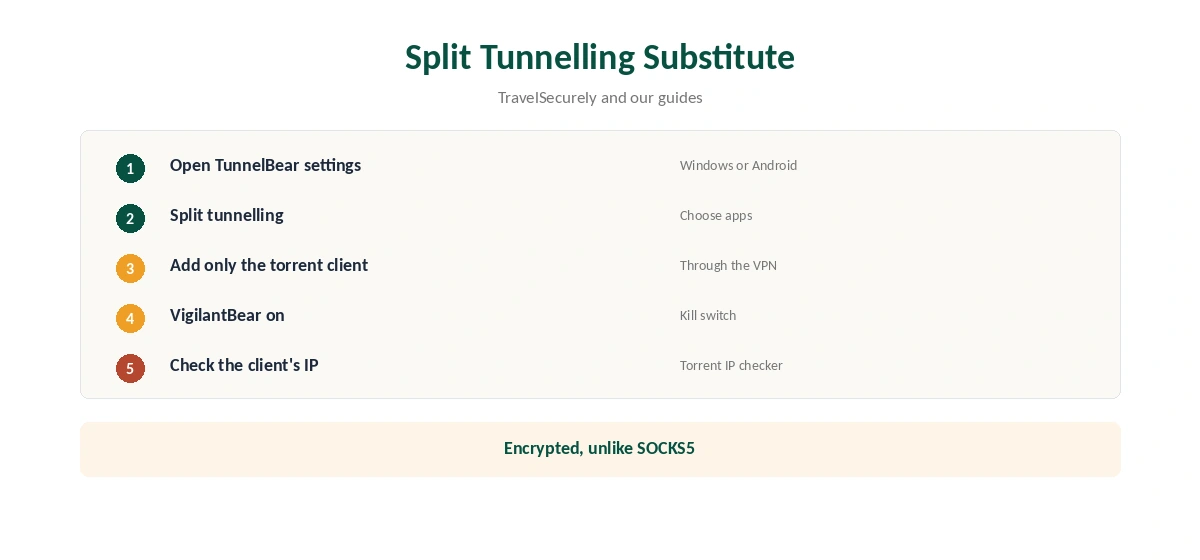
TunnelBear’s split tunnelling, on Windows and Android, lets you choose which apps use the VPN. Sending only your torrent client through TunnelBear mimics a per-app proxy, with encryption added. TravelSecurely used it that way. Our split tunnelling guide explains the setup.
Providers With SOCKS5
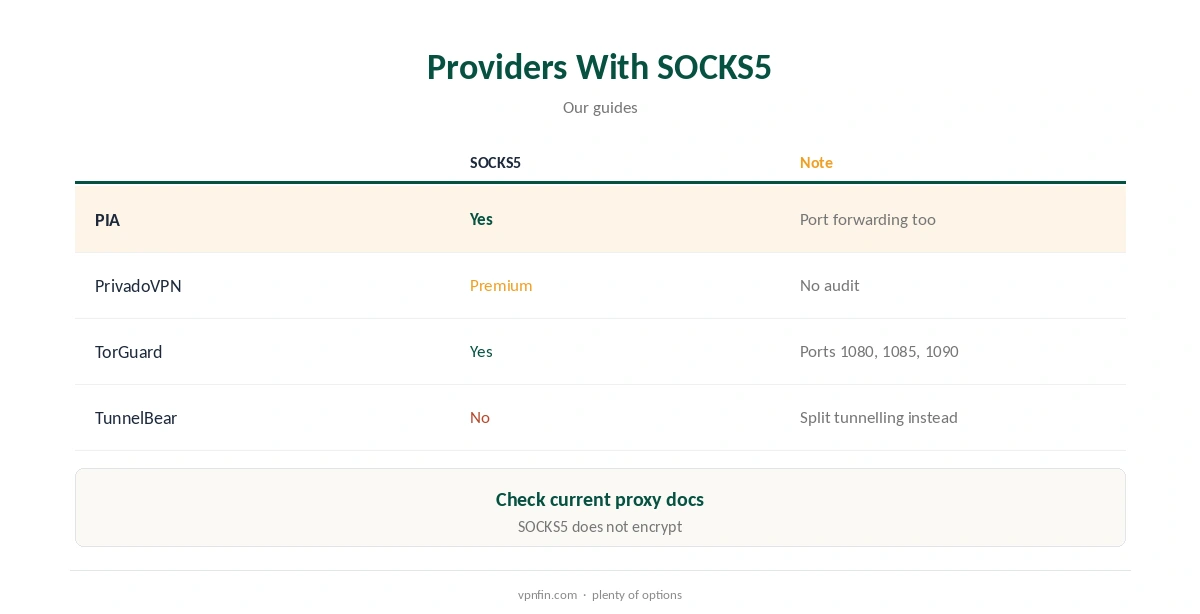
PIA, TorGuard and PrivadoVPN Premium include SOCKS5 proxies, our guides record. Our TorGuard SOCKS5 guide covers one setup, with servers, ports and qBittorrent settings. Check any provider’s current documentation, since proxy offerings change.
GhostBear Is Not a Proxy
GhostBear, TunnelBear’s obfuscation mode, disguises VPN traffic on networks that block VPNs. It is still a full tunnel, not a SOCKS5 proxy, and adds overhead rather than removing it. Our obfuscation guide explains how disguise works.
Browser Extensions
TunnelBear’s browser extensions route only browser traffic, a bit like a proxy for one app. They do not cover torrent clients. Our TunnelBear Chrome guide covers the extension.
Mac and iPhone
Split tunnelling, the closest substitute, is limited to Windows and Android in our guides. On Mac and iPhone, every app uses the tunnel when TunnelBear is on, so per-app routing is not possible there.
A Quick Rule
Want a per-app route on Windows or Android? Use split tunnelling. Need a real TunnelBear SOCKS5 equivalent for a torrent client? It does not exist; use PIA, NordVPN or TorGuard. Fine with a full tunnel? TunnelBear’s kill switch covers it.
Why Some People Want SOCKS5
Torrent users like SOCKS5 because it routes only the torrent client, leaves gaming and video calls on the normal connection, and adds little overhead. Some also chain it behind a VPN for a second exit address. TunnelBear covers the first need with split tunnelling and the second not at all.
Checking Your Torrent IP
Whatever route you use, load a torrent IP checker in the client. It should show a VPN address, not yours. If it shows yours, the split tunnelling list may be wrong.
Testing on the Free Plan
TunnelBear Free’s 2 GB a month is enough to test split tunnelling with a small public torrent before paying for Unlimited. Our TunnelBear pricing guide covers the plans.
Privacy Comparison
A SOCKS5 proxy does not encrypt traffic, so your provider can see torrent activity even if peers cannot see your address. TunnelBear’s full tunnel encrypts it all, which is the stronger privacy choice even without a proxy option.
Several Devices
Unlimited sets no device limit, so a desktop running a torrent client and the family’s phones can share one plan, each using the full tunnel.
Keeping It Updated
After app updates, check that split tunnelling settings stayed the same, since updates can reset lists.
Routers
TunnelBear does not support routers officially, so a router-level proxy is not an option either. Our TunnelBear router guide covers the unofficial route with OpenVPN files.
Quick Check
After setting split tunnelling, open a browser and confirm it shows your normal address while the torrent client shows a TunnelBear one.
Is TunnelBear Right for You Without SOCKS5?
For browsing, public Wi-Fi and light streaming, yes. Its audits and simple apps suit those uses. For heavy torrenting with a per-app proxy, the missing SOCKS5 and port forwarding make other providers a better fit.
Kill Switch
VigilantBear stops traffic if the tunnel drops, which protects a torrent client better than an unencrypted proxy would.
Speed
A full tunnel adds some overhead compared with a proxy. Choosing a nearby country keeps that small for most users.
Do You Need SOCKS5 at All?
For most people, no. A full VPN encrypts everything, and TunnelBear’s kill switch protects torrent clients if the tunnel drops. SOCKS5 matters mainly for heavy torrent users who want a per-app proxy with less overhead.
Torrenting on TunnelBear
Reviewers disagree on whether TunnelBear handles torrents well, as our TunnelBear torrenting guide explains. Without SOCKS5 or port forwarding, it suits occasional downloads at best.
TunnelBear’s Record
TunnelBear has had annual Cure53 audits since 2017 and belongs to McAfee, our tables record. Its free plan gives 2 GB a month, and Unlimited sets no device limit. Our TunnelBear safety guide covers the full picture.
How We Research
This page draws on Gizmodo’s 2026 TunnelBear comparison, a torrent-focused comparison page, TravelSecurely’s TunnelBear review and our provider guides. We cross-checked these sources against each other, and where they conflict or something can’t be verified, we say so in the text rather than guessing. We checked time-sensitive figures, including prices in US dollars, on 7 October 2026. The main source we relied on is Gizmodo’s TunnelBear comparison. Our full approach lives on the About Us page.
TunnelBear SOCKS5 FAQ
No, per Gizmodo’s 2026 comparison.
Split tunnelling on Windows or Android to route only one app.
PIA, TorGuard and PrivadoVPN Premium, among others.
No; it hides your IP without encrypting traffic.
No, per Gizmodo.
The Verdict
TunnelBear SOCKS5 is not on offer. Use split tunnelling for per-app routing, or choose a provider that includes a SOCKS5 proxy if you rely on one.