
Disclosure: VPNFin is reader-supported. If you buy a VPN through links on this page, we may earn a commission at no extra cost to you. This never affects our ratings — here’s our full disclosure.
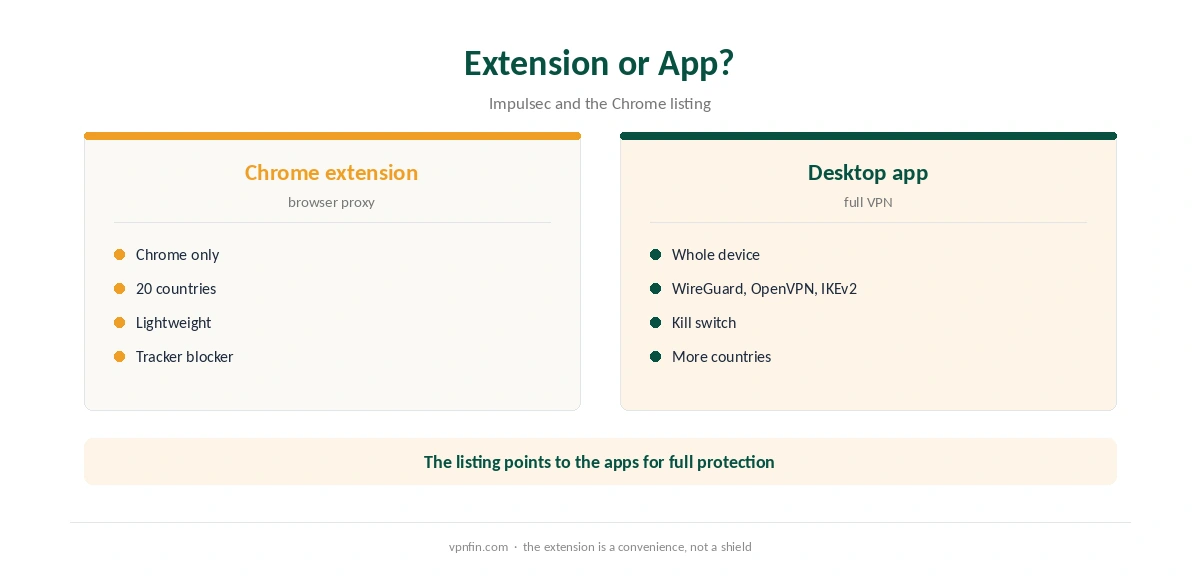
TunnelBear Chrome support comes as a free extension that encrypts your browser traffic through servers in 20 countries, according to its Chrome Web Store listing. It protects Chrome only: the listing itself points to TunnelBear’s apps for Android, iOS, macOS and Windows to encrypt the whole device. Impulsec describes it as a proxy for Chrome rather than a full VPN, and Holafly notes the extensions add tracker and malware blocking.
This guide covers what the extension does, how it differs from the app, the setup and its limits.
What the Extension Does
The Chrome Web Store listing describes a lightweight extension that encrypts all your browsing traffic, reduces tracking by websites, advertisers and internet providers, secures your browser on public Wi-Fi and gets around blocked sites. Version 4.3.0 was current on 30 June 2026, with more than a million users.
Holafly adds that TunnelBear’s browser extensions include a tracker and malware blocker.
Extension or Desktop App?
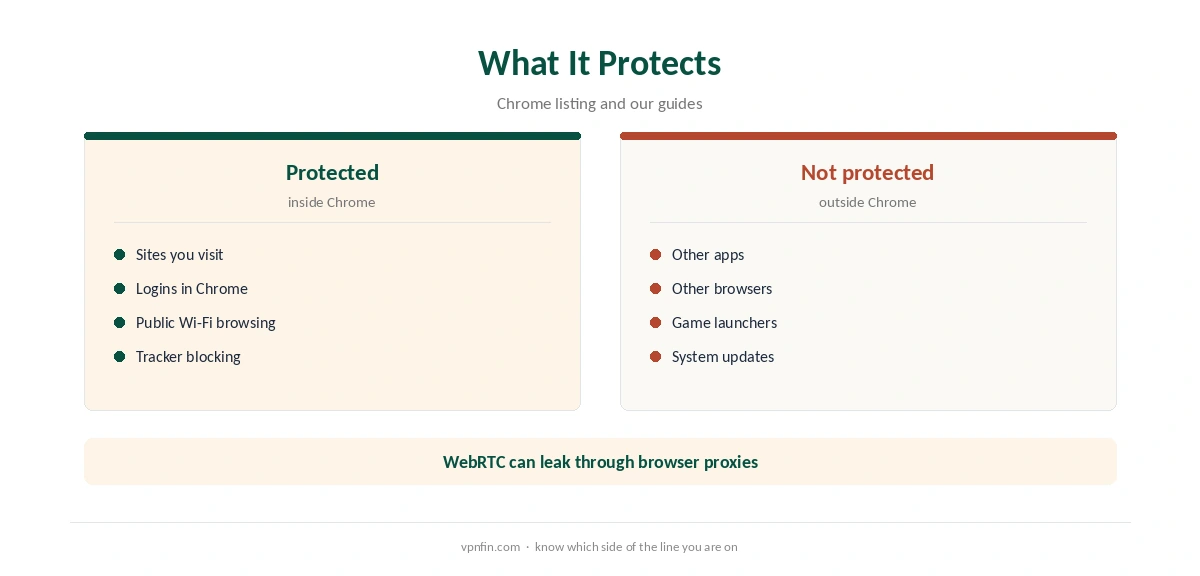
The extension covers Chrome; the app covers every program on the device, including games, email clients and other browsers. Impulsec puts it simply: the extension handles Chrome, the app covers everything else. At launch in 2015, TechCrunch reported the extension used AES-128 encryption against AES-256 in the apps; check TunnelBear’s current documentation for today’s figures.
Our VPN vs proxy guide explains the difference in more detail.
TunnelBear Chrome Setup
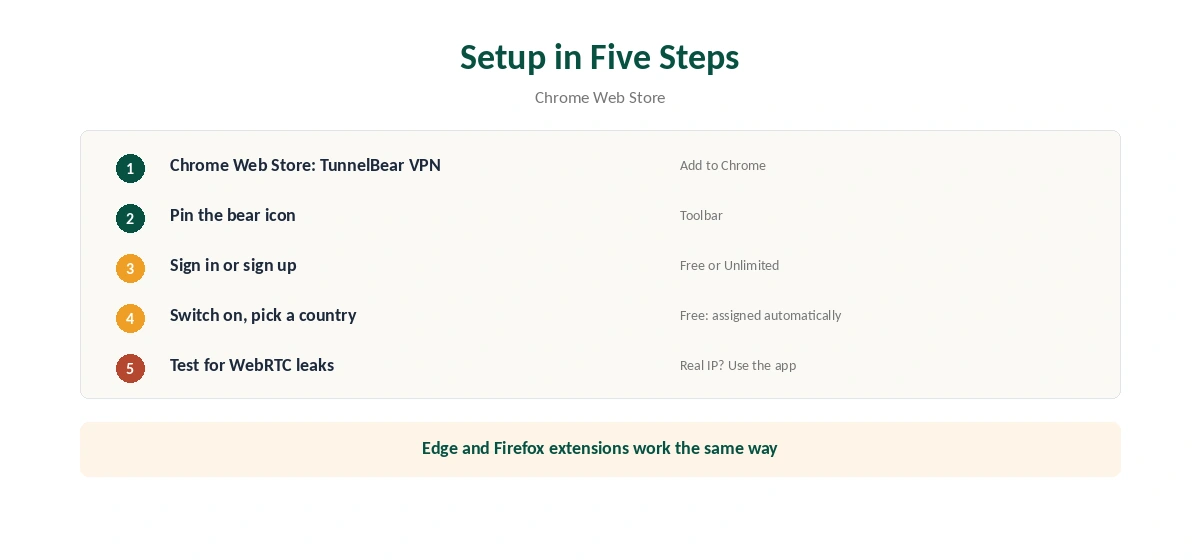
Open the Chrome Web Store, search for TunnelBear VPN, and click Add to Chrome. Pin the bear icon to the toolbar, sign in or create a free account, and switch the extension on. Choose a country if your plan allows it; since early 2026, free accounts get a server assigned automatically, TheBestVPN reports.
Confirm the new address with our VPN test page.
WebRTC and Leaks
Browser proxies can leak your real address through WebRTC, a browser feature for calls. Test with our WebRTC leak guide after connecting, and run our DNS leak guide. If you see your real IP, use the desktop app instead.
Public Wi-Fi
The extension secures browsing on public Wi-Fi, its listing says. Other apps on the same laptop stay unprotected, so for hotel or café networks the full app is the safer choice. Our public Wi-Fi guide explains the risks.
Other Browsers
Tom’s Guide lists TunnelBear extensions for Chrome, Firefox and Edge, with Edge added in December 2024. Each protects only its own browser. Our NordVPN Chrome guide and Surfshark Chrome guide cover rival extensions; NordVPN and Surfshark share an owner, Nord Security.
TunnelBear Chrome Extension on the Free Plan
The extension works with the free plan’s 2 GB a month, shared with TunnelBear’s apps on the same account. Browsing alone uses little data, but video in Chrome eats into it fast. Watch the data counter in the extension, and save the allowance for public Wi-Fi.
Security Record
The listing notes TunnelBear commissioned the industry’s first independent VPN security audit, and our audit table records annual Cure53 audits since 2017. Our VPN audit tracker explains what those audits cover.
Speed
Because the extension routes only browser traffic, Impulsec found speeds stay quick. Downloads in other apps run on your normal connection and do not slow the extension down. Pick the nearest country for everyday browsing, and a distant one only when you need it.
Who Should Use the Extension
The extension suits people who mostly need privacy in Chrome on shared networks, or who want a quick way to check how a site looks from another country. Anyone who needs the whole device protected, or who torrents or games, should install the app. Our TunnelBear free alternatives guide and Proton VPN vs TunnelBear page cover other options.
A Quick Rule
Browsing on café Wi-Fi in Chrome only? The extension is enough. Anything beyond the browser? Install the app.
Keeping It Updated
Chrome updates extensions automatically. If the bear icon misbehaves, check the version on Chrome’s extensions page and restart the browser before reinstalling it. Our guide to TunnelBear on Chromebook covers the Android app against the Chrome extension.
Turning It Off
Click the bear icon and switch the toggle off, or remove the extension from Chrome’s extensions page. Our guide to turning off a VPN in Chrome covers stubborn cases.
What TunnelBear Costs
TheBestVPN lists TunnelBear Unlimited at $3.33 a month on a three-year plan, $4 a month on one year and $9.99 month to month, with no device limit. Vpnprograms notes TunnelBear does not publish its renewal price. Refunds are limited: TunnelBear’s terms offer 30 days only on the first year of an annual plan bought directly, as our TunnelBear refund guide explains.
The free plan gives 2 GB a month, and since early 2026 it assigns your server automatically, TheBestVPN reports. Our TunnelBear free guide covers the limits.
How We Research
This page draws on TunnelBear’s Chrome Web Store listing, Impulsec, Holafly, Tom’s Guide, TechCrunch’s 2015 launch report, TheBestVPN and vpnprograms on pricing, and TunnelBear’s terms of service. We cross-checked these sources against each other, and where they conflict or something can’t be verified, we say so in the text rather than guessing. We checked time-sensitive figures, including prices in US dollars, on 6 October 2026. TunnelBear prices from TheBestVPN; renewal not published, per vpnprograms. The main source we relied on is Tom’s Guide’s TunnelBear review. Our full approach lives on the About Us page.
TunnelBear Chrome FAQ
It works as an encrypted proxy for Chrome; the apps protect the whole device.
20, according to its Chrome Web Store listing.
It works with the free plan’s 2 GB a month, or without limits on Unlimited.
Holafly notes TunnelBear’s extensions include a tracker and malware blocker.
No. Only Chrome traffic goes through the extension.
The Verdict
TunnelBear Chrome support suits quick browser privacy and public Wi-Fi browsing. Test for WebRTC leaks, and use the desktop app when you need the whole device protected. TunnelBear has belonged to McAfee since March 2018.