
Disclosure: VPNFin is reader-supported. If you buy a VPN through links on this page, we may earn a commission at no extra cost to you. This never affects our ratings — here’s our full disclosure.
We sell VPN subscriptions, so start with something inconvenient for us.
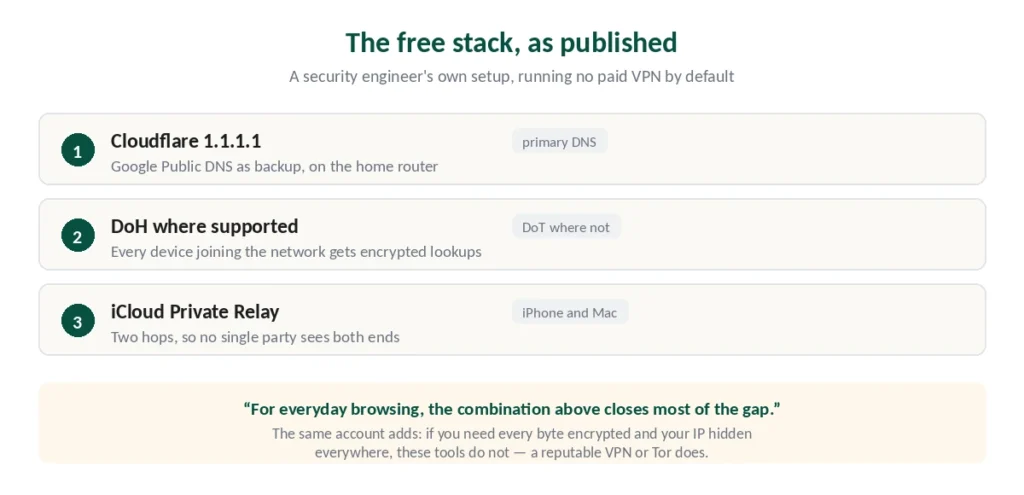
A security engineer published his own setup in June 2026: Cloudflare 1.1.1.1 as primary DNS with Google as backup, encrypted DNS on every device, and iCloud Private Relay on his phone and Mac. No paid VPN by default.
His reasoning is worth reading in full, but the summary is that for ordinary privacy from ISP tracking, that combination closes most of the gap at no cost.
He also says plainly where it stops: if you need every byte encrypted and your IP hidden everywhere, those tools don’t do it — a reputable VPN or Tor does.
This guide covers both halves.
The Short Answer
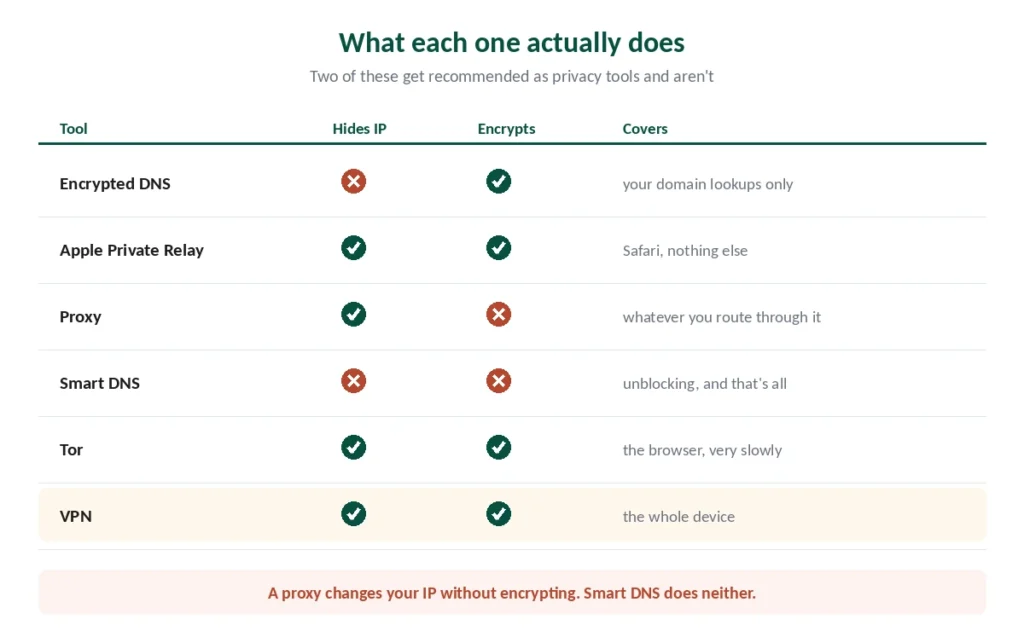
Encrypted DNS is free and underused. It hides which domains you look up from your ISP, on any device, at no cost.
Apple Private Relay covers Safari with a two-hop design nobody outside Apple sees end-to-end.
Proxies and Smart DNS are not privacy tools — one changes your IP without encrypting, the other doesn’t even do that.
And Tor solves a different problem than any of them, covered in our Tor comparison.
Encrypted DNS: The Free One That Works
The most useful thing on this page, and most people have never enabled it.
What it does. Every website you visit starts with a DNS lookup — your device asking “where is this domain?” By default that question travels unencrypted, so your ISP reads it even on HTTPS sites. Encrypted DNS wraps those queries, using DoH or DoT depending on what your device supports.
What it costs. Nothing. Cloudflare’s 1.1.1.1 and Google Public DNS are both free.
What it doesn’t do. Your ISP still sees which IP addresses you connect to, so it can often infer the destination anyway. And it does nothing about your IP address being visible to the sites you visit.
⚠️ On trust: Cloudflare’s privacy claims were examined in a KPMG report in 2025 — a similar arrangement to the audits we look for in every VPN review we publish.
Worth doing regardless of whether you use a VPN. They operate at different layers and don’t conflict.
Apple Private Relay: Better Than It Sounds
Available to iCloud+ subscribers, and structurally more interesting than most people realise.
How it works. Safari traffic passes through two separate relays. Apple sees your IP address but not your destination; the second relay, run by a partner company, sees your destination but not your IP. Neither holds both halves.
Why that matters. It’s the same split-knowledge principle behind double VPN routing — no single party can reconstruct your browsing.
The limits are real: Safari only, nothing else on the device, and availability varies by country.
The practical setup described in that published account: Private Relay for Safari, encrypted DNS for everything else.
What Proxies and Smart DNS Actually Do
Both get recommended as VPN alternatives. Neither is a privacy tool, and it’s worth being blunt about why.
A proxy routes your traffic through another server, changing the IP address websites see. It does not encrypt anything. Your ISP reads your traffic exactly as before, and so does anyone on the network you’re using. Free proxy lists exist; paid ones run $5–10 a month for better reliability.
Smart DNS redirects only your DNS queries so services think you’re elsewhere. It neither hides your IP nor encrypts your traffic. It exists purely for unblocking, which it does quickly because there’s no encryption overhead.
Where each genuinely fits: a proxy for a quick IP change on a task where privacy doesn’t matter, Smart DNS for streaming on devices that can’t run VPN software — our Roku guide covers that case.
⚠️ Neither belongs in a privacy discussion. Published analysis is consistent on this: proxies provide weaker protection than a VPN, Smart DNS provides none.
The Technical Options
Two more, for people who’d enjoy them.
SSH tunnelling creates an encrypted tunnel to a server you control. Strong encryption, good for port forwarding, and free if you already have a server. The trade-offs: it needs technical knowledge, a single hop limits anonymity, and it isn’t practical for everyday browsing. Building your own VPN server on a Raspberry Pi has the same shape: full control, and no privacy from the provider whose line it runs on.
Shadowsocks is an obfuscated proxy built for censorship circumvention — fast, and harder to detect than standard VPN protocols. Relevant in the countries covered in our legality guide, less so elsewhere.
Where the Alternatives Stop
The honest boundary, stated by the same engineer who chooses not to run a VPN.
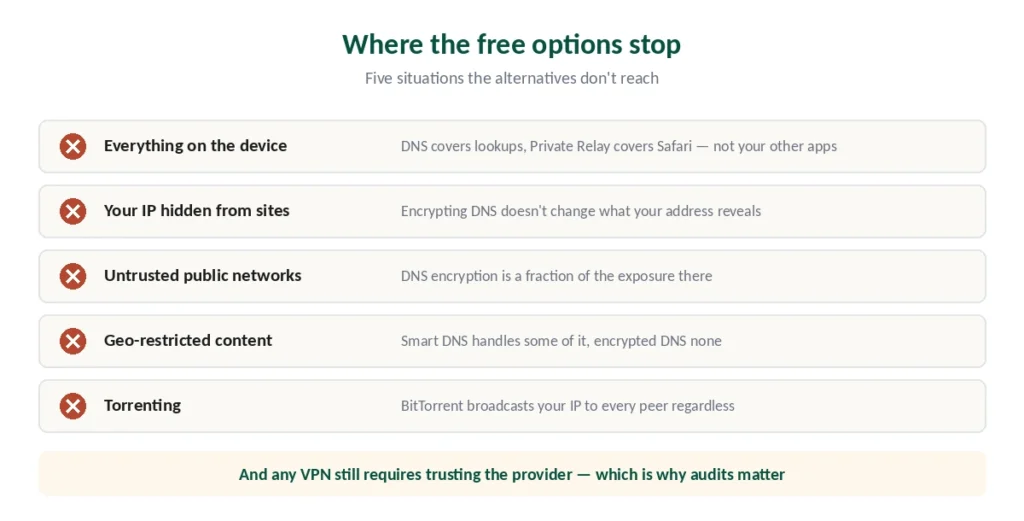
Everything on your device, not just the browser. Encrypted DNS protects lookups; Private Relay protects Safari. Neither covers your other apps, background services or system connections.
Your IP address hidden from the sites you visit. DNS encryption doesn’t change what your IP reveals. Only a VPN, proxy or Tor does.
Public Wi-Fi in full. On an untrusted network, encrypting DNS is a fraction of the exposure — our guide on whether you need a VPN covers what the actual risks are in 2026.
Geo-restricted content. Smart DNS handles some of it; encrypted DNS handles none.
Torrenting. BitTorrent broadcasts your IP to every peer, and no DNS setting changes that.
⚠️ One caveat that cuts our way and theirs: any VPN still requires trusting the provider not to log. That’s why the audit record matters more than the marketing, and why we examine it in every review.
What We’d Actually Suggest
Enable encrypted DNS today, whatever else you decide. It’s free, takes five minutes, and improves your position regardless.
If you’re in the Apple ecosystem and use Safari, turn on Private Relay too. The combination covers ordinary browsing privacy well.
Add a VPN when your situation includes public networks, torrenting, geo-restricted content, or wanting all traffic covered rather than some of it.
And if you’re facing censorship, published analysis points to Tor or Shadowsocks rather than a standard VPN — different problem, different tool. Our guide to CyberGhost alternatives covers seven providers matched to your reason.
Start simple, add complexity when you need it. That’s the advice from the engineer whose setup we opened with, and it’s better than anything we could sell you. For seven providers matched to your reason, see our page on Proton VPN alternatives.
How We Research
This guide draws on published technical analysis from named sources including Security Boulevard, TechLasi and FreeVPNDownload, alongside documentation from Apple and Cloudflare and our own full reviews of the providers we rank — cross-checked and verified at publication. The engineer’s setup described at the start is from a June 2026 published account, quoted because it argues against buying what we sell. Several other sources carry commercial interests in VPN services. Our full approach lives on the About Us page.
VPN Alternatives FAQ
Encrypted DNS, using Cloudflare’s 1.1.1.1 or Google Public DNS. It hides which domains you look up from your ISP, works on any device, costs nothing, and takes about five minutes to enable. It doesn’t hide your IP address or encrypt your traffic, but it closes a gap most people don’t know is open.
No, and the difference is fundamental. A proxy changes the IP address websites see but does not encrypt anything — your ISP reads your traffic exactly as before, as does anyone on the network you’re using. Proxies suit quick IP changes on tasks where privacy isn’t the point.
No. Smart DNS redirects your DNS queries so services think you’re in a different country. It neither hides your IP address nor encrypts your traffic. Its only purpose is unblocking geo-restricted content, which it does quickly because there’s no encryption overhead to slow it down.
An iCloud+ feature that routes Safari traffic through two separate relays. Apple sees your IP but not your destination; a partner company sees your destination but not your IP. Neither holds both. It’s genuinely useful, but it only covers Safari — nothing else on the device.
Yes, and they don’t conflict. They operate at different layers: encrypted DNS protects your domain lookups, a VPN encrypts all traffic and changes your IP. Most VPN providers run their own DNS servers and route queries through the tunnel automatically, which achieves a similar result.
When you need everything on the device covered rather than just the browser, your IP hidden from the sites you visit, protection on untrusted public networks, access to geo-restricted content, or torrenting. Published analysis is consistent that a reputable VPN handles those cases and the free alternatives don’t.
The Short Version
Encrypted DNS is free and most people haven’t enabled it. It hides your domain lookups from your ISP on any device, and it’s worth doing whether or not you also use a VPN.
Apple Private Relay covers Safari with a split-trust design where no single party sees both your identity and your destination. Our page on Surfshark alternatives covers seven providers matched to the usual reasons for leaving.
Proxies and Smart DNS are not privacy tools. One changes your IP without encrypting; the other does neither. We also have a separate guide to PureVPN alternatives.
The boundary is clear: if you need everything covered rather than some of it, an IP hidden from sites, or protection on public networks, the alternatives don’t reach. If you don’t, they might be all you need. Our page on NordVPN on Chromebook covers the Android app versus the browser extension.