
Disclosure: VPNFin is reader-supported. If you buy a VPN through links on this page, we may earn a commission at no extra cost to you. This never affects our ratings — here’s our full disclosure.
We make money when people buy VPNs through this site. So it is worth saying plainly: a lot of people asking this question do not need one, and the argument they have been sold is roughly a decade out of date.
The classic pitch — without a VPN, anyone in the coffee shop can steal your banking password — was accurate in 2012. It is not accurate now. Over 95% of web traffic uses HTTPS, which encrypts the connection between your browser and the site regardless of what network you are on. Modern banking apps are built specifically to resist hostile networks.
That does not make VPNs useless. It means the real reasons to want one are different from the advertised ones, and this guide covers both. If you are not yet sure what a VPN actually does, start there and come back.
The Short Answer
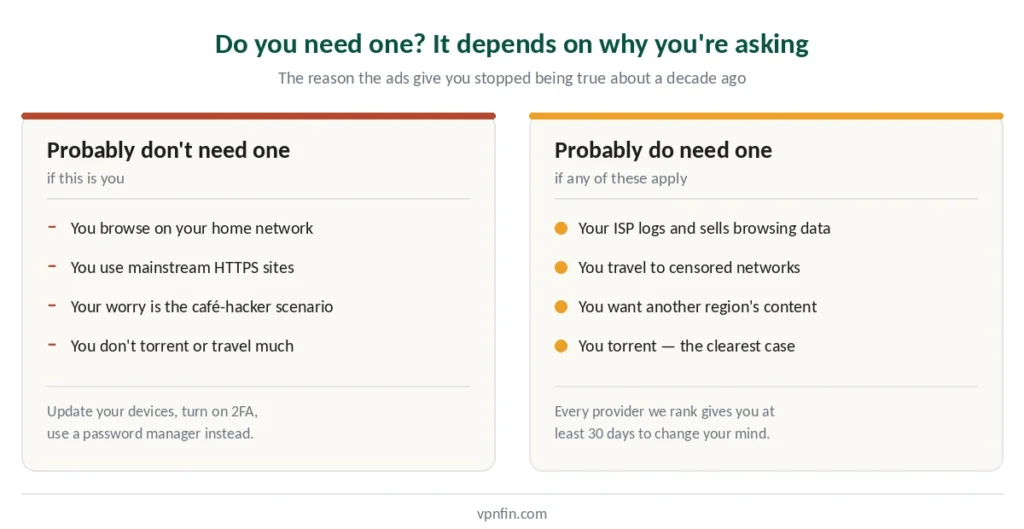
You probably don’t need one if you browse on your home network, use HTTPS sites, and are mainly worried about hackers stealing passwords in cafés. That threat has largely been engineered away.
You probably do need one if you want to stop your internet provider building a profile of everything you visit, you travel to countries with censorship, you watch content from another region, or you torrent. Cheaper airfares are not on that list, and the evidence on flight prices mostly points the other way.
You definitely need one if you handle sensitive material where the network itself is untrusted, or where being identified carries real consequences.
What Changed Since the Ads Were Written
A decade ago the coffee-shop warning was simple and correct: traffic was unencrypted, and anyone on the same network could read it.
Then HTTPS became the default. Today it covers over 95% of web traffic, encrypting the content of your connection end-to-end. The dramatic man-in-the-middle demonstrations from old conference talks no longer work the way they used to, and phones now refuse unsigned Wi-Fi connections.
The VPN industry has not updated its marketing to match. That is the honest state of play, and it is why we would rather tell you what still matters.
What Still Matters on Public Wi-Fi
Four categories survived the encryption shift, and none of them require breaking HTTPS.
Metadata. This is the most underestimated risk and the one HTTPS did least to address. A passive observer on the same network can still see which domains your device queries, which IP addresses you connect to, and the timing and size of your connections. Streaming video looks different from loading a page; a voice call has a distinct signature. What you are doing can be inferred without reading a single byte of content.
Evil twin networks. An attacker sets up a hotspot named “Starbucks Free WiFi” and waits. Once you connect, all your traffic flows through their device.
Captive portal phishing. The page that asks you to accept terms or log in with a room number is a natural place to harvest credentials, and it appears before any encryption applies.
DNS hijacking. Even when the site itself is encrypted, an attacker controlling DNS can redirect you to a convincing fake.
A VPN addresses all four, because it encrypts everything before it leaves your device — including the DNS queries and the metadata. If your VPN is having trouble on those networks specifically, that’s a known pattern with a known fix.
Three Things That Matter More Than a VPN
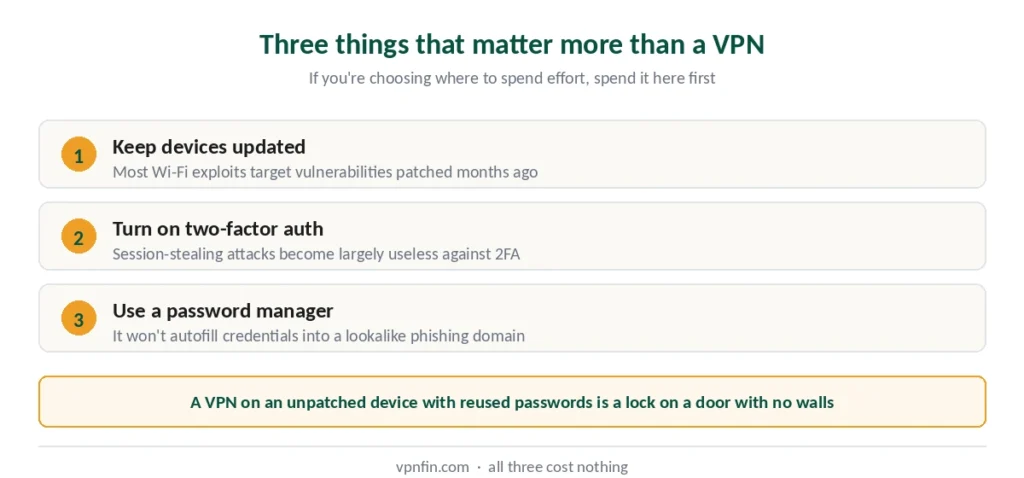
If you are choosing where to spend effort, spend it here first.
Keep your operating system and browser updated. Most Wi-Fi exploits target known vulnerabilities that were patched months ago. This matters more than a VPN and costs nothing.
Turn on two-factor authentication. Session-stealing attacks become largely useless against accounts that require a second factor.
Use a password manager. It protects against phishing even on a compromised network, because it will not autofill credentials into a lookalike domain.
A VPN on an unpatched device with reused passwords is a lock on a door with no walls.
The Reasons That Actually Hold Up in 2026
Four situations where a VPN earns its cost.
Your ISP is watching. In many countries internet providers can log and monetise browsing history. HTTPS hides the content of pages; it does not hide which sites you visited. A VPN moves that visibility from your ISP to your VPN provider — which is why audited no-logs policies matter, and why we examine audit records in every review we publish. In Australia it’s a legal requirement, not a commercial choice — two years, by statute.
Someone wants your identity documents. This is the newest reason and the one that arrived without warning. UK age-verification duties from July 2025 pushed millions of adults to hand a passport or a facial scan to third-party verifiers, and a meaningful share preferred not to — what the law requires, and of whom. It is a privacy decision rather than a legal one, and it was always lawful to make it.
The same thing happened across twenty-seven US states, and the numbers are larger. Florida alone saw VPN demand rise around 1,150% when its law took effect — none of which was ever unlawful, whatever the coverage implied.
You travel to censored networks. Some countries block services at network level. This is the use case where obfuscation matters, and our legality guide covers where VPNs are restricted before you arrive.
You want content from another region. Streaming libraries differ by country, and this is a terms-of-service matter rather than a legal one — our streaming guide covers which providers open the most libraries.
You torrent. BitTorrent exposes your IP address to every peer in the swarm. This is the least ambiguous case on the list, and our torrenting guide covers what to look for.
You’re targeted by DDoS attacks. In games where opponents can see your IP, a flood of junk traffic knocks you offline mid-match. Hiding your home address prevents it — our gaming guide covers why that, rather than ping, is the real case for gamers.
What a VPN Does Not Do
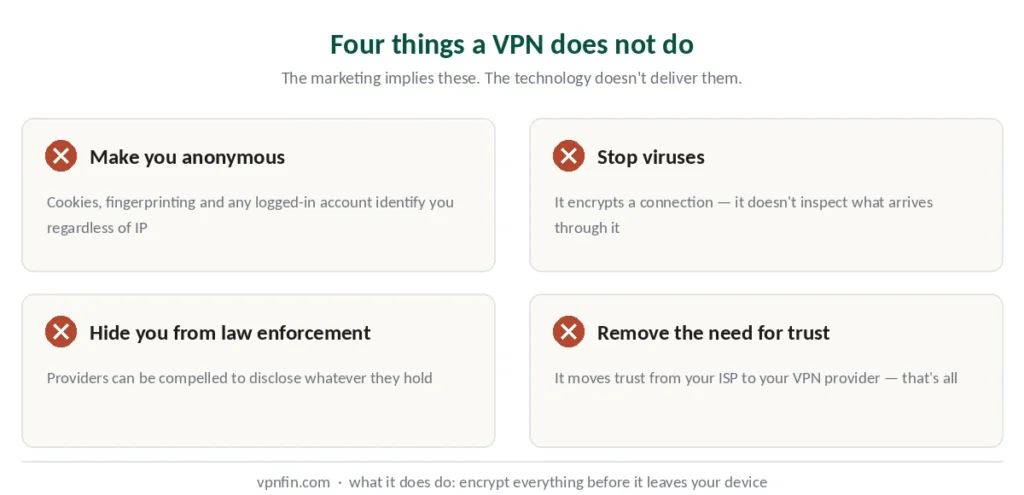
Four things the marketing implies and the technology does not deliver.
It does not make you anonymous. Cookies, browser fingerprinting and logged-in accounts identify you regardless of your IP address. If you check your email, you have identified yourself. Stronger setups exist — double VPN and Onion over VPN — but they solve a problem most people don’t have.
It does not stop viruses. A VPN encrypts a connection. It does not inspect what arrives through it. Some providers bundle malware blocking as a separate feature, which is not the VPN doing the work. Precisely who sees what is worth understanding before you buy.
It does not hide you from law enforcement. Providers can be compelled to disclose whatever they hold. The protection is that a genuinely audited no-logs provider holds very little. If anonymity rather than privacy is what you need, that’s Tor’s territory, not a VPN’s.
It does not remove trust — it moves it. You stop trusting your ISP and start trusting your VPN provider. That is a real improvement only if the provider deserves it — whether that trust is safe to give is the question a separate page answers, with the incidents that decided it. There’s a free middle ground worth enabling either way.
So, Do You Need One?
Skip it if you are on your home network, you visit mainstream HTTPS sites, and your worry is the 2012 café-hacker scenario. Update your devices, turn on 2FA, use a password manager. That combination beats a VPN for the threat you were actually worried about.
Get one if you use public Wi-Fi regularly and dislike the metadata exposure, your ISP monetises browsing data, you travel to restricted networks, you want regional content, or you torrent.
And if you are unsure, every provider we rank offers at least a 30-day refund window — our free trial guide covers which ones let you test without a payment card at all. Buy, use it for a month, and decide from experience rather than from advertising.
How We Research
This guide draws on published security analysis from named sources including SpeedTestHQ, Windscribe’s own research and independent commentary, alongside our full reviews of the providers we rank — cross-checked and verified at publication. We do not run our own network tests. Where the industry’s standard marketing conflicts with current evidence, as it does on public Wi-Fi risk, we report the evidence. Our full approach lives on the About Us page.
VPN Necessity FAQ
Less than the advertising suggests. Over 95% of web traffic uses HTTPS, which encrypts content end-to-end regardless of network, and modern banking apps are built to resist hostile networks. The classic password-sniffing attack was largely engineered away. What remains: evil twin networks, captive portal phishing, DNS hijacking, and metadata exposure.
Only if your internet provider’s visibility into your browsing bothers you. HTTPS hides what is on the pages you visit; it does not hide which sites you visited, and in many countries ISPs can log and monetise that. If that is not a concern for you, a home VPN adds little.
No. Cookies, browser fingerprinting and any account you log into identify you regardless of IP address. A VPN changes which network you appear to be on — it does not erase your identity. Anyone claiming full anonymity from a VPN alone is overselling.
They solve different problems. HTTPS encrypts the content between your browser and a site. A VPN encrypts everything leaving your device, including DNS queries and the metadata that reveals which services you are using. On a hostile network, that difference matters. On a trusted one, less so.
Three things, in order: keep your operating system and browser updated, since most Wi-Fi exploits target already-patched vulnerabilities; enable two-factor authentication, which defeats session-stealing; and use a password manager, which resists phishing by refusing to autofill on lookalike domains.
No. A VPN encrypts a connection; it does not inspect what travels through it. Some providers bundle malware blocking as a separate product feature, but that is antivirus functionality sold alongside a VPN rather than something the VPN itself does.
The Honest Version
We would sell more subscriptions by telling you that public Wi-Fi is a minefield and only a VPN stands between you and disaster. That was true once. It is mostly not true now, and pretending otherwise would make everything else on this site less believable.
The real reasons to use a VPN in 2026 are quieter than the advertised ones: metadata privacy, ISP visibility, censorship, region-locked content, and torrenting. If none of those apply to you, spend the money on a password manager instead. And if paying is the obstacle rather than the need, three free options are safe — with limits worth knowing first.
If some of them do, our current top 5 covers which providers we rank and why.