
Disclosure: VPNFin is reader-supported. If you buy a VPN through links on this page, we may earn a commission at no extra cost to you. This never affects our ratings — here’s our full disclosure.
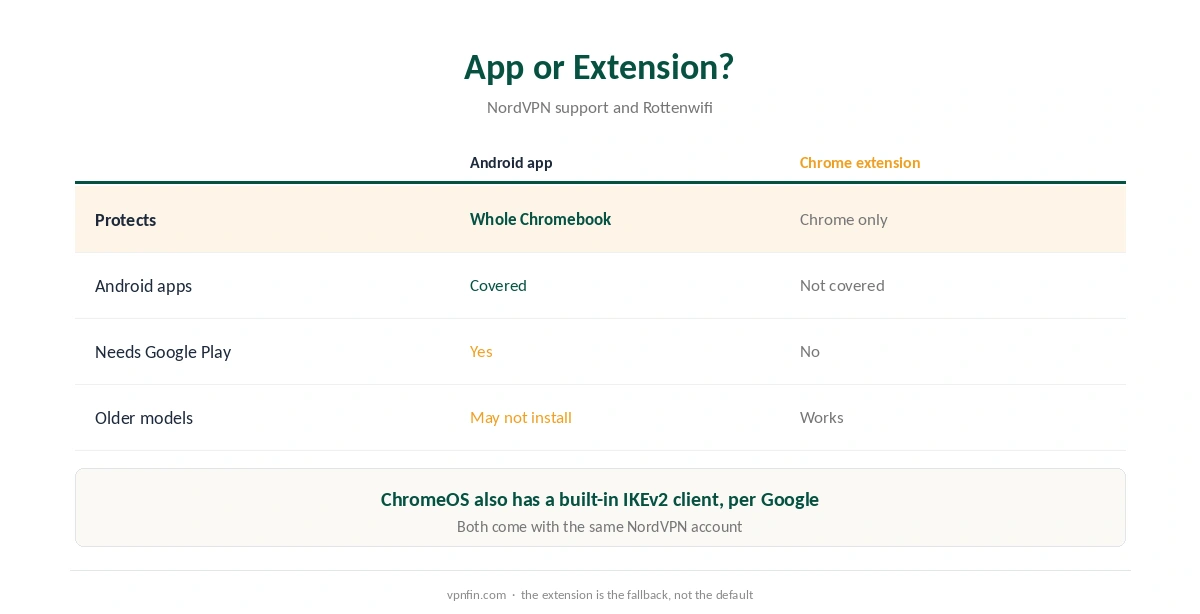
NordVPN for Chromebook comes in two main forms, and they protect very different things. NordVPN’s support article recommends the Android app from Google Play, which covers the whole device. The Chrome extension, by contrast, protects only the browser. Some older Chromebooks cannot run the Android app at all.
Android App or Chrome Extension?
NordVPN’s article states it plainly: the Android app protects your entire device, while the extension’s security is limited to Chrome. Rottenwifi adds a detail: the extension does not protect Android apps running on the Chromebook either.
So use the Android app where you can, and the extension only on models without Google Play. Our NordVPN Chrome guide covers the extension in detail.
How to Install NordVPN for Chromebook
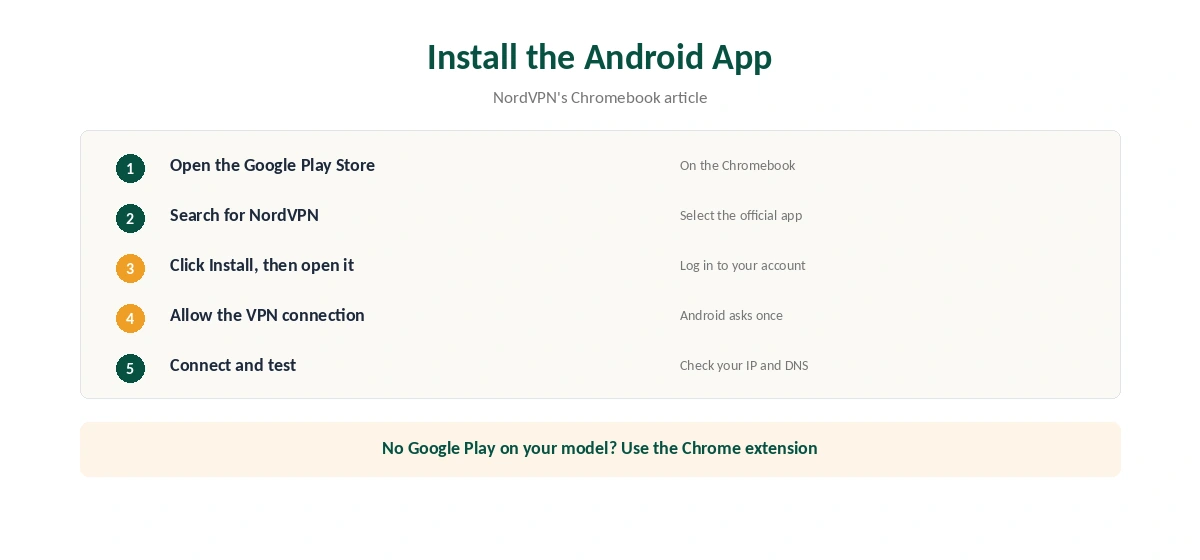
The steps come from NordVPN’s support. Open the Google Play Store on the Chromebook and search for NordVPN. Select the app and click Install. When it finishes, open the app and log in.
Android then asks to allow a VPN connection; accept it. After that, pick a server or press Quick connect. Confirm the result on our VPN test page.
NordVPN for Chromebook on Older Models
NordVPN warns that some older models do not support its Android app. On those, the Chrome extension is the practical option, with the browser-only limit. ChromeOS also has a built-in VPN client for IKEv2, according to Google’s help pages, under Settings, Network, Add connection.
Our Chromebook VPN guide compares other providers, and our WebRTC guide explains why the extension blocks browser leaks.
School and Work Chromebooks
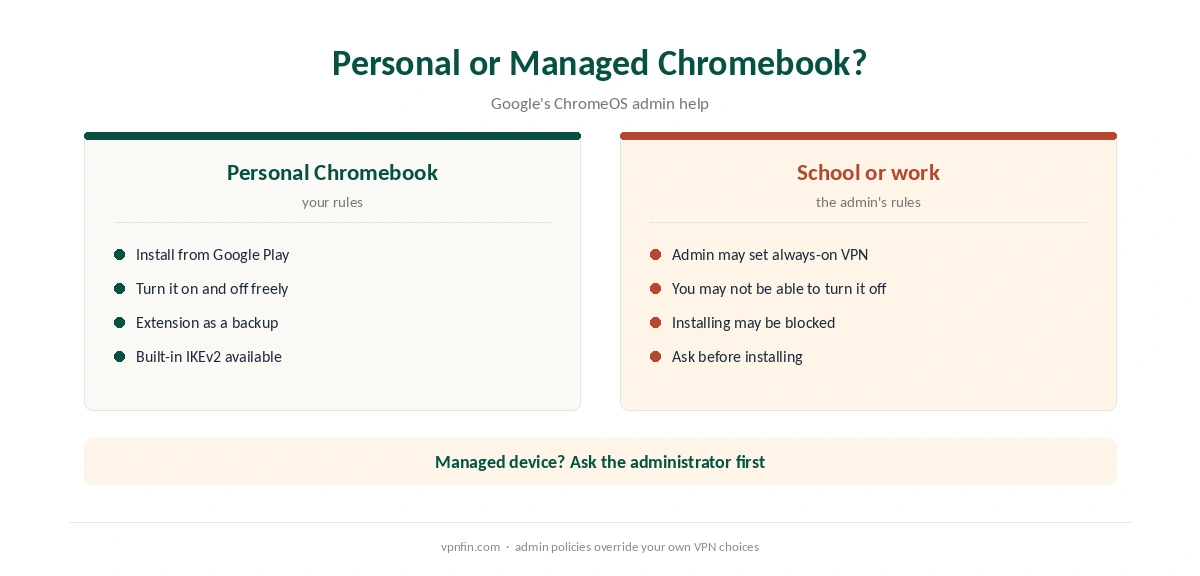
Managed Chromebooks follow the administrator’s rules. Google’s admin help shows that an administrator can set an Android VPN app as always on, and can stop users from turning it off. On a school or work device, ask the administrator before installing NordVPN for Chromebook use.
Turning It Off and Fixing Problems
To switch the VPN off, our Chromebook VPN off guide covers the app, the extension and the system profile. If the app will not connect, our NordVPN not connecting guide lists the Android fixes.
For drops, see our disconnection guide. Battery saving on Android applies to Chromebooks running the Android app too. NordVPN belongs to Nord Security, which also owns Surfshark.
Testing NordVPN for Chromebook
The Android app on a Chromebook behaves like the phone app, so Android fixes apply. Our Android VPN troubleshooting page covers them, and our split tunnelling guide explains the app’s per-app option.
Before paying for a long plan, our NordVPN trial guide and refund guide explain how to test it. If you also browse in Firefox, our NordVPN Firefox guide covers that add-on. Both routes use the same account.
Linux Apps on a Chromebook
Many Chromebooks can run Linux apps in a separate container. Whether those apps use the Android app’s tunnel depends on the setup. Test any Linux tool you rely on with an IP check from inside the container.
If a Linux app ignores the tunnel, a router running NordVPN covers it instead. NordVPN’s Linux app is another option inside the container, as our NordVPN Linux guide explains.
Older Chromebooks Without Google Play
Older models without Google Play cannot run the Android app. The browser extension covers Chrome, and ChromeOS includes a built-in IKEv2 client, according to Google. A manual IKEv2 profile protects the whole device, as our NordVPN IKEv2 guide explains.
School and Work Chromebooks
Managed Chromebooks follow the administrator’s rules. Google’s admin help shows that administrators can set or block VPN apps. Ask before installing anything on a school or work device, and follow the organisation’s policy.
Testing and Battery
After connecting the Android app, check your IP in Chrome with our VPN test page. Then open an Android app that shows location to confirm Android traffic uses the tunnel too.
A VPN adds some processing work, which can shorten battery life slightly. NordLynx is the lighter protocol, so keep it as the default on battery. If the VPN drops when the lid closes, check the battery settings for the NordVPN app.
Extension Limits
The NordVPN browser extension is a proxy for Chrome only. It has no kill switch, Gizmodo notes, and it does not cover Android apps or system traffic. It suits quick location changes in the browser, not full protection.
Each extension counts as one of your 10 devices, so a family sharing a Chromebook may prefer the Android app, which covers every user profile that runs it.
For most Chromebook owners, the Android app is the right default. It protects everything the Chromebook does, and the extension remains handy for quick browser-only changes. Test it once after every ChromeOS update. Our guide to CyberGhost on Chromebook covers the Android app, the free extension and what each covers.
How We Research
This page draws on NordVPN’s Chromebook article, Google’s ChromeOS and admin help pages, and Rottenwifi’s guide. We cross-checked these sources against each other, and where they conflict or something can’t be verified, we say so in the text rather than guessing. We read every source on 5 October 2026. The main source we relied on is NordVPN’s Chromebook article. Our full approach lives on the About Us page.
NordVPN on Chromebook FAQ
The Android app from Google Play, which protects the whole device, according to NordVPN’s support.
No. It protects only the Chrome browser.
No. NordVPN says some older models do not support its Android app. Use the extension on those.
Only if the administrator allows it. Managed devices follow admin VPN rules.
Yes, an IKEv2 client under Settings, Network, Add connection, according to Google.
The Verdict
For NordVPN for Chromebook, choose the Android app whenever the model supports Google Play. Keep the extension for older models or browser-only use, and check with the administrator on managed devices.