
Disclosure: VPNFin is reader-supported. If you buy a VPN through links on this page, we may earn a commission at no extra cost to you. This never affects our ratings — here’s our full disclosure.
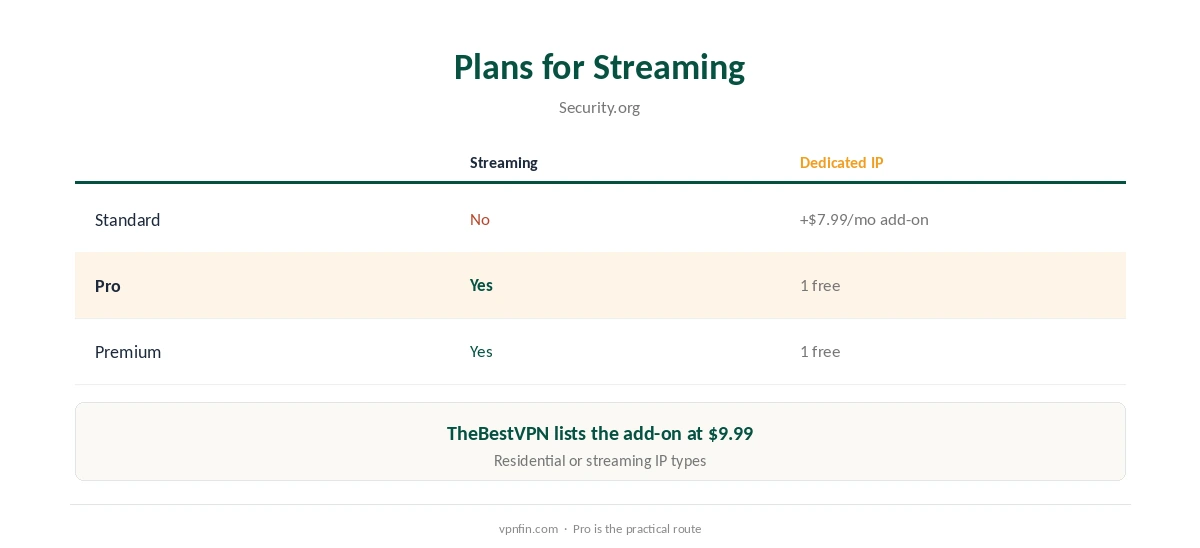
TorGuard Netflix access depends on your plan. Security.org and TheBestVPN both say the Standard plan does not work with Netflix. Pro and Premium include streaming support and a free dedicated IP, which can be a streaming IP, and Tom’s Guide and VPNTotaal reached Netflix with one. Cloudwards, testing without that setup, could not get in. Standard users can rent a dedicated IP, priced at $7.99 a month by Security.org and $9.99 by TheBestVPN.
This guide covers the plans, the setup and what testers found.
Plans and Streaming
Security.org’s plan table shows no streaming on Standard, and streaming plus one free dedicated IP on Pro and Premium. The dedicated IP can be residential, for general use, or a streaming IP. Our TorGuard cost guide covers the prices.
TorGuard Netflix Setup
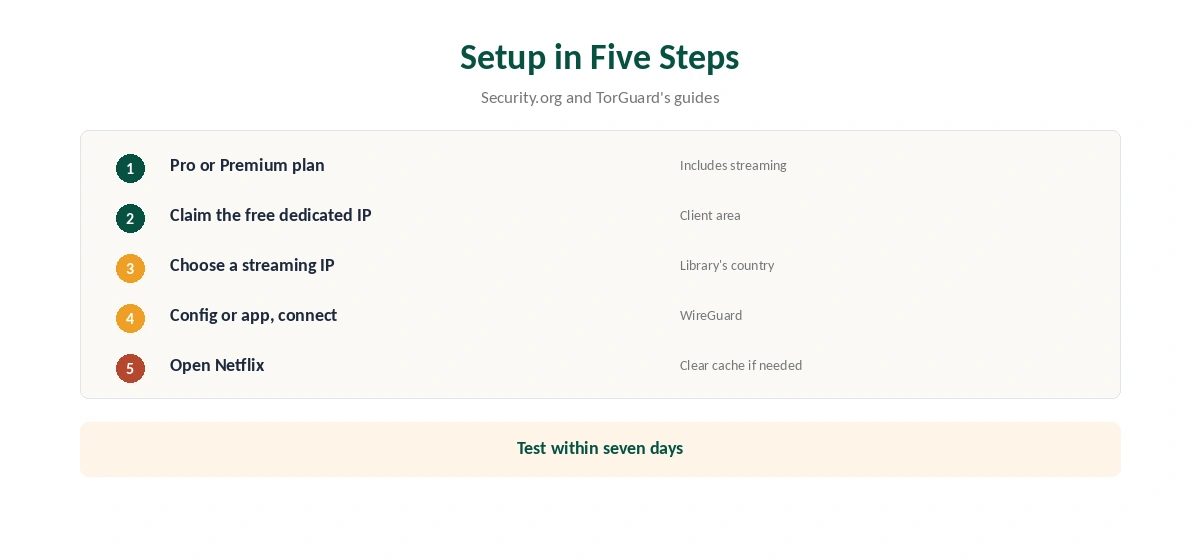
On Pro or Premium, claim your free dedicated IP in the client area and choose a streaming IP in the country you want. Generate a config for it or select it in the app, connect, then open Netflix. Our TorGuard WireGuard guide covers generating dedicated IP configs.
What Testers Found
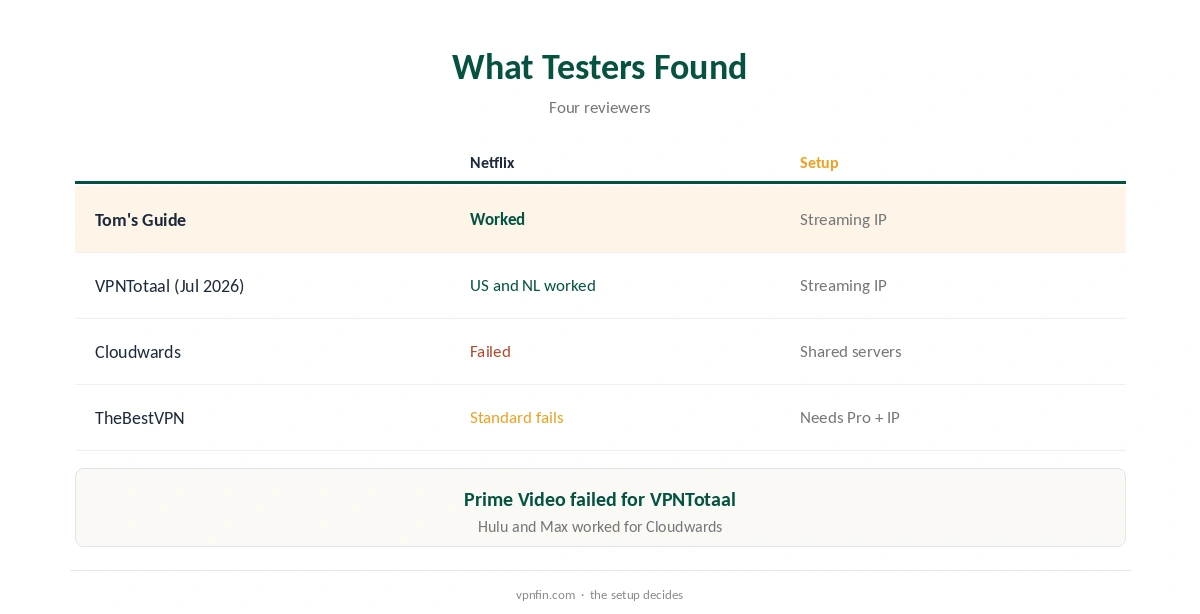
Tom’s Guide reached Netflix and Prime Video with a streaming IP, with speeds fine for 4K on several devices. VPNTotaal, in July 2026, reached Netflix US and Netflix NL, BBC iPlayer on a UK streaming IP, Disney+ and HBO Max, but not Prime Video. Cloudwards, without a streaming IP, failed with Netflix, Disney+ and iPlayer but reached Hulu, Prime Video and Max.
Fixes Worth Trying
Connect before opening the streaming app, close it fully if it was open, and clear its cache or the browser’s cookies. Try another server in the same country. If the service still detects the VPN, its block list likely covers that address range. Our Netflix VPN guide explains how detection works.
Residential or Streaming IP?
Security.org describes two dedicated IP types: residential, for general use, and streaming, for streaming only. For TorGuard Netflix use, the streaming type is the one testers used. A residential IP may still work, but it is aimed at banking and allowlists rather than video.
Other Services
VPNTotaal reached BBC iPlayer on a UK streaming IP, Disney+ and HBO Max, while Prime Video failed. Cloudwards reached Hulu, Prime Video and Max on shared servers. Our Hulu VPN guide covers that service.
Speed
Tom’s Guide found streaming IP speeds fast enough for 4K on several devices at once. Pick a streaming IP in the library’s country and connect over WireGuard.
A Quick Rule
On Standard and want Netflix? Rent a streaming IP or upgrade to Pro. On Pro or Premium? Claim the free streaming IP. Want Netflix without add-ons? Choose a provider that streams on shared servers.
TorGuard Netflix on TVs
A dedicated streaming IP also works on routers. TorGuard’s OpenWrt app and config generator can load a dedicated IP config, so a TV behind the router uses the same address. Our TorGuard router guide covers the setup.
Testing Within Seven Days
TorGuard’s refund window is seven days, our tables record. Claim the streaming IP on day one, test every Netflix library you need, and decide quickly. Security.org received its refund within four business days.
Why TorGuard Netflix Results Vary
Testers with a streaming IP succeeded; those on shared servers mostly failed. The difference is the address: a dedicated streaming IP is not shared with other VPN users, so it is less likely to be on Netflix’s block list.
Several Devices
Standard allows up to eight devices, Fahimai notes, and Pro up to 12. One streaming IP can serve several devices in the household, though using it from many places at once may draw attention; check TorGuard’s terms.
Quick Check
After connecting to the streaming IP, search Netflix for a title exclusive to the library you want. If it appears, the TorGuard Netflix setup is working.
Checking for Leaks
Run our DNS leak guide after connecting to the streaming IP. TorGuard’s guides recommend its own DNS servers, which keep Netflix from seeing your provider’s DNS.
Browser or App
If the Netflix website shows the wrong library, try the app, or a private window, since browsers can expose location through WebRTC and cookies.
Keeping It Updated
If Netflix starts detecting your streaming IP, ask TorGuard’s support for a replacement address in the same country.
The Cost Question
TheBestVPN calls TorGuard’s streaming route more expensive than many alternatives, since you need Pro, or Standard plus a paid IP. Fahimai describes the same need for a streaming bundle. Providers that reach Netflix on shared servers avoid that cost. Our NordVPN Netflix guide covers one.
TorGuard’s Record
Our audit table records no independent audit for TorGuard. Its refund window is seven days, so test Netflix quickly. Our TorGuard safety guide covers the rest.
How We Research
This page draws on Security.org’s TorGuard pricing guide, TheBestVPN’s, Cloudwards’, Tom’s Guide’s and Fahimai’s TorGuard reviews, VPNTotaal’s July 2026 review and our TorGuard tables. We cross-checked these sources against each other, and where they conflict or something can’t be verified, we say so in the text rather than guessing. We checked time-sensitive figures, including prices in US dollars, on 7 October 2026. The main source we relied on is Security.org’s TorGuard guide. Our full approach lives on the About Us page.
TorGuard Netflix FAQ
On Pro or Premium with a streaming IP, testers say yes; Standard does not.
Security.org and TheBestVPN say no.
A dedicated IP for streaming, free with Pro and Premium.
Security.org says $7.99 a month; TheBestVPN says $9.99.
VPNTotaal reached US and NL; Tom’s Guide reached Netflix with a streaming IP.
The Verdict
TorGuard Netflix access works with the right setup: Pro or Premium and a streaming IP. On Standard, skip it, or choose a provider that streams without add-ons.