
Disclosure: VPNFin is reader-supported. If you buy a VPN through links on this page, we may earn a commission at no extra cost to you. This never affects our ratings — here’s our full disclosure.
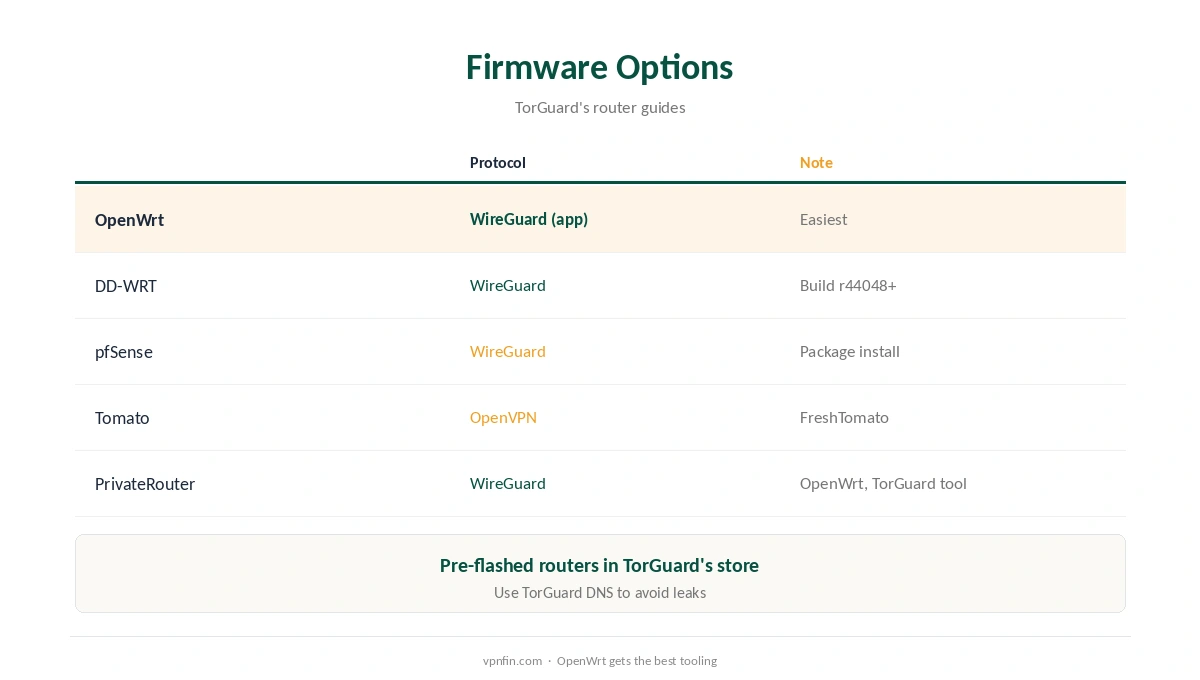
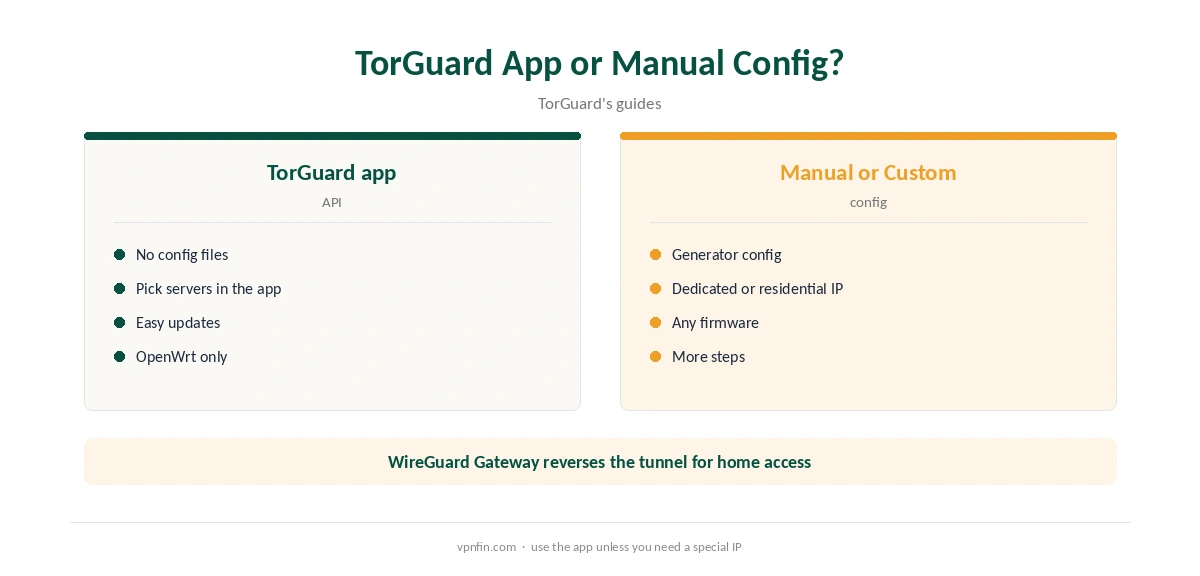
OpenWrt TorGuard setup is one of the better-documented router routes in the VPN market. TorGuard publishes its own WireGuard app for OpenWrt, which works with TorGuard’s API instead of config files, plus a Custom version that accepts any config from its generator, including dedicated and residential IPs. Its guides, updated in July 2026, also cover DD-WRT, pfSense, Tomato and PrivateRouter’s OpenWrt routers, and TorGuard sells routers already flashed. Our page on TorGuard on Apple TV covers why there is no tvOS app and the router routes instead.
This guide compares the routes, walks through the OpenWrt app and covers the checks.
OpenWrt TorGuard Setup With the App
Download TorGuard’s WireGuard app for OpenWrt from its support page, then install it through OpenWrt’s web interface or over SSH, as the guide describes. Open the app under the VPN menu, sign in with your TorGuard credentials, pick a server and start WireGuard. Our guide to TorGuard WireGuard covers the app, config generator and routers.
TorGuard’s guide says the app uses its API, so there is no config file to import. Check the result at TorGuard’s address-check page, as the guide suggests.
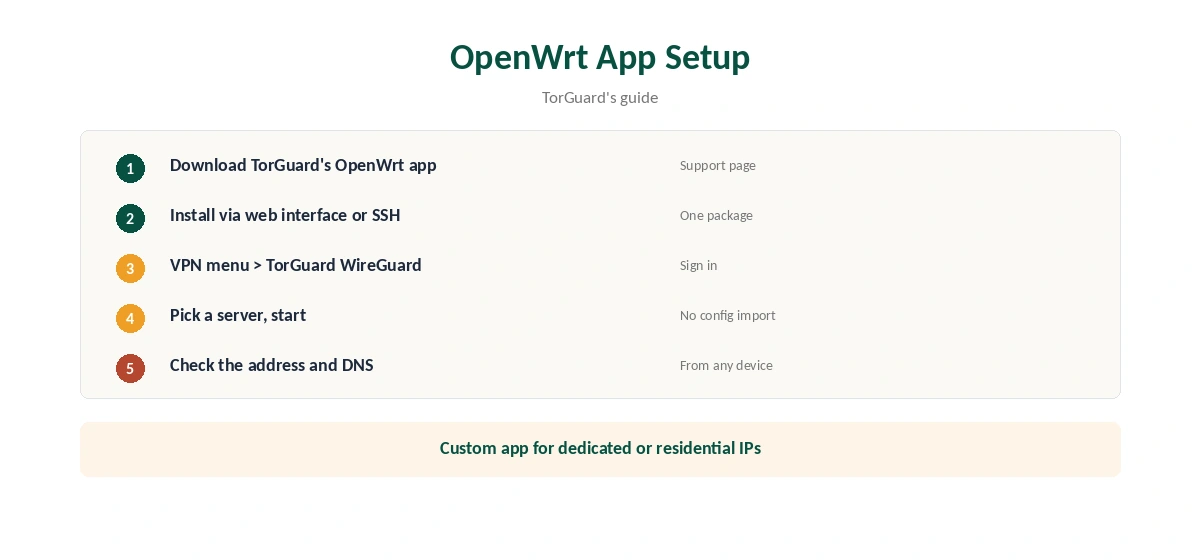
The Custom App for Special IPs
TorGuard also offers a Custom WireGuard app for OpenWrt. Paste a config from TorGuard’s generator to use a dedicated IP, a residential IP or its Private VPN Cloud. That suits users who need one stable address for banking, work logins or remote access. Our dedicated IP guide explains when that helps.
Other Firmware
TorGuard’s DD-WRT guide requires a build with WireGuard support, r44048 or newer, and sets the tunnel under Setup, Tunnels. Its pfSense guide installs the WireGuard package. Its Tomato guide uses OpenVPN on FreshTomato with an imported configuration. PrivateRouter sells OpenWrt routers with a setup tool built for TorGuard.
Remote Access With WireGuard Gateway
TorGuard’s WireGuard Gateway turns the OpenWrt router into a home endpoint, so your phone abroad can appear at your home address. TorGuard’s guide says the same approach works on DD-WRT, pfSense and OPNsense. That is the reverse of a normal VPN and useful for banking or streaming from home while travelling.
Torrenting Through the Router
TorGuard includes port forwarding, which helps seeding, but forwarded ports on a router setup need extra care. Request the port in TorGuard’s client area, then point it at the device running your torrent client. Our port forwarding guide explains how the pieces fit.
Is OpenWrt TorGuard Setup Right for You?
If you already run OpenWrt, yes: the app removes most of the manual work. If your router runs stock firmware, compare the effort of flashing it with buying a pre-flashed router from TorGuard or PrivateRouter. For a single computer, the desktop app is simpler. Our router or device guide weighs the choice.
Checking the Router Connection
From any device on the network, confirm the new address with our VPN test page. Then run our DNS leak guide, since routers often keep handing out your provider’s DNS servers. Set the router’s DNS to the VPN’s, or follow the provider’s guide for that firmware.
If one device needs to skip the VPN, use a second Wi-Fi network or a policy-based routing option in the firmware, so that device bypasses the tunnel.
Choosing a Router for TorGuard
TorGuard’s DD-WRT guide recommends ARM or newer MIPS processors, and its PrivateRouter guide lists 128 MB of RAM or more for generic OpenWrt. WireGuard runs better than OpenVPN on modest hardware, but the processor still sets the ceiling. If you are buying, pick a router with headroom, or a pre-flashed model so the firmware is already right.
Using a Second Network
Many households keep one Wi-Fi network on the VPN and one off it. TVs and laptops join the VPN network; smart home devices and work laptops join the normal one. OpenWrt can run both from the same router, so no one device has to choose.
Turning It Off
Stop WireGuard in TorGuard’s app under the VPN menu, or disable the tunnel in the firmware. Our guide to turning off a router VPN covers other firmware.
Performance Tips
TorGuard’s guides stress the router’s processor: WireGuard uses a single core on pfSense, and weaker routers bottleneck speed. Enable hardware acceleration if your router supports it, keep firmware updated and use TorGuard’s DNS servers to avoid leaks.
TorGuard’s Record
TorGuard includes port forwarding and Stealth modes, but our audit table records no independent audit. It settled a copyright lawsuit in 2022 by blocking BitTorrent on its US servers, which matters if you torrent through a router. Pick a server outside the US for P2P. Our guide to TorGuard Cost covers standard, Pro and Premium plans explained.
Other Providers on Routers
For comparison, our NordVPN router guide and Surfshark router guide cover two more router setups; NordVPN and Surfshark share an owner, Nord Security.
Our NordVPN vs TorGuard page compares the services in full.
Related Guides
Our router setup guide covers the general steps, and our TorGuard Windows guide covers its desktop client.
How We Research
This page draws on TorGuard’s OpenWrt app, WireGuard Gateway, PrivateRouter, DD-WRT, pfSense and Tomato guides (June and July 2026) and our TorGuard review and audit table. We cross-checked these sources against each other, and where they conflict or something can’t be verified, we say so in the text rather than guessing. We checked time-sensitive figures, including prices in US dollars, on 7 October 2026. The main source we relied on is TorGuard’s OpenWrt app guide. Our full approach lives on the About Us page.
OpenWrt TorGuard FAQ
It does: a WireGuard app that works through TorGuard’s API, plus a Custom version for pasted configs.
Yes, through the Custom app with a config from TorGuard’s generator.
It does, with WireGuard on builds r44048 or newer.
TorGuard sells pre-flashed routers, and PrivateRouter offers OpenWrt models with a TorGuard tool.
Our audit table records no independent audit.
The Verdict
OpenWrt TorGuard setup is unusually easy thanks to TorGuard’s own app, with options for dedicated IPs and home-IP access. Weigh the missing audit if privacy is the main goal.