
Disclosure: VPNFin is reader-supported. If you buy a VPN through links on this page, we may earn a commission at no extra cost to you. This never affects our ratings — here’s our full disclosure.
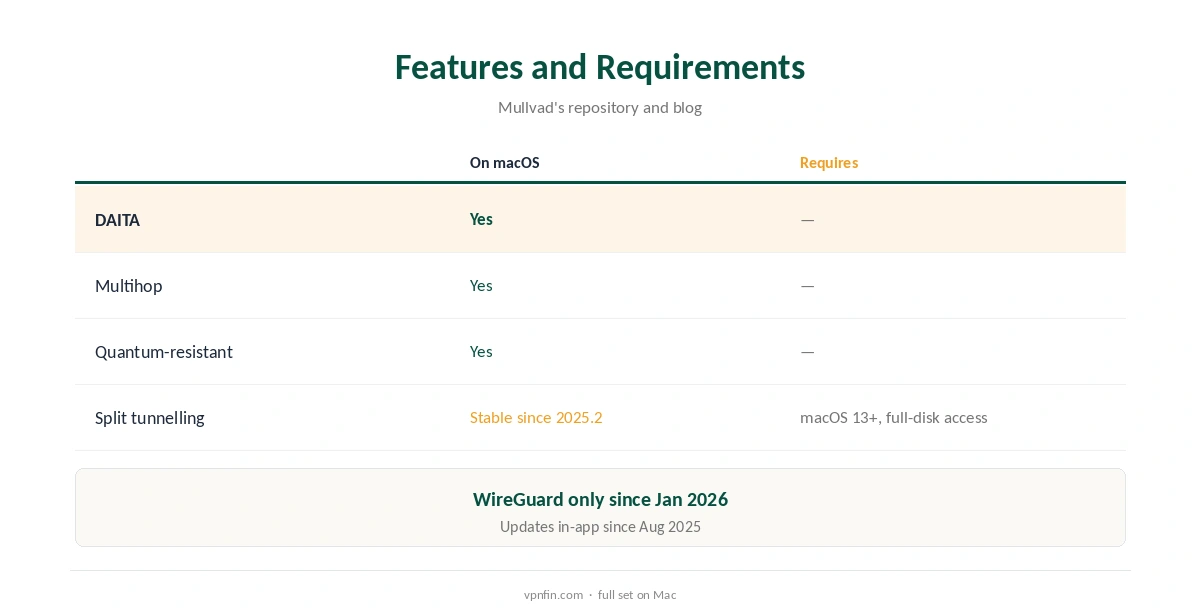
Mullvad Mac support covers the full toolkit: quantum-resistant tunnels, DAITA and WireGuard multihop run on macOS as on other platforms, Mullvad’s code repository lists. Split tunnelling reached macOS in 2024 and became stable in version 2025.2, Mullvad’s blog said. It needs macOS 13 or later and full-disk access. Since August 2025, the Mac app updates itself, TechRadar reported.
This guide covers setup and the macOS permissions, each feature, split tunnelling’s limits, updates and pricing.
Mullvad Mac Setup
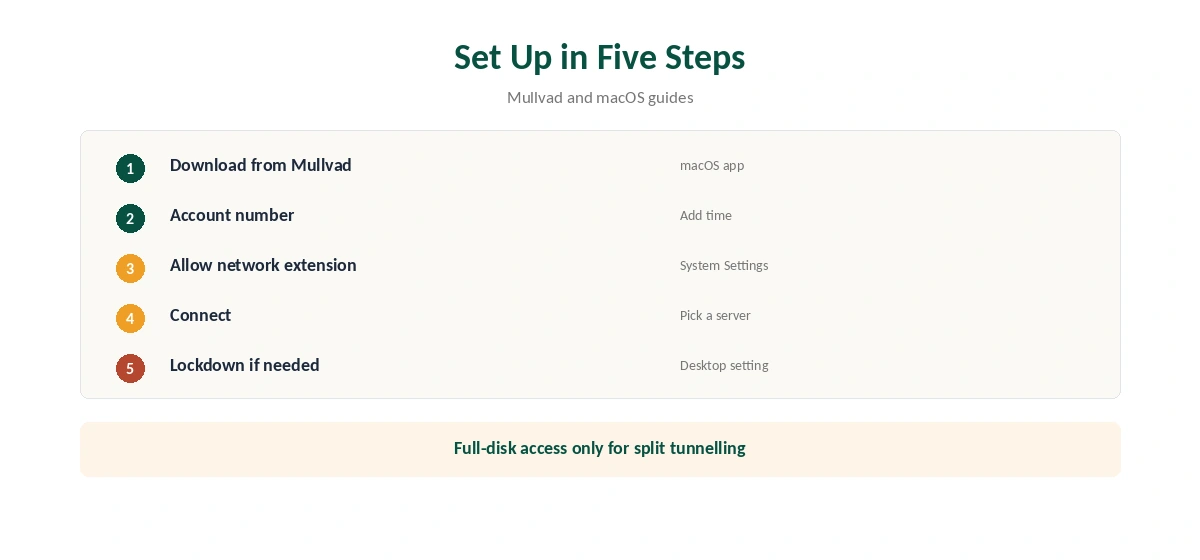
Download the macOS app from Mullvad’s site and install it. Open it, create an account number or enter yours, add time, and connect. There is no email, and you can pay in cash or cryptocurrency, Mullvad’s terms say. Keep the account number somewhere safe, since you log in with it and Mullvad holds no email to recover it.
On macOS Sequoia and Tahoe, the first connection asks you to allow a network extension in System Settings, under General, Login Items and Extensions, Bitdefender’s and Little Snitch’s guides describe. Approve it once, and the tunnel can start. If the app ever stops connecting, check that the extension is still switched on in the same place. Our Mac VPN guide compares other providers.
DAITA, Multihop and Quantum-Resistant Tunnels
DAITA adds noise and padding against traffic analysis. Multihop routes through an entry and an exit server, and quantum-resistant tunnels add a post-quantum key exchange to WireGuard. All three are available on macOS, Mullvad’s repository lists.
Each adds some overhead, so turn them on where the extra protection matters. Mullvad’s Android guide warns these features cost more battery, and on a MacBook running on battery the same applies. Our post-quantum VPN guide explains what the extra key exchange protects against.
Split Tunnelling on macOS
Split tunnelling arrived on macOS in version 2024.4, and Mullvad called it stable on all desktop platforms in 2025.2, its January 2025 blog said. You find it under Settings, Split tunneling, or through the mullvad split-tunnel command in Terminal.
The first time, macOS may ask you to grant full-disk access, which lets Mullvad’s service track which apps should bypass the VPN. It needs macOS 13 or later.
Split Tunnelling’s Limits
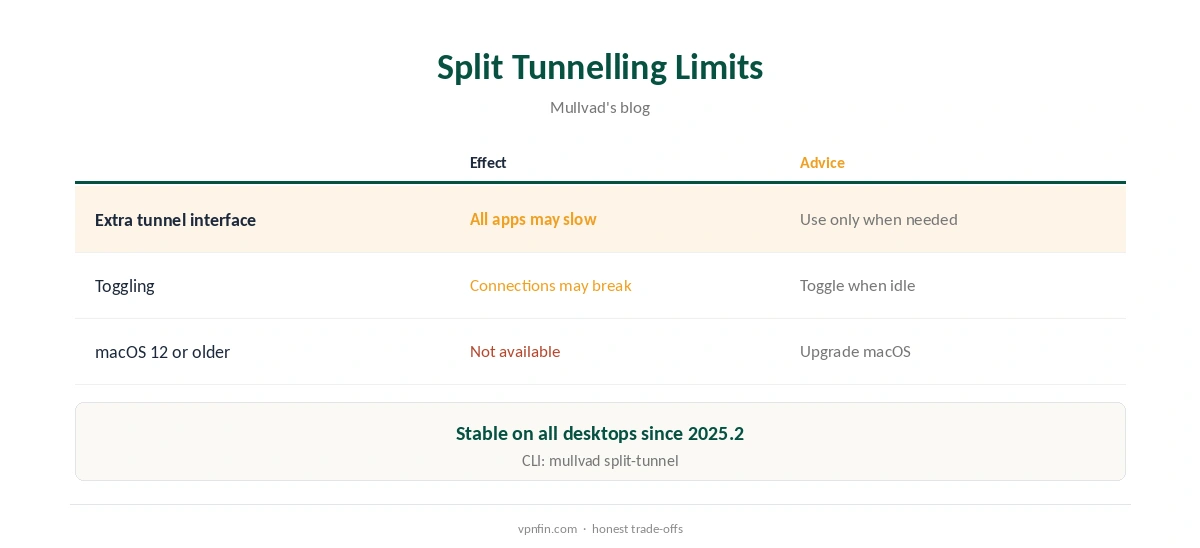
Mullvad is candid about the cost: split tunnelling routes all traffic through an extra tunnel interface, so every app may run slower while it is on, excluded ones included. Connections sometimes break when you toggle it or disconnect, the blog adds.
Turn it on only when you need an app outside the tunnel. Our split tunnelling guide explains when excluding an app is worth it.
Getting Past Blocked Networks
Mullvad’s desktop app on macOS offers Shadowsocks obfuscation for networks that block VPNs, Gizmodo notes, alongside the anti-censorship settings in the app. Gizmodo also describes GotaTun, a WireGuard engine written in Rust that reduces memory use.
Try obfuscation on hotel or office Wi-Fi that blocks the connection, then switch it off at home. Our obfuscation guide explains how these options disguise VPN traffic.
Automatic Updates
Mullvad announced in-app updates for Windows and Mac in August 2025, TechRadar reported, so the Mac app can fetch new versions itself rather than needing a manual download. Our guide to Mullvad on Windows covers setup, lockdown mode and split tunnelling.
Keep it current: Mullvad has dropped OpenVPN entirely since January 2026, and new releases add WireGuard features and fixes. Linux users get the same through Mullvad’s repositories, TechRadar added.
Lockdown and Leaks
Mullvad’s app documentation describes an always-on kill switch, and the desktop app offers a lockdown mode that blocks traffic whenever the VPN is off. Use lockdown on a laptop that should never go online unprotected. The app documentation adds that its basic kill switch is always on and cannot be disabled.
Turn lockdown off before uninstalling, or the Mac may stay offline until you reinstall and switch it off. Our DNS leak guide covers testing after setup.
Mullvad Browser on Mac
Mullvad Browser installs on macOS as well as Windows and Linux, Mullvad’s browser guide covers. Its download page describes it as built against fingerprinting and without telemetry, and it ships with Mullvad’s leak-checking extension.
Use it for private research alongside Safari or Firefox for everyday browsing, so logged-in sessions stay out of the private browser. Our Mullvad Firefox guide explains the extension.
Price and Devices
Mullvad costs a flat €5 a month for five devices, with a 14-day refund on card-style payments; cash and cryptocurrency are not refunded, its terms say. A Mac, an iPhone and three more devices fit one account, and removing an old device’s key in your account frees a slot.
Mullvad has more than 10 audits in our table, and police who visited with a warrant left with nothing, because there were no user records to take. Our Mullvad cost guide covers payment methods.
How We Research
This page draws on Mullvad’s January 2025 blog on macOS split tunnelling, its code repository and terms, TechRadar’s August 2025 report, Bitdefender’s and Little Snitch’s macOS guides and our Mullvad tables. We cross-checked these sources against each other, and where they conflict or something can’t be verified, we say so in the text rather than guessing. We checked time-sensitive figures, including prices in US dollars, on 8 October 2026. The main source we relied on is Mullvad’s macOS split tunnelling post. Our full approach lives on the About Us page.
Mullvad Mac FAQ
It has a full macOS app with DAITA, multihop and quantum-resistant tunnels.
On macOS 13 or later, stable since version 2025.2.
So it can track which apps bypass the VPN with split tunnelling.
Since August 2025, with in-app updates.
No; Mullvad removed it in January 2026.
The Verdict
Mullvad Mac support is complete, with DAITA, multihop and split tunnelling. Approve the network extension, use split tunnelling only when needed and keep the app updated.