
Disclosure: VPNFin is reader-supported. If you buy a VPN through links on this page, we may earn a commission at no extra cost to you. This never affects our ratings — here’s our full disclosure.
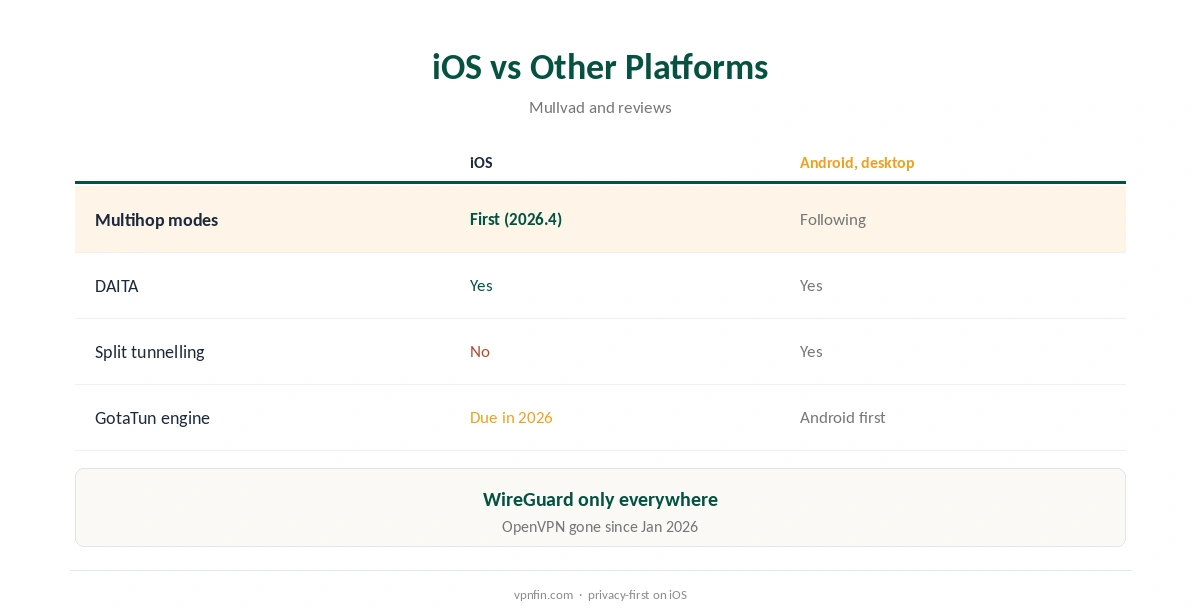
Mullvad iPhone support runs on WireGuard only, Mullvad’s iOS guide says, and the iOS app was the first to get Mullvad’s new multihop modes, in version 2026.4, its August 2026 blog announced. DAITA and quantum-resistant tunnels are available on iOS too, its code repository lists. Split tunnelling is not, because of Apple’s restrictions, a 2026 review notes. You can also skip the app and use the official WireGuard app with a configuration from Mullvad’s generator.
This guide covers setup, multihop modes, DAITA, the WireGuard-app route, local network access, pricing and iOS’s own limits.
Mullvad iPhone Setup
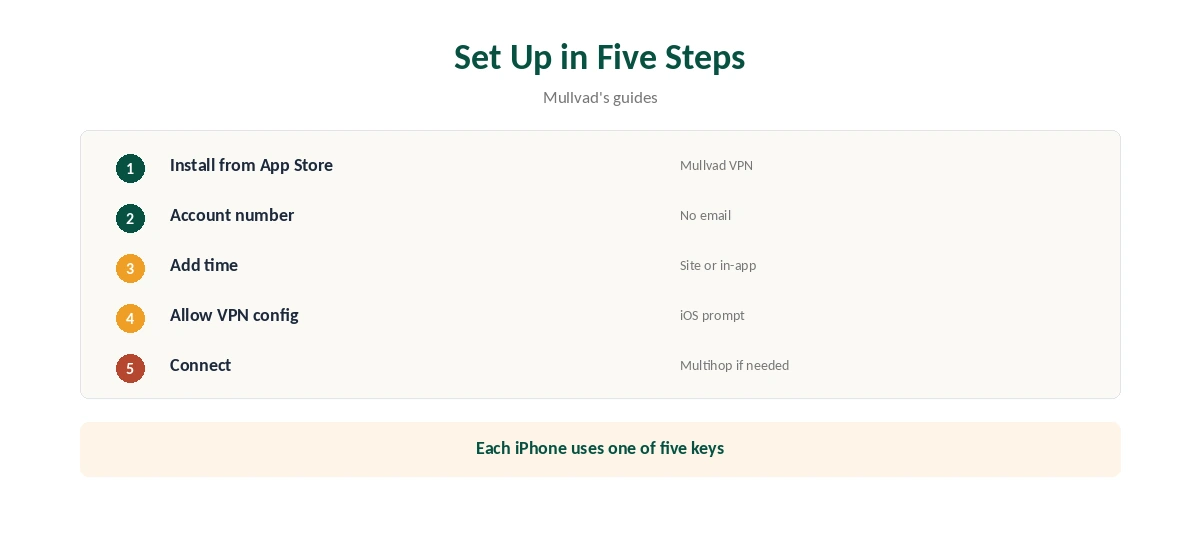
Install Mullvad from the App Store, open it and enter your account number, or create one; Mullvad asks for no email. Add time on Mullvad’s site, or by in-app purchase, which its terms list as a payment route. Then connect to a nearby server.
Allow iOS to add the VPN configuration. The app uses only WireGuard, so there is no protocol to choose, and settings stay simple. Our iPhone VPN guide compares other providers’ iOS apps.
Multihop Modes
Multihop arrived on iOS in version 2024.5, routing traffic through an entry and an exit server, Mullvad’s blog said. In August 2026, iOS 2026.4 introduced multihop modes first. When needed multihops only if a feature such as DAITA is unavailable at your chosen location; Always multihops every time.
The new modes replaced the older DAITA Direct only setting, and existing settings migrate automatically when you update, the blog explains. Our Double VPN guide explains multi-hop routing.
DAITA and Quantum-Resistant Tunnels
DAITA adds noise and padding against traffic analysis, and quantum-resistant tunnels add a post-quantum key exchange; both are listed for iOS in Mullvad’s repository. Because not every server supports DAITA, the app may multihop through a DAITA server.
Mullvad’s new WireGuard engine, GotaTun, launched on Android first and was due to reach iOS during 2026, Tom’s Guide reported. On Android, Mullvad had traced most app crashes to the older wireguard-go engine, which GotaTun replaces. Our post-quantum VPN guide explains the extra key exchange.
No Split Tunnelling on iOS
Split tunnelling remains unavailable on iOS because of Apple’s APIs, ip-trackers’ 2026 review notes, so every app goes through the tunnel. Android and desktop apps do offer it.
If one app refuses to work over the VPN, disconnect briefly for that app, or use it on another device. Banking apps that reject VPN addresses are the usual cause; a quick disconnect for the payment, then reconnect, keeps the gap short. Our split tunnelling guide explains which providers split on iOS.
Using the WireGuard App Instead
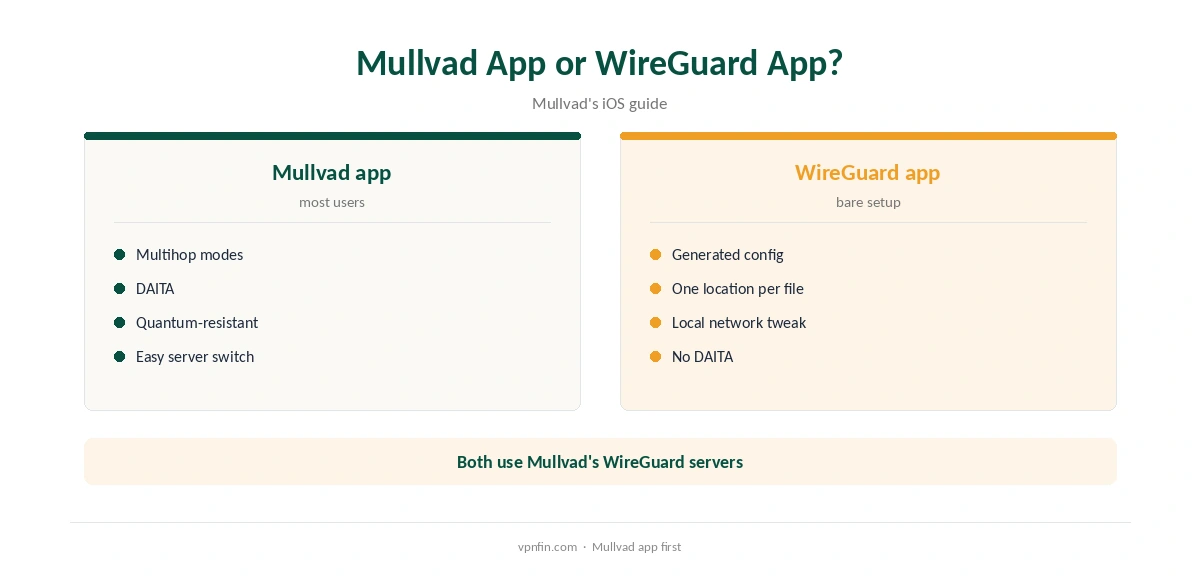
Mullvad’s guide offers a second route: generate a configuration on Mullvad’s site on your iPhone, choosing a separate key for the device and an exit location, then import it into the official WireGuard app.
To reach local devices such as a printer, edit the tunnel, turn on Exclude private IPs and add 10.64.0.0/10 to Allowed IPs, the guide lists. The WireGuard app lacks DAITA and multihop modes, so the Mullvad app suits most people.
Price and Devices
Mullvad costs a flat €5 a month for five devices, its terms say; each iPhone uses one WireGuard key. An iPad, a Mac and two more devices fit alongside it, and removing an old key frees a slot. Refunds run 14 days from payment for card-style payments, and App Store purchases are refunded through Apple.
Our Mullvad cost guide covers payment methods, including cash by post and Monero.
Mullvad’s Privacy Record
Mullvad has more than 10 audits in our table, and when police visited its office with a warrant, they left with nothing, because there were no user records. Accounts are numbers, not emails, and payment can be in cash.
That record matters on a phone, which carries much of your identity. Our guide to whether a VPN can be traced explains what a VPN can and cannot hide.
Turning It Off
Disconnect in the app for a quick break. To stop it fully, turn off any always-on setting first, then delete the app; iOS removes its VPN configuration with it.
If you bought time in the App Store, cancel in Settings, your name, Subscriptions, since deleting the app does not cancel billing. Our guide to turning off a VPN on iPhone covers the settings.
The iOS Limit Every VPN Shares
Michael Horowitz’s long-running tests found iOS sending some traffic outside VPN tunnels on an iPad, with several VPNs, and Proton reported an iOS bypass flaw in 2020. The issue lies in iOS rather than any one app.
For the strictest protection, Horowitz recommends a VPN router. Our Mullvad router guide covers running Mullvad on one.
How We Research
This page draws on Mullvad’s iOS WireGuard guide, its multihop blog posts from 2024 and August 2026, its code repository and terms, Tom’s Guide on GotaTun, ip-trackers’ 2026 review, Michael Horowitz’s iOS tests and our Mullvad tables. We cross-checked these sources against each other, and where they conflict or something can’t be verified, we say so in the text rather than guessing. We checked time-sensitive figures, including prices in US dollars, on 8 October 2026. The main source we relied on is Mullvad’s multihop modes post. Our full approach lives on the About Us page.
Mullvad iPhone FAQ
It does, in the App Store, using WireGuard only.
Since 2024.5, with new multihop modes first on iOS in 2026.4.
No; Apple’s APIs prevent it, a 2026 review notes.
Mullvad’s guide shows how, with a generated configuration.
Five devices per account, each with its own key.
The Verdict
Mullvad iPhone support is strong on privacy, with multihop modes, DAITA and quantum-resistant tunnels, but no split tunnelling. Use the Mullvad app unless you need a bare WireGuard setup.