
Disclosure: VPNFin is reader-supported. If you buy a VPN through links on this page, we may earn a commission at no extra cost to you. This never affects our ratings — here’s our full disclosure.
Turn on a VPN on your iPhone and the icon appears in the status bar. Most people take that as confirmation. For iPad specifics, see our NordVPN on iPad guide. For Apple users who want per-app regions, our SafeShellVPN review covers SafeShellVPN.
It is not. iOS keeps connections that were already open running outside the VPN tunnel, sometimes for hours, and no VPN app on the App Store can close them. Proton VPN reported this to Apple in March 2020. Six years and thirteen major iOS versions later, it still happens. Our page on Astrill on iPhone covers the iOS app, Smart Mode and why App Store accounts stay on Apple mobile devices. Some iPhone VPNs reveal little about who runs them, as our Hide Expert VPN review shows.
The fix takes two seconds and is not in any app’s settings. So this guide covers that first, then which apps are actually worth running once you have done it.
The Short Answer
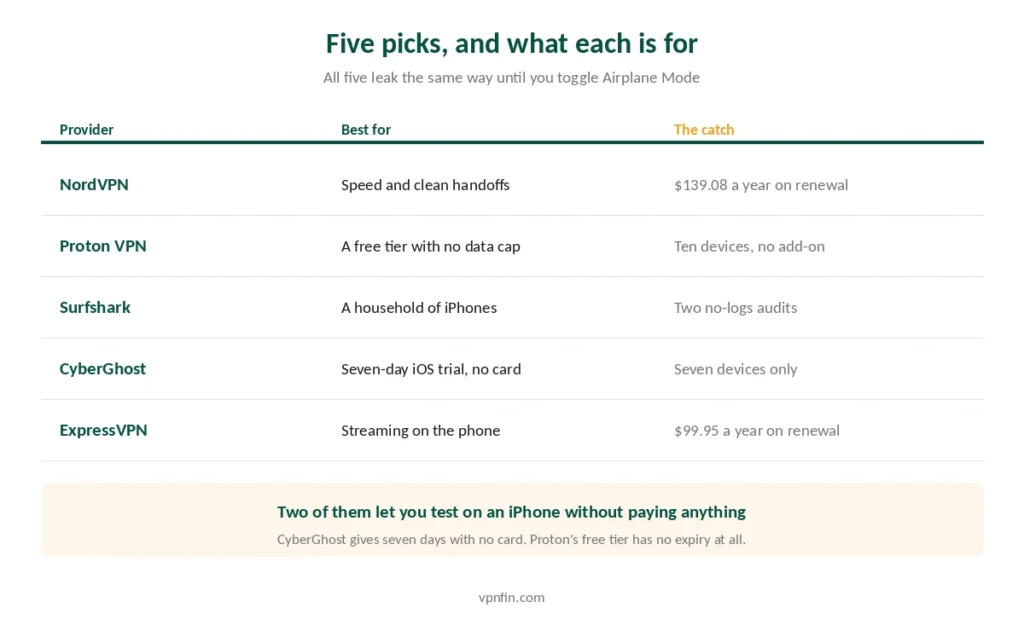
Best overall: NordVPN — fastest in independent testing and the app that recovers cleanest when your phone switches between Wi-Fi and cellular.
Best free: Proton VPN — a permanent free tier with no data cap, no ads and open-source code.
Best for a family of iPhones: Surfshark — unlimited simultaneous connections.
Best for trying before paying: CyberGhost — a seven-day iOS trial that needs no card.
The Leak Nobody Mentions
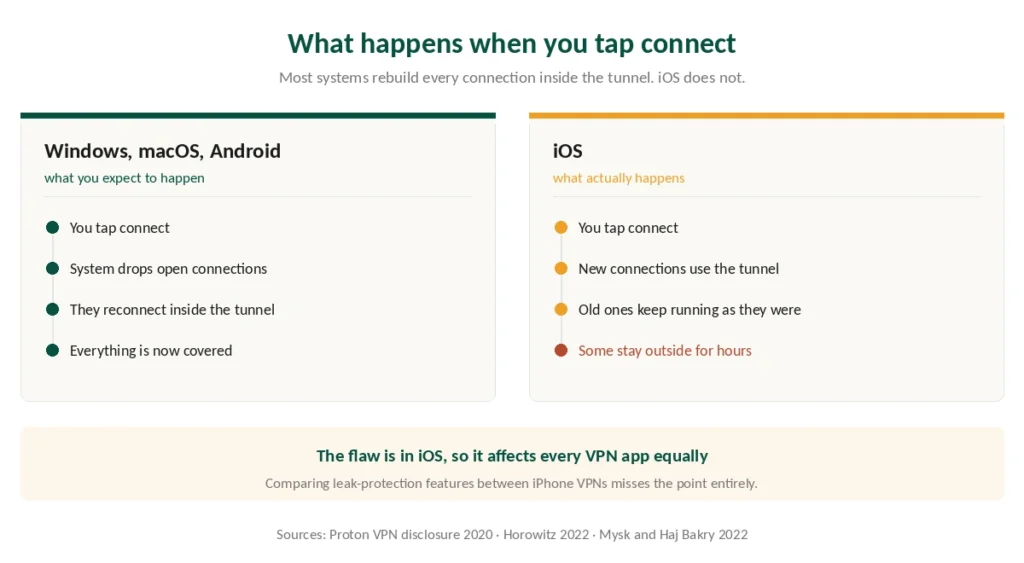
When you connect a VPN on most operating systems, the system drops every existing connection and rebuilds it inside the tunnel. iOS does not do that.
Connections opened before you tapped connect stay outside the tunnel. Proton VPN captured this with Wireshark in 2020 and found sessions surviving for minutes to hours. Apple’s own push-notification service was the clearest example, because it holds a long-lived connection that never gets re-routed.
It is not a DNS leak. Security researcher Michael Horowitz retested the behaviour in 2022 across three providers, three protocols and three iOS versions, and reached the same conclusion each time: real data leaves the device outside the tunnel. The DNS version of this problem belongs to Windows.
Lockdown Mode does not help. Researchers Tommy Mysk and Talal Haj Bakry found iOS 16 handled VPN traffic identically whether Lockdown Mode was enabled or not.
⚠️ No VPN can fix this, and any that claims to is wrong. iOS gives apps no permission to terminate connections they did not create. That is why the flaw affects every provider equally, and why comparing “leak protection” features between iPhone VPN apps misses the point entirely.
Who this actually endangers. For most people the exposure is an IP address visible to services you were already using. For someone in a country where that address is dangerous to reveal, it is considerably more than that.
The Two-Second Fix
You cannot stop iOS from leaving those connections open. However, you can force them to close.
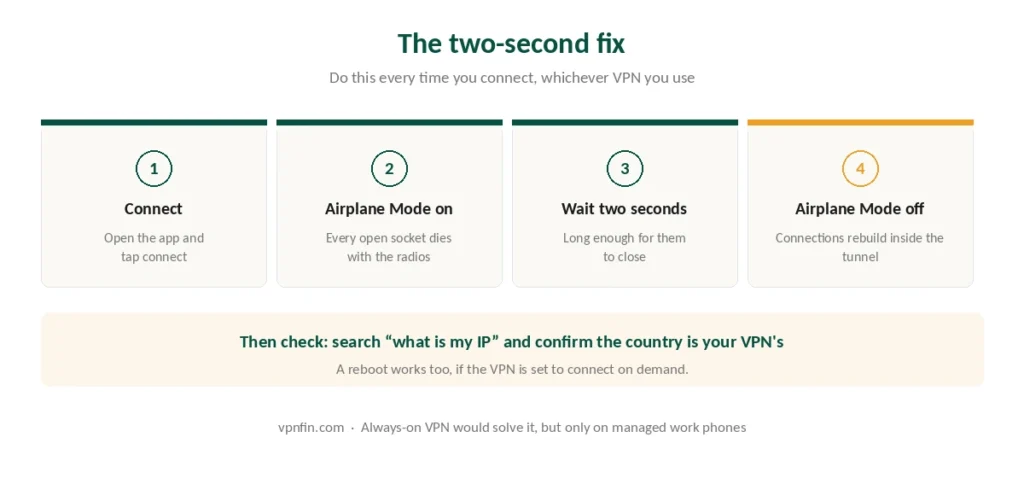
Connect the VPN, then switch Airplane Mode on and off. Every open socket dies with the radios. When they come back, the VPN is already running, so everything rebuilds inside the tunnel. Our page on TorGuard on iPhone covers the iOS app, the OpenVPN Connect route and the missing kill switch.
Do it in this order, every time:
- Open the VPN app and connect
- Turn Airplane Mode on
- Wait two seconds
- Turn Airplane Mode off
- Confirm the VPN reconnected before opening anything else
A reboot works too, if the VPN is set to connect on demand — the phone comes up with nothing open. Slower, but it needs no thinking. This matters most on a network you do not control, where the seconds before the tunnel exists are the ones worth closing.
⚠️ Always-on VPN is the proper solution and most people cannot use it. Apple supports it, though only on supervised devices enrolled in mobile device management, which means a company-issued phone. On a personal iPhone the option does not exist. Apple’s other operating system has its own history here. Android gives every user the same setting for free, in two taps.
Check it worked. Search for “what is my IP” in Safari and confirm the address matches your VPN’s country rather than your own. If the opposite is your problem and it will not stay switched off, the setting responsible is Connect On Demand. Our setup guide covers the rest of the first-run checks.
1. NordVPN — Best Overall for iPhone
Why it wins on iOS specifically: phones move between Wi-Fi and cellular constantly, and NordVPN’s app re-establishes the tunnel faster than the rest after each handoff. Independent testing also puts it fastest overall, at 2.9% average download loss in CNET’s measurements.
Six independent no-logs audits by PwC and Deloitte, Panama jurisdiction, ten simultaneous connections. Threat Protection blocks trackers at the DNS level, which matters more on a phone where you cannot run browser extensions.
The catch: renewal jumps to $139.08 a year, the steepest of the providers here. Our NordVPN review covers the full picture.
2. Proton VPN — Best Free Option, and the Best Paid One for Privacy
Why it stands out on iOS: it is the provider that found and disclosed the leak in the first place, and its iOS app is open source like the rest.
The free tier is a permanent plan rather than a trial. No data cap, no ads, and the same no-logs policy as the paid tier — limited to one device and ten countries the app chooses. For an iPhone that is often exactly enough. Our guide to Free VPN for iPhone covers what’s safe, and the App Store catches.
Paid adds Secure Core routing, NetShield filtering and the Stealth protocol, which is the most reliable option on networks that block VPNs. Five annual audits, all published. Our Proton VPN review has the detail, and our free VPN guide explains why this free tier is not like the others.
3. Surfshark — Best for a Household of iPhones
Unlimited simultaneous connections, with no cap written into the terms. Two parents, three children, an iPad and an Apple TV all run on one subscription.
Renewal lands around $79 a year, two Deloitte no-logs audits, Netherlands jurisdiction. Its Dausos protocol ships post-quantum key exchange, audited by Cure53 in April 2026. Our Surfshark review covers where it sits against the rest.
4. CyberGhost — Best Way to Try Before Paying
Seven days free on iOS, with no card required. Windows and macOS get 24 hours; Android gets three days. The iOS trial is the longest of the three, which makes an iPhone the best device to test it on.
Beyond that: a 45-day money-back guarantee on longer plans, $56.94 a year at renewal, three Deloitte audits, and quarterly transparency reports going back to 2011. Seven devices, which is fewer than the others here. Our CyberGhost review has the rest.
5. ExpressVPN — Best for Streaming on the Phone
MediaStreamer and the widest unblocking record, covering 20 or more Netflix libraries plus Disney+, BBC iPlayer and Hulu. If the iPhone is what you actually watch things on, this is the one. Our guide to StrongVPN on iPhone covers the app, protocols and the kill switch question.
Lightway ships post-quantum protection by default and was rewritten in Rust. British Virgin Islands jurisdiction, and a server seized by Turkish investigators in 2017 yielded nothing. Renewal is $99.95 a year. Our ExpressVPN review covers the audit record, which is larger than anyone can precisely count.
What About the VPN Setting Built Into iOS?
Settings has a VPN section, and it is not a VPN.
It is a configuration screen for connecting to a server you already have — a corporate network, or one you run yourself. Apple provides the client, not the service. There is no Apple VPN to subscribe to. Our guide to IPVanish on iPhone covers the App Store trial, domain split tunnelling and Apple TV.
iCloud Private Relay is also not a VPN. It covers Safari browsing only, hides your address from websites rather than from Apple, and offers no country selection. Useful, but it does not replace the thing this guide is about. What a VPN actually hides sets out the difference.
Battery, Speed and the Practical Costs
Battery drain is real but modest. Encryption costs power, and a VPN running constantly will shorten your day somewhat. WireGuard and its derivatives cost noticeably less than OpenVPN, so leave the protocol on automatic unless something is broken. Our guide to Windscribe on iPhone covers six protocols, the firewall and 10 GB free.
Speed loss on a phone is usually invisible. Cellular connections rarely exceed the point where a 3% or 16% reduction changes anything you can perceive, and how much speed you actually lose puts the percentages in context.
Connection drops are the common annoyance, especially when moving between networks. If yours keeps dropping, our troubleshooting guide works through the usual causes.
Using one of the big three? Our provider guides walk through setup and the usual faults step by step: NordVPN on iPhone, Surfshark on iPhone and ExpressVPN on iPhone.
Troubleshooting: our fix guides cover a VPN not working on iPhone.
Setting up Proton? Our Proton VPN on iPhone guide covers its protocols and limits. Apple’s own option is compared in our VPN vs Private Relay guide, and turning Private Relay off explains the clash.
How We Research
This guide draws on Proton VPN’s 2020 vulnerability disclosure, Michael Horowitz’s 2022 retesting across multiple providers and protocols, research by Tommy Mysk and Talal Haj Bakry on Lockdown Mode, contemporaneous reporting from AppleInsider, MacRumors and TechRadar, provider documentation for iOS trial terms, and speed results from named independent testers — cross-checked and verified at publication. We don’t run our own speed tests, and we don’t own the leak finding; we are reporting what named researchers published and Apple has not disputed. Our full approach lives on the About Us page.
iPhone VPN FAQ
Yes, and every provider is affected equally. iOS keeps connections that were open before you connected running outside the tunnel, sometimes for hours. Proton VPN documented this in 2020 and independent researchers confirmed it in 2022. Toggling Airplane Mode after connecting forces those connections to rebuild inside the tunnel.
No. That screen configures a connection to a server you already have access to, such as a work network. Apple supplies the client software but no VPN service, so you still need a provider. iCloud Private Relay is also not a substitute, since it covers Safari only.
Proton VPN, by a wide margin. Its free tier has no data cap, no advertising and the same no-logs policy as its paid plan, restricted to one device and ten countries the app selects. Most other free iOS VPNs fund themselves by handling your data.
Somewhat. Encryption costs processing power, so a VPN running all day will shorten battery life a little. Modern protocols like WireGuard are considerably more efficient than OpenVPN, so leaving protocol selection on automatic usually gives the best balance.
Yes, in two ways. CyberGhost offers a seven-day iOS trial with no card required, which is longer than its trials on any other platform. Proton VPN’s free tier has no time limit at all. Most other providers rely on a 30-day money-back guarantee instead, which requires paying first.
The Verdict
Fix the leak first. Connect, toggle Airplane Mode, then use the phone. It costs two seconds and closes a gap that no app can close for you, whichever provider you pay. Our page on CyberGhost on iPhone covers the iOS app’s protocols, setup and fixes.
Then pick on what you actually need. NordVPN if speed and clean handoffs matter, Proton VPN if you want something free that does not sell you or an audit you can read, Surfshark for a house full of Apple devices, CyberGhost to test for a week without a card, ExpressVPN if the phone is your television. Our page on PureVPN on iPhone covers protocol choice on iOS and what the app lacks.