
Disclosure: VPNFin is reader-supported. If you buy a VPN through links on this page, we may earn a commission at no extra cost to you. This never affects our ratings — here’s our full disclosure.
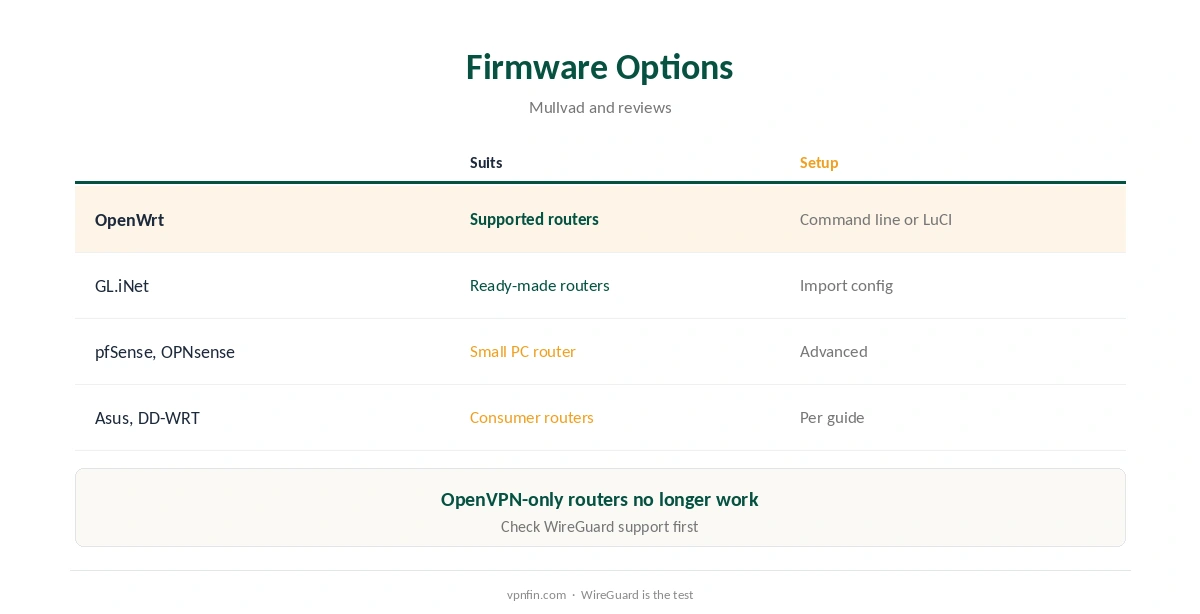
A Mullvad router setup puts WireGuard on the router itself. Every device on the network then uses the VPN, and the router counts as one of your five. Mullvad publishes guides for OpenWrt, and reviews list guides for OPNsense, pfSense, Asus and DD-WRT too. Since 15 January 2026 only WireGuard works. Mullvad removed OpenVPN from its servers, so routers that support only OpenVPN can no longer connect.
This guide covers choosing a router, generating a configuration, OpenWrt setup, Mullvad’s server advice, multihop, and what a router adds and takes away.
Choosing a Router
You need a router that runs WireGuard. Mullvad’s guide starts from a fresh OpenWrt installation and asks you to check OpenWrt’s list of supported routers first. pfSense and OPNsense suit a small PC acting as a router, following Mullvad’s and the projects’ own guides.
Consumer routers from GL.iNet, such as the Beryl AX or Flint 2, ship ready for WireGuard and save building a box yourself, a 2026 review suggests. Our router setup guide compares hardware.
Generate a WireGuard Configuration
Open Mullvad’s WireGuard configuration generator on its site: log in with your account number, generate a key for the router and pick an exit location, its guides describe. Each key uses one of your five device slots.
If you have used all five, first remove a key for a device you no longer use in your account. One router key then covers every phone, TV and console behind it. Keep the generated file private: it contains the router’s private key. If it leaks, revoke the key in your account and generate a new one. Our guide to Mullvad on Apple TV covers the missing tvOS app and the router route that works.
Mullvad Router Setup on OpenWrt
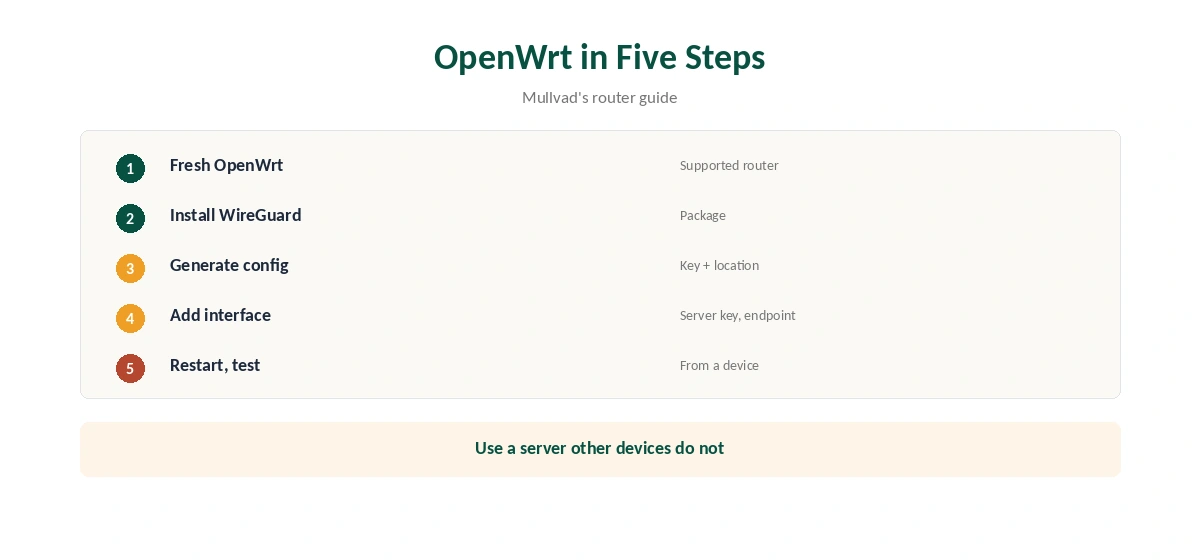
On OpenWrt, install WireGuard, add a WireGuard interface, and enter the public key and endpoint IP address of the Mullvad server you chose, Mullvad’s router guide walks through. Route the LAN through the new interface and restart the router.
Mullvad advises connecting the router to a server that your other devices do not also use while behind it. To confirm WireGuard loaded, SSH into the router and check its kernel log, the guide adds.
GL.iNet and Other Firmware
GL.iNet’s admin panel can import a WireGuard configuration directly, guides describe, which is simpler than OpenWrt’s command line. Reviews list Mullvad guides for pfSense, OPNsense, Asus and DD-WRT as well, so most popular router firmware has a guide to follow.
Proton’s WireGuard router guides cover OpenWrt, Asus RT-AX and GL.iNet Flint, which shows how similar the steps are across providers. Our Proton router guide is a useful comparison.
Multihop and SOCKS5 on a Router
All Mullvad WireGuard servers connect to each other, so a router can use a SOCKS5 proxy on another server for a second hop, Mullvad’s router guide explains as an optional step.
That gives browser traffic a different exit from the router’s server. Our Double VPN guide explains multi-hop routing, and our Mullvad Firefox guide covers the browser proxy.
Testing the Router
From a phone or laptop behind the router, with no VPN app running, check that your address now shows a Mullvad server. Mullvad’s browser extension shows the connection status and checks for IP, WebRTC and DNS leaks.
Then test what happens when the tunnel drops. Whether devices lose access or fall back to your normal connection depends on how the router’s firewall is set, so configure it to block traffic outside the tunnel. Our DNS leak guide covers a manual test.
What a Router Adds
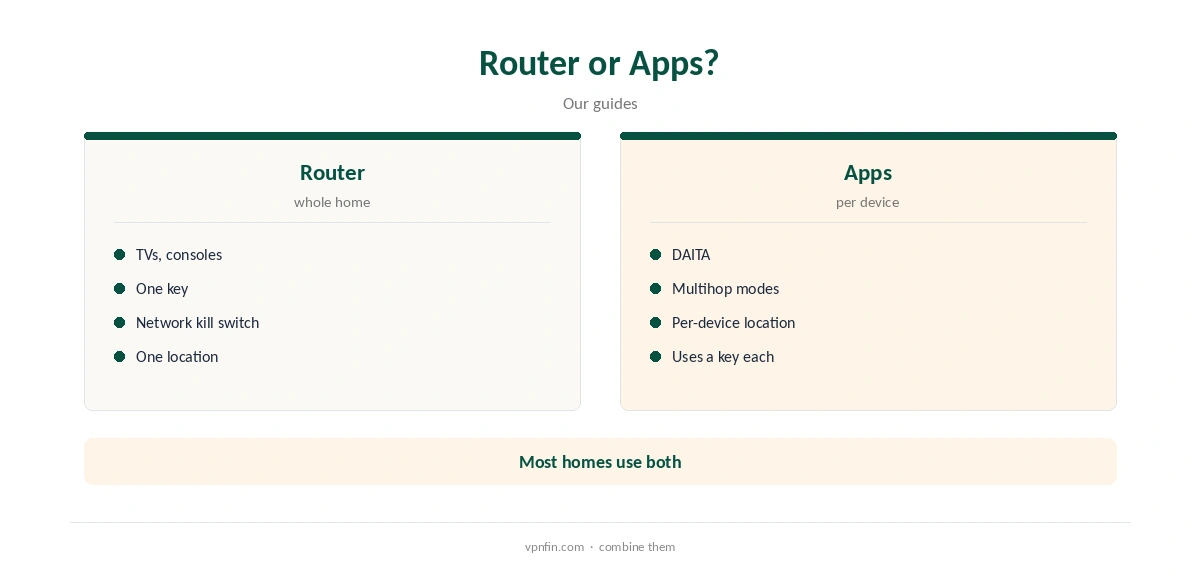
A router covers devices that cannot run VPN apps, such as smart TVs and consoles. Set up to block traffic outside the tunnel, it also acts as a network-wide kill switch, a 2026 review notes. Our guide to Mullvad on Smart TV covers which TVs get the app, and why Samsung and LG need a router.
Michael Horowitz recommends a VPN router for iPhones and iPads, since his tests found iOS sending some traffic outside app-based tunnels. Our Mullvad iPhone guide covers that limit.
What a Router Takes Away
Every device shares one exit location, so a streaming box and a work laptop appear in the same country. DAITA and multihop modes are features of Mullvad’s apps, not of a plain router configuration. Switching location means editing the router, or keeping several configurations ready to swap.
Router hardware matters too: the 2026 review notes purpose-built units such as GL.iNet’s suit WireGuard well. Many households combine both: a router for TVs and consoles, apps on phones and laptops. Within five keys, that might mean the router plus four personal devices.
No Port Forwarding
Mullvad removed port forwarding in 2023, our tables record, so a router running Mullvad cannot expose services such as a game server or remote access to the outside world through the VPN. Our guide to Mullvad on Chromecast covers the app on Google TV, a router for older models.
If you need inbound ports, our port forwarding guide lists providers that still offer them.
How We Research
This page draws on Mullvad’s WireGuard router and iOS guides, its OpenVPN removal notices, ip-trackers’ 2026 Mullvad review, Michael Horowitz’s iOS tests, our Proton router guide and our Mullvad tables. We cross-checked these sources against each other, and where they conflict or something can’t be verified, we say so in the text rather than guessing. We checked time-sensitive figures, including prices in US dollars, on 8 October 2026. The main source we relied on is Mullvad’s WireGuard router guide. Our full approach lives on the About Us page.
Mullvad Router FAQ
On any router that runs WireGuard, such as OpenWrt or GL.iNet.
No; Mullvad removed OpenVPN on 15 January 2026.
One of your five, covering every device behind it.
No; DAITA belongs to Mullvad’s apps.
Mullvad advises one your other devices behind it do not use.
The Verdict
A Mullvad router covers a whole home with one key, but only over WireGuard. Pair it with the apps on phones and laptops for DAITA and multihop.