
Disclosure: VPNFin is reader-supported. If you buy a VPN through links on this page, we may earn a commission at no extra cost to you. This never affects our ratings — here’s our full disclosure.
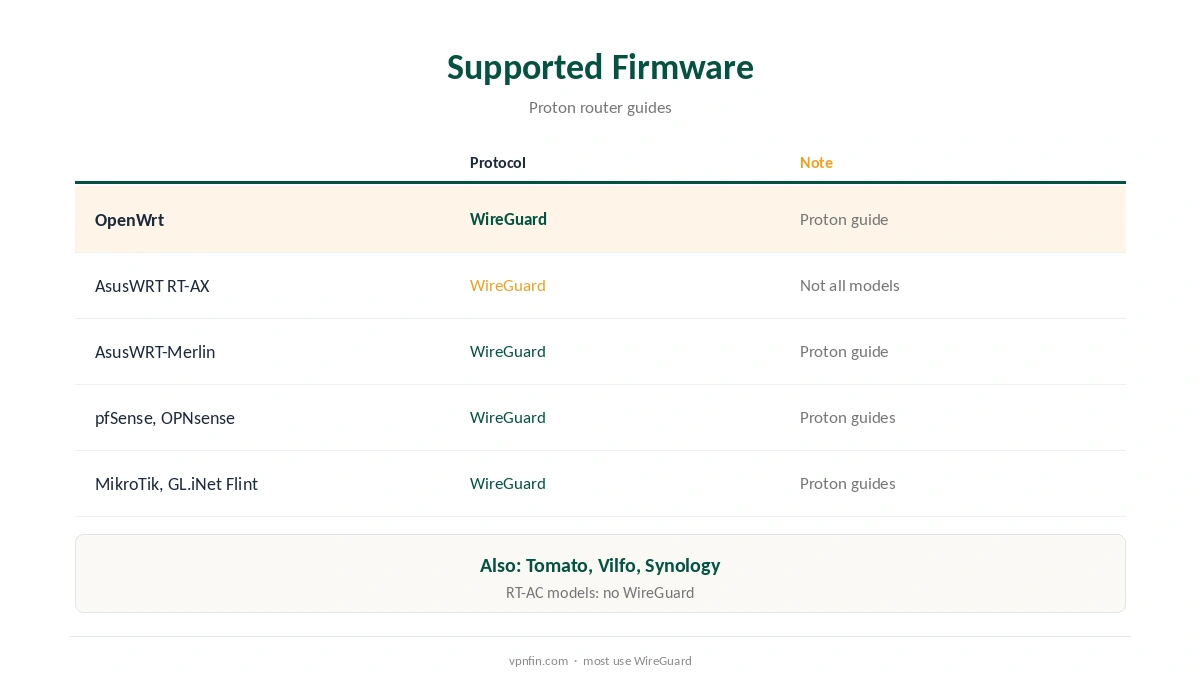
A Proton VPN router setup protects every device on your network, including TVs and consoles that cannot run apps. Proton publishes guides for OpenWrt, AsusWRT, AsusWRT-Merlin, pfSense, OPNsense, MikroTik, GL.iNet’s Flint, Tomato and Synology NAS, most using WireGuard. You download a WireGuard configuration file from your account, choosing Router as the platform, and import it into the router’s VPN client. Proton VPN, run by the Proton Foundation in Switzerland, has five Securitum audits in our table, a free plan with no data cap and 10 devices on VPN Plus.
This guide covers which routers work, the setup and what you give up compared with the apps.
Which Routers Work With a Proton VPN Router Setup
Proton’s router library covers OpenWrt, AsusWRT, AsusWRT-Merlin, pfSense, OPNsense, MikroTik, the GL.iNet Flint (GL-AX1800), Tomato, Vilfo, InvizBox and Synology DSM. On Asus, Proton notes that RT-ACxxx models and some RT-AXxxx models do not support WireGuard, so check yours first. Our VPN router setup guide explains router choices.
Setup With WireGuard
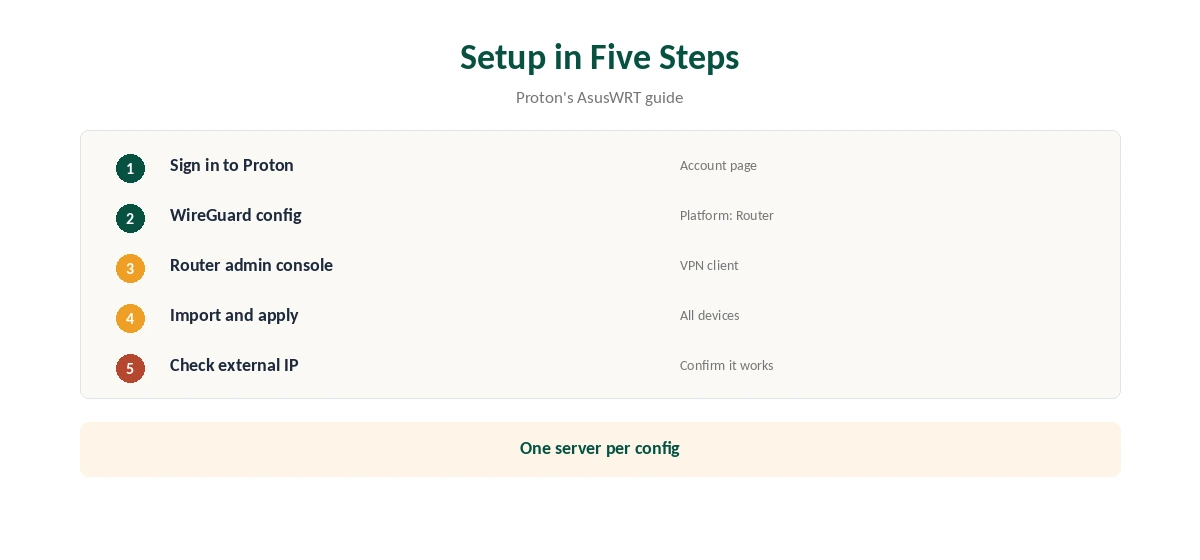
Sign in to your Proton account, open the WireGuard configuration page, choose Router as the platform and a server, and download the file. On an AsusWRT RT-AX router, open the admin console, add a WireGuard VPN profile, import the file and apply it to all devices, Proton’s guide explains. Then check your external IP.
What a Router Gives Up
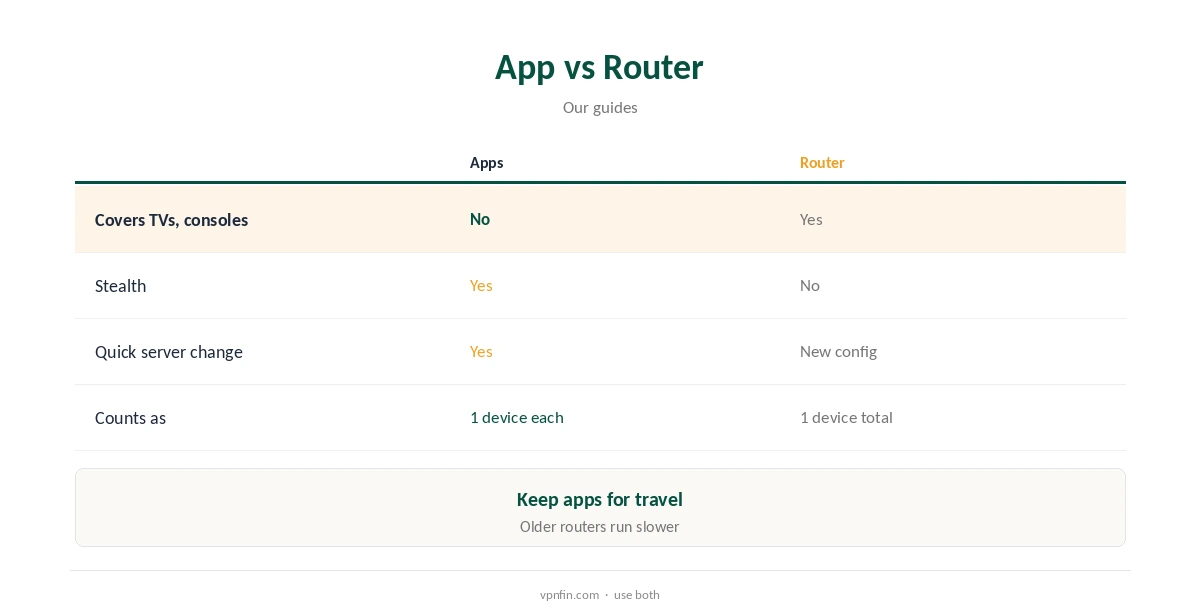
A router connection uses one fixed server. App features such as Smart Protocol, Stealth, Secure Core switching and NetShield controls stay in the apps. Changing country means loading a new config. Our NordVPN router guide shows how another provider handles the same trade-offs.
Proton VPN Router Setup on OpenWrt and GL.iNet
OpenWrt and GL.iNet’s firmware both import WireGuard files. Proton’s Flint guide covers the GL-AX1800, a common travel and home router, and Proton’s guide walks through GL.iNet’s own VPN client page.
pfSense and OPNsense
Proton’s pfSense guides cover versions 2.4.5 to 2.6, and its OPNsense guide uses WireGuard. These suit home labs that want rules per device.
Synology NAS
Proton’s Synology guide shows how to run the VPN on a DiskStation and share the connection, a route that suits home-server owners who prefer not to touch the router.
Is a Proton VPN Router Worth It?
For homes with TVs and consoles, yes: one Proton VPN router config protects devices that cannot run apps. For a single laptop or phone, the apps are simpler and keep Stealth and Secure Core.
MikroTik
Proton publishes a WireGuard guide for MikroTik routers, which suit technical users who want fine-grained rules.
Testing the Connection
After applying the profile, visit our VPN test page from a device on the network and confirm the address shows the server’s country.
Keeping Configs Current
Server addresses and keys can change. If a router stops connecting, download a fresh WireGuard config from your account and import it again.
Choosing a Server
Pick a nearby server for speed, or a specific country for streaming. Changing later means a new config, so name each profile clearly in the router.
Who It Suits
Households with smart TVs, consoles and smart speakers gain most from a router. Single users with a phone and a laptop are better served by the apps.
Several Routers
Each router running Proton counts as one device on your plan. A main router plus a travel router still leaves room on VPN Plus’s 10.
Speed Expectations
Router speed depends on the processor, so test WireGuard on your own model at peak time. Older AC-class Asus models may not run WireGuard at all, as Proton’s Asus note shows, so check before buying a plan for router use. Test before relying on it for 4K streaming.
Quick Rule
TVs and consoles: router. Phones and laptops: apps, with Stealth and quick server changes. Many homes use both on one plan, since a router counts as a single device.
Free Plan and Routers
Check your account’s WireGuard configuration page for the servers your plan can use, since free and paid plans differ in server access. Streaming support is for paid plans.
Kill Switch on a Router
Router firmware decides what happens if the tunnel drops. On AsusWRT and OpenWrt, check whether traffic stops or falls back to the normal connection, and test by stopping the VPN profile.
Devices
A router counts as one device on your plan, and it covers everything behind it. That suits TVs, consoles and smart speakers, while phones and laptops can still run the apps when away.
Speed
Router processors are slower than computers, so VPN speed often drops on older models. WireGuard is lighter than OpenVPN and usually faster on routers. Test speed at your busiest time. Our guide to Proton VPN on Roku covers why there is no app, and the two routes that work.
Turning It Off
Disable the VPN profile in the router’s admin console. Our guide to turning off a router VPN covers common firmware.
How We Research
This page draws on Proton’s router guide library and its AsusWRT WireGuard guide, and our router and Proton tables. We cross-checked these sources against each other, and where they conflict or something can’t be verified, we say so in the text rather than guessing. We checked time-sensitive figures, including prices in US dollars, on 8 October 2026. The main source we relied on is Proton VPN’s router guides. Our full approach lives on the About Us page.
Proton VPN Router FAQ
OpenWrt, AsusWRT, AsusWRT-Merlin, pfSense, OPNsense, MikroTik, GL.iNet Flint, Tomato and more.
WireGuard, which Proton’s guides use for most routers.
Yes, and it covers everything connected to it.
No; RT-AC models and some RT-AX models do not.
Yes; Stealth, Smart Protocol and quick server changes stay in the apps.
The Verdict
A Proton VPN router setup covers TVs and consoles with one config. Check WireGuard support on your model, and keep the apps for phones and laptops.