
Disclosure: VPNFin is reader-supported. If you buy a VPN through links on this page, we may earn a commission at no extra cost to you. This never affects our ratings — here’s our full disclosure.
ExpressVPN Ubuntu users, and Linux users generally, got a graphical app in March 2025, when ExpressVPN released version 4 of its Linux client in beta. It brought Network Lock, ExpressVPN’s kill switch, with an always-on mode. It also added split tunnelling by app or IP address, Lightway with post-quantum protection, OpenVPN and a command-line interface alongside the GUI. ExpressVPN’s download page listed version 4.0.1 in September 2026 for Ubuntu, Debian, Fedora, Arch, Raspberry Pi and Linux Mint. Our guide to ExpressVPN on Raspberry Pi covers 64-bit only, setup and Network Lock.
This guide covers supported systems, installation, the settings that matter, the CLI and the limits Linux users should know.
Supported Distributions
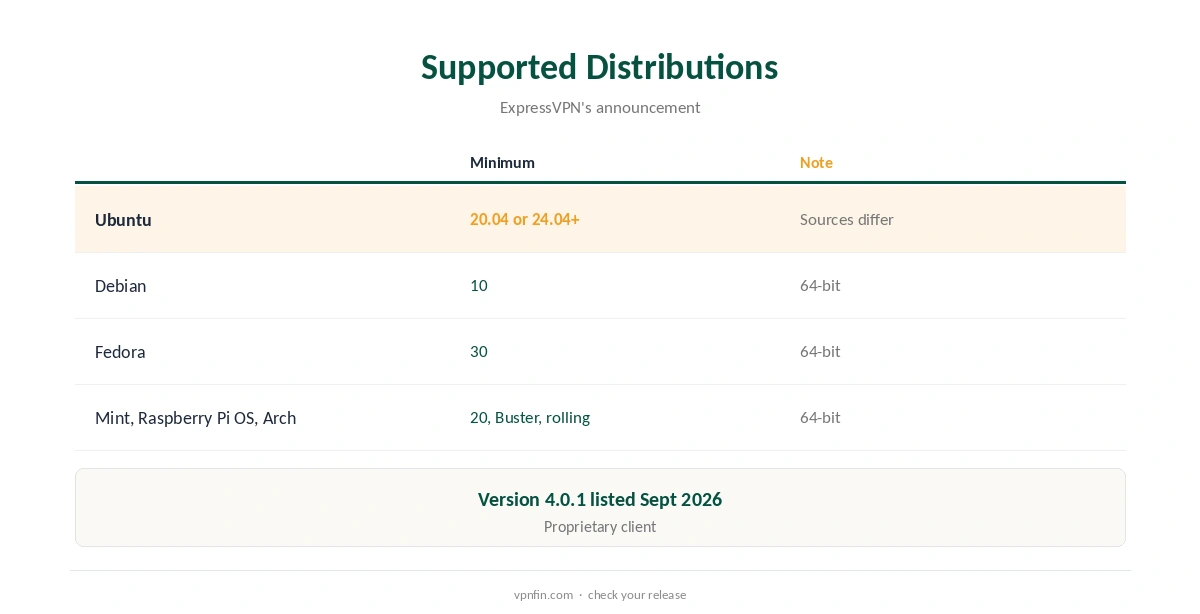
The app is 64-bit only and runs on Ubuntu, Debian, Fedora, Raspberry Pi OS, Linux Mint and Arch, ExpressVPN’s launch announcement said. Sources disagree on the minimum Ubuntu version: the press release named 24.04 or later, while ExpressVPN’s blog post said 20.04 or later.
Phoronix notes the client is proprietary and built for x86_64. Check the download page for your exact release before installing. ExpressVPN’s older Linux page set minimums of Ubuntu 20.04, Fedora 37 and the latest Arch rolling release, citing security support from the distributions themselves. Our Linux VPN guide compares providers’ Linux support.
ExpressVPN Ubuntu Setup
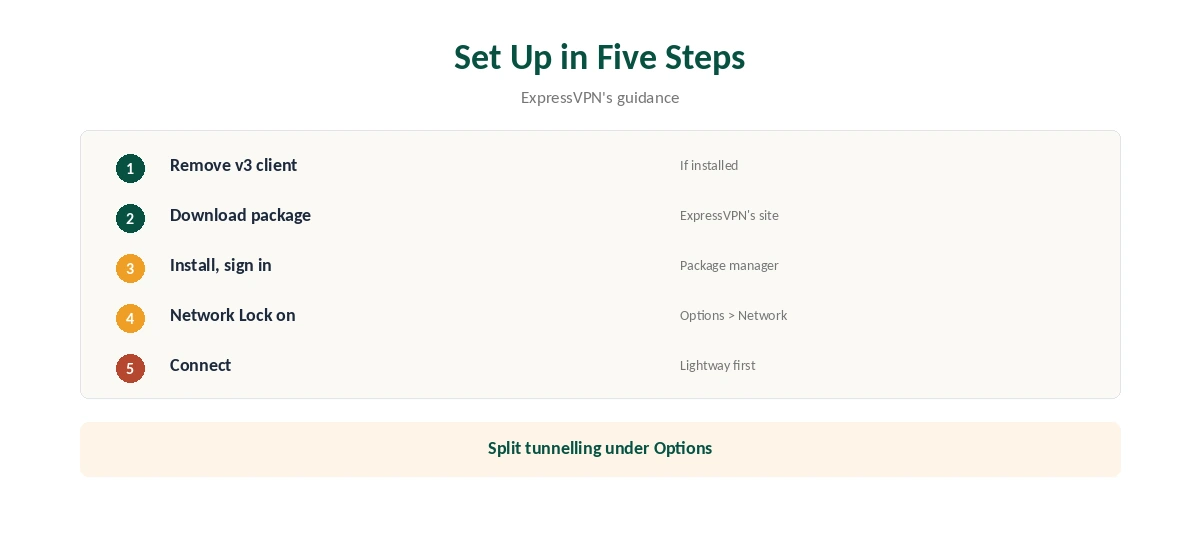
If you used the old command-line client, version 3 or earlier, uninstall it first, ExpressVPN advises, to avoid conflicts. Then download the package for your distribution from ExpressVPN’s site and install it with your package manager, such as apt on Ubuntu or dnf on Fedora.
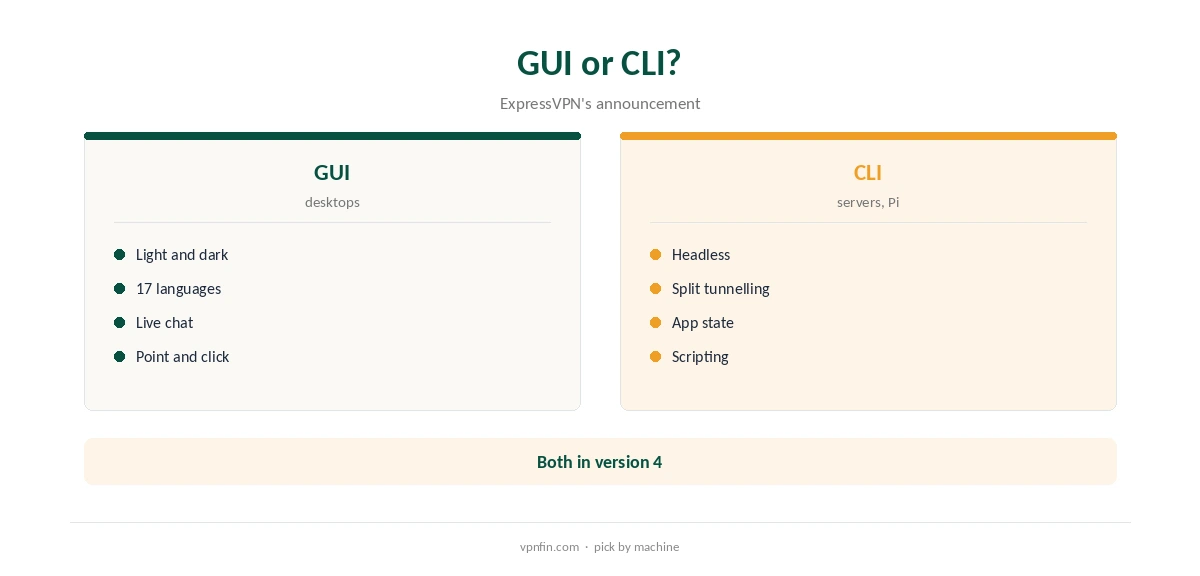
Open ExpressVPN from your applications, sign in with your activation details and connect. The app offers light and dark themes in 17 languages, and live chat support inside the app, ExpressVPN’s announcement said.
Network Lock and the Advanced Kill Switch
Network Lock stops internet traffic if the VPN connection drops. The advanced mode keeps it blocking even while the VPN is disconnected. To turn it on, open Options, Network, Network Lock and choose Enable at all times, ExpressVPN’s release notes explain.
The always-on mode suits laptops that should never reach the internet unprotected. Turn it off before uninstalling, or the system may stay offline. Our kill switch guide explains the trade-offs.
Split Tunnelling by App or IP
Version 4 added split tunnelling to Linux for the first time, by app or by IP address, under Options, Split Tunneling, the release notes say. IP-based splitting lets you send traffic to particular servers through the VPN or around it.
Exclude local services such as a NAS or printer, or include only the apps you want protected. Revisit the list after installing new apps, so each one goes where you intend. Our split tunnelling guide explains the modes.
Protocols
The Linux app offers Lightway, ExpressVPN’s own protocol, with post-quantum key exchange, plus OpenVPN. Lightway also supports DTLS 1.3, except on Arch. Phoronix notes there is no WireGuard option.
Lightway is the default for speed; OpenVPN suits networks that block it. If you need WireGuard specifically, for example to match a router setup, ExpressVPN’s Linux app is not the tool for it. Our VPN protocols guide explains how they compare.
The Command-Line Interface
The new CLI works alongside the GUI and on headless systems, and gained split tunnelling and app-state monitoring for scripting, ExpressVPN said. Servers and Raspberry Pi devices without a desktop use the CLI.
Auto-connect can connect or disconnect based on network conditions, the release notes say, and LAN access keeps local devices reachable while connected. On a Raspberry Pi acting as a small server, the CLI and auto-connect together keep the tunnel up without a screen.
Privacy and Ownership
ExpressVPN is registered in the British Virgin Islands and owned by Kape, which also owns CyberGhost and PIA, our ownership table records. It lists 27 independent audits by May 2026, including three KPMG no-logs reports.
The Linux client itself is proprietary, Phoronix notes, so its code cannot be inspected the way open-source clients can. Weigh that against the audits, as our VPN audit tracker explains.
Price and Devices
ExpressVPN’s Basic plan cost $83.72 for the first 28 months in a September 2026 promotion. It renews at $99.95 a year, its pricing page shows. It covers 10 devices on Basic, 12 on Advanced and 14 on Pro.
New users get a 30-day refund, the pricing page says, which gives time to test the Linux app on your own distribution. Our Chromebook guide explains the Linux route on Chromebooks.
Removing It
Turn Network Lock’s always-on mode off, disconnect, then remove the package with your package manager. Our guide to turning off a VPN on Linux covers leftover settings.
If the network stays blocked after removal, re-install the app, turn Network Lock off and remove it again. For distribution-specific problems, the in-app live chat is the fastest route to ExpressVPN’s support. Our guide to ExpressVPN on Steam Deck covers the Arch app, the update catch and the router route.
How We Research
This page draws on ExpressVPN’s March 2025 Linux announcement, blog and release notes, its download and pricing pages, Phoronix, TechRadar and our ExpressVPN tables. We cross-checked these sources against each other, and where they conflict or something can’t be verified, we say so in the text rather than guessing. We checked time-sensitive figures, including prices in US dollars, on 8 October 2026. The main source we relied on is ExpressVPN’s Linux app announcement. Our full approach lives on the About Us page.
ExpressVPN Ubuntu FAQ
Since version 4, released in beta in March 2025.
Ubuntu, Debian, Fedora, Raspberry Pi OS, Linux Mint and Arch, 64-bit only.
Network Lock, with an always-on mode.
No; it offers Lightway and OpenVPN.
The new CLI works alongside the GUI.
The Verdict
ExpressVPN Ubuntu and Linux support is now complete, with a GUI, Network Lock and split tunnelling. Uninstall the old v3 client first, and note there is no WireGuard.