
Disclosure: VPNFin is reader-supported. If you buy a VPN through links on this page, we may earn a commission at no extra cost to you. This never affects our ratings — here’s our full disclosure.
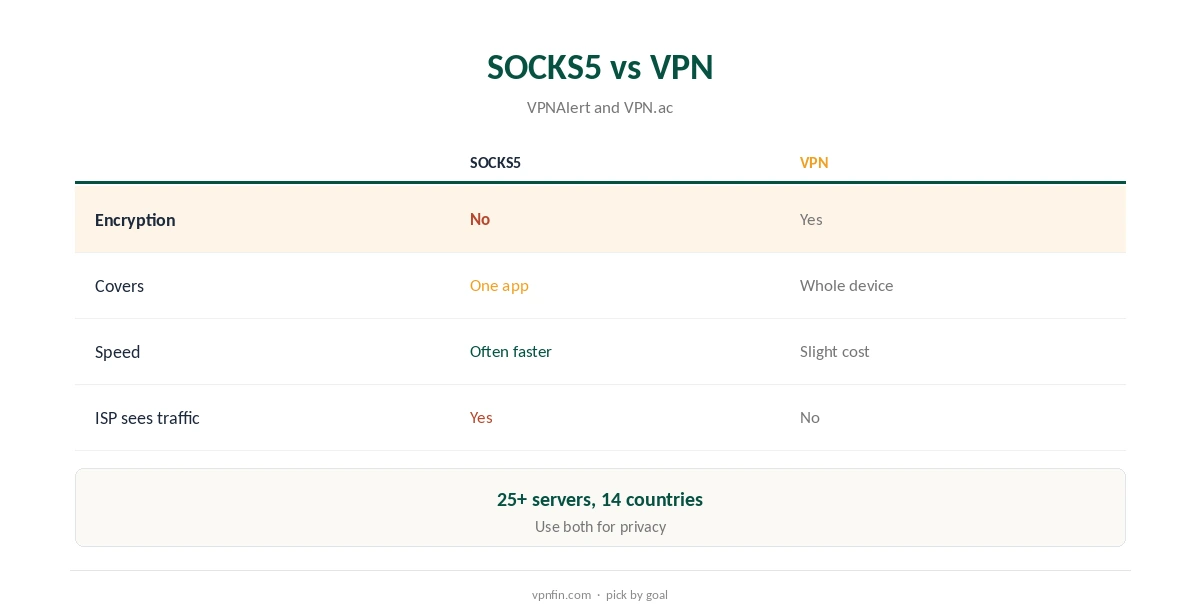
Yes, IPVanish offers a SOCKS5 proxy, on more than 25 servers in 14 countries, VPNAlert reports. You generate separate proxy credentials in your IPVanish account and pick a host name from the list there. Then you enter both, with port 1080, in a torrent client. SOCKS5 changes the address peers see but does not encrypt traffic, so your internet provider can still see it.
This guide covers getting credentials, setting up qBittorrent, leak settings, combining it with the VPN and its limits.
What IPVanish SOCKS5 Does
A SOCKS5 proxy routes one application, usually a torrent client, through IPVanish’s servers. Peers see the proxy’s address instead of yours, and the client often runs faster than over the VPN, VPNAlert notes.
Unlike the VPN, it does not encrypt anything, and only the configured app uses it; everything else keeps your normal address. Our SOCKS5 VPN guide explains the difference.
Getting Your Proxy Credentials
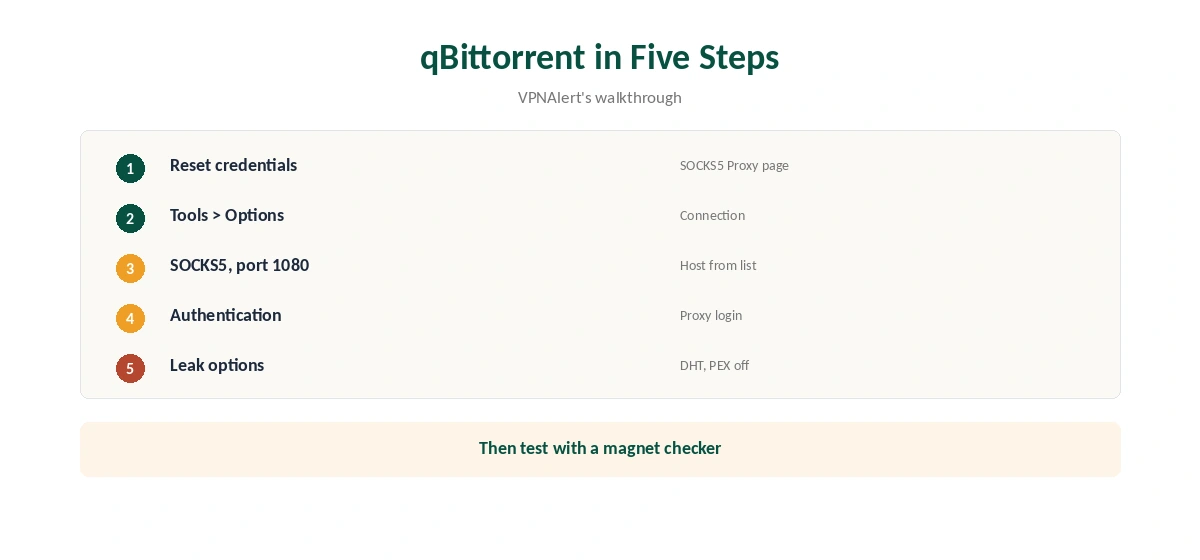
Sign in to IPVanish’s account control panel, open the SOCKS5 Proxy section and choose Reset Credentials, VPNAlert’s walkthrough shows. IPVanish generates a separate username and password for the proxy, and you can reset them again at any time.
The same page lists the proxy host names. Use these credentials, not your account email and password, in the client.
IPVanish SOCKS5 Setup in qBittorrent
In qBittorrent, open Tools, Options, Connection. Set the proxy type to SOCKS5 and enter an IPVanish host name and port 1080. Turn on authentication with the generated credentials, and tick the options to use the proxy for peer connections.
Save and restart qBittorrent so the new proxy settings apply to every torrent, including ones already in the list. Other clients such as Deluge and BitTorrent follow the same pattern, VPNAlert notes.
Leak Settings
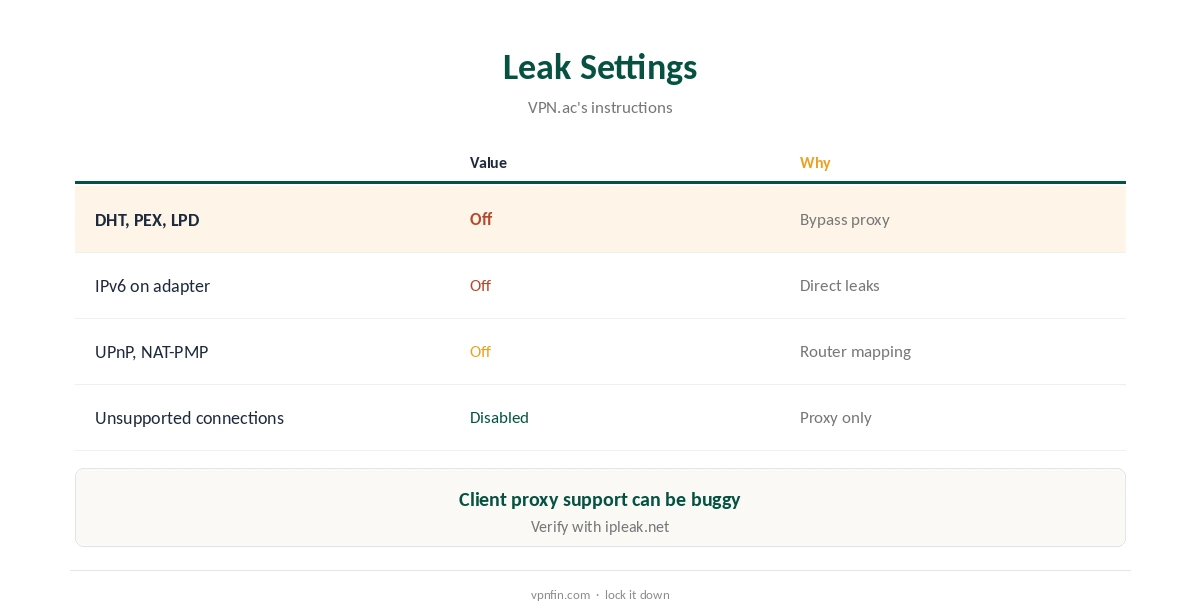
Proxy support in torrent clients can leak around the proxy, VPN.ac warns. Disable DHT, peer exchange and local peer discovery, and IPv6 on your network adapter. Turn off UPnP and NAT-PMP port mapping too, since they open ports on your router outside the proxy.
Tick the option to disable connections not supported by the proxy, where your client offers it.
Checking It Works
Load a torrent IP checker’s magnet link, such as the one on ipleak.net, in your client. Confirm the address it reports is an IPVanish proxy address, as NordVPN’s help suggests for its own proxy.
If your real address appears, recheck the proxy settings and the leak options above, then remove and re-add the test torrent.
SOCKS5 With or Without the VPN
SOCKS5 alone hides your address from peers but leaves your traffic visible to your internet provider. Running the VPN as well encrypts everything, at some cost in speed, and the proxy then gives peers a second, different address.
For privacy from your internet provider, use the VPN; for speed with a different address for peers, SOCKS5 suits. Our IPVanish torrenting guide covers both.
Other Torrent Clients
Deluge, BitTorrent and uTorrent take the same details in their proxy settings: SOCKS5 as the type, an IPVanish host name, port 1080, and the generated credentials. NordVPN’s BitTorrent tutorial shows the same fields for its own proxy.
Tick options such as using the proxy for peer connections and hostname lookups, and disabling features that leak identifying information, where the client offers them.
Choosing a Proxy Location
Pick the proxy host nearest to you for the best speed; the list in your account shows each location’s host name. With only 14 countries available, the choice is narrower than for the VPN, which covers far more locations.
If one host is slow or refuses connections, switch to another in the same country before changing any other settings.
Common Problems
Authentication errors usually mean someone entered the account login instead of the generated proxy credentials, or the credentials were reset since you entered them. Generate them again, update the client and restart it.
If downloads stall, check that the client allows connections through the proxy and that your network or router does not block port 1080.
Who Should Use It
SOCKS5 suits people who want torrent peers to see a different address and care most about speed, on a network they trust. On public Wi-Fi or where your provider throttles P2P, the VPN is the better choice because it encrypts traffic.
If you already run the IPVanish app, the proxy adds little except a second address for peers, so most people choose one or the other.
Limits
IPVanish offers no port forwarding with the proxy or the VPN, VPNAlert notes. The proxy covers only apps that support SOCKS5, such as torrent clients, so browsers and other apps keep your real address. Use the VPN app for those. Our guide to IPVanish for Warzone covers ping, servers and the right settings.
NordVPN retired its SOCKS5 proxy in 2025, a 2026 comparison reports, so fewer providers now offer one.
How We Research
This page draws on VPNAlert’s IPVanish torrenting guide, VPN.ac’s qBittorrent SOCKS5 instructions, NordVPN’s proxy help, a 2026 SOCKS5 comparison and our IPVanish tables. We cross-checked these sources against each other, and where they conflict or something can’t be verified, we say so in the text rather than guessing. We checked time-sensitive figures, including prices in US dollars, on 8 October 2026. The main source we relied on is VPN.ac’s SOCKS5 guide. Our full approach lives on the About Us page.
IPVanish SOCKS5 FAQ
Yes, on more than 25 servers in 14 countries.
In your account’s SOCKS5 Proxy section, with Reset Credentials.
Port 1080.
No; use the VPN for encryption.
No; IPVanish offers none.
The Verdict
IPVanish SOCKS5 is a fast way to give a torrent client a different address, with separate credentials and port 1080. Add the VPN when you need encryption.