
Disclosure: VPNFin is reader-supported. If you buy a VPN through links on this page, we may earn a commission at no extra cost to you. This never affects our ratings — here’s our full disclosure.
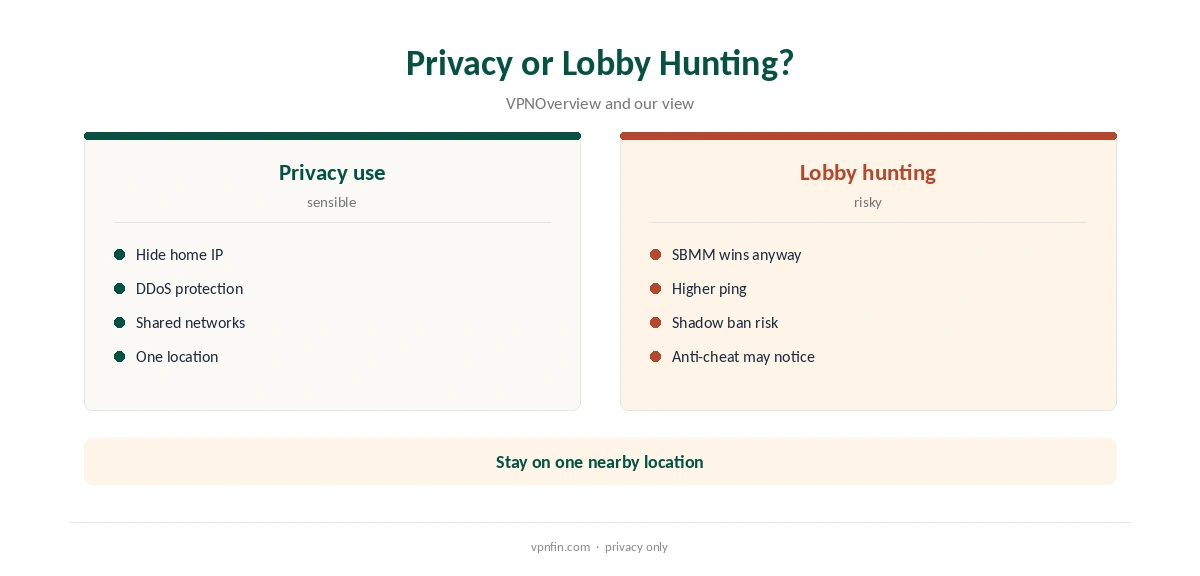
IPVanish Warzone use makes sense for privacy and DDoS protection rather than easier lobbies. Warzone’s skill-based matchmaking puts skill ahead of geography, so a VPN cannot reliably steer you into weaker lobbies, and frequent location changes may risk a shadow ban, VPNOverview warns. IPVanish lost only about 4% of speed in Security.org’s tests, but it offers no port forwarding, and consoles need a router.
This guide covers Warzone’s servers, ping, Activision’s position, PC and console setup and the risks.
Where Warzone’s Servers Are, and Why Matchmaking Beats Geography
Warzone runs on Demonware servers hosted on Azure and AWS, with regions including Virginia, Chicago and Los Angeles in North America, London and Frankfurt in Europe, and Tokyo in Asia, pong.com reports. The game uses a 22-tick rate.
Pick the IPVanish location nearest the region you normally play in, and stay on it all evening. Our gaming VPN guide explains how distance adds ping.
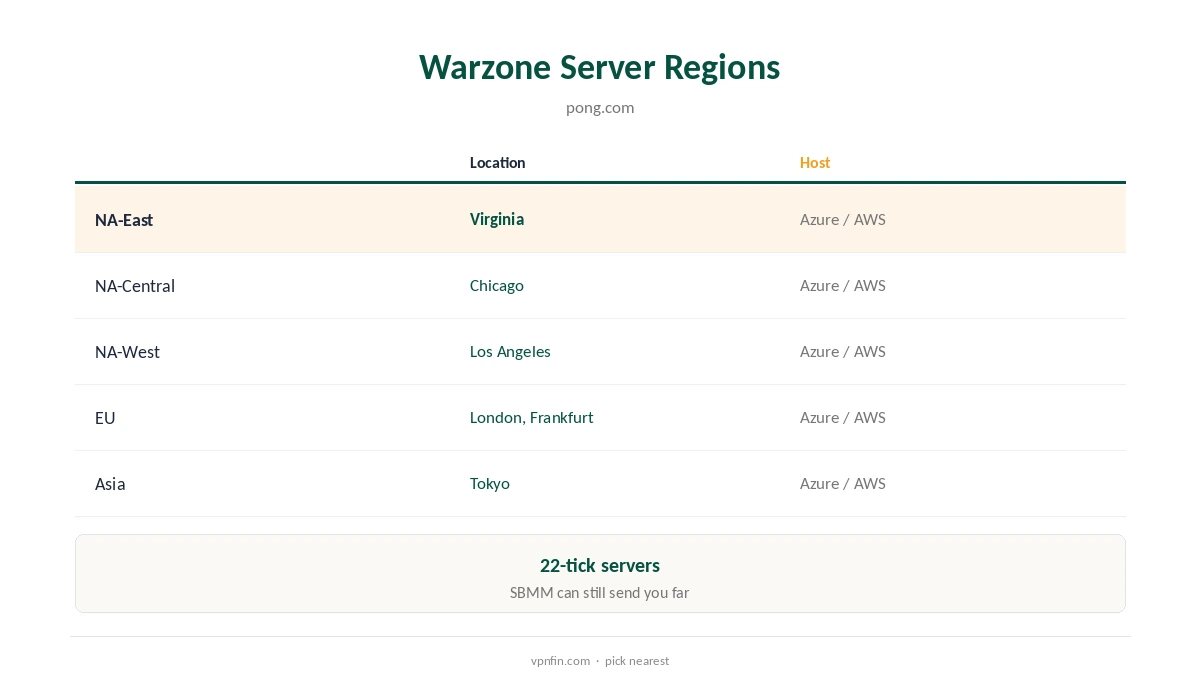
Skill-based matchmaking ranks skill above location and can send you to distant lobbies anyway, pong.com notes, and VPNAlert says it cannot be eliminated. Activision has not published how its matchmaking works.
Connecting through another country mostly adds ping rather than guaranteeing weaker opponents.
Activision’s Position and Ricochet
Activision’s terms do not forbid VPNs, VPNOverview found, and its Ricochet anti-cheat does not target them; frequent location changes may still lead to a shadow ban. Cybernews’ German edition reports that the anti-cheat added in Season 4 may recognise VPNs.
Treat lobby hunting as a risk to your account, and keep the VPN to one nearby location.
IPVanish Warzone Setup on PC
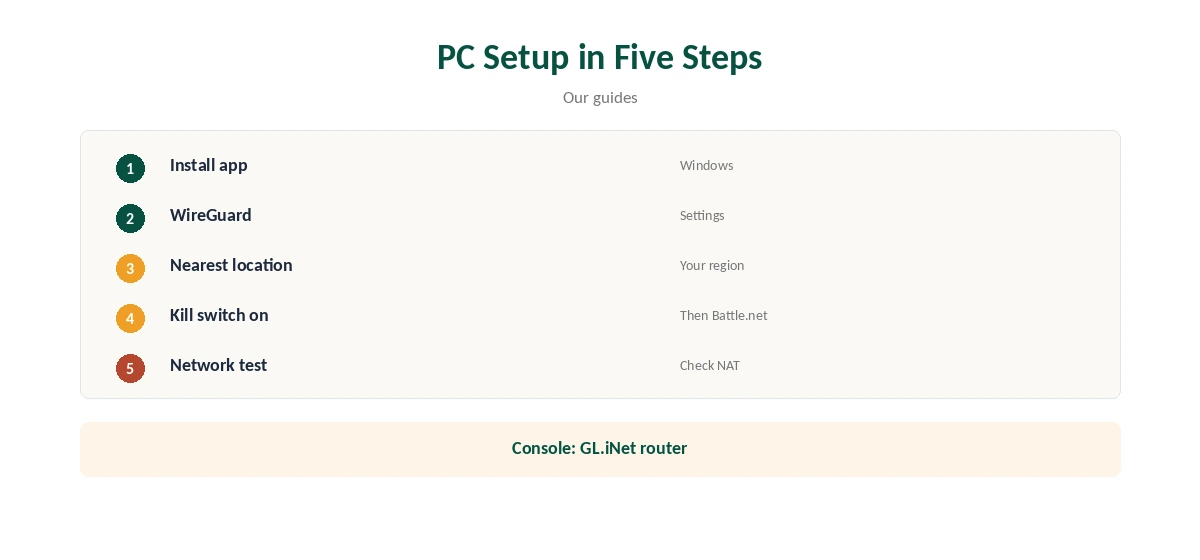
Install the IPVanish Windows app, choose WireGuard and connect to the nearest location before opening Battle.net or Steam. The kill switch cut traffic within a second in Security.org’s desktop tests, so your IP stays hidden if the tunnel drops.
Split tunnelling on Windows can keep Warzone outside the tunnel while chat and browser stay inside.
PlayStation, Xbox, NAT and Port Forwarding
Consoles cannot run VPN apps, and IPVanish has no Smart DNS. A GL.iNet router with IPVanish built in, or a Windows PC sharing its connection, covers the console.
Our IPVanish PS5 guide and Xbox guide walk through both.
IPVanish offers no port forwarding, so a VPN may leave your NAT type stricter, which affects party chat and matchmaking. Run the game’s or console’s network test after connecting.
If party chat breaks, play direct for that session and test again later.
Price and Privacy
IPVanish costs $57.22 for the first 24 months and renews at $89.99 a year, VPNOverview lists, with no device limit. Yearly website plans carry a 30-day refund; monthly plans carry none.
IPVanish’s no-logs policy has two audits in our table, by Leviathan in 2022 and Schellman in 2025. Our IPVanish gaming guide covers other games.
Jitter, Packet Loss and Checking Your Setup
Warzone feels laggy as much from jitter and packet loss as from high ping. A VPN on a nearby server usually changes these little, but a congested or distant server can make them worse.
A wired connection to your router helps more than any VPN setting you can change.
Streaming Your Matches
Streamers are the players most exposed to DDoS attacks once their IP address leaks. Running IPVanish on the PC keeps both the game and the streaming software behind the VPN’s address.
IPVanish sets no device limit, so a second PC or a phone for chat can use the same account.
Warzone’s settings can show on-screen latency and packet loss. Compare a few matches with the VPN on and off at the same time of day, and keep whichever setup gives steadier numbers.
Run a browser leak test to confirm your home IP is hidden from sites and other players.
Matching a Location to Your Region
Choose an IPVanish city close to the Warzone data centre you normally reach: an East Coast city for NA-East, the Midwest for NA-Central, the West Coast for NA-West, or London or Frankfurt in Europe. Staying on that one location keeps ping steady.
Avoid hopping between countries between matches, which VPNOverview links to shadow-ban risk.
Travelling, and Testing Within the Refund Window
Hotel and dorm networks often block game ports or add their own lag. A GL.iNet travel router running IPVanish gives the console a private connection and hides your traffic from the shared network.
Expect higher ping when you are far from your usual region, VPN or not, so casual modes suit travel best.
IPVanish’s yearly website plans carry a 30-day refund, which is long enough to compare a week of matches with and without it. Monthly plans carry none, so test on a yearly plan. For what it changes for Warzone, see our page on Windscribe for Warzone.
Keep notes of ping and packet loss for each setup so the comparison stays fair.
How We Research
This page draws on All Things VPN’s IPVanish review, pong.com’s Warzone server analysis, VPNOverview’s and VPNAlert’s Warzone guides, Cybernews’ German Warzone coverage, Security.org’s IPVanish tests and our IPVanish tables. We cross-checked these sources against each other, and where they conflict or something can’t be verified, we say so in the text rather than guessing. We checked time-sensitive figures, including prices in US dollars, on 8 October 2026. The main source we relied on is All Things VPN’s IPVanish review. Our full approach lives on the About Us page.
IPVanish Warzone FAQ
Usually not; it adds a hop. Use a nearby location.
Not reliably; skill-based matchmaking outweighs location.
Frequent location changes may risk a shadow ban, VPNOverview warns.
Through a router or a shared Windows connection.
No.
The Verdict
IPVanish Warzone use is sensible for privacy at a nearby location. It will not beat skill-based matchmaking, and lobby hunting carries risk.