
Disclosure: VPNFin is reader-supported. If you buy a VPN through links on this page, we may earn a commission at no extra cost to you. This never affects our ratings — here’s our full disclosure.
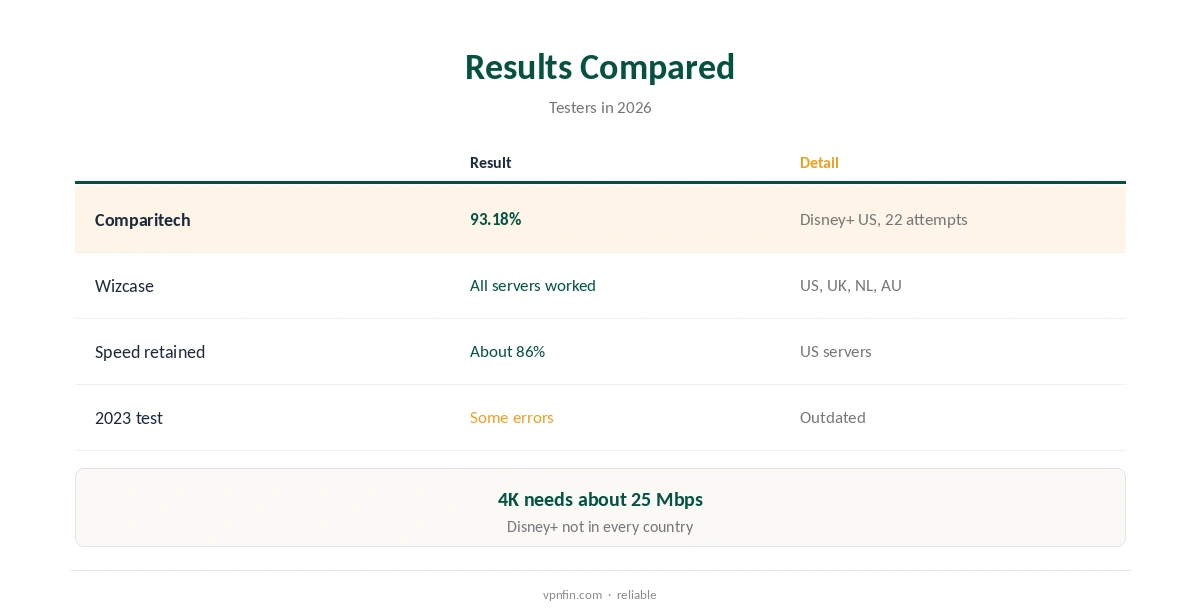
Disney Plus ExpressVPN access is reliable most of the time. Comparitech measured a 93% success rate on Disney+ US across 22 attempts in August 2026. Wizcase found every server it tried in the US, UK, Netherlands and Australia worked, in UHD. When it fails, the cause is usually cached location data in the Disney+ app, which clearing the cache fixes. WizCase belongs to Kape, which also owns ExpressVPN, so we weigh its findings alongside independent sources.
This guide covers the numbers, why Disney+ sometimes errors, the fixes in order and device notes.
What the Numbers Say
Comparitech’s 2026 measurements put ExpressVPN at 93.18% on Disney+ US, with about 86% of US speed retained. Its sample was 22 attempts, so expect the occasional failure. Wizcase connected to US, UK, Dutch and Australian servers and found each one worked.
An older 2023 test that hit errors on Miami and Perth servers predates these results. Our Disney+ VPN guide compares providers.
Why Disney Plus ExpressVPN Streams Sometimes Error
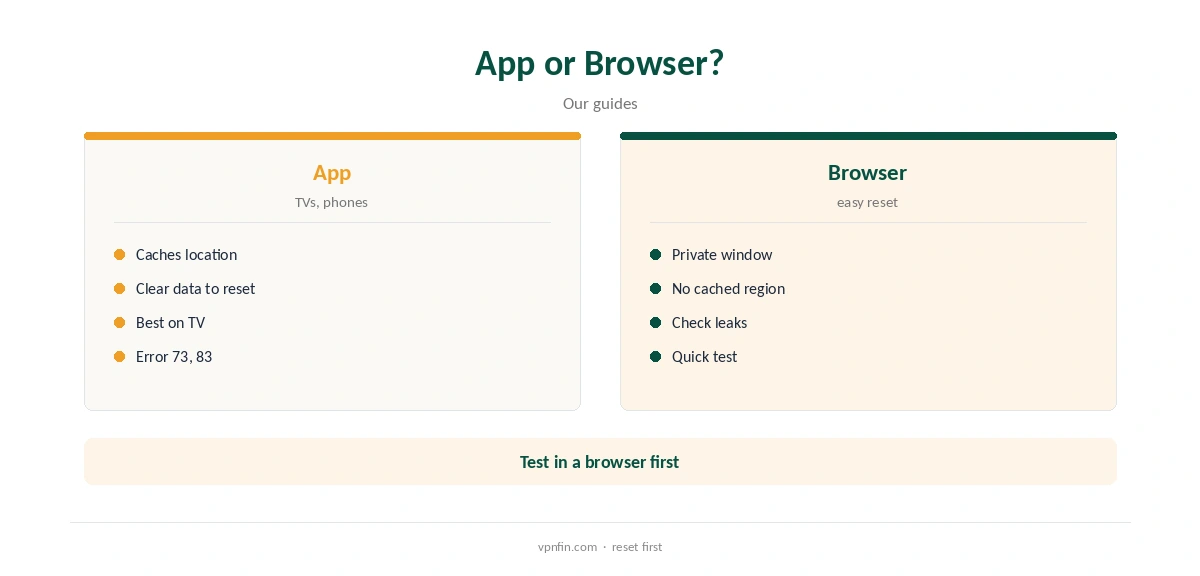
Disney+ caches your detected location and may check device signals such as time zone and system language, a 2026 troubleshooting guide notes. A mismatch can trigger errors 73 or 83. The VPN may be working while the app still remembers your old region.
Disney+ is also not available in every country, so connect to one where it operates.
Disney Plus ExpressVPN Fixes
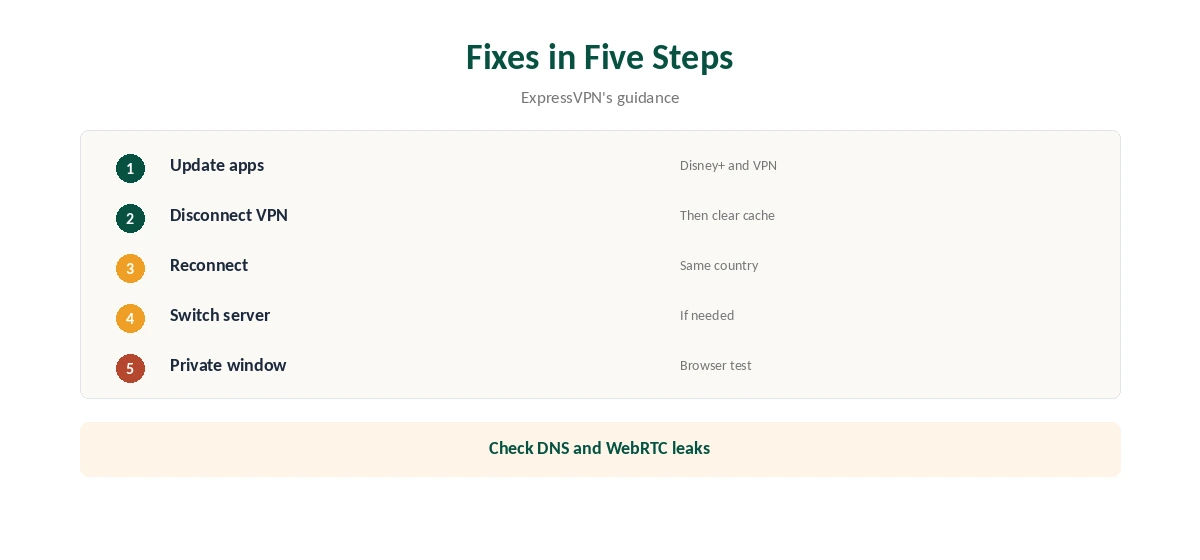
ExpressVPN’s own guidance is to update both apps, disconnect the VPN, clear the Disney+ app’s cache, then reconnect and reopen Disney+. On Android, the cache sits under Settings, Apps, Disney+, Storage.
If that fails, switch to another server in the same country, then try a private browser window instead of the app to rule out cached data.
App or Browser
Browsers are easier to reset: a private window carries no cached location. Apps on phones and TVs hold on to data until you clear it. That is why the same server can work in a browser and fail in the app.
Check for DNS and WebRTC leaks in the browser, which can reveal your real location. Our DNS leak guide explains the test.
TVs, Sticks and 4K
ExpressVPN has apps for Fire TV, Android TV and Apple TV, so Disney+ on those devices can run through the VPN directly. Clear the Disney+ app’s data on the TV itself, not just on your phone, since each device keeps its own copy. For TVs without apps, a router running ExpressVPN covers everything.
Our ExpressVPN Fire Stick guide and Apple TV guide cover setup.
Disney+ needs about 25 Mbps for 4K, VPNAlert notes, and about 5 Mbps for basic streaming. With roughly 86% of speed retained in Comparitech’s US tests, most connections can manage it on a nearby server.
Use Lightway and a wired connection for the TV if 4K stutters, and pick the nearest city in the country you need.
Where Disney+ Is Not Available
Disney+ does not operate in every country, so a server there will never work, VPNAlert reminds readers. Check that the country you connect to has Disney+ before troubleshooting, using Disney’s own list of supported countries.
The US, UK, Netherlands and Australia all worked in Wizcase’s tests, which makes them sensible first choices for most viewers.
Devices, Terms and Price
ExpressVPN’s Basic plan covers 10 devices, our tables record, so phones, laptops and a TV app can all stream Disney+ through it. A router counts as one device but covers everything behind it.
Our ExpressVPN router guide covers that setup.
Time Zone and Device Settings
If clearing the cache does not help, check the device’s time zone and language. A phone set to your home country’s time zone while connected abroad can contribute to a mismatch, the troubleshooting guide notes.
Location services on phones can also reveal your real position to apps that request it, so check app permissions too.
Streaming services license content by country, and their terms may restrict viewing outside your region; a VPN does not change what your subscription allows.
ExpressVPN’s Basic plan covers 10 devices and renews at $99.95 a year, our tables record, with a 30-day refund for new users.
Privacy and Audits
ExpressVPN lists 27 independent audits by May 2026, including three KPMG no-logs reports. Its TrustedServer setup runs servers from memory, so data is wiped at every reboot. Kape owns ExpressVPN, along with CyberGhost and PIA.
On a family TV or a hotel network, that keeps what you watch on Disney+ private from the network owner and your internet provider.
Checking Your Setup
Before blaming a server, confirm Network Lock is on and run a leak test. The IP, DNS servers and WebRTC address should all show the VPN’s country. ExpressVPN uses its own DNS on every server, which helps here. Our ExpressVPN and Paramount Plus page goes into 87.5% success and the cookie step.
If everything matches and Disney+ still errors, the app’s cache is the likely cause, so clear it and sign in again.
How We Research
This page draws on Comparitech’s 2026 Disney+ VPN measurements, Wizcase’s ExpressVPN review, ExpressVPN’s Disney+ guidance, a 2026 Disney+ troubleshooting guide and our ExpressVPN tables. We cross-checked these sources against each other, and where they conflict or something can’t be verified, we say so in the text rather than guessing. We checked time-sensitive figures, including prices in US dollars, on 8 October 2026. The main source we relied on is Comparitech’s Disney+ VPN tests. Our full approach lives on the About Us page.
Disney Plus ExpressVPN FAQ
Usually; Comparitech measured 93% success on Disney+ US.
Disney+ detected a location mismatch; clear its cache and reconnect.
Wizcase found US, UK, Dutch and Australian servers all worked.
On a nearby server, usually yes.
Yes, through ExpressVPN’s apps.
The Verdict
Disney Plus ExpressVPN access works in most tests. When it errors, clear the Disney+ cache before blaming the server.