
Disclosure: VPNFin is reader-supported. If you buy a VPN through links on this page, we may earn a commission at no extra cost to you. This never affects our ratings — here’s our full disclosure.
Many guides published this summer say ExpressVPN does not work on the newest Firestick models. That was true until September 2026, when ExpressVPN released an app for Vega OS, the Linux-based system on the Fire TV Stick 4K Select. It was the fourth VPN to arrive there, after NordVPN, IPVanish and Surfshark.
So the question is no longer whether ExpressVPN runs on your Fire Stick. It is which of two apps you need, whether you can sideload, and what the newer system does with your traffic. ExpressVPN’s own support pages answer all three, including one detail most setup guides leave out.
ExpressVPN on Firestick: The Short Answer
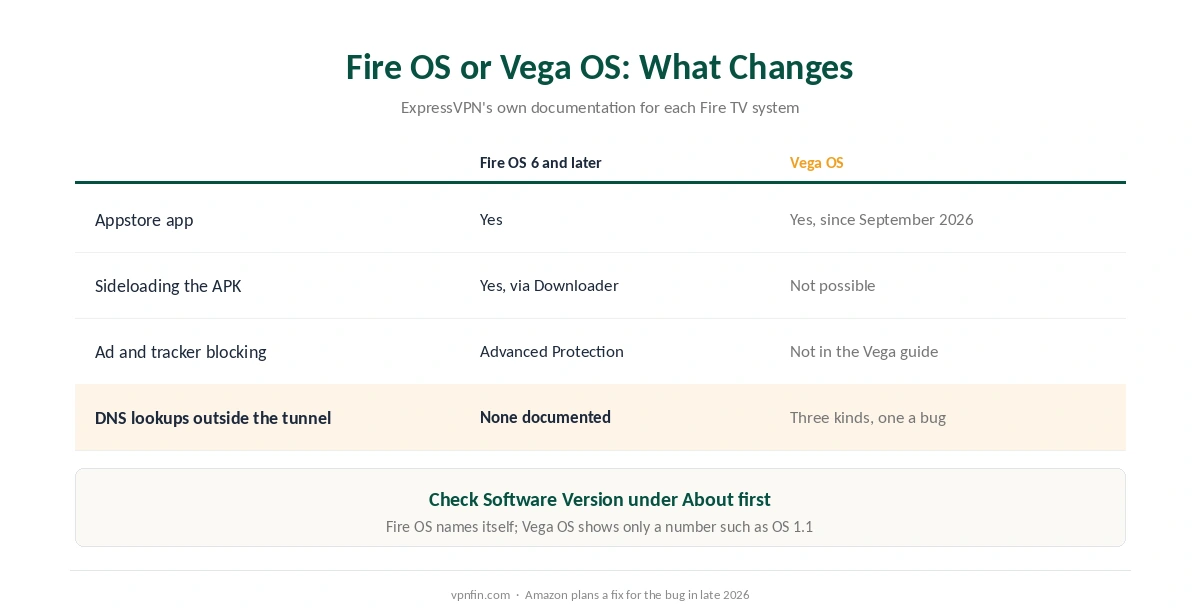
ExpressVPN now runs on both Fire TV systems. Fire OS 6 and later use the long-standing app, and Vega OS uses the new one. Both install from the Amazon Appstore.
Sideloading works only on Fire OS. If the Appstore does not show ExpressVPN, you can install the official APK through Downloader. On Vega OS, the Appstore is the only route.
On Vega OS, a few DNS lookups leave the tunnel. ExpressVPN documents three kinds, says they affect VPN apps on the platform generally, and notes that Amazon plans to fix one of them. Our Fire Stick VPN guide covers the wider choice of provider, and our ExpressVPN review the service itself.
First, Check Which System You Have
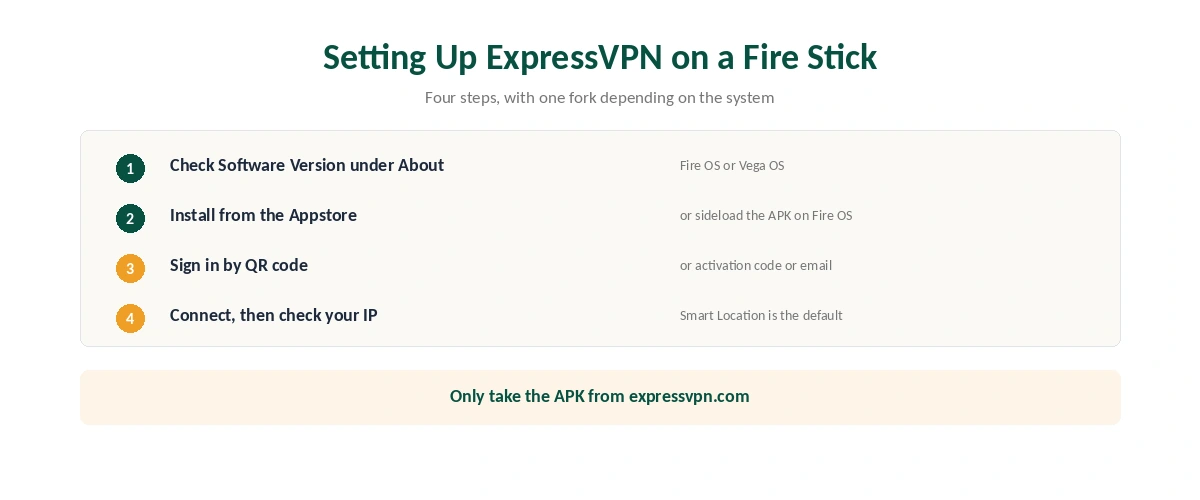
Open Settings, then My Fire TV, then About, and look at Software Version. ExpressVPN’s guide gives the rule: a Fire OS device shows the system by name, such as Fire OS 8.1.7.4, while a Vega OS device shows only a number, such as OS 1.1.
That one line decides everything below. Fire OS sticks, including the 4K Max, can install from the Appstore or by sideloading. Vega OS sticks, the 4K Select and the 2026 Fire TV Stick HD, can install only from the Appstore.
Installing ExpressVPN on Fire OS
Search for ExpressVPN from the Fire TV home screen, select it, and choose Download. Open the app when it finishes; on some devices it launches by itself.
To sign in, scan the QR code with your phone or enter your activation code. Then accept the two permission prompts, one to set up the VPN and one for the connection request, and choose whether to share anonymous diagnostics.
Finally, press the power button to connect. ExpressVPN suggests a Smart Location by default, and the Current Location widget opens the full list of 113 countries.
Sideloading, If the Appstore Does Not Have It
This route is for Fire OS 6 and later only. ExpressVPN’s guide recommends it only when the app is missing from the Appstore, for example on a device registered in a region where it is not listed.
First, unlock Developer Options: go to Device and Software, then About, and press Select seven times on the first entry. Next, install Downloader from the Appstore, return to Developer Options, and switch on Install unknown apps for Downloader alone.
Then open Downloader and enter ExpressVPN’s own APK address, expressvpn.com/latest#android. Download the APK from there and install it.
⚠️ Only ever use the provider’s own address. APK files from third-party sites are a common way to spread malware, and a tampered VPN app is worse than none. Our guide to turning a Fire Stick VPN off also covers removing an app you no longer trust.
Installing ExpressVPN on Vega OS
Search for ExpressVPN in the Appstore, download it and open it. Sign in by QR code or with your email and password, then select Agree and continue on the privacy notice.
After that, accept the permission and connection prompts, exactly as on Fire OS. There is no sideloading option and no workaround: Vega OS does not run Android packages at all.
Surfshark reached Vega OS in May 2026, and our Surfshark and Netflix page covers how its TV options changed the same year.
What Leaves the Tunnel on Vega OS
ExpressVPN published a support note in August 2026 describing DNS lookups that bypass the VPN on Vega OS. It says this happens at the operating-system level and is not specific to ExpressVPN.
Amazon’s own checks are deliberate. One is its network diagnostic check, and the other is captive-portal detection, the test for hotel and airport Wi-Fi sign-in pages. Both run over the physical connection by design, and Amazon has confirmed they will not change.
The app start-up lookups are a bug. When certain apps start, some lookups skip the tunnel; ExpressVPN observed it with Netflix’s startup domains. Amazon has confirmed it is unintended and plans a firmware fix, expected in late 2026, though updates reach devices at different times.
⚠️ What this reveals is limited. Only the lookup escapes, not the traffic. Your internet provider could see that the Netflix app was opened, but not what you watched. Our guide to checking a VPN explains how to test for leaks yourself.
Settings Worth Changing
Leave the protocol on Automatic unless support suggests otherwise. If you do change it, disconnect first, then go to Options, Settings and VPN Protocol.
Switch on Advanced Protection if you want ads and trackers blocked. It is off by default, and ExpressVPN’s guide places it under Options and Settings on Fire OS. With it on, only the Automatic and Lightway protocols are available.
For Prime Video, match your Amazon country. ExpressVPN advises choosing a server in the country set on your Amazon account, under Your Account, Your Content and Devices, Preferences. Our Fire Stick guide, linked above, explains why Amazon’s own apps spot a VPN more easily than others.
Casting and Mirroring Through the VPN
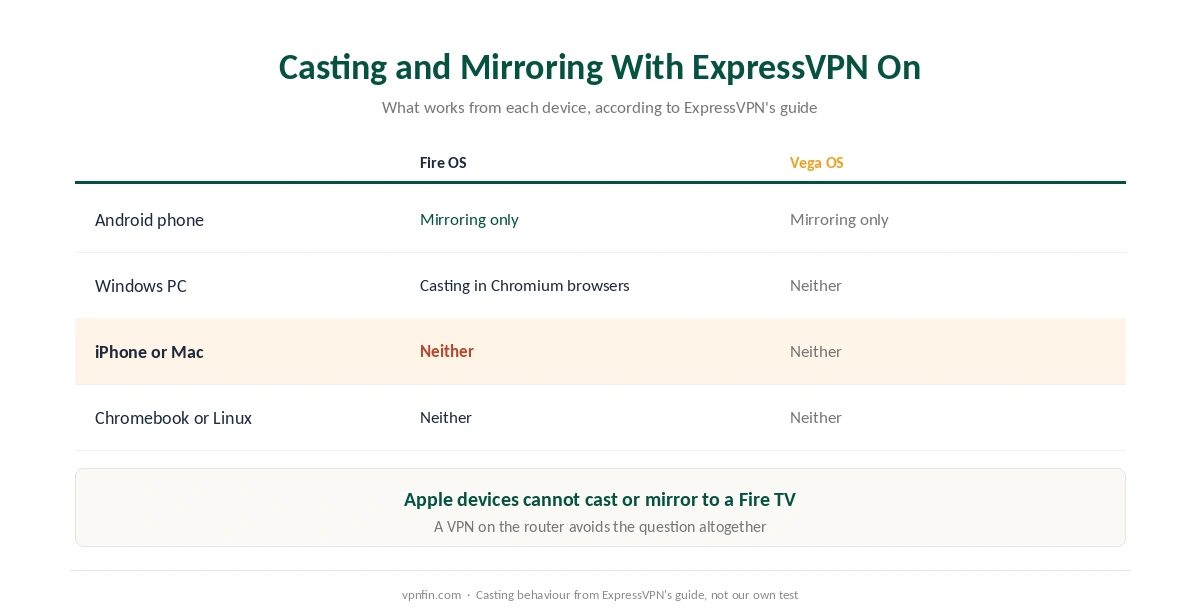
ExpressVPN’s guide includes a compatibility table worth reading before you buy. On Fire OS, you can mirror from Android but not cast, and cast from Windows in a Chromium-based browser. iPhones and Macs can neither cast nor mirror to a Fire TV.
On Vega OS, only mirroring from Android works. If you need more, a VPN on the router covers the Fire TV without casting at all, and our router guide covers that route. For an Apple household, our Apple TV guide may be the simpler answer.
If It Will Not Connect or Stream
Check the system first. ExpressVPN supports Fire OS 6 and later, so the oldest sticks cannot run it. On Vega OS, confirm the app came from the Appstore, since nothing else will install.
Then change location or protocol. Try another server in the same country before anything else, and switch the protocol only while disconnected.
For Netflix errors specifically, our ExpressVPN and Netflix page collects what published tests found and the fixes that work. Our smart TV guide covers TVs that have no app at all.
What It Costs, and How Many Devices
A Fire TV counts as one device. ExpressVPN allows ten on Basic, twelve on Advanced and fourteen on Pro. On the current offer Basic is $83.72 for the first 28 months, then $99.95 a year, as our ExpressVPN pricing page sets out.
If price matters more than the app, NordVPN against ExpressVPN and ExpressVPN against Surfshark compare it with two rivals that also run on both Fire TV systems. Both of those belong to the same parent, Nord Security.
Our refund guide covers the 30-day window if ExpressVPN does not work out on your stick.
How We Research
We took the setup steps, the casting table, the Prime Video advice and the Vega OS DNS note from ExpressVPN’s own support pages, updated on 22 September and 26 August 2026 respectively. TechRadar, Cord Busters and XDA Developers supplied the order in which VPN apps reached Vega OS. The prices come from our ExpressVPN pricing page and the device limits from our tables. We did not install ExpressVPN on a Fire Stick ourselves. Our full approach lives on the About Us page.
ExpressVPN on Firestick FAQ
Yes, on both Fire TV systems. Fire OS 6 and later use the long-standing app, and Vega OS devices such as the Fire TV Stick 4K Select have had their own app since September 2026. Both install from the Amazon Appstore.
Only on Fire OS 6 and later. Unlock Developer Options, allow Downloader to install unknown apps, and fetch the APK from expressvpn.com/latest#android. Vega OS does not support sideloading at all.
A few DNS lookups, according to ExpressVPN’s own support note. Amazon’s diagnostic and captive-portal checks bypass the tunnel by design, and some app start-up lookups, including Netflix’s, do so by mistake. Amazon plans a fix in late 2026.
No. ExpressVPN’s guide says iPhones and Macs can neither cast nor mirror to Fire TV. Android can mirror on both systems, and Windows can cast from Chromium browsers on Fire OS.
One in the country set on your Amazon account, according to ExpressVPN. You can check it under Your Account, Your Content and Devices, Preferences, Country/Region.
The Verdict
ExpressVPN now works on every Fire TV Stick Amazon sells, through the Appstore on both systems and by sideloading on Fire OS. Most guides written before September 2026 say otherwise, so check the date on anything you read.
On Vega OS, accept that a handful of DNS lookups leave the tunnel until Amazon’s fix arrives. For most viewers that reveals little. For anyone who needs every lookup hidden, a VPN on the router is the cleaner answer.