
Disclosure: VPNFin is reader-supported. If you buy a VPN through links on this page, we may earn a commission at no extra cost to you. This never affects our ratings — here’s our full disclosure.
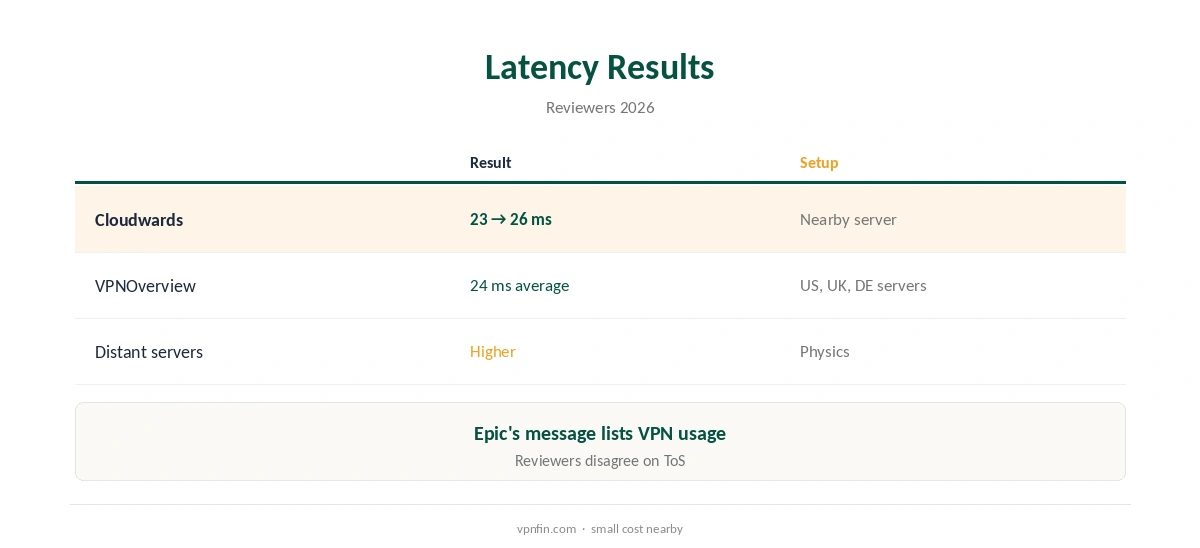
ExpressVPN Fortnite use comes with a warning from Epic itself. Players report a match-removal message that lists VPN usage among the reasons and recommends not using VPN or proxy services, Comparitech and vpncentral note. On nearby servers ExpressVPN adds little delay: Cloudwards measured latency rising from 23 to 26 ms. Reviewers disagree on whether Epic’s terms forbid VPNs outright.
This guide covers latency, Epic’s position, legitimate uses, consoles and the risks.
Latency on Nearby Servers
Cloudwards found ExpressVPN’s Lightway protocol raised latency from 23 to 26 ms on a nearby server, and it stayed consistent across repeated tests. VPNOverview played Fortnite and Call of Duty through US, UK and German servers with an average ping of 24 ms.
Distant servers add more, often far more than three milliseconds. Our gaming VPN guide explains why ping usually rises through a VPN.
What Epic Says
The match-removal message players see names internet lag, IP or machine, VPN usage or cheating, and recommends not using VPN or proxy services, Comparitech reports. Comparitech reads Epic’s terms as banning VPN use; an older ProPrivacy guide says they do not explicitly.
ExpressVPN’s own Fortnite page says a ban follows only if you break Epic’s terms and community rules. Treat VPN use in matches as a real risk to your account either way.
Legitimate Uses
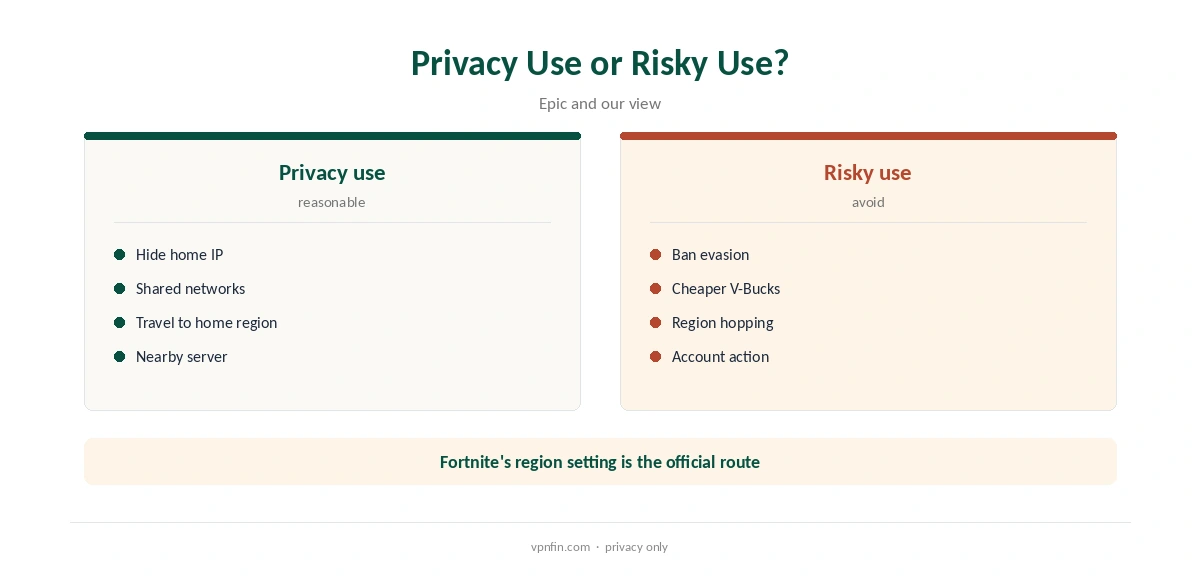
A VPN hides your home IP address from other players, which helps against DDoS attempts, and encrypts traffic on shared networks. Travellers can reach their usual region’s servers from abroad.
Using a VPN to evade a ban, or to buy V-Bucks or games at another region’s price, breaks Epic’s rules; VPNAlert notes Epic’s store prohibits VPNs for regional pricing.
ExpressVPN Fortnite Setup on PC, Consoles and Mobile
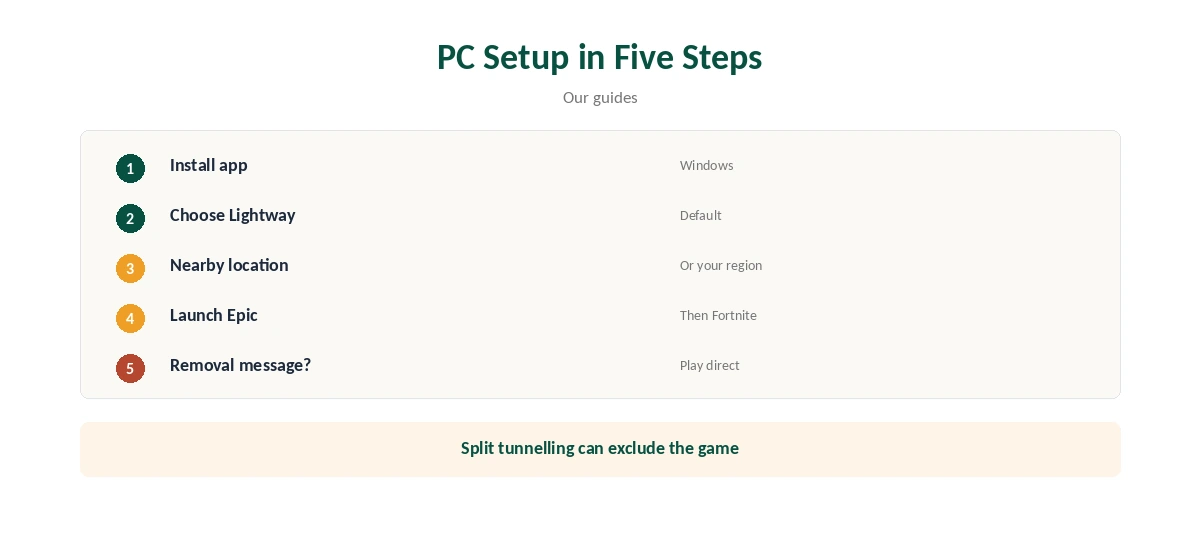
Install the ExpressVPN Windows app, choose Lightway and connect to the location nearest you or the Fortnite region you play in, then launch the Epic Games launcher. Split tunnelling can keep the game outside the tunnel while chat and browser stay inside.
If you see the removal message, disconnect and play direct rather than reconnecting through another server.
PlayStation, Xbox and Nintendo Switch consoles cannot run VPN apps, so use a router running ExpressVPN or a shared PC connection. On iPhone and Android, the ExpressVPN app covers Fortnite mobile.
Our ExpressVPN PS5 guide covers console routes.
DDoS, Streamers and Network Lock
Streamers and competitive players sometimes face DDoS attacks once their IP address leaks. A VPN hides the home address, and ExpressVPN presents that as protection on its gaming pages; VPNOverview also credits ExpressVPN with DDoS protection through IP masking.
If you stream, also keep the VPN on for the streaming software, not just the game itself.
If the tunnel drops during a match, Network Lock blocks traffic rather than letting your real IP show. That briefly disconnects you, which can cost a match.
For ranked play where a drop matters most, consider playing direct and using the VPN in casual sessions or on public networks.
Checking Your Ping
Fortnite can show network statistics in its settings; compare ping with the VPN on and off on the same server region. If the difference is small, keep the VPN for privacy; if it is large, try a closer location.
Test at the same time of day, since evening congestion on your provider’s network changes results.
Regions, Matchmaking and Price
Fortnite lets you choose a matchmaking region in its game settings, which is the official way to play in another region. A VPN near that region’s servers can shorten the route, ExpressVPN argues, but distant regions still mean higher ping.
Our ExpressVPN Warzone guide covers similar questions for another shooter.
ExpressVPN’s Basic plan renews at $99.95 a year for 10 devices, our tables record, and new users get 30 days to ask for a refund.
ExpressVPN lists 27 independent audits by May 2026, and Kape owns it along with CyberGhost and PIA.
On Mobile Data
On a phone, Fortnite mobile goes through ExpressVPN’s app like any other app. Lightway handles switching between Wi-Fi and mobile data quickly, which matters mid-match.
Mobile networks add their own latency, so test with and without the VPN before a long session.
Privacy Beyond the Game
The VPN also covers voice chat apps, browsers and the Epic launcher’s store traffic, hiding them from your internet provider. ExpressVPN lists 27 independent audits by May 2026.
Keep in mind that Epic still sees your account and its history, whatever the VPN hides.
Checking for Leaks
After connecting, visit an IP check site to confirm your address shows the ExpressVPN location, and run a WebRTC test in the browser. Leaks would undo the point of hiding your IP from other players.
Repeat the check after app updates or when you change protocol.
How We Research
This page draws on Cloudwards’ Fortnite VPN tests, VPNOverview’s ExpressVPN review, Comparitech’s and vpncentral’s Fortnite guides, ExpressVPN’s Fortnite page, VPNAlert and our ExpressVPN tables. We cross-checked these sources against each other, and where they conflict or something can’t be verified, we say so in the text rather than guessing. We checked time-sensitive figures, including prices in US dollars, on 8 October 2026. The main source we relied on is ExpressVPN’s Fortnite page. Our full approach lives on the About Us page.
ExpressVPN Fortnite FAQ
Usually not; Cloudwards saw 23 ms rise to 26 ms nearby.
Its match-removal message lists VPN usage as a reason.
Reviewers disagree; treat it as an account risk.
Through a router or a shared PC.
No; Epic’s store prohibits that.
The Verdict
ExpressVPN Fortnite use adds little latency nearby but can get you removed from matches. Use it for privacy, not to dodge bans or regional prices.