
Disclosure: VPNFin is reader-supported. If you buy a VPN through links on this page, we may earn a commission at no extra cost to you. This never affects our ratings — here’s our full disclosure.
An entire product category exists around “gaming VPNs” promising lower ping. For most players that promise is backwards, and you don’t have to take our word for it — NordVPN says so in its own blog: a VPN can occasionally lower ping, but it’s uncommon, and most players should expect slightly higher ping in exchange for privacy and DDoS protection. Our page on NordVPN for Warzone covers DDoS protection and the risks of lobby tricks. For a gaming-focused free app against a fast audited VPN, see NordVPN vs PotatoVPN.
That is a company with every commercial reason to claim otherwise, telling you the honest version. This guide covers the physics behind it, the three situations where a VPN genuinely helps, and how to find out which group you’re in.
The Short Answer
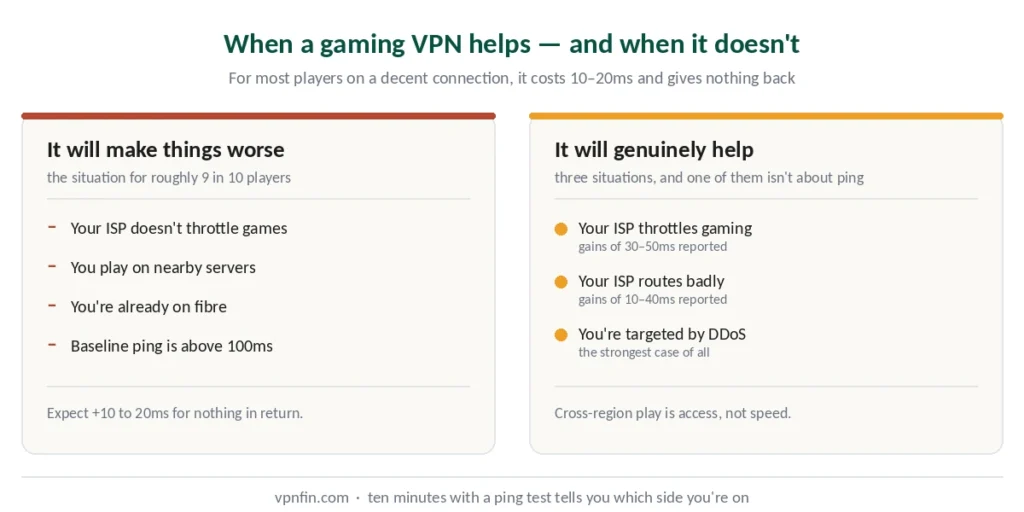
Expect +10 to 20ms. Your traffic takes a detour through a VPN server and gets encrypted on the way. Both cost time.
Three exceptions where it helps: your ISP throttles gaming traffic, your ISP routes badly to the game servers, or you’re playing on servers in another region. Our page on CyberGhost for Warzone covers its gaming servers, the limits of SBMM and the anti-cheat risk. PotatoVPN labels servers for specific games, as our PotatoVPN review explains.
The real reason to use one while gaming: DDoS protection. Hiding your home IP address stops an opponent flooding your connection — and that is a genuine problem, not a marketing one.
Why It Usually Adds Latency
Ping is round-trip time: how long a packet takes to reach the game server and come back. Two things make that trip longer with a VPN.
Distance. Without a VPN your packets go device → ISP → game server. With one they go device → ISP → VPN server → game server, and back the same way. Unless the VPN server sits directly on that path, you have added kilometres.
Encryption overhead. Encrypting and decrypting each packet takes processing time at both ends. Modern protocols like WireGuard, NordLynx and Lightway add noticeably less than older OpenVPN, but they do not add zero.
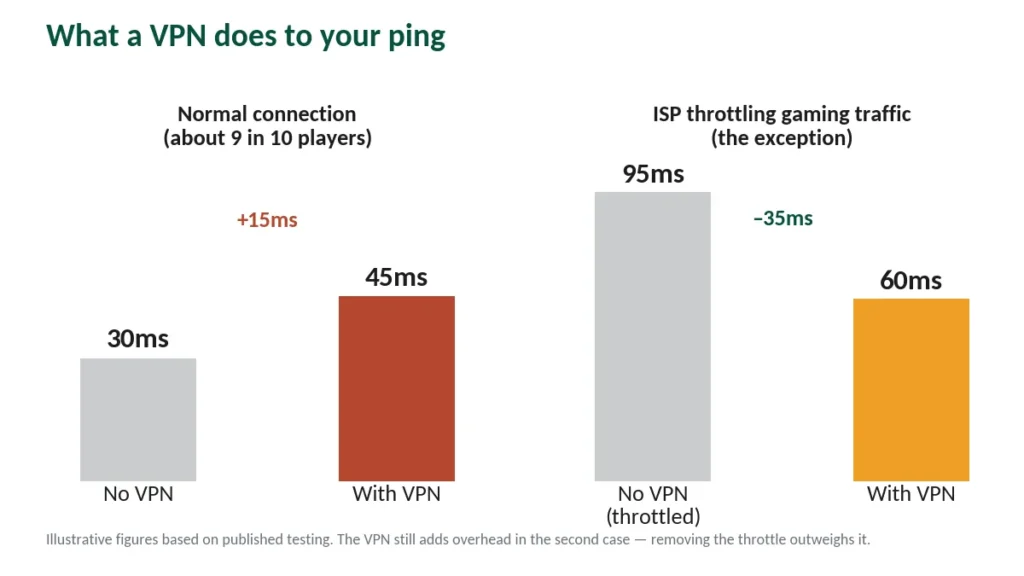
The number to expect: 10 to 20ms on a normal connection, sometimes 5 to 15 if the server is close and the protocol modern.
What a VPN cannot fix: distance to the game server. If the host is 8,000 kilometres away, no VPN teleports your packets. Latency there is governed by physics and server load, and rerouting only adds to it.
The Three Cases Where It Genuinely Helps
1. Your ISP throttles gaming traffic
Some providers deliberately slow gaming flows during peak hours, or apply deep packet inspection to identify and deprioritise them. A VPN encrypts your traffic so it looks like ordinary browsing, which the throttling cannot target.
This is the strongest case, and the improvement can be substantial — published testing documented gamers in regions with aggressive throttling seeing 30 to 50ms improvements, even though the VPN itself added 15 to 20ms. The throttling being removed outweighed the overhead.
How to spot it: your speed test looks fine but ping spikes the moment you join a match, especially in the evening.
2. Your ISP routes badly
Your provider’s default path to a game server sometimes takes an inefficient route through congested infrastructure. VPN providers with good peering agreements occasionally offer a shorter path than your ISP’s default.
Reported improvements in these cases run 10 to 40ms. It is uncommon, and entirely dependent on your specific ISP and location.
3. You play on servers in another region
Playing on Japanese or European servers from elsewhere, joining friends abroad, or accessing regional beta tests. Here the VPN isn’t reducing latency — it’s giving you access you wouldn’t otherwise have.
How to Find Out Which Group You’re In
Ten minutes, and it settles the question for your specific connection.
Step 1. Close everything else — background downloads, streaming on other devices, game updates. Then run a ping test to the region you normally play in and write the number down.
Step 2. Connect to a VPN server as close to the game server as possible. Run the same test.
Step 3. Compare. Higher with the VPN means you’re in the normal 90% — the VPN costs you latency. Lower means you were being throttled or badly routed, and it’s worth keeping.
Step 4. Test again at your usual playing time, especially evenings. Throttling is often time-dependent and won’t show at 10am.
⚠️ Test in actual matches, not just ping tools. A ping tool measures one path; your game measures the path that matters.
Every provider we rank offers at least a 30-day refund window, which makes this test free — our free trial guide covers the conditions attached to each.
The Reason That Actually Justifies It: DDoS
This is where a VPN earns its cost for gamers, and it has nothing to do with milliseconds.
In games where players can see each other’s IP addresses — or where a losing opponent can find yours through peer-to-peer connections — a DDoS attack floods your home connection with junk traffic. It usually shows up as ping jumping from 30ms to several thousand, then a disconnect.
A VPN prevents this by design. Attackers see the VPN server’s address, not your home IP, and VPN infrastructure absorbs floods that a home router cannot.
This matters most for streamers, whose IP can leak through overlays or chat, and for competitive players in games with peer-to-peer matchmaking.
If DDoS is your concern, the 15ms is a trivial price. If lower ping was the goal, it probably isn’t.
Consoles: You Can’t Install a VPN
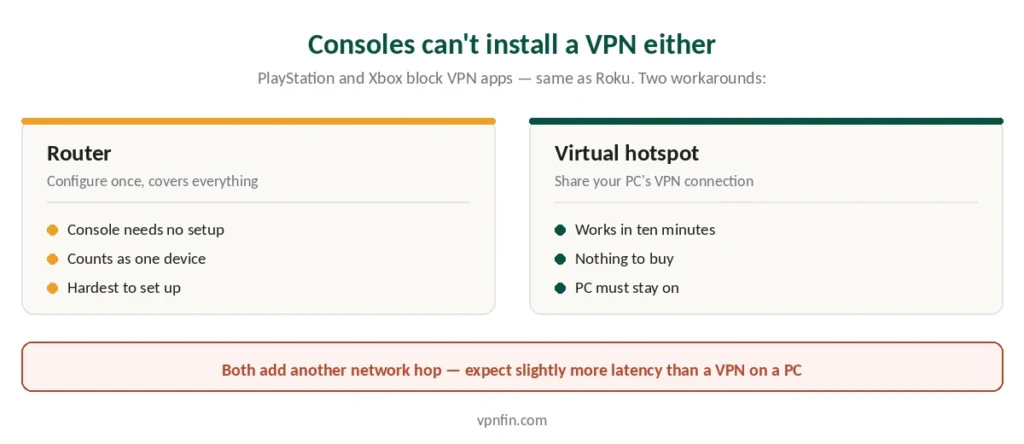
PlayStation and Xbox do not run VPN apps, the same limitation Roku has. Two workarounds:
Router. Configure the VPN on your router and the console is covered automatically, along with everything else on the network. A router connection typically counts as one device against your VPN’s limit. How to actually do it, including which routers support it at all.
Virtual hotspot. Connect your PC to the VPN, share that connection over Wi-Fi, connect the console to it. Easier than the router, but the computer must stay on. For what it changes for Fortnite, see our page on ExpressVPN for Fortnite.
The Steam Deck is the exception to this heading. It runs SteamOS, which is Linux underneath, so a VPN installs on the device itself — provided you install it the way an immutable system expects.
The PlayStation case has a third option and one hard limit. Smart DNS works on a PS5 because the console accepts manual DNS entries, and the Store region follows the account rather than the address at any point.
The Switch is the exception worth knowing. Its store reads the account country too, but Nintendo lets you change that setting yourself — so for the eShop a VPN is not the answer at all.
⚠️ Both add another hop, which means slightly more latency than a VPN on a PC would cost. Factor that in before setting it up for ping reasons.
What We Won’t Help With
A significant share of gaming VPN searches are about manipulating matchmaking — connecting through distant servers to be placed against weaker opponents. Our page on Surfshark for gaming covers its ping results, the missing gaming servers and the limits.
That breaches the terms of service of the games where it’s popular, and publishers have banned accounts for it. We’re not going to write that guide. Our Windscribe for Warzone page goes into what it changes for Warzone.
Region-changing for content access — buying in a cheaper regional store, accessing a beta that launched elsewhere — occupies a greyer area. It generally breaches platform terms rather than any law, and the realistic consequence is a blocked purchase or a locked account rather than anything worse. Your call, but know which rules you’re bending. Our guide to VPN for Twitch covers blocked countries, regional ads and the rules.
If You Do Want One
Three things matter, in this order.
Server proximity to your game servers. More locations means a better chance of one sitting near the host. ExpressVPN covers 113 countries, the widest of the providers we rank.
Modern protocol support. WireGuard, NordLynx or Lightway — the overhead difference against OpenVPN is real and measurable. The protocol difference is close to double on identical hardware.
Raw speed, because overhead compounds. NordVPN lost 2.9% of baseline speed in CNET testing against 18 to 38% for the rest, and on a connection already paying a latency tax that margin matters.
| Provider | Speed loss | Source |
|---|---|---|
| NordVPN | 2.9% | CNET |
| Surfshark | 21% | CNET |
| ExpressVPN | 18% | CNET |
| CyberGhost | 31–38% | independent labs |
| PureVPN | 12–67% | four labs, varies by server |
| Proton VPN | 16% | CNET |
One thing that doesn’t matter as much as advertised: servers labelled “gaming”. They are usually ordinary servers with a badge. Our guide to ExpressVPN for Valorant covers ping, Vanguard and the right settings.
Game-specific guides: Fortnite, Valorant and Call of Duty. For VR, see our Meta Quest guide.
How We Research
This guide draws on published testing and technical analysis from named sources including ZeroToVPN, Comparitech and Windows Forum, provider documentation including NordVPN’s own admission about ping, and our full reviews of the providers we rank — cross-checked and verified at publication. We do not run our own latency tests; the figures here come from named third parties and are attributed. Our full approach lives on the About Us page.
Gaming VPN FAQ
Usually not. Your traffic takes a longer path and gets encrypted, typically adding 10 to 20ms. NordVPN states this in its own blog: lower ping is possible but uncommon, and most players should expect slightly higher latency. The exceptions are ISP throttling, poor ISP routing, and cross-region play.
It depends what’s causing the lag. If your ISP throttles gaming traffic, a VPN can produce meaningful improvement — published testing documented 30 to 50ms gains in regions with aggressive throttling. If the cause is distance to the game server or an overloaded server, a VPN cannot help and will make it slightly worse.
Only for specific problems: ISP throttling, DDoS attacks, or accessing servers in other regions. DDoS protection is the strongest case — hiding your home IP prevents an opponent flooding your connection, which is a real risk in games with peer-to-peer matchmaking and for streamers.
Not directly — neither console runs VPN apps. You configure the VPN on your router, which covers the console automatically, or share a VPN connection from a computer as a Wi-Fi hotspot. Both add another network hop, which means slightly more latency than running a VPN on a PC. The Xbox has one extra complication: cloud gaming checks your account region and your address together, and refuses when they disagree.
Using a VPN for privacy or DDoS protection generally isn’t against the rules. Using one to manipulate matchmaking or access region-locked content usually breaches the game’s terms of service, and publishers have banned accounts for it. The distinction is between protecting your connection and gaming the system.
WireGuard, or a provider’s implementation of it — NordLynx on NordVPN, Lightway on ExpressVPN. These add measurably less overhead than OpenVPN, which matters when you’re already paying a latency tax. Most apps default to automatic, which usually picks correctly.
The Honest Version
For most players on a decent connection playing on nearby servers, a VPN makes gaming marginally worse. That is the physics, and the industry selling “gaming VPNs” knows it.
Get one anyway if: your ISP throttles gaming traffic, you’re targeted by DDoS attacks, or you play on servers in other regions. Those are real problems a VPN solves.
Don’t get one because an ad promised lower ping. Test it on a refund window first — ten minutes with a ping tool tells you more than any review, including this one. Our page on NordVPN for Fortnite covers in-game region settings, ping tests and Epic’s rules.