
Disclosure: VPNFin is reader-supported. If you buy a VPN through links on this page, we may earn a commission at no extra cost to you. This never affects our ratings — here’s our full disclosure.
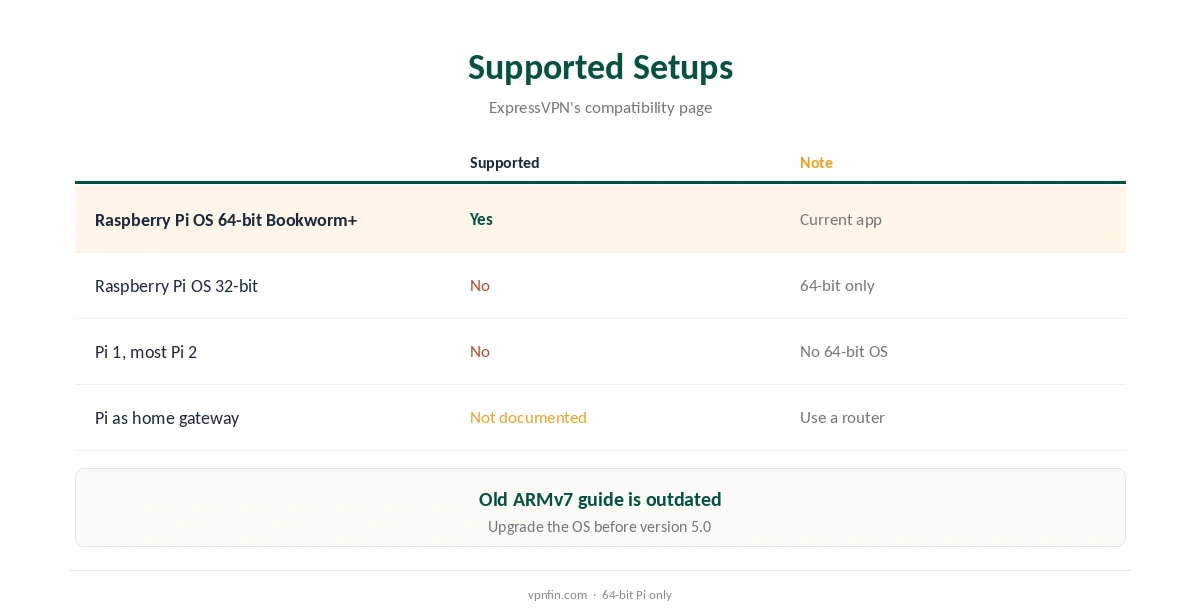
ExpressVPN on Raspberry Pi is officially supported. Its Linux app runs on Raspberry Pi OS 64-bit, Bookworm or newer, ExpressVPN’s compatibility page lists, alongside Ubuntu 24.04, Debian 12, Fedora 39, Arch and Linux Mint 22. The app supports only 64-bit systems. The Pi therefore needs a 64-bit operating system. An older ExpressVPN guide describing 32-bit ARMv7 support on the Pi 2 predates the current app.
This guide covers which Pis qualify, installation, the graphical and command-line apps, updates, Network Lock and limits.
Which Raspberry Pis Qualify
The current app needs Raspberry Pi OS 64-bit, Bookworm or newer, ExpressVPN’s pages say, and older systems must upgrade before installing version 5.0. A 64-bit system needs 64-bit hardware: the Pi 3, 4 and 5 and the Zero 2 W qualify, while the original Pi and most Pi 2 boards do not.
Check with the command uname -m: aarch64 means a 64-bit system, while armv7l means 32-bit and needs a reinstall. Our Raspberry Pi VPN guide covers other providers’ ARM support.
ExpressVPN on Raspberry Pi Install
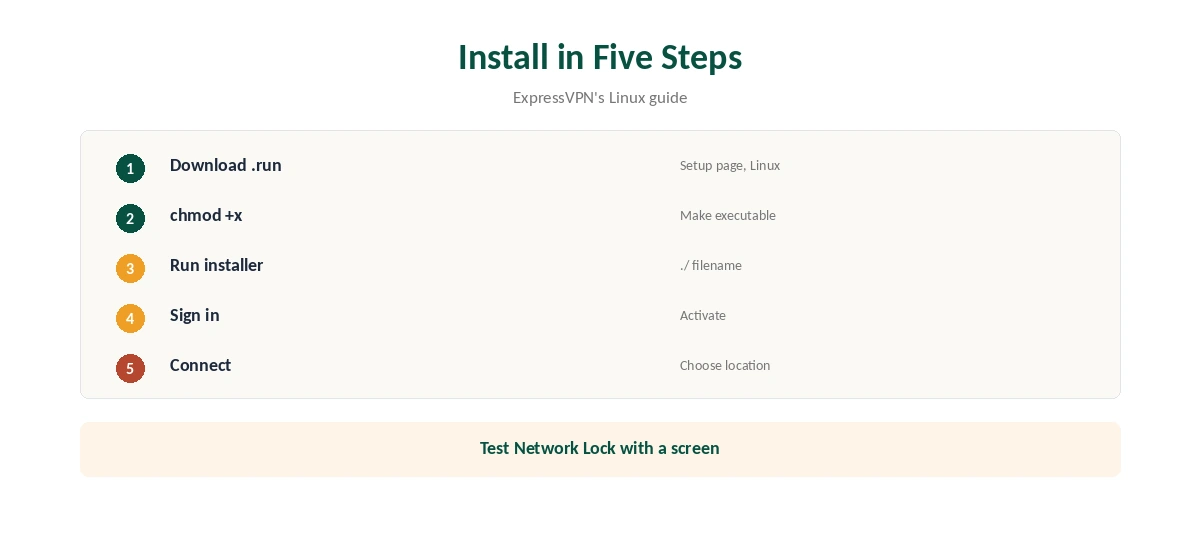
Sign in on ExpressVPN’s setup page, choose Linux and download the installer, a .run file. In a terminal, make it executable with chmod +x, then run it, ExpressVPN’s guide shows.
Sign in or activate when prompted, choose a location and connect. The installer sets up a background service that keeps the app running. On a Pi without a desktop, use the command-line steps below.
GUI or Command Line
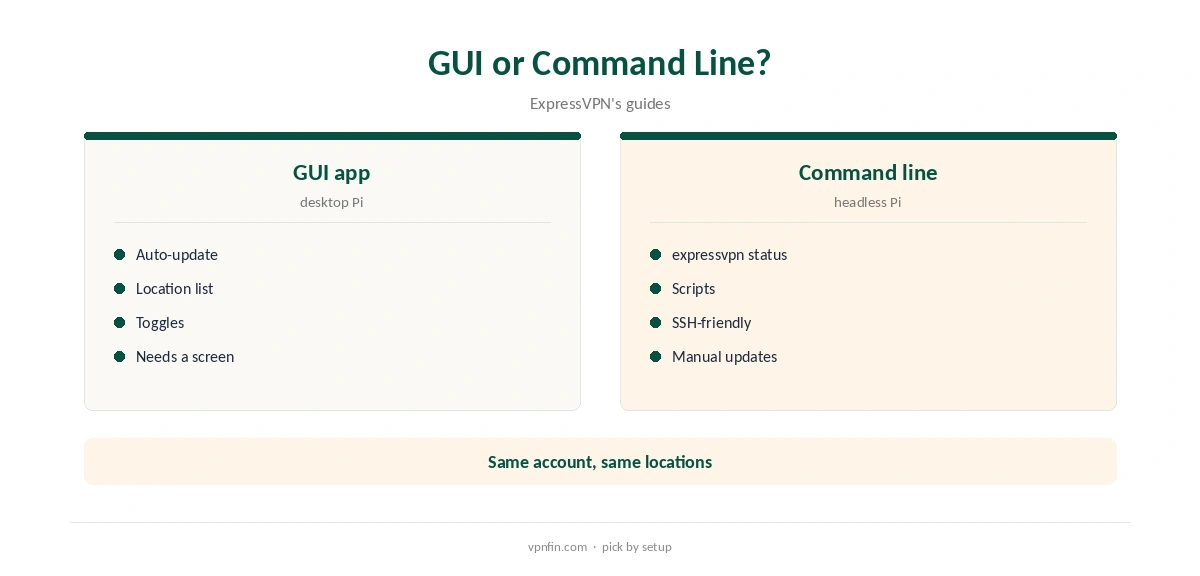
The graphical app suits a Pi with a desktop and screen. On a headless Pi, the command-line app connects and disconnects with commands, and expressvpn status shows the connection and update instructions, ExpressVPN’s update guide notes.
Both use the same account and locations, and the command line is the easier route over SSH. Our ExpressVPN Linux guide covers the app’s features in more depth.
Network Lock and Split Tunnelling
Network Lock, ExpressVPN’s kill switch, has an always-on mode in the Linux app that blocks traffic whenever the VPN is off. Split tunnelling works by app or IP address, our tables record. On a Pi used as a server, always-on Network Lock keeps traffic from leaking if the tunnel drops.
Be careful with a headless Pi: if Network Lock blocks traffic and you reach the Pi over the network, you may lock yourself out. Test with a screen attached first.
Protocols
The Linux app offers Lightway, with post-quantum key exchange, and OpenVPN. ExpressVPN added WireGuard on Windows, iOS and Android in August 2025, but not yet on Linux, Salon noted in March 2026.
Lightway is the efficient choice on a Pi’s modest processor, and the app’s default. Our Lightway vs WireGuard guide compares the protocols.
Updates
The graphical app updates itself by default, with a toggle under the Profile icon, ExpressVPN’s update guide says. With the command-line app, expressvpn status tells you when an update is available and how to install it.
Older apps stopped connecting after ExpressVPN retired old certificates on 31 March 2026, Tom’s Guide reported, so keep the Pi current.
Price, Privacy and Removing It
ExpressVPN’s Basic plan covers 10 devices and renews at $99.95 a year, our tables record, and it lists 27 independent audits by May 2026. Kape owns it, along with CyberGhost and PIA.
To remove it, turn off Network Lock’s always-on setting first, then uninstall, or the Pi may stay offline. Our guide to turning off a VPN on Linux covers the commands.
Headless Pi Tips
On a Pi reached over SSH, connect from the command line and check expressvpn status before changing Network Lock, so you know the tunnel is up. Keep a keyboard and screen nearby the first time you enable always-on mode, so you can undo it locally if needed.
A Pi’s processor limits VPN throughput more than a desktop’s. Newer models such as the Pi 5 handle encryption faster than older ones.
Using a Pi as a Home Gateway
ExpressVPN supports the Pi as a device, not as a router. Turning a Pi into a VPN gateway for other devices takes manual routing and firewall work that ExpressVPN does not document.
For whole-home coverage, ExpressVPN’s Fortify router is the supported route. Our Raspberry Pi VPN server guide explains what a Pi server can and cannot replace.
Which Pi to Use
A Pi 4 or Pi 5 suits a VPN that carries real traffic, such as a small home server, since both run a 64-bit system comfortably. A Zero 2 W also runs 64-bit and suits light tasks that need privacy rather than speed.
Whatever the model, use Raspberry Pi OS 64-bit, Bookworm or newer, from Raspberry Pi Imager. Our NordVPN Raspberry Pi guide compares another provider’s Pi support.
How We Research
This page draws on ExpressVPN’s Linux app, compatibility and update pages, its older Raspberry Pi guide, Tom’s Guide on the certificate change, Salon’s 2026 review and our ExpressVPN tables. We cross-checked these sources against each other, and where they conflict or something can’t be verified, we say so in the text rather than guessing. We checked time-sensitive figures, including prices in US dollars, on 8 October 2026. The main source we relied on is ExpressVPN’s Linux app guide. Our full approach lives on the About Us page.
ExpressVPN on Raspberry Pi FAQ
Yes, on Raspberry Pi OS 64-bit, Bookworm or newer.
No; the current Linux app is 64-bit only.
Those that run a 64-bit OS: Pi 3, 4, 5 and Zero 2 W.
Not yet; the Linux app offers Lightway and OpenVPN.
The GUI updates itself; the CLI shows steps in expressvpn status.
The Verdict
ExpressVPN on Raspberry Pi works on a 64-bit Raspberry Pi OS, Bookworm or newer. Use Lightway, test Network Lock with a screen attached, and keep the app updated.