
Disclosure: VPNFin is reader-supported. If you buy a VPN through links on this page, we may earn a commission at no extra cost to you. This never affects our ratings — here’s our full disclosure.
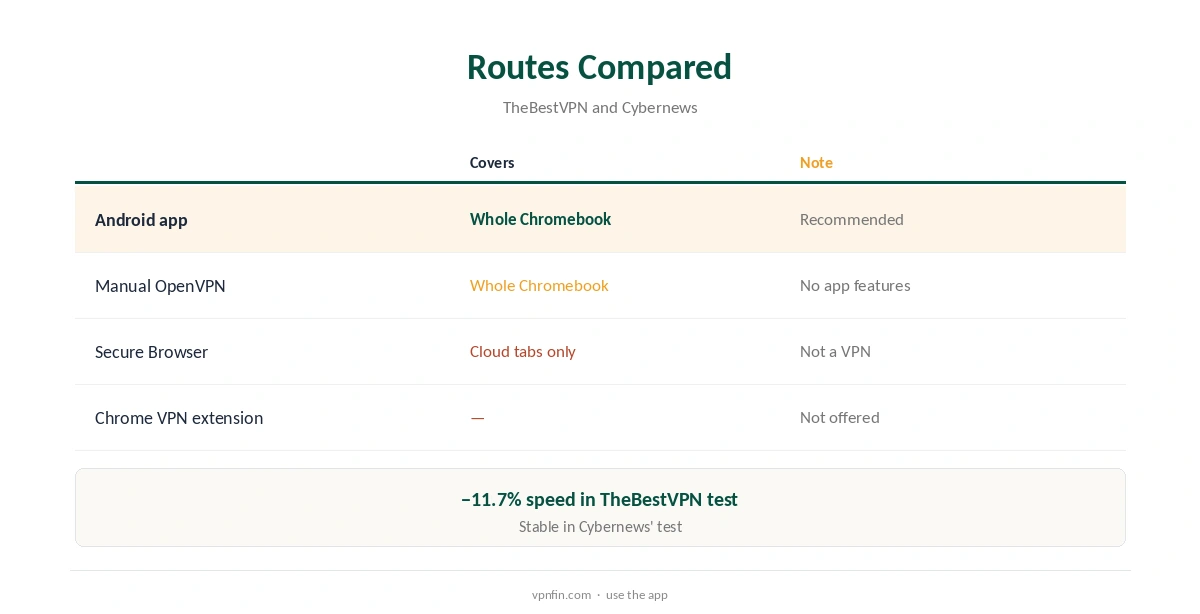
IPVanish Chromebook support comes through its Android app: TheBestVPN found it runs reliably on ChromeOS from the Play Store, with speeds about 11.7% below baseline. Unlike NordVPN, Surfshark, Proton and ExpressVPN, IPVanish ships no Chrome VPN extension; NordVPN and Surfshark share an owner, Nord Security. Its Secure Browser extension is a cloud browser, not a VPN. A manual OpenVPN setup is the other route.
This guide covers the Android app, what it protects on ChromeOS, the Secure Browser confusion, school devices and limits.
IPVanish Chromebook Setup
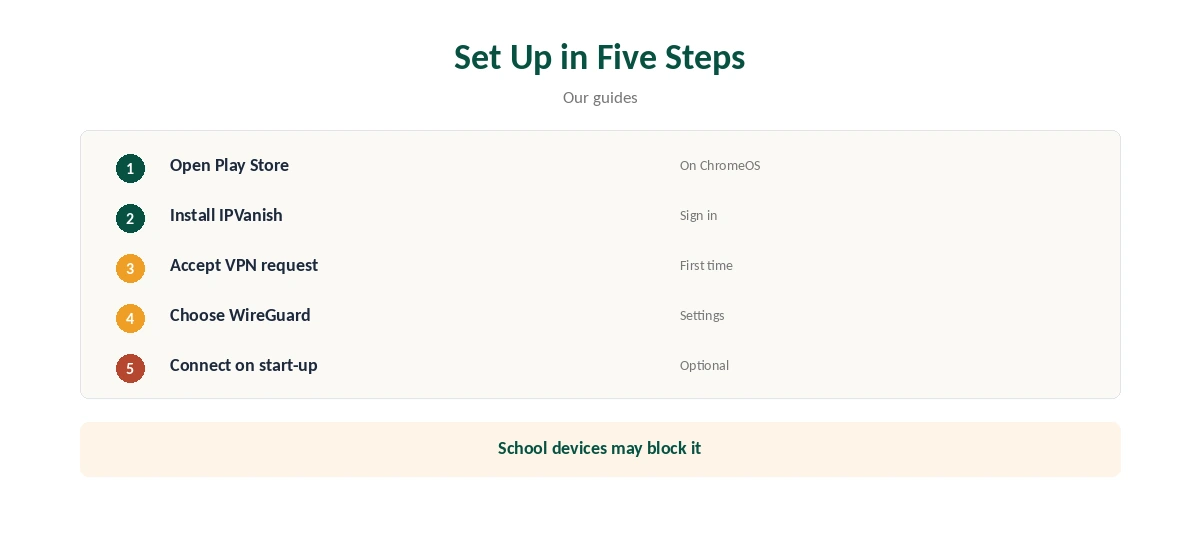
Open the Play Store on the Chromebook, search for IPVanish, install it, sign in and connect, as on an Android phone. Older Chromebooks without Play Store support need the manual OpenVPN route instead, described below. ChromeOS shows a VPN connection request the first time; accept it to let IPVanish create the tunnel.
ChromeOS routes the whole Chromebook’s traffic through an Android VPN app, not just Android apps, which is how other providers’ ChromeOS apps work too. Our Chromebook VPN guide explains the routes.
No Chrome VPN Extension
TheBestVPN noted that IPVanish, alone among its five Chromebook picks, ships no Chrome browser add-on, and Cybernews’ Chrome testing found the same. Some guides suggest otherwise, but they appear to confuse the Secure Browser extension with a VPN, an easy mistake given the name.
An extension only covers the browser anyway; the Android app covers everything. Our NordVPN Chromebook guide shows how an extension and an app differ.
What the Secure Browser Extension Is
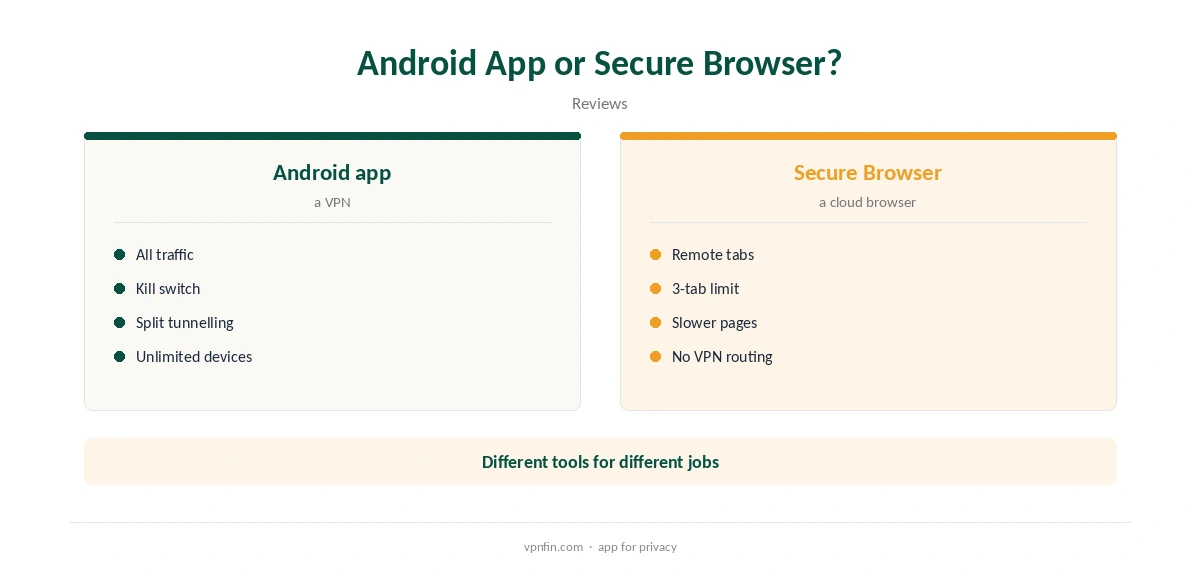
IPVanish Secure Browser runs web pages in a remote cloud browser and streams them to you, a 2026 review describes. It allows three secure tabs open at once. Pages load a little slower, and text input needs more care, because each action travels to the cloud browser and back.
It isolates risky sites from your device by running them elsewhere, but does not route your Chromebook’s traffic through a VPN. Your address still shows to sites outside it, and other apps are unaffected.
Settings on ChromeOS
The Android app’s settings carry over: WireGuard as the protocol, the kill switch, and split tunnelling by app or domain, our tables record. A keyboard and trackpad make the phone-style app easy to use. Connect on start-up keeps the Chromebook protected after a restart.
Choose WireGuard for speed, since it also suits laptops running on battery. Split tunnelling by domain or app lets a school or work site skip the VPN if it rejects VPN addresses outright.
Manual OpenVPN
ChromeOS can also import an OpenVPN configuration through its network settings, Cybernews notes, using IPVanish’s configuration files from configs.ipvanish.com. A manual setup lacks the app’s kill switch and split tunnelling, so use it only if the Play Store is unavailable. Each file covers one location, so download a few for the countries you use.
Our IPVanish Linux guide covers the same configuration files.
Speed on a Chromebook
TheBestVPN measured IPVanish about 11.7% below baseline on ChromeOS, mid-table among its picks, and Cybernews recorded stable connections to Germany and Japan throughout its testing. Chromebook hardware varies widely, so cheaper models with slower processors may lose more.
Use WireGuard and a nearby location for the best result, and test at the times you usually work. Our IPVanish speed guide covers more fixes.
Price and Devices
IPVanish costs $57.22 for the first 24 months and renews at $89.99 a year, VPNOverview lists. With no device limit, the Chromebook joins phones and TVs on one plan. Store purchases through Google Play follow Google’s refund rules.
Website purchases of yearly plans carry a 30-day refund; monthly plans carry none. Our IPVanish refund guide explains the rules.
Streaming and Other Devices
Streaming in the Chromebook’s browser uses the VPN like any other traffic. VPNOverview reached major streaming services with IPVanish in 2026, while VPNpro found its streaming inconsistent, so test yours.
IPVanish sets no device limit, so the Chromebook shares the plan with phones, TVs and other laptops without counting against a cap. Families with several Chromebooks pay nothing extra.
Turning It Off
Disconnect in the IPVanish app, or remove the VPN in ChromeOS’s network settings, where active VPN connections appear alongside Wi-Fi. Uninstall the app from the launcher if you no longer need it; your account stays active until you cancel separately.
Our guide to turning off a VPN on a Chromebook covers system, app and extension cases.
School and Work Chromebooks
Managed Chromebooks often block the Play Store or VPN apps. Administrators can usually see that a VPN is in use, even if they cannot see what you browse through it. Ask before installing one on a device you do not own, since school and work rules may forbid it outright. Our guide to IPVanish on Firefox covers why the Secure Browser extension is not a VPN, and what to use instead.
Our Surfshark Chromebook guide covers school devices in more detail.
How We Research
This page draws on TheBestVPN’s Chromebook guide, Cybernews’ Chromebook and Chrome VPN tests, a 2026 review of IPVanish’s Secure Browser and our IPVanish tables. We cross-checked these sources against each other, and where they conflict or something can’t be verified, we say so in the text rather than guessing. We checked time-sensitive figures, including prices in US dollars, on 8 October 2026. The main source we relied on is TheBestVPN’s Chromebook VPN guide. Our full approach lives on the About Us page.
IPVanish Chromebook FAQ
Yes, through its Android app from the Play Store.
Not a VPN one; Secure Browser is a cloud browser.
Yes, all of its traffic.
Yes, with its OpenVPN files, without app features.
Often not; administrators may block it.
The Verdict
IPVanish Chromebook use is simple through the Android app, which covers the whole device. Do not mistake Secure Browser for a VPN.