
Disclosure: VPNFin is reader-supported. If you buy a VPN through links on this page, we may earn a commission at no extra cost to you. This never affects our ratings — here’s our full disclosure.
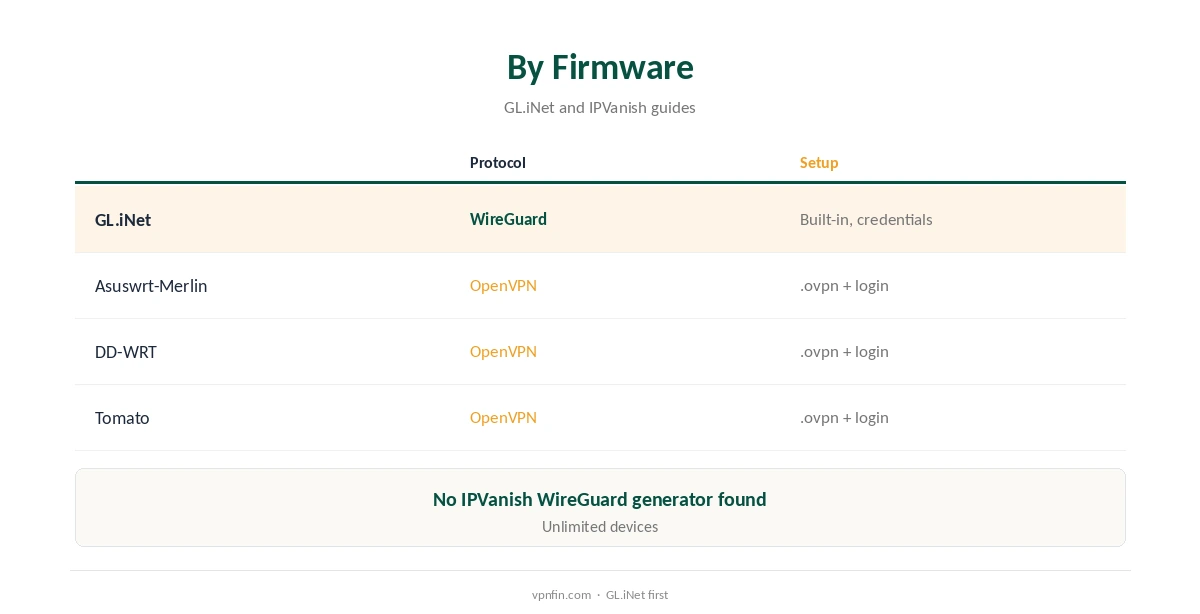
IPVanish for router use has two routes. GL.iNet’s router firmware has a built-in WireGuard client for several providers: you enter your credentials and it creates the server configurations itself, its documentation shows. IPVanish is on its list, so a GL.iNet router connects over WireGuard after you sign in. For DD-WRT, Asus and Tomato firmware, IPVanish publishes OpenVPN guides using its configuration files, Comparitech notes. IPVanish sets no device limit, so the router never competes with your other devices for a slot on the plan.
This guide covers both routes, firmware choices, leak protection, speed, troubleshooting and when a router is not the right answer.
Why Put IPVanish on a Router
A router covers devices that cannot run IPVanish at all, which is its main purpose at home, such as LG and Samsung TVs, Roku, PlayStation and Xbox, along with everything else on the network. IPVanish has no Smart DNS, TheBestVPN noted, so for those devices a router is the main option.
The trade-off is control: every device uses the same location unless your firmware can route devices separately, and changing location means opening the router’s settings. Our router vs device guide weighs it up.
IPVanish for Router on GL.iNet
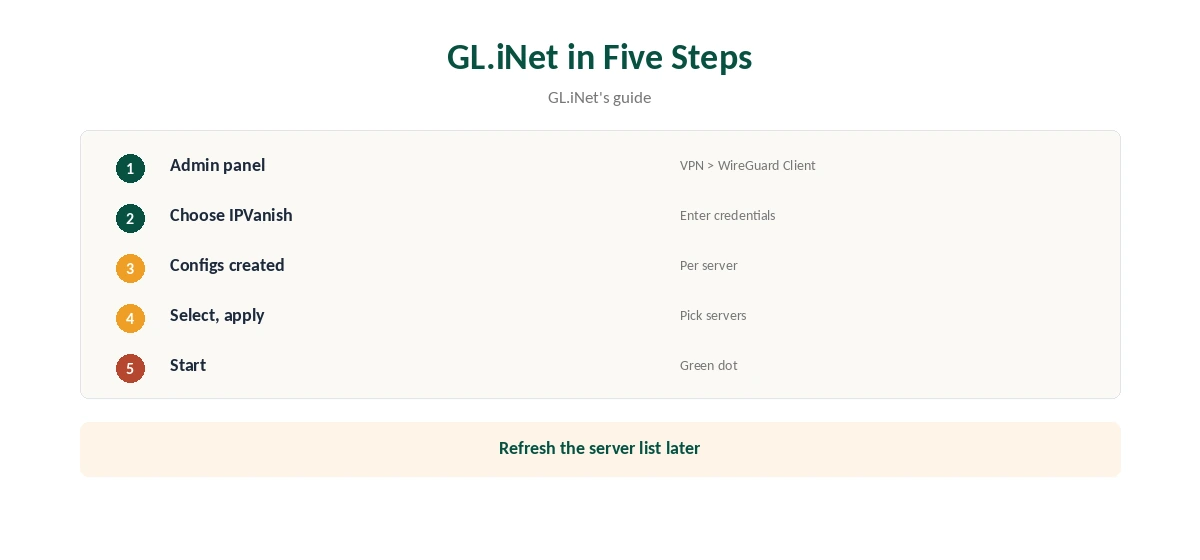
In the GL.iNet admin panel, open VPN, WireGuard Client and IPVanish, enter your IPVanish username and password, and save. The router generates configurations for each server; select the servers you want, apply and start the connection, GL.iNet’s guide shows.
A green dot marks the active connection, and the VPN Dashboard shows its details, including the server in use. GL.iNet’s compact travel routers make this an easy way to cover one room or a hotel, and they fit in a bag.
DD-WRT, Asus and Tomato
On these firmwares, IPVanish’s own guides use OpenVPN: download configuration files from configs.ipvanish.com, enter your IPVanish username and password in the router’s OpenVPN client, and set it to start at boot, as FlashRouters’ Merlin guide shows.
Asuswrt-Merlin added a WireGuard client in version 388.1 and DD-WRT offers one under Tunnels, a 2026 router guide notes, but we found no IPVanish WireGuard file generator for them, so OpenVPN is the documented route there.
WireGuard or OpenVPN on a Router
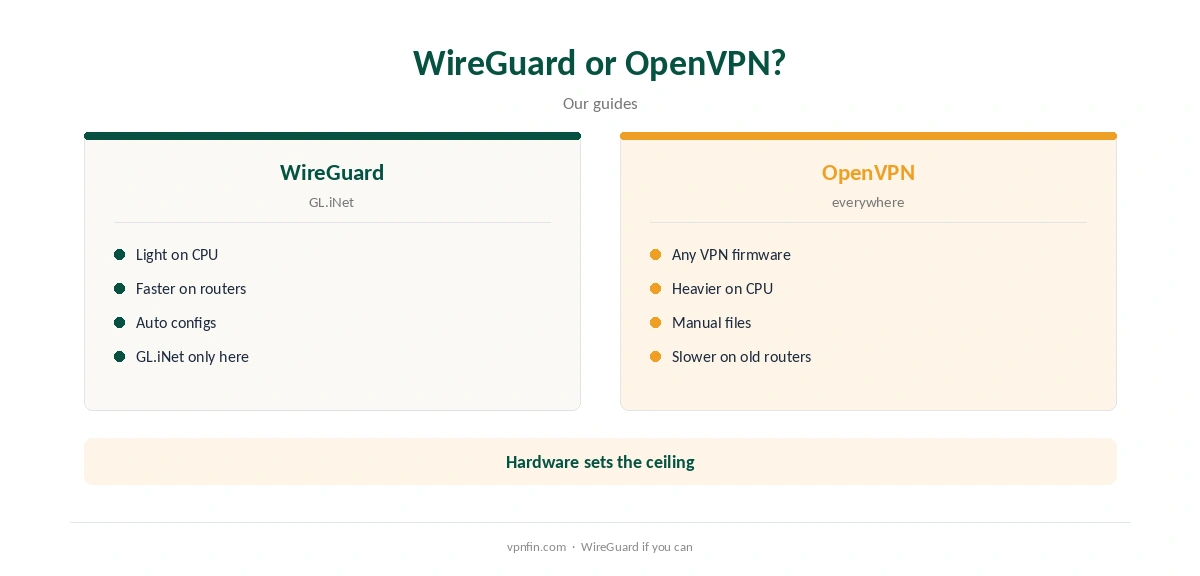
WireGuard is lighter on a router’s processor, so it usually runs faster on the same hardware; that is GL.iNet’s advantage. OpenVPN works on almost any VPN-capable firmware but loads older routers heavily.
VPNpro found IPVanish fastest on WireGuard in its app tests, and the same advantage applies on a router’s weaker processor. Our WireGuard vs OpenVPN guide explains the difference.
Sending Only Some Devices Through the VPN
Most firmware can route chosen devices through the tunnel and leave others direct: VPN Director on Asuswrt-Merlin, policy-based routing on OpenWrt, and a device-based mode on GL.iNet, a 2026 router guide explains.
That lets a console or TV use IPVanish while a work laptop stays direct. Check the device’s address matches an active rule if it does not route as expected, and give it a fixed address on the router.
Which Router to Use
A GL.iNet router is the simplest choice for IPVanish, with built-in WireGuard and a guided setup. An Asus router with Merlin firmware suits people who want a full home router with VPN Director.
Older routers on DD-WRT or Tomato work, but OpenVPN will tax their processors and cap speeds well below a fast line. Our router setup guide compares firmware in more depth.
Preventing Leaks
Disable IPv6 on the router unless the VPN handles it properly, and set DNS so lookups go through the tunnel; a 2026 router guide lists the IPv6 switch for each firmware. Then run a DNS leak test from a phone or laptop on the router’s network.
When the tunnel drops, some firmware lets traffic continue unprotected; enable any kill-switch or block-on-failure option it offers. Our DNS leak guide explains the test.
Speed on a Router
The router’s processor sets the limit: older models running OpenVPN may manage far less than your line speed. Cloudwards found IPVanish barely slowed on nearby servers in app tests, so a slow router setup usually points to the hardware.
If one device needs full speed, run IPVanish’s app on it and keep the router for the devices that cannot run an app. Our IPVanish speed guide covers more fixes.
Troubleshooting
If the connection fails, re-enter your credentials, try another server, and on GL.iNet refresh the server list. On OpenVPN firmware, download fresh configuration files in case server addresses changed. If the internet stops when the VPN is on, check the router’s DNS settings and firewall rules.
IPVanish’s live chat runs around the clock for problems the steps above do not solve. Our guide to turning off a VPN on a router covers disabling it cleanly.
How We Research
This page draws on GL.iNet’s WireGuard client documentation, FlashRouters’ Merlin guide, encapsulated.network’s 2026 router guide, Comparitech, TheBestVPN, VPNpro and Cloudwards on IPVanish, and our IPVanish tables. We cross-checked these sources against each other, and where they conflict or something can’t be verified, we say so in the text rather than guessing. We checked time-sensitive figures, including prices in US dollars, on 8 October 2026. The main source we relied on is GL.iNet’s WireGuard client guide. Our full approach lives on the About Us page.
IPVanish for Router FAQ
Yes; GL.iNet has it built in, and DD-WRT, Asus and Tomato use OpenVPN.
On GL.iNet, which generates the configurations for you.
IPVanish sets no device limit.
Usually the router’s processor, especially with OpenVPN.
Disable IPv6 if unused, route DNS through the tunnel, then test.
The Verdict
IPVanish for router use is easiest on GL.iNet, with built-in WireGuard. Other firmware works through OpenVPN; check DNS and IPv6 either way.