
Disclosure: VPNFin is reader-supported. If you buy a VPN through links on this page, we may earn a commission at no extra cost to you. This never affects our ratings — here’s our full disclosure.
VPN on router vs device: which setup fits? A router VPN covers every device on your network, including smart TVs, consoles and smart-home gadgets that can’t run VPN apps, and your provider sees it as a single connection, Geeks in Sneaks notes. VPN apps on each device are faster, easier to switch between countries, and come with features such as a kill switch and split tunnelling. The deciding factor is often your router’s processor, which can cap VPN speeds well below your line speed.
This page weighs the two setups and suggests a mix that suits most homes.
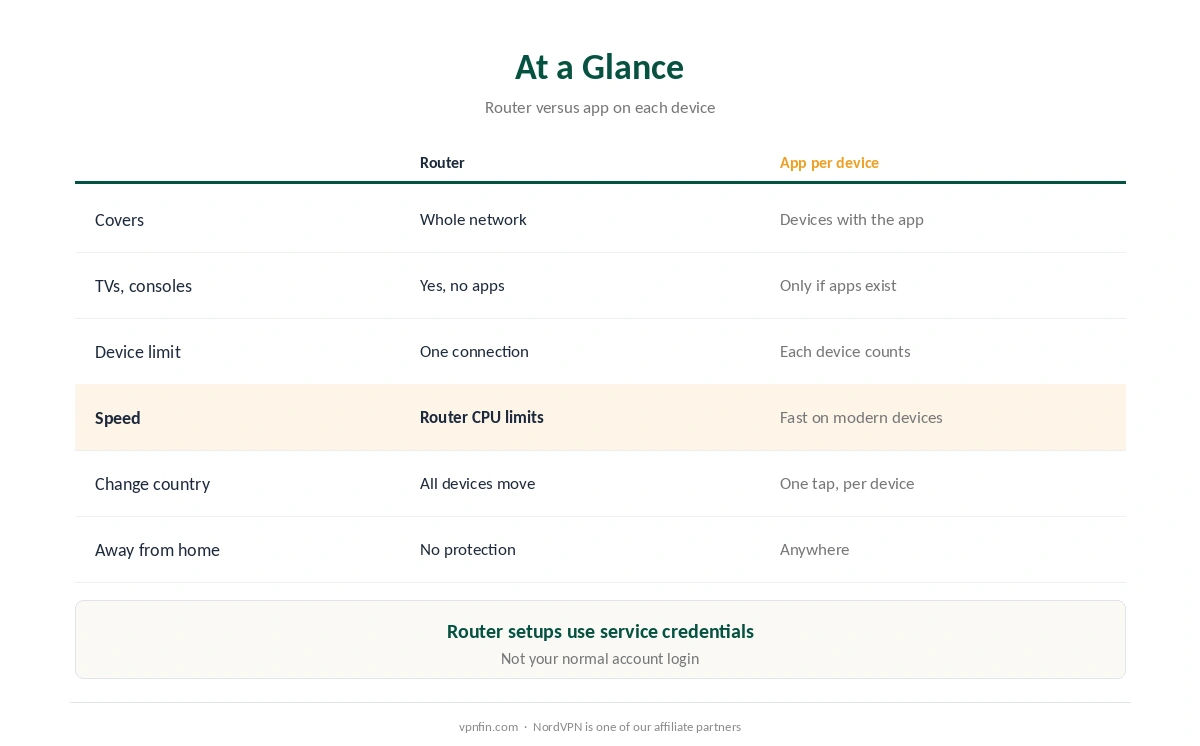
VPN Router vs Device: At a Glance
| VPN on the router | VPN app on each device | |
|---|---|---|
| Devices covered | Everything on the network | Only devices with the app |
| Smart TVs, consoles | Yes, without apps | Only if they run VPN apps |
| Device limit | Counts as one connection | Each device counts |
| Speed | Limited by the router’s processor | Fast on modern phones and laptops |
| Changing country | Router settings; all devices move | One tap, per device |
| Away from home | No protection | Protected anywhere |
Coverage is the big win in the VPN router vs device choice. One setup protects every connected device, and it doesn’t use up your plan’s device limit, Geeks in Sneaks explains. Our multi-device VPN guide covers plans with generous limits instead.
Speed: The Router’s Weak Spot
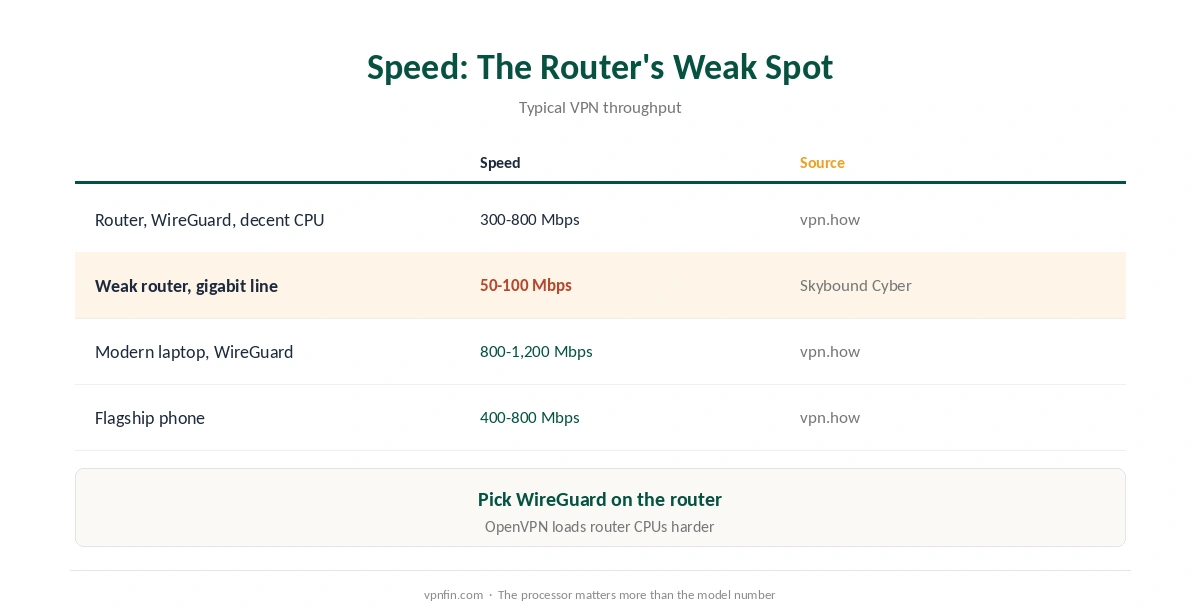
| Setup | Typical VPN speed | Source |
|---|---|---|
| Consumer router, WireGuard | 300 to 800 Mbps with a decent CPU | vpn.how |
| Weak consumer router | Can fall to 50 to 100 Mbps | Skybound Cyber |
| Modern laptop, WireGuard | 800 to 1,200 Mbps | vpn.how |
| Flagship phone | 400 to 800 Mbps | vpn.how |
Encryption is hard work for a router. A router on a gigabit line might manage only 50 to 100 Mbps through a VPN, Skybound Cyber warns, while WireGuard on a capable router reaches several hundred. The processor matters more than the model number, CyberInsider notes.
Choose WireGuard if the router supports it. OpenVPN is slower on routers because of its processor load, vpn.how explains. Our WireGuard vs OpenVPN guide compares them.
Control and Troubleshooting
Apps are easier to live with. In the VPN router vs device trade-off, flexibility favours the device. With apps, you can switch countries per device, and if one phone has a problem the rest of the house keeps working, v2cross notes. On a router, every device shares one region, and some local services can break.
Apps carry the extra features. Kill switches, split tunnelling and malware blocking live in provider apps; a router connection generally offers a plainer tunnel, and our kill switch guide explains what you give up. Our split tunnelling guide explains why that matters.
Router setup needs service credentials. Manual router setups use a separate VPN username and password from your provider’s dashboard, not your normal login, Geeks in Sneaks notes. Our NordVPN router guide shows an example, and our not-connecting guide helps when a router tunnel won’t come up.
The Best Mix for Most Homes
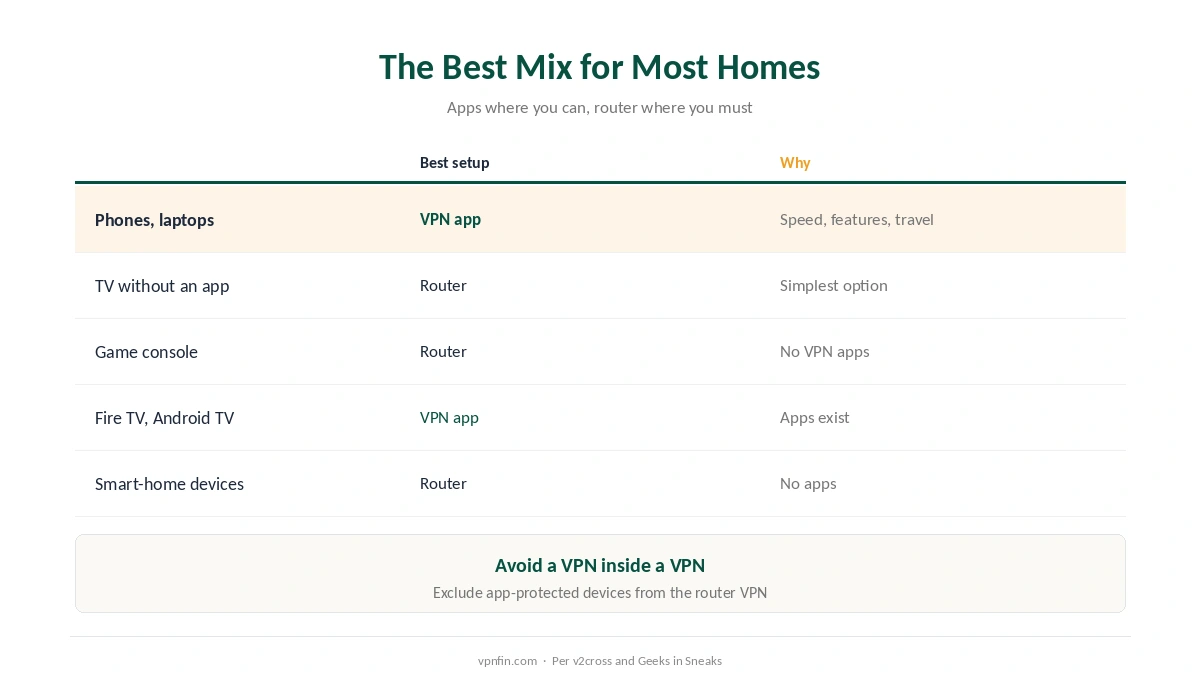
| Device | Best setup | Why |
|---|---|---|
| Phones and laptops | VPN app | Speed, features, protection outside the home |
| Smart TV without an app | Router, or a second router | Simplest way to cover it |
| Game console | Router | Consoles don’t run VPN apps |
| Fire TV, Android TV | VPN app | Apps exist; faster |
| Smart-home devices | Router | No apps available |
Many households combine both. Run apps on phones and laptops, and put TVs and consoles behind a VPN router, or a second router dedicated to them. Our smart TV guide and our Xbox guide cover those devices.
How We Research
Speed figures come from vpn.how and Skybound Cyber; coverage, device limits and credentials from Geeks in Sneaks; control and troubleshooting from v2cross; router processors from CyberInsider. We read all sources on 28 September 2026. NordVPN is one of our affiliate partners. The WireGuard project’s own site, useful when checking router support, is wireguard.com. Our full approach lives on the About Us page.
VPN Router vs Device FAQ
Apps on phones and laptops are faster and more flexible. A router covers devices that can’t run apps, like consoles and many smart TVs.
It can. A weak router may cap VPN speeds at 50 to 100 Mbps; a capable one running WireGuard reaches several hundred.
Yes. Your provider sees one connection, however many devices sit behind the router.
Yes, but not on the same device at once, or you’ll run a VPN inside a VPN. Exclude app-protected devices from the router VPN, or turn the app off at home.
WireGuard, if the router supports it. OpenVPN is slower on router hardware.
The Verdict
VPN on router vs device isn’t either-or. Apps win on speed, features and travel; routers win on coverage for TVs and consoles.
Use apps where you can, and a router only for devices that can’t run one.