
Disclosure: VPNFin is reader-supported. If you buy a VPN through links on this page, we may earn a commission at no extra cost to you. This never affects our ratings — here’s our full disclosure.
A Kodi Windscribe setup means running Windscribe on the device Kodi runs on, not inside Kodi, which has no VPN of its own. Windscribe has apps for Fire TV, in Amazon’s Appstore since 2017, Android TV, Windows, macOS and Linux. The free plan’s 10 GB a month suits a test; regular streaming needs Pro, which costs $69 a year with no renewal jump.
This guide covers setup by device, routing only Kodi, the free plan’s limits, speed and the legal side.
Why the VPN Goes on the Device
Kodi is a media player without a VPN client, so protection must come from the system underneath, whether a stick, a box or a computer. A Windscribe app on the same device covers Kodi’s traffic along with everything else.
Windscribe sets no device limit, so every Kodi box in the house fits on one plan, free or paid. Our Kodi VPN guide explains what a VPN does and does not change for Kodi.
Kodi Windscribe on Fire TV
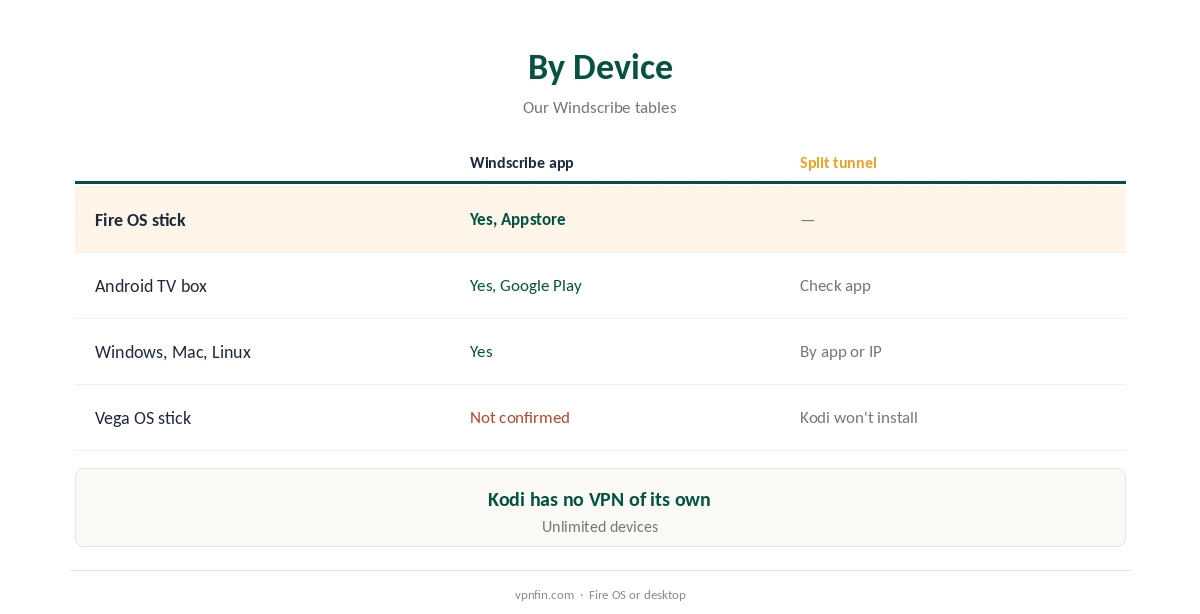
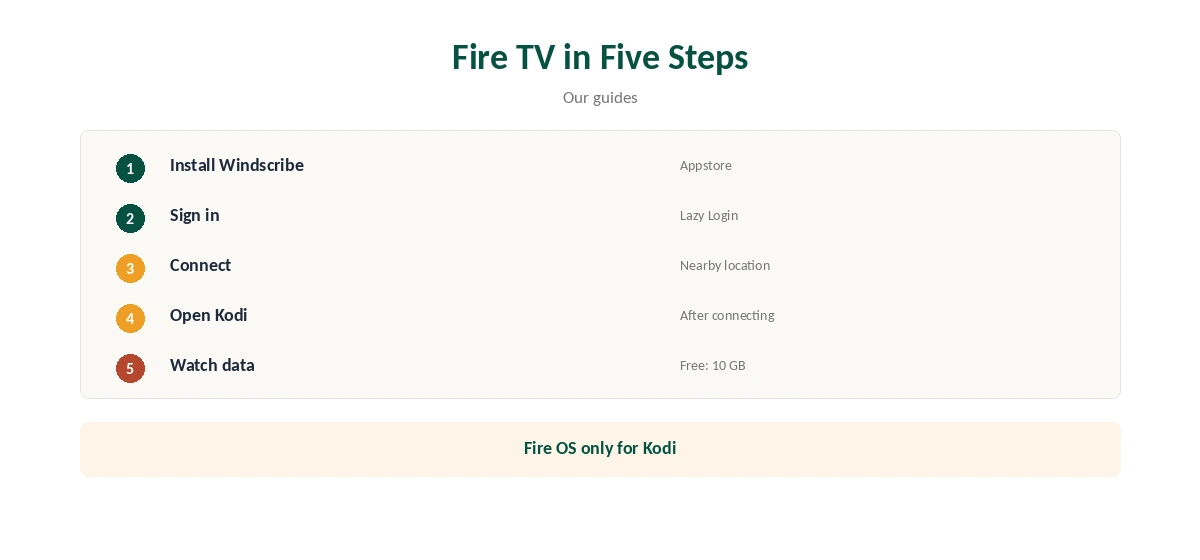
On a Fire OS stick, install Windscribe from the Amazon Appstore, sign in with Lazy Login or your credentials, connect, then open Kodi. Kodi is not in the Appstore and is usually sideloaded on Fire OS sticks instead.
We found no confirmation of a Windscribe app for Amazon’s Vega OS sticks, which also cannot sideload Kodi. Our Windscribe Firestick guide covers the Fire TV app.
Android TV, PC and Mac
On an Android TV box such as an Nvidia Shield, install Windscribe from Google Play. On Windows, macOS or Linux, install the desktop app and connect before opening Kodi. Windscribe’s Linux app has both a graphical and a command-line version.
Windscribe’s desktop firewall, its kill switch, blocks all traffic if the tunnel drops, so Kodi never streams unprotected. Our Windscribe Android guide covers the TV app.
Routing Only Kodi
Windscribe’s desktop apps offer split tunnelling by app and by IP address, our tables record, so you can send only Kodi through the VPN or exclude it. On TV boxes without that option, keep everything in the tunnel, which is the safer default anyway.
Keeping everything in the tunnel is simpler and safer for most people; split tunnelling suits households where other apps dislike VPN addresses. Our split tunnelling guide explains the trade-off.
Free Plan or Pro
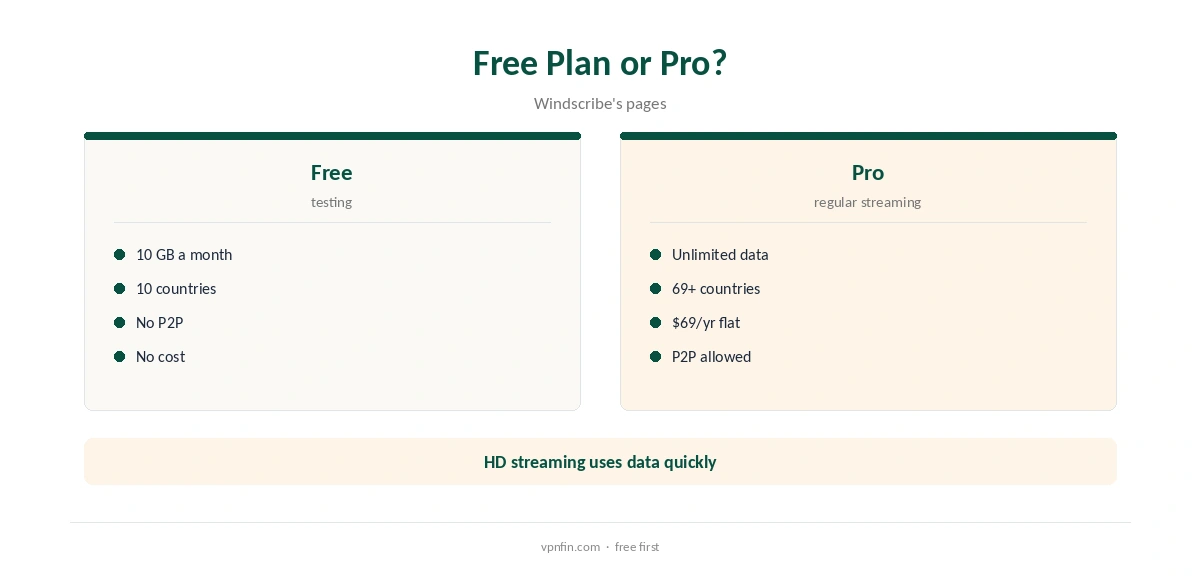
The free plan gives 10 GB a month with a confirmed email and servers in 10 countries. An evening of high-definition streaming can easily use a few gigabytes, so the free plan suits testing rather than daily viewing.
Pro costs $9 a month or $69 a year, with no renewal jump, or Build-a-Plan from $3 for chosen locations. Our Windscribe price guide compares them.
Speed for Streaming
Pick a nearby location and WireGuard, Windscribe’s fastest protocol, which also includes post-quantum encryption. Older Fire TV sticks may encrypt more slowly than newer boxes, and a wired connection helps 4K streams most.
Security.org reported Netflix problems on Windscribe, so test the services you use within the free plan before paying. Windscribe’s refund window is only seven days, and only under 10 GB of use.
Checking It Works, and Privacy
Open a browser on the same device and check that your address shows Windscribe’s location before starting Kodi. Windscribe’s app also shows the connected location clearly on its main screen.
Restart Kodi completely each time after changing location so it picks up the new connection and any region-based sources refresh.
Windscribe’s no-logs claim held when an Athens court dismissed charges against its CEO in April 2025, because no user data existed. Sign-up needs no email at all, though confirming one raises free data to 10 GB a month.
Our Windscribe safety guide covers its full record.
A Router for Boxes Without an App
If your Kodi box cannot run Windscribe, a router can cover it. Paid plans generate WireGuard or OpenVPN files for routers, and GL.iNet routers support Windscribe directly, GL.iNet’s documentation lists.
A router lacks the app’s firewall and easy switching, so use it only where the app will not install. Our Windscribe router guide walks through it.
Fixing Common Problems
When Kodi buffers, switch to a nearer location and to WireGuard, and check that the free plan’s data has not run out. A source showing a region error usually clears after reconnecting and restarting Kodi.
On a restrictive network where Windscribe will not connect, try Stealth or WStunnel, which work on the free plan too.
The Legal Side
Kodi is legal software, but add-ons that stream pirated content are not, and a VPN does not make them legal. Windscribe has also switched P2P off on its free servers, which affects torrent-based add-ons.
Use Kodi with legitimate sources, official add-ons from Kodi’s own repository and your own media library at home. Our Windscribe P2P guide covers its P2P rules.
How We Research
This page draws on Windscribe’s plans page and P2P help article, our Windscribe device tables and Security.org’s Windscribe review. We cross-checked these sources against each other, and where they conflict or something can’t be verified, we say so in the text rather than guessing. We checked time-sensitive figures, including prices in US dollars, on 8 October 2026. The main source we relied on is Windscribe’s plans page. Our full approach lives on the About Us page.
Kodi Windscribe FAQ
Use the Windscribe app on the device instead; Kodi has no VPN of its own.
Yes, within 10 GB a month, which suits testing.
Yes, with split tunnelling in the desktop apps.
We found no confirmed app, and Kodi will not install there.
No; it only hides activity from your provider.
The Verdict
A Kodi Windscribe setup works best as an app on the same device. Test on the free plan, and move to Pro for regular streaming.