
Disclosure: VPNFin is reader-supported. If you buy a VPN through links on this page, we may earn a commission at no extra cost to you. This never affects our ratings — here’s our full disclosure.
SafeShellVPN alternatives make sense if you like its streaming but want an audit behind the privacy promise. SafeShell is popular on Apple TV, yet its zero-logs claim has no outside check, and reviews raise support problems.
The services below offer TV apps and audits. Our SafeShellVPN review covers App Mode and what you would leave behind.
SafeShellVPN Alternatives for Streaming: NordVPN or Surfshark
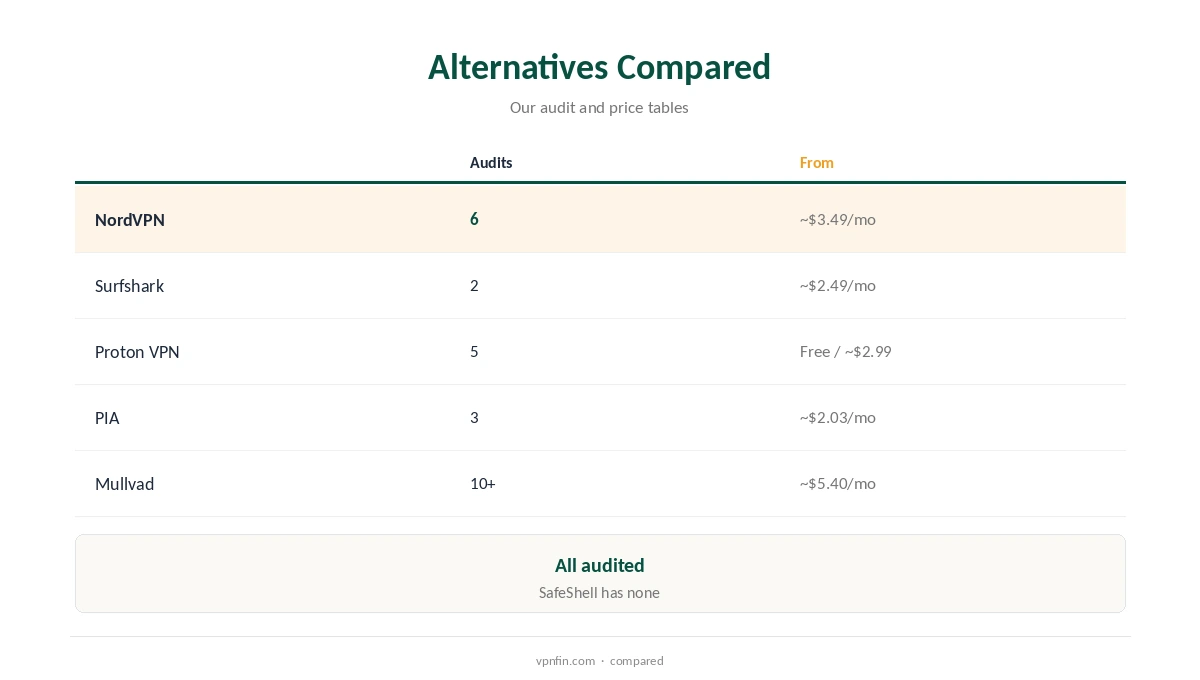
SafeShell’s App Mode makes multi-region streaming easy, which is hard to match. Both come from Nord Security: NordVPN brings 6 audits and 10 devices, and Surfshark brings unlimited devices and 2 Deloitte audits.
For Audited Privacy and a Free Plan: Proton VPN
SafeShell has no audit and no published leak tests. Proton VPN pairs 5 audits in our table with a free plan that has no data cap. Paid plans cost about $2.99 a month on a two-year term.
For Torrenting: PIA
SafeShell focuses on streaming and has no stated P2P policy. Private Internet Access adds port forwarding for faster seeding, unlimited devices and 3 Deloitte audits in our table.
For Strict Privacy: Mullvad
If privacy is your main reason to switch, Mullvad offers 10+ audits in our table. Mullvad leads our table with 10+ audits and needs no email to sign up. It charges about $5.40 a month, with no discounts for long plans.
For Lower Prices: PureVPN or CyberGhost
SafeShell’s monthly VIP costs $11.99 or $12.99 by region, above audited long-term plans. On a budget, PureVPN costs about $2.15 a month with 4 KPMG audits, and CyberGhost about $2.19 with a 45-day refund window on longer plans.
For TVs and Routers
SafeShell’s Apple TV and Vision Pro apps are its strength. Smart TVs and consoles need either a TV app, which NordVPN and Surfshark offer, or a VPN router such as ExpressVPN Aircove. Our guide to a VPN for smart TV covers both.
Price Comparison
SafeShell’s 1-Month VIP costs $11.99 or $12.99 depending on the App Store region. The alternatives above run from free to about $5.40 a month in our price table.
Check your own App Store region’s price before comparing. SafeShell’s price varies by country.
Free or Paid
SafeShell offers a trial in some regions rather than a free plan. Among free plans, Proton VPN sets no data cap and Windscribe allows up to 15 GB, our refund table records. Each has outside audits behind it.
Streaming on a TV usually needs a paid plan. Free tiers rarely cover TV apps well.
A Quick Rule
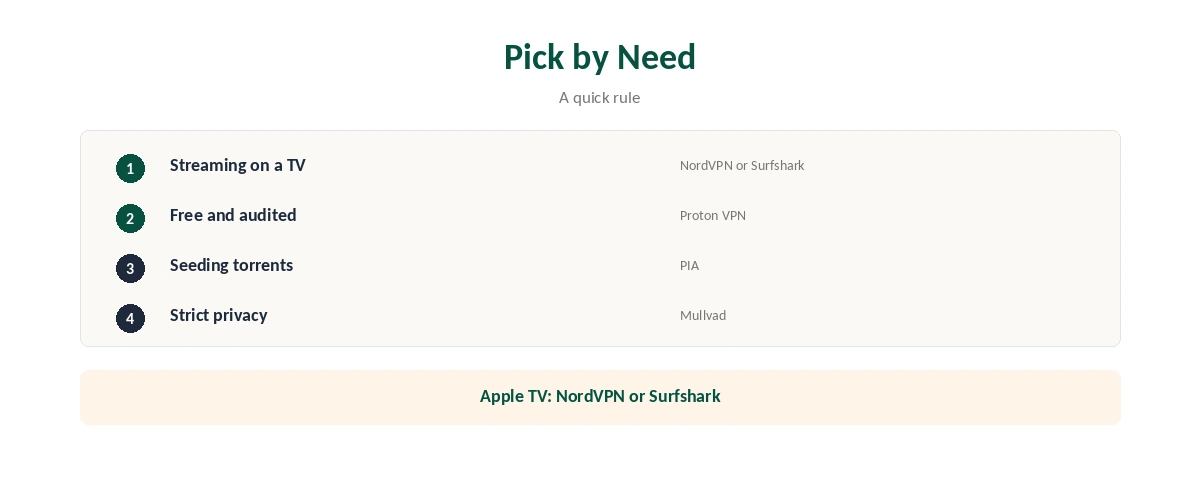
Apple TV streaming with audits? NordVPN or Surfshark. Free and audited? Proton VPN. Torrents? PIA. Strict privacy? Mullvad.
Whichever you choose, set up the TV app first, since that is where SafeShell users spend most time.
Switching Without a Gap
Install the new VPN on your Apple TV and phone first, then cancel SafeShell in your Apple ID subscriptions.
Several Devices
SafeShell covers a wide range of platforms. NordVPN allows 10 devices, Surfshark and PIA set no limit, and Mullvad allows 5.
Apple TV, iPhone and Mac each need their own installation.
Families
For family Apple TVs, Surfshark’s unlimited devices avoid counting connections.
Keeping Protection Running
Set up each streaming app’s region again on the new VPN, since App Mode settings do not carry over. Run both VPNs side by side only briefly; two active VPN apps can block each other. Remove the old one once the new one runs everywhere.
Keep SafeShell until the new app works on your TV.
Testing an Alternative
Our guide to checking if a VPN is working explains the leak test; then check each streaming app you used with App Mode.
Test on the Apple TV first. Then check your phone and Mac.
Ownership
Nord Security owns NordVPN and Surfshark, and Kape owns PIA, CyberGhost and ExpressVPN. Proton VPN and Mullvad are independent companies. GearUP Portal PTE. LTD. develops SafeShellVPN.
A clearly named owner also makes support and refunds easier to pursue.
What You Give Up
You give up App Mode, which lets different apps use different regions at once, and subtitle translation. Few rivals offer either.

Without App Mode, you switch regions per device rather than per app. That takes a little more effort.
Leaving SafeShellVPN
Cancel through your Apple ID subscription settings; request refunds from Apple.
Note your App Mode regions before cancelling, so you can recreate the setup elsewhere.
Are SafeShellVPN Alternatives Worth the Switch?
If privacy matters to you, yes. If you only stream and value App Mode, SafeShell may still suit you.
Most readers who switch keep streaming working with a TV app from a larger provider. The main adjustment is losing per-app regions.
You may also want whether SafeShellVPN is safe and ExpressVPN vs SafeShellVPN.
Similar services are covered in JamboVPN alternatives and Hide Expert VPN alternatives.
How We Research
This page draws on our SafeShellVPN research, including its App Store listings and Trustpilot, read on 21 October 2026. The main source for this brand is SafeShell’s App Store listing. Partner figures come from our audit, price, device and refund tables. We do not run our own tests. Our full approach lives on the About Us page.
SafeShellVPN Alternatives FAQ
NordVPN or Surfshark for Apple TV streaming with audits.
NordVPN and Surfshark offer TV apps.
Not in the same form; that is SafeShell’s unique feature.
In your Apple ID subscription settings.
The Verdict
The best SafeShellVPN alternatives add audits: NordVPN or Surfshark for Apple TV streaming, Proton VPN for free use and Mullvad for strict privacy. You lose App Mode, but gain proof.