
Disclosure: VPNFin is reader-supported. If you buy a VPN through links on this page, we may earn a commission at no extra cost to you. This never affects our ratings — here’s our full disclosure.
Three consoles cannot run a VPN app at all. The Steam Deck can, because underneath it is Linux.
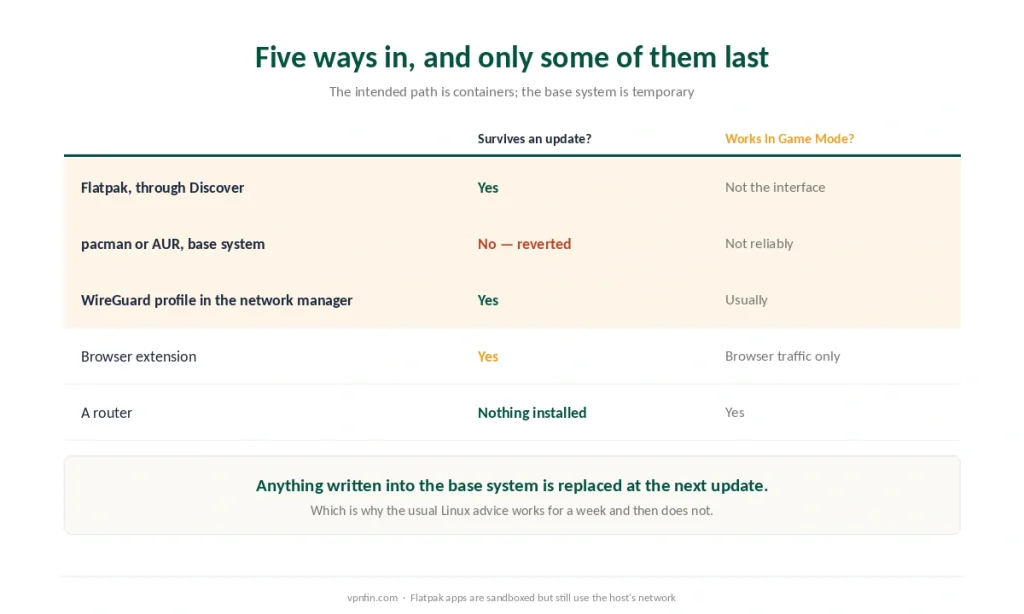
And that is where most guides stop, which is why so many people install one that disappears. SteamOS keeps its root filesystem read-only, so anything written into the base system is reverted the next time Valve ships an update.
The Short Answer
Install through Flatpak, in Desktop Mode. Containerised applications survive updates; packages installed into the base system do not.
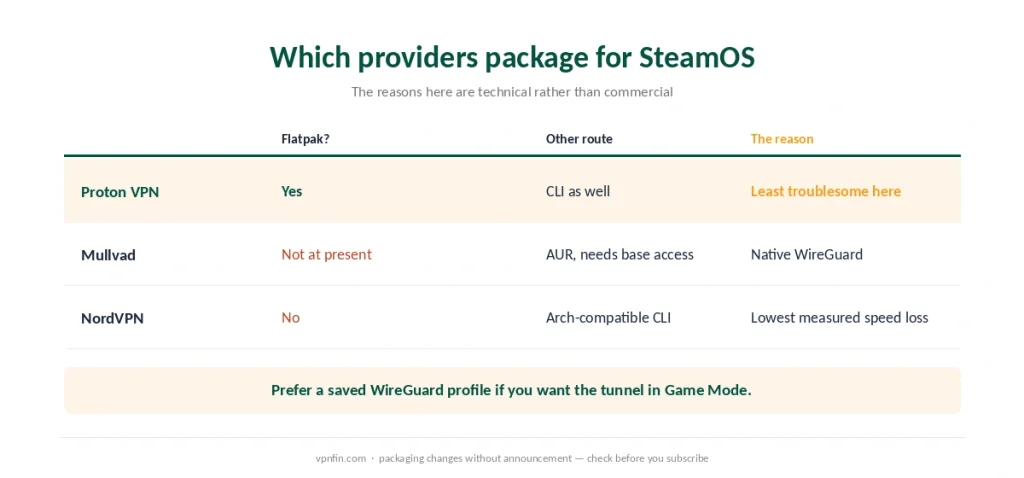
Proton VPN is the straightforward choice because it ships a Flatpak. Mullvad, at the time of writing, does not — its package requires base system access. Our page on Proton VPN on Steam Deck covers the Flatpak, WireGuard files and Gaming Mode.
Flatpak apps use the host’s network, so a system-level VPN profile covers your games as well as the sandboxed application.
⚠️ And changing your Steam store country to reach cheaper prices is explicitly prohibited, with consequences Valve spells out. We cover what the rules say and stop there.
Why the Usual Linux Advice Fails Here
This is the part worth the page.
SteamOS 3 is Arch-based, which is why guides suggest pacman or the AUR. Both work — briefly.
The root filesystem is read-only and managed as an image. Forcing write access is possible, and every system-level change made that way is reverted at the next operating system update.
The intended path is containers. Flatpak applications install into user space, survive updates, and are what the platform is designed around.
⚠️ So a guide that tells you to unlock the filesystem and install a package is describing something that works this week. Our Linux guide covers ordinary distributions, where that advice is correct and where the filesystem does not fight you.
Desktop Mode and Game Mode
Two environments, and the VPN behaves differently in each.
Desktop Mode is where you install. KDE Plasma, the Discover store, and a normal graphical application.
Game Mode may not run the graphical client. What does carry across is a saved system connection — a WireGuard profile configured in the network manager — because that lives below the interface.
Behaviour changes between SteamOS versions. Menu availability differs, and something that worked before an update may need reconfiguring after it.
⚠️ A router removes the problem entirely. The Deck connects to a network that is already covered, and neither mode matters — our router guide covers the three paths.
What a VPN Covers, and What It Misses
A system profile covers everything, including games, the Steam client and Flatpak applications, because sandboxed apps still use the host’s network stack — which is what a VPN does at the operating system level.
A browser extension covers the browser and nothing else. Not games, not launchers — it is a proxy rather than a VPN, and the distinction matters more here than on a phone.
DNS is the thing to verify. A tunnel that carries traffic while lookups still go to your provider produces exactly the region mismatches people then blame on the VPN — a leak test takes a minute.
The Steam Store Rule
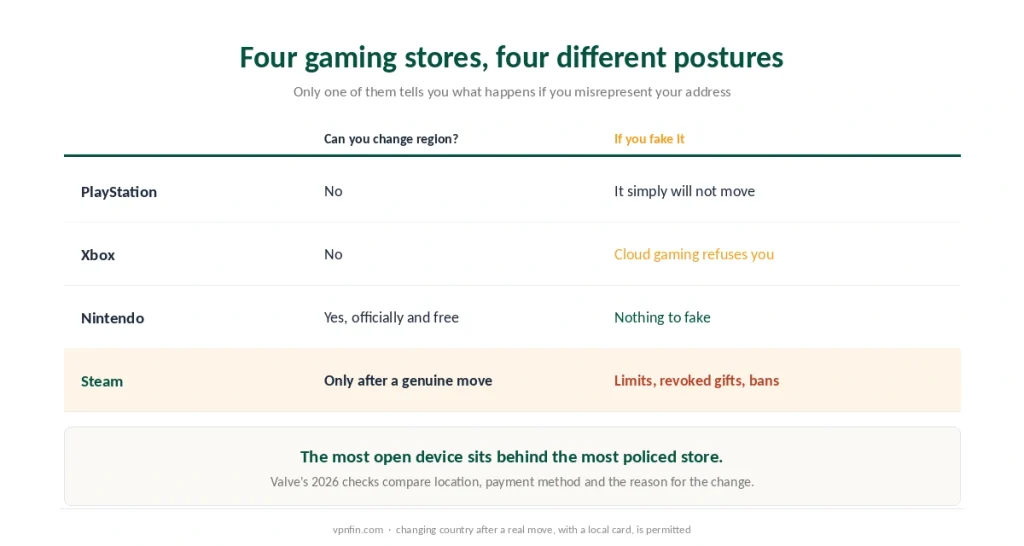
Here the Deck is the strictest of the four gaming devices, and it is worth being precise.
Valve’s agreement prohibits disguising your residence to obtain regional pricing that does not apply to you.
Since 2026 the checks look at three things together: your actual location by address and behaviour, the payment method attached to the account, and whether there is a genuine reason for a change such as relocation.
The stated consequences are graduated. Limited purchasing, revoked access to games gifted from other regions, and account bans in the clearest cases.
⚠️ Compare that with the other three. PlayStation simply will not move the region. Xbox refuses cloud streams when account and address disagree. Nintendo lets you change it officially and for free. Steam is the only one of the four that describes penalties.
Changing country after a genuine move is permitted, with a local payment method. That is the route Valve documents, and it is the only one we will describe.
What a VPN Is Genuinely For Here
Three reasons, and none of them is the store.
Public networks. The Deck is a portable device, which makes hotel and café connections its normal environment rather than an exception — and that is where a VPN earns its cost.
Provider throttling on large downloads. Game files are enormous and an encrypted tunnel makes them harder to single out. Our Mullvad on Steam Deck page goes into a WireGuard profile that survives updates.
Region-locked launches and local-only servers, where a game or a server list is unavailable in your market — a separate question from store pricing. Our guide to ExpressVPN on Steam Deck covers the Arch app, the update catch and the router route.
⚠️ It will not lower your ping. A tunnel adds a routing step worth roughly ten to twenty milliseconds — our gaming guide has the measurements, and obfuscation or multi-hop makes it worse. Use the nearest server and disable both unless the network blocks VPN traffic outright.
Which Providers Suit SteamOS
Three, and the reasons are technical rather than commercial.
Proton VPN ships a Flatpak alongside its command-line tool, which makes it the least troublesome installation on an immutable system.
Mullvad has native WireGuard support and minimal configuration, but no Flatpak at the time of writing — its package expects base system access, which is the thing to avoid here.
NordVPN provides an Arch-compatible command-line client and the lowest measured speed loss of the providers we cover, which matters on a handheld sharing a hotel connection.
⚠️ Whatever you pick, prefer a saved WireGuard profile over a graphical client if you want the connection to survive into Game Mode.
Gaming in VR too? Our Meta Quest guide covers the native app and sideloading.
How We Research
This guide draws on published SteamOS documentation and community reporting for the immutable root filesystem, the reversion of base-system changes at update, and the availability of Flatpak packages, on LagZero for the behaviour of saved system connections in Game Mode and the network scope of Flatpak sandboxes, on LinuxMind for the provider-by-provider packaging comparison, and on Valve’s own subscriber agreement and published 2026 guidance for the store country rules and the stated consequences. Where a guide recommends unlocking the filesystem, we have described why that advice expires rather than repeating it. We do not run our own tests. Our method lives on the About Us page.
Steam Deck VPN FAQ
Yes, unlike any console. SteamOS is Linux, so a VPN application installs in Desktop Mode. Use a Flatpak rather than a package installed into the base system, because SteamOS keeps its root filesystem read-only and reverts system-level changes at the next update.
Because it was installed into the base system. SteamOS manages its root filesystem as an image, so anything written there is replaced when Valve ships an update. Flatpak applications install into user space and survive.
A graphical client often will not appear there. A saved system connection — a WireGuard profile configured in the network manager — usually does, because it sits below the interface. Behaviour differs between SteamOS versions, so test after any update.
No. Valve’s agreement prohibits disguising your residence to obtain regional pricing that does not apply to you, and its 2026 checks compare your location, your payment method and the reason for any change. Stated consequences range from limited purchasing to account bans.
Usually the opposite. A tunnel adds a routing step worth roughly ten to twenty milliseconds, and obfuscation or multi-hop adds more. Choose the nearest server, disable both, and expect a VPN to help with public networks and throttling rather than with latency.
The Verdict
The Steam Deck is the only gaming device that runs a VPN application properly, and the only one where installing it the obvious way makes it disappear.
Flatpak in Desktop Mode, or a WireGuard profile in the network manager. The first is easier, the second survives into Game Mode, and a router makes both questions irrelevant.
And the store is the strictest of the four. PlayStation will not move, Xbox refuses a mismatch, Nintendo permits the change outright — Steam is the one that describes what happens if you misrepresent where you live. Our page on NordVPN on Steam Deck covers a manual OpenVPN setup that carries into Gaming Mode.